
1. הקדמה
This manual provides instructions for the proper use and care of your Andoer 13-piece Square Gradient Full Color Filter Bundle Kit for Cokin P Series. This kit is designed to enhance your photography by offering a range of color and neutral density filters, along with the necessary accessories for mounting them on various camera lenses.
די קיט כולל:
- 7 Graduated Color Filters (Yellow, Orange, Blue, Purple, Green, Red, Dark Brown)
- 3 Gradual Neutral Density (G.ND) Filters (G.ND2, G.ND4, G.ND8)
- 3 Full Neutral Density (ND) Filters (ND2, ND4, ND8)
- 1 פילטער האָלדער
- 5 Adapter Rings (52mm, 58mm, 62mm, 67mm, 72mm)
- 2 סטאָרידזש זעקלעך
- 1 רייניקונג שטאָף
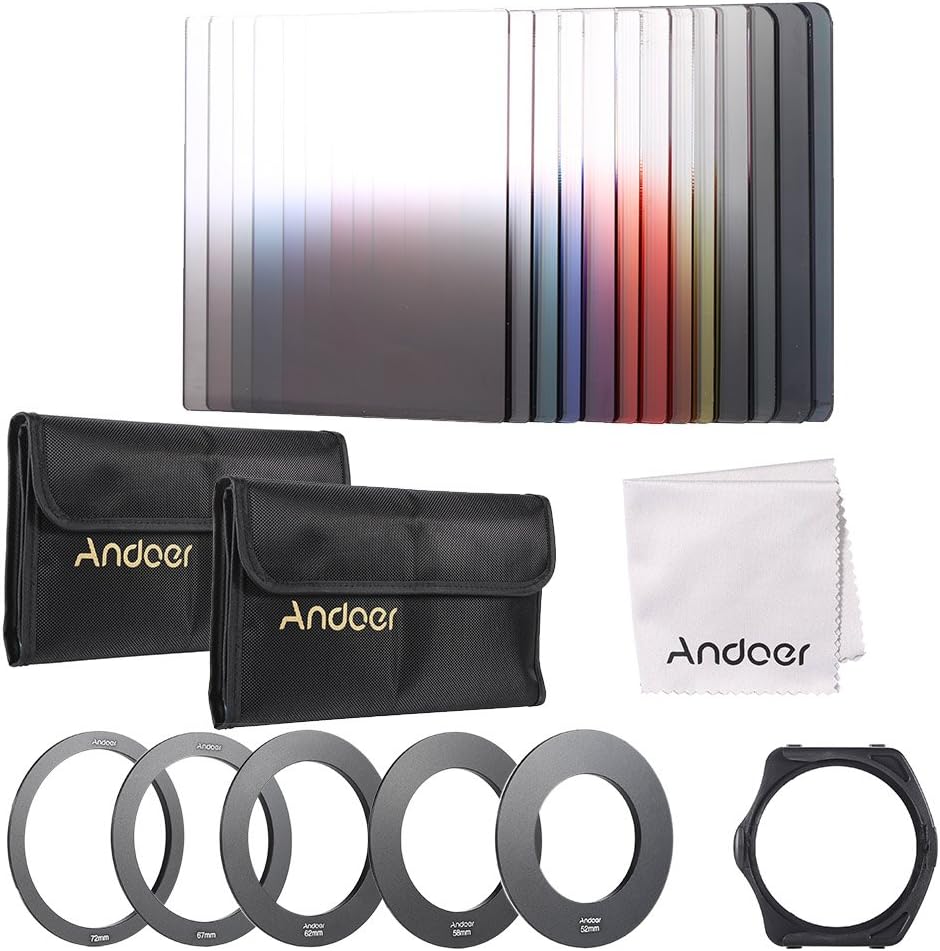
This image displays all items included in the kit: various square filters, adapter rings, a filter holder, storage bags, and a cleaning cloth.
2. סעטאַפּ און ייַנמאָנטירונג
Follow these steps to properly set up your filter system:
- Identify Your Lens Thread Size: Check the front of your camera lens or its specifications for the filter thread diameter, typically indicated by a "Ø" symbol followed by a number (e.g., Ø52mm).
- אויסקלייבן דעם ריכטיקן אַדאַפּטער רינג: Choose the adapter ring from the kit that matches your lens's filter thread size (52mm, 58mm, 62mm, 67mm, or 72mm).
- צוטשעפּען דעם אַדאַפּטער רינג: Screw the selected adapter ring onto the front filter thread of your camera lens clockwise until it is secure. Do not overtighten.
- Attach the Filter Holder: Align the square filter holder with the adapter ring and press it firmly onto the ring. The holder should snap into place or fit snugly.
- אַרייַנלייגן פילטערס: Slide the desired square filter(s) into the slots of the filter holder. The holder can accommodate up to three filters simultaneously. Ensure filters are inserted gently to avoid scratching.

This image shows the five included adapter rings, each marked with its corresponding diameter: 52mm, 58mm, 62mm, 67mm, and 72mm.

This image illustrates the filter holder, designed to accommodate square filters, attached to one of the circular adapter rings.

This image demonstrates how several square filters can be stacked within the filter holder for combined effects.
3. אַפּערייטינג ינסטרוקטיאָנס
This kit provides various filters for different photographic effects:
- Graduated Color Filters: These filters (Yellow, Orange, Blue, Purple, Green, Red, Dark Brown) feature a gradual color transition. They are used to add a specific color tint to a portion of your image, typically the sky or foreground, while leaving the other part unaffected. Slide the filter up or down in the holder to align the gradient with the horizon or desired transition point in your scene.
- Gradual Neutral Density (G.ND) Filters (G.ND2, G.ND4, G.ND8): These filters reduce the amount of light entering the lens in a specific area of the frame, typically used to balance exposure between a bright sky and a darker foreground.
- G.ND2 reduces light by 1 stop.
- G.ND4 reduces light by 2 stops.
- G.ND8 reduces light by 3 stops.
- Full Neutral Density (ND) Filters (ND2, ND4, ND8): These filters uniformly reduce the amount of light entering the lens across the entire frame without affecting color. They are ideal for achieving longer exposure times in bright conditions, creating motion blur effects, or using wider apertures for shallower depth of field.
- ND2 reduces light by 1 stop.
- ND4 reduces light by 2 stops.
- ND8 reduces light by 3 stops.

This image demonstrates the visual impact of using a gradual blue filter to enhance a sky and a gradual red filter to add warmth to a sunset scene, compared to unfiltered images.
Filter Stacking: The filter holder allows for stacking multiple filters. This can be used to combine effects, such as a gradual ND filter with a graduated color filter, or to achieve stronger neutral density effects by stacking full ND filters.
4. וישאַלט און קער
Proper maintenance ensures the longevity and performance of your filters:
- רייניקונג פילטערס: Use the provided cleaning cloth or a dedicated lens cleaning solution and microfiber cloth to gently wipe away dust, fingerprints, and smudges from the filter surfaces. Avoid using abrasive materials or harsh chemicals.
- סטאָרידזש: Store filters in the provided storage bags when not in use to protect them from dust and scratches. Keep them in a dry, cool place away from direct sunlight.
- האַנדלינג: Always handle filters by their edges to avoid leaving fingerprints on the optical surfaces.

This image shows the correct method for cleaning a filter using the included microfiber cleaning cloth to remove dust and smudges.

This image displays one of the storage bags included in the kit, designed to safely hold and protect the square filters.
5. טראָובלעשאָאָטינג
If you encounter issues with your filter kit, consider the following:
- וויניעטינג (טונקעלע ווינקלען):
- סיבה: Occurs when the filter holder or stacked filters block the corners of the lens's field of view, especially with wide-angle lenses.
- לייזונג: Try using a wider adapter ring if available, or remove one or more stacked filters. Some wide-angle lenses may inherently experience vignetting with certain filter systems.
- Difficulty Inserting/Removing Filters:
- סיבה: Filters may be slightly misaligned or the holder slots are tight.
- לייזונג: Ensure filters are perfectly aligned with the slots. Apply gentle, even pressure. Avoid forcing filters, as this can cause damage.
- Unwanted Color Cast:
- סיבה: While color filters are designed to add color, an unexpected or undesirable color cast with ND filters can occur due to manufacturing variations or extreme stacking.
- לייזונג: Adjust white balance in your camera settings or during post-processing. If the cast is severe and consistent, it may indicate a filter defect.
- Fuzzy or Unsharp Images:
- סיבה: Dirt, smudges, or scratches on the filter surface.
- לייזונג: Clean filters thoroughly using the recommended method. Inspect for scratches.
6. ספּעסאַפאַקיישאַנז
| שטריך | באַשרייַבונג |
|---|---|
| סאָרט | Andoer |
| פילטער מאַטעריאַל | סמאָלע |
| Adapter Ring Material | אַלומינום צומיש |
| Filter Holder Material | פּלאַסטיק |
| Compatible Filter System | Cokin P Series (Square Filters) |
| אַדאַפּטער רינג סיזעס | 52 מם, 58 מם, 62 מם, 67 מם, 72 מם |
| Neutral Density Filter Factors | ND2 (1 stop), ND4 (2 stops), ND8 (3 stops) |
| וואַסער קעגנשטעל מדרגה | ניט וואַסער קעגנשטעליק |
| אומגעפערע פּעקל גרייסן (L x B x H) | 22.5 X 13 X 4 סענטימעטער (8.9 X 5.1 X 1.6 אינטשעס) |
| אומגעפערע פּעקל וואָג | 461 ג (16.3 אַז) |
7. וואָראַנטי אינפֿאָרמאַציע
Andoer products are manufactured to high-quality standards. For specific warranty details, including coverage period and terms, please refer to the warranty card included with your purchase or visit the official Andoer webזייטל. האַלט דיין קויפן באַווייַז פֿאַר קיין וואָראַנטי קליימז.
8. קונה שטיצן
If you have any questions, require technical assistance, or need to report an issue with your Andoer filter kit, please contact Andoer customer support through the retailer where you purchased the product or visit the official Andoer webפּלאַץ פֿאַר קאָנטאַקט אינפֿאָרמאַציע.
אָנליין רעסורסן: For additional tips and photographic techniques using filters, you may find helpful resources on photography forums and educational webזייטלעך.