
הקדמה
This manual provides instructions for the proper setup, operation, maintenance, and troubleshooting of your Excalibur Deluxe Virtual Casino 5-in-1 Video Game. Please read this manual thoroughly before using the device to ensure optimal performance and longevity.
The Excalibur Deluxe Virtual Casino is a handheld electronic gaming device featuring five classic casino games: Poker, Blackjack, Slots, Craps, and Roulette. It is designed for portable entertainment.
סעטאַפּ
1. באַטאַרייע ייַנמאָנטירונג
The Excalibur Deluxe Virtual Casino requires 3 AAA batteries (not included) for operation.
- געפינט דעם דעקל פונעם באַטעריע־אָפּטייל אויף דער הינטערשטער זייט פונעם אַפּאַראַט.
- רוק דעם דעקן אין די ריכטונג אנגעוויזן דורך די פייַל.
- Insert 3 AAA batteries, ensuring the correct polarity (+ and -) as marked inside the compartment.
- לייג צוריק דעם דעקל פונעם באַטעריע־אָפּטייל, און זאָרג אַז עס קליקט זיכער אַרײַן.
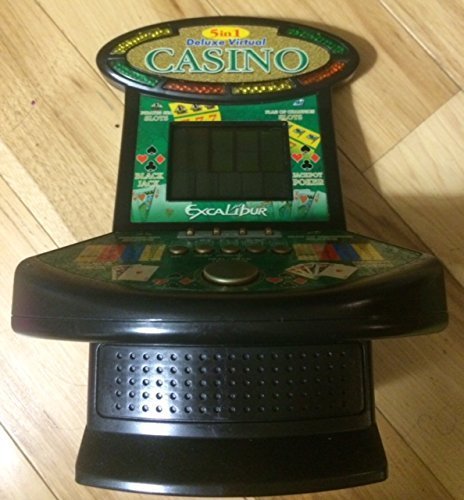
פיגורע 1: Excalibur Deluxe Virtual Casino handheld device. This image shows the front of the device, featuring the LED display and control buttons, which include a directional pad and action buttons.
2. ערשטע אויפשטעל
After installing batteries, press the מאַכט button, usually located on the top or front of the device, to turn it on. The screen should illuminate, displaying the main menu or game selection screen.
אַפּערייטינג ינסטראַקשאַנז
קאָנטראָלס איבערview
- ריכטונגס-פאד (די-פאד): Used for navigating menus and making selections within games.
- SELECT/MENU Button: Typically used to confirm selections or access in-game menus.
- ACTION Buttons (A, B, C, etc.): Used for specific game actions, such as dealing cards, spinning reels, or placing bets. Refer to individual game instructions for specific button functions.
- SOUND/VOLUME Button: Adjusts the device's sound level or mutes audio.
- POWER קנעפּל: טורנס די מיטל אויף אָדער אַוועק.
שפּיל סעלעקציע
From the main menu, use the ד-פּאַד to highlight your desired game (Poker, Blackjack, Slots, Craps, or Roulette). Press the אויסקלייַבן button to confirm your choice and start the game.
Basic Gameplay (General)
- Placing Bets: ניצן די ד-פּאַד to select bet amounts or areas on the table (for Craps/Roulette). Confirm with an קאַמף קנעפּל.
- Game Actions: Follow on-screen prompts. For example, in Poker/Blackjack, use קאַמף buttons to "Hit," "Stand," "Deal," or "Fold." In Slots, press an קאַמף button to "Spin."
- Viewing Rules: Some games may have an option to view rules within their respective menus. Access this via the MENU קנעפּל אויב פֿאַראַן.
וישאַלט
רייניקונג
To clean the device, gently wipe the exterior with a soft, dry cloth. Do not use abrasive cleaners, solvents, or immerse the device in water. For the screen, use a soft, lint-free cloth specifically designed for electronics displays.
באַטערי זאָרגן און סטאָרידזש
- אַרויסנעמען באַטעריעס אויב די דעוויס וועט נישט ווערן גענוצט פֿאַר אַ לענגערע צייט צו פאַרמייַדן ליקאַדזש.
- האַלט דעם אַפּאַראַט אין אַ קיל, טרוקן אָרט, אַוועק פון דירעקט זונשייַן און עקסטרעמע טעמפּעראַטורן.
- דו זאלסט נישט מישן אַלט און נייַ באַטעריז, אָדער פאַרשידענע טייפּס פון באַטעריז.
טראָובלעשאָאָטינג
| פּראָבלעם | מעגלעך סיבה | לייזונג |
|---|---|---|
| די מיטל איז נישט קער אויף. | טויטע אדער נישט ריכטיק אינסטאלירטע באַטעריעס. | קאָנטראָלירט די פּאָלאַריטעט פון די באַטעריעס. פאַרבייטן מיט פרישע AAA באַטעריעס. |
| דער עקראַן איז ליידיק אָדער פליקערט. | Low batteries or a temporary software glitch. | Replace batteries. Turn the device off and on again. |
| די קנעפּלעך זענען נישט ריספּאַנדינג. | Low batteries or a software issue. | Replace batteries. Turn the device off and on again. Ensure buttons are not stuck. |
| קיין געזונט. | Volume is muted or set too low. | דרוק די SOUND/VOLUME button to adjust volume or unmute. |
ספּעסאַפאַקיישאַנז
- מאָדעל: B01GGZSPTA
- סאָרט: עקסקאַליבור
- ווייַז טיפּ: געפירט
- פאָרם פאַקטאָר: כאַנדכעלד
- מאַכט מקור: 3 X AAA באַטעריז (ניט אַרייַנגערעכנט)
- Games Included: Poker, Blackjack, Slots, Craps, Roulette
וואָראַנטי און שטיצן
Excalibur products are designed for quality and reliability. For information regarding warranty coverage, please refer to the warranty card included with your purchase or visit the official Excalibur webפּלאַץ.
For technical support or customer service inquiries, please contact Excalibur customer support through their official channels. Contact details are typically available on the product packaging or the manufacturer's webפּלאַץ.