
1. פּראָדוקט איבערview
This manual provides essential instructions for the safe and efficient installation, operation, and maintenance of your ZOTAC GeForce GTX 1080 AMP Extreme graphics card. Please read this manual thoroughly before proceeding with installation.
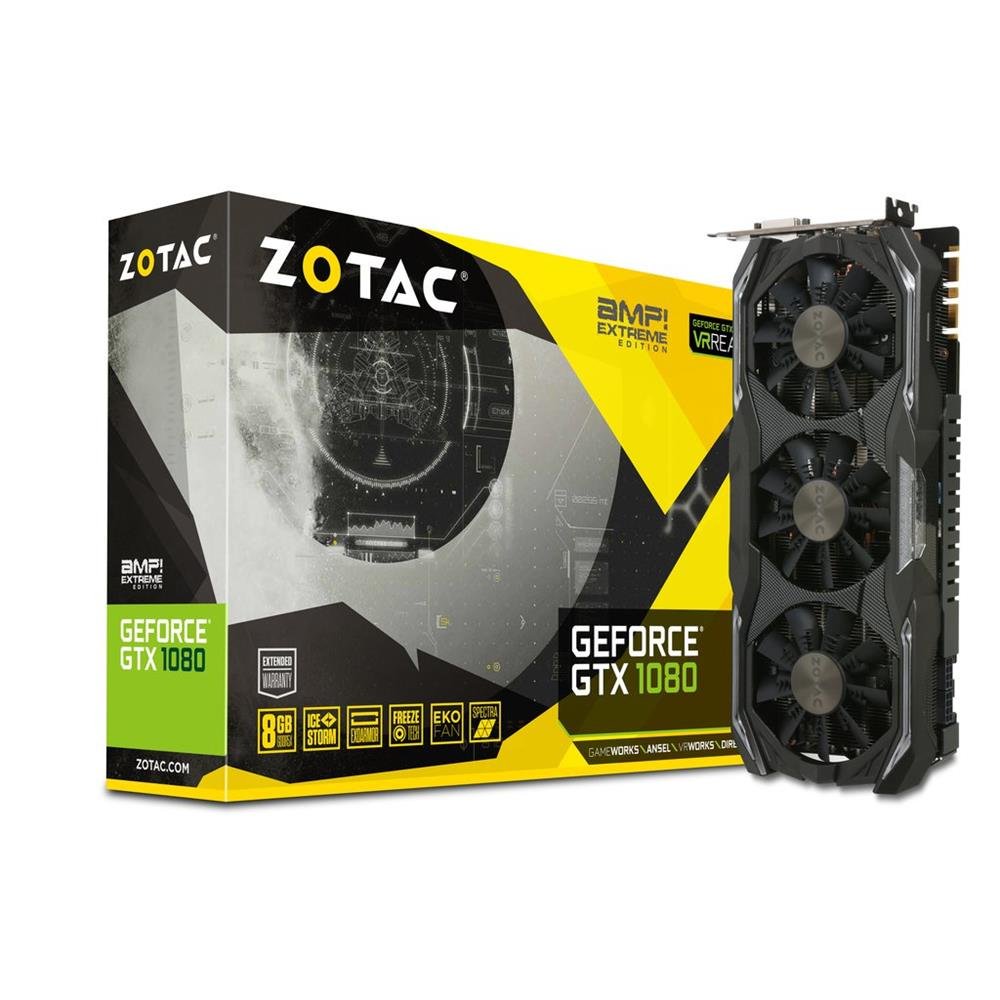
Image 1.1: ZOTAC GeForce GTX 1080 AMP Extreme Graphics Card. This image displays the front view פון די גראַפיקס קאַרטל, כיילייטינג זיין טריפּלע-פאָכער קאָאָלינג סיסטעם און קוילעלדיק פּלאַן.
2. פּעקל אינהאַלט
באַשטעטיקט אַז אַלע זאכן וואָס זענען אויסגערעכנט אונטן זענען פאַראַן אין אייער פּראָדוקט פּאַקעט:
- זאָטאַק געפאָרסע גטקס 1080 AMP Extreme Graphics Card
- DVI-VGA אַדאַפּטער
- Dual 6-pin to 4 x 2-pin Power Cable
- דרייווער קאָמפּאַקטדיסק
- ינסטרוקטיאָן מאַנואַל (דעם דאָקומענט)
3. סעטאַפּ און ייַנמאָנטירונג
3.1. סיסטעם רעקווירעמענץ
- PCI Express x16 slot on a compatible motherboard.
- Minimum 500W power supply with two 8-pin (or 6+2 pin) PCIe power connectors.
- Compatible operating system (e.g., Windows 7/8/10/11).
- At least 4GB of system memory (8GB recommended).
3.2. גשמיות ייַנמאָנטירונג
- מאַכט אַוועק: שליסט אויס אייער קאמפיוטער אינגאנצן און ציט ארויס דעם עלעקטרישן שנור פון דער וואנט-אויסגאבע.
- אפענער קעיס: Open your computer case to access the motherboard and expansion slots.
- געפינען PCIe סלאָט: אידענטיפיצירט אַ פאַראַן PCI Express x16 סלאָט אויף אייער מוטערבאָרד.
- אַראָפּנעמען דעם דעקל פון דעם שפּאַלט: Remove the metal slot cover from the back of the computer case corresponding to the chosen PCIe slot.
- אַרײַנשטעלן גראַפיקס קאַרטל: Carefully align the graphics card with the PCIe slot and press it firmly until it is fully seated. Ensure the retention clip on the slot locks into place.
- זיכערע קאַרטל: Secure the graphics card to the computer case with a screw or retention mechanism.
- פאַרבינדן מאַכט: Connect the required PCIe power cables from your power supply to the graphics card. The ZOTAC GeForce GTX 1080 AMP Extreme typically requires two 8-pin (or 6+2 pin) power connectors. Use the provided dual 6-pin to 4 x 2-pin power cable if your power supply only has 6-pin connectors.
- שליסן פאַל: Close your computer case and reconnect the power cord.
3.3. דרייווער ינסטאַלירונג
- שטיוול סיסטעם: Power on your computer. The system may boot into a basic display mode.
- ינסטאַלירן דריווערס: Insert the provided Driver CD into your optical drive and follow the on-screen instructions to install the NVIDIA graphics drivers. Alternatively, download the latest drivers directly from the official ZOTAC or NVIDIA webפּלאַץ פֿאַר אָפּטימאַל פאָרשטעלונג און קאַמפּאַטאַבילאַטי.
- ריסטאַרט: ריסטאַרט אייער קאָמפּיוטער נאָך דעם ווי די דרייווער אינסטאַלאַציע איז פֿאַרטיק.
3.4. פֿאַרבינדן דיספּלייז
Connect your monitor(s) to the appropriate output ports on the graphics card. This model supports HDMI, DisplayPort, and DVI connections. Use the DVI-VGA adapter if your monitor only supports VGA input.
4. אַפּערייטינג ינסטרוקטיאָנס
4.1. יקערדיק אָפּעראַציע
Once the drivers are installed, your graphics card will automatically manage display output and graphics processing. You can adjust display settings, resolution, and refresh rates through your operating system's display settings or the NVIDIA Control Panel.
4.2. Multi-Monitor Setup
The ZOTAC GeForce GTX 1080 AMP Extreme supports multiple displays. Connect additional monitors to the available video output ports. Use the NVIDIA Control Panel to configure display modes such as extended desktop, duplicate displays, or NVIDIA Surround for an immersive gaming experience.
5. וישאַלט
Regular maintenance helps ensure optimal performance and longevity of your graphics card.
- רייניקונג: Periodically clean the fans and heatsink to prevent dust buildup, which can impede airflow and lead to overheating. Use compressed air to gently remove dust from the cooling fins and fan blades. Ensure the system is powered off and unplugged before cleaning.
- לופט לויפן: Ensure your computer case has adequate airflow to dissipate heat generated by the graphics card. Keep the area around your PC clear of obstructions.
- דרייווער דערהייַנטיקונגען: Keep your graphics drivers updated by regularly checking the ZOTAC or NVIDIA webפּלאַץ פֿאַר די לעצטע ווערסיעס.
6. טראָובלעשאָאָטינג
אויב איר טרעפט פּראָבלעמען מיט אייער גראַפיקס קאַרטל, זעט די פאלגענדע געוויינטלעכע טראָובלעשווטינג טריט:
- קיין אַרויסווייַז רעזולטאַט:
- Ensure the monitor is correctly connected and powered on.
- איבערצייגט אז די גראַפיקס קאַרטל איז גאָר אײַנגעזעצט אין די PCIe סלאָט.
- Check that all PCIe power cables are securely connected to the graphics card.
- Try connecting the monitor to a different video output port on the card or to the motherboard's integrated graphics (if available) to isolate the issue.
- שאָפער ישוז:
- If you experience crashes, artifacts, or poor performance, try reinstalling the graphics drivers. Use a driver uninstaller utility to completely remove old drivers before installing new ones.
- Ensure you are installing the correct drivers for your operating system and graphics card model.
- פאָרשטעלונג פּראָבלעמען:
- Check system temperatures using monitoring software. Overheating can lead to performance throttling.
- זיכער מאַכן אַז אייער מאַכט צושטעלן טרעפט די מינימום וואַטtage requirements for the graphics card and other system components.
- Verify that your system's BIOS/UEFI settings are configured correctly for a discrete graphics card.
7. ספּעסאַפאַקיישאַנז
| שטריך | דעטאַל |
|---|---|
| סאָרט | ZOTAC |
| מאָדעל נאָמען | GTX 1080 |
| מאָדעל נומער | ZT-P10800B-10P |
| גראַפיקס קאָופּראַסעסער | NVIDIA GeForce GTX 1080 |
| גראַפיקס ראַם גרייס | 8 גיגאבייט GDDR5X |
| זכּרון זייגער ספּיד | 10800 מהז |
| Engine Clock Speed | 1771 מעגהערץ (באַזע), 1911 מעגהערץ (בוסט) |
| וידאו רעזולטאַט צובינד | HDMI, DisplayPort, DVI |
| ווידעא צובינד | PCI Express |
| מאַקסימום סקרין האַכלאָטע | 7680x4320 |
| נומער פון פאַנס | 3 |
| רעקאַמענדיד נוצן | גיימינג |
| פּונקט וואָג | 1.6 קילאָגראַמס |
| UPC | 816264016721 |
8. וואָראַנטי און שטיצן
8.1. פּראָדוקט וואָראַנטי
This ZOTAC graphics card comes with a 24-חודש וואָראַנטי from the date of purchase. Please retain your proof of purchase for warranty claims. The warranty covers manufacturing defects and malfunctions under normal use. It does not cover damage caused by misuse, accidents, unauthorized modifications, or improper installation.
8.2. טעכניש שטיצן
For technical assistance, driver downloads, or further information, please visit the official ZOTAC webפּלאַץ:
You may also refer to the FAQ section on the ZOTAC website for solutions to common issues.