
1. פּראָדוקט איבערview
The Midiplus Studio M is a compact and high-performance USB audio interface designed for studio recording. It features one input and two outputs, supporting high-quality microphone input and 24-bit/192kHz high-precision sampling. The device is powered via PC USB and includes 48V phantom power for condenser microphones. Its small, exquisite design is compatible with both Mac and Windows operating systems, making it a versatile tool for musicians and producers.
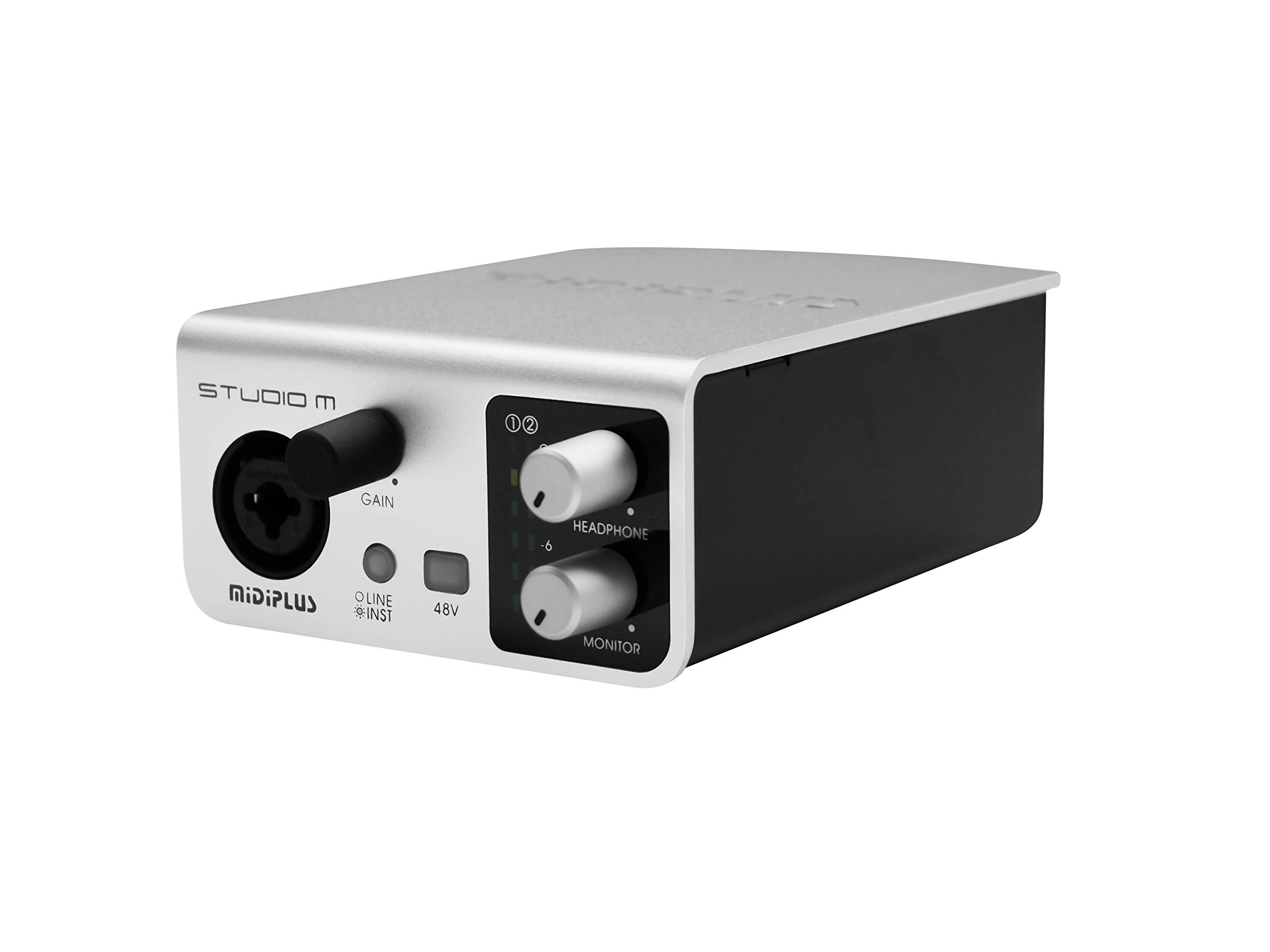
פיגור 1: פאָרנט און הינטן view of the Midiplus Studio M USB Audio Interface.
2. סעטאַפּ גייד
2.1 פּעקל אינהאַלט
- Midiplus Studio M USB Audio Interface
- וסב קאַבלע
- באַזיצער ס מאַנואַל (דאָס דאָקומענט)
- אינפארמאציע קארטל
2.2 סיסטעם רעקווירעמענץ
- אַפּערייטינג סיסטעם: Windows, macOS
- Compatible Devices: Personal Computer with USB port
2.3 קאַנעקטינג די מיטל
- Connect the Midiplus Studio M to your computer using the provided USB cable. The device is USB-powered.
- Ensure your operating system (Windows or macOS) recognizes the device. Drivers may be required for optimal performance; refer to the Midiplus webוועבזייטל פֿאַר די לעצטע דרייווער דאַונלאָודז.
- Connect your microphone or instrument to the Input (MIC/Line/Hi-z) interface on the front panel.
- Connect your headphones to the headphone interface on the front panel, or your studio monitors to the Output interface (Left/Right) on the rear panel.

Figure 2: Midiplus Studio M connected to a computer, showing input and output cables.
3. אַפּערייטינג ינסטרוקטיאָנס
3.1 פראָנט פּאַנעל קאָנטראָלס
- Input Gain Control Knob: Adjusts the input level for the connected microphone or instrument.
- Switch (Mic/Instrument) Button: Toggles between microphone and instrument input modes.
- 48V Phantom Power ON/OFF: Activates or deactivates 48V phantom power for condenser microphones.
- Headphone Volume Control Button: Adjusts the output volume for connected headphones.
- Output Volume Control Button: Adjusts the main output volume for connected studio monitors.

Figure 3: Midiplus Studio M in a studio setup, demonstrating its compact size and integration.
3.2 דערציען פּאַנעל קאַנעקשאַנז
- USB צובינד: USB2.0 port for connection to your computer and power supply.
- Output Interface (Left/Right): Connects to your studio monitors or other output devices.
- Extensible Device Interface: Provides additional connectivity options for other devices.
4. וישאַלט
- האַלט דאָס אַפּאַראַט ריין דורך עס אָפּווישן מיט אַ ווייכן, טרוקענעם שטאָף. פֿאַרמייַדט ניצן שאַרפע כעמיקאַלן אָדער אַברייסיוו מאַטעריאַלן.
- זיכער מאַכן אַז אַלע קייבלס זענען זיכער פארבונדן צו פאַרמייַדן סיגנאַל אָנווער אָדער שעדיקן.
- Store the interface in a cool, dry place away from direct sunlight and extreme temperatures.
- ויסמיידן פּלייסינג שווער אַבדזשעקץ אויף שפּיץ פון די אַפּאַראַט.
5. טראָובלעשאָאָטינג
5.1 קיין קלאַנג אַרויסגאַנג
- Check all cable connections (USB, input, output, headphones).
- Ensure the device is powered on and recognized by your computer.
- Verify that the output volume controls (headphone and main output) are turned up.
- Check your computer's sound settings to ensure the Midiplus Studio M is selected as the output device.
5.2 Input Signal Issues
- Adjust the Input Gain Control Knob.
- Ensure the correct input mode (Mic/Instrument) is selected.
- If using a condenser microphone, verify that 48V Phantom Power is enabled.
- Check the microphone/instrument cable for damage.
5.3 Device Not Recognized by Computer
- פּרוּווט קאַנעקטינג די וסב קאַבלע צו אַ אַנדערש וסב פּאָרט אויף דיין קאָמפּיוטער.
- ריסטאַרט דיין קאָמפּיוטער.
- Ensure the latest drivers for the Midiplus Studio M are installed from the official Midiplus webפּלאַץ.
- פּרוביר מיט אַן אַנדער USB קאַבל אויב פֿאַראַן.
6. טעכניש ספּעסאַפאַקיישאַנז
| שטריך | דעטאַל |
|---|---|
| מאָדעל נומער | Studio M |
| סאָרט | מידיפּלוס |
| קאַנעקטיוויטי טעכנאָלאָגיע | USB (USB2.0) |
| אַודיאָ האַכלאָטע | 24-ביסל / 192 כז |
| ינפּוץ | 1 (MIC/Line/Hi-z) |
| אַוטפּוץ | 2 (Left/Right) |
| פאַנטאָם מאַכט | 48V (אויסשוויטשבאר) |
| קאַמפּאַטאַבאַל אַפּערייטינג סיסטעמס | Windows, macOS |
| פּראָדוקט דימענשאַנז | 5.28 X 3.54 X 1.89 אינטשעס |
| פּונקט וואָג | 14.1 אונס (0.4 קילאָגראַמס) |
7. וואָראַנטי און שטיצן
For warranty information and technical support, please refer to the official Midiplus website or contact your local dealer. Keep your purchase receipt as proof of purchase for any warranty claims.