
Bios BBYCA10300783
BIOS Weather Indoor/Outdoor Wireless Thermometer & Hygrometer
Model: 312BC (BBYCA10300783)
Brand: Bios
הקדמה
This manual provides detailed instructions for the setup, operation, and maintenance of your BIOS Weather Indoor/Outdoor Wireless Thermometer & Hygrometer. Please read this manual thoroughly before using the device to ensure proper function and longevity.
The BIOS Weather Indoor/Outdoor Wireless Thermometer & Hygrometer is designed to provide accurate readings of indoor temperature and humidity, as well as outdoor temperature. It features wireless connectivity for the outdoor sensor, a moon phase display, and the capability to connect with up to three sensors (additional sensors sold separately).
- Wireless range up to 30 meters (100 feet) from the outdoor sensor.
- Indoor monitor includes a hygrometer sensor for RH percentage readings (20% to 95%).
- Displays temperature from up to 3 sensors (Model No. 312TX, sold separately).
- Tracks relative indoor humidity and moon phase.
פּעקל אינהאַלט
ביים עפענען דעם פעקל, ביטע זיכער מאכן אז אלע קאמפאנענטן זענען דא און אין גוטן צושטאנד:
- 1 x Main Display Unit (Indoor Monitor)
- 1 x ווירעלעס דרויסנדיק סענסאָר
- 1 x אינסטרוקציע מאַנואַל (דאָס דאָקומענט)

Image: The main display unit (left) and the wireless outdoor sensor (right). The main unit shows indoor temperature, humidity, moon phase, time, and outdoor temperature. The outdoor sensor displays its current temperature.
סעטאַפּ גייד
1. באַטאַרייע ייַנמאָנטירונג
Both the main display unit and the wireless outdoor sensor require batteries (not included).
- Open the battery compartment on the back of both the main display unit and the outdoor sensor.
- Insert the required batteries (e.g., AA or AAA, refer to the battery compartment markings for correct type and polarity).
- פאַרמאַכן די באַטאַרייע קאַמפּאַרטמאַנץ סיקיורלי.
באַמערקונג:
- It is recommended to insert batteries into the outdoor sensor first, then the main display unit, to facilitate immediate pairing.
- Use high-quality alkaline batteries for optimal performance, especially in cold weather for the outdoor sensor.
2. סענסאָר פּלייסמאַנט
Proper placement of both units is crucial for accurate readings and reliable wireless communication.
- הויפּט אַרויסווייַז אַפּאַראַט: Place indoors, away from direct sunlight, heat sources, or drafts that could affect temperature and humidity readings. Ensure it is within 30 meters (100 feet) of the outdoor sensor.
- ווירעלעסס דרויסנדיק סענסאָר:
- Mount in a shaded area to avoid direct sunlight, which can cause artificially high temperature readings.
- Protect from direct rain and snow. An overhang or a weather-resistant enclosure is ideal.
- Avoid placing near large metal objects, electrical appliances, or thick walls that could interfere with the wireless signal.
- Ensure it is within the 30-meter (100-foot) wireless range of the main unit.
3. ערשט פּערינג
The main display unit and outdoor sensor should automatically pair upon battery installation. If pairing does not occur:
- זיכער מאַכן אַז ביידע אַפּאַראַטן האָבן פרישע באַטעריעס.
- Bring the outdoor sensor closer to the main display unit.
- Press the "CH" (Channel) button on the main display unit to cycle through channels or initiate a search for the sensor.
- If issues persist, remove batteries from both units, wait a few minutes, and reinsert them, starting with the outdoor sensor.
אַפּערייטינג ינסטראַקשאַנז
1. ווייַז איבערview
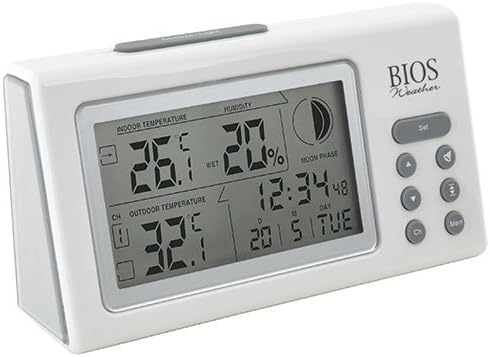
בילד: ווינקלדיק view of the main display unit, highlighting the various segments for indoor temperature, humidity, moon phase, time, and outdoor temperature.
די הויפּט אַרויסווייַז אַפּאַראַט גיט די פאלגענדע אינפֿאָרמאַציע:
- דרינענדיק טעמפּעראַטור: ווײַזט די איצטיקע טעמפּעראַטור אין צימער וואו די הויפּט־איינהייט געפינט זיך.
- הומידיטי: Shows the relative indoor humidity percentage.
- דרויסנדיק טעמפּעראַטור: Displays the temperature from the connected wireless outdoor sensor.
- צייט און דאַטע: קראַנט צייט און דאַטע.
- לבנה פאַסע: An icon indicating the current moon phase.
- קאַנאַל ינדיקאַטאָר: Shows which outdoor sensor channel is currently displayed (if multiple sensors are used).
2. קנעפּל פאַנגקשאַנז
The main display unit features several buttons for configuration and viewאינפֿאָרמאַציע:
| קנעפּל | פֿונקציע |
|---|---|
| שטעלן | Enters setup mode for time, date, and other settings. Press to confirm settings. |
| ▲ / ▼ (Up/Down) | Adjusts values during setup. Cycles through channels for outdoor sensors. |
| CH (קאַנאַל) | Switches between outdoor sensor channels (1, 2, 3) or initiates a search for sensors. |
| MEM (זיקאָרן) | Displays maximum and minimum temperature/humidity readings. Press again to clear. |
3. באַשטעטיקן צייט און דאַטע
- דריקן און האַלטן די שטעלן קנעפּל ביז די צייט-אויסשטעלונג בלינקט.
- ניצן די ▲ or ▼ קנעפּלעך צו סטרויערן די שעה.
- דרוק שטעלן to confirm and move to the next setting (minutes, year, month, day).
- איבערחזרן שריט 2 און 3 ביז אַלע סעטטינגס זענען קאָנפיגורירט.
- דרוק שטעלן one last time to exit setup mode.
4. Viewing Max/Min Readings
דרוק די MEM קנעפּל צו view the maximum recorded indoor temperature, humidity, and outdoor temperature. Press MEM ווידער צו view the minimum readings. To clear the memory, press and hold the MEM button while the max/min readings are displayed.
וישאַלט
1. רייניקונג
To clean the display unit and outdoor sensor, use a soft, damp cloth. Do not use abrasive cleaners, solvents, or harsh chemicals, as these may damage the plastic casinג אדער עלעקטראָנישע קאָמפּאָנענטן.
2. באַטערי פאַרבייַט
When the battery indicator appears on the display, it is time to replace the batteries in the respective unit (main unit or outdoor sensor). Always replace all batteries in a unit at the same time with new, high-quality batteries of the correct type.
וויכטיק:
- אָפּזאָגן אַלט באַטעריז ריספּאַנסאַבלי לויט די היגע רעגיאַליישאַנז.
- אויב די איינהייט וועט נישט ווערן גענוצט פאר א לענגערע צייט, נעמט ארויס די באַטעריעס כדי צו פארמיידן ליקאַדזש און שאָדן.
טראָובלעשאָאָטינג
If you experience issues with your BIOS Weather Thermometer & Hygrometer, please refer to the following common problems and solutions:
| פּראָבלעם | מעגלעך סיבה / לייזונג |
|---|---|
| קיין דרויסנדיקע טעמפּעראַטור לייענונג אדער "---" ווערט נישט געוויזן. |
|
| נישט פּינקטלעכע טעמפּעראַטור/פֿײַכטקייט מעסטונגען. |
|
| דער עקראַן איז טונקל אָדער ליידיק. |
|
| צייט/דאטום איז נישט ריכטיג. |
|
פּראָדוקט ספּעסאַפאַקיישאַנז

Image: The main display unit with indicated dimensions: 21.59 cm (length), 7.62 cm (width), and 19.05 cm (height).
| שטריך | דעטאַל |
|---|---|
| מאָדעל נומער | BBYCA10300783 (312BC) |
| טיפּ | Indoor/Outdoor Thermometer and Hygrometer |
| מאַטעריאַל | פּלאַסטיק |
| קאָליר | ווייַס |
| דימענשאַנז (הויפּט אַפּאַראַט) | הייך: 19.05 סענטימעטער, ברייט: 7.62 סענטימעטער, טיף: 21.59 סענטימעטער |
| וואָג | 0.30 קג |
| ווירעלעסס ראַנגע | אַרויף צו 30 מעטער (100 פֿיס) |
| דרינענדיק הומידיטי ראַנגע | 20% צו 95% RH |
| Sensor Capability | Supports up to 3 outdoor sensors (additional sensors Model No. 312TX, sold separately) |
| ספּעציעלע פֿעיִקייטן | Wireless connectivity, Multi-Sensor support, Humidity Tracking, Moon Phase Display |
| מאַכט מקור | באַטאַרייע פּאַוערד |
וואָראַנטי אינפֿאָרמאַציע
This BIOS Weather product comes with a 1-יאָר גאַראַנטיע אויף טיילן פֿון דעם קויפֿדאַטום. די וואָראַנטי דעקט חסרונות אין מאַטעריאַלן און אַרבעט אונטער נאָרמאַלן באַנוץ. עס דעקט נישט שאָדן וואָס רעזולטירט פֿון אומרעכטן באַנוץ, אַקסידענט, נישט-אָטעריזירטע מאָדיפֿיקאַציע, אָדער אומרעכטע אינסטאַלאַציע.
ביטע האַלטן דיין דערווייַז פון קויפן פֿאַר וואָראַנטי קליימז.
קונה שטיצן
If you have any questions, require technical assistance, or need to make a warranty claim, please contact Bios customer support. For more information and resources, you may also visit the official Bios store on Amazon:
Visit the Bios Store on Amazon
Please have your product model number (BBYCA10300783) and purchase date ready when contacting support.
Ask a question about this manual
Ask about setup, troubleshooting, compatibility, parts, safety, or missing instructions. Manuals+ will review the question and use this page’s manual context to help answer it.