
1. הקדמה
א דאנק פארן קויפןasing the Silverlit Xion FPV Camera Drone 84765. This drone is designed for outdoor use and offers an exciting First-Person View (FPV) flying experience with its integrated camera. Please read this manual thoroughly before operating the drone to ensure safe and optimal performance. Keep this manual for future reference.

Image 1.1: The Silverlit Xion FPV Camera Drone 84765.
2. זיכערקייַט אינפֿאָרמאַציע
WARNING: Failure to follow these instructions may result in injury or damage to the product.
- Always operate the drone in open, clear areas, away from people, animals, buildings, and power lines.
- פליט נישט אין שטארקע ווינטן אדער שלעכטע וועטער באדינגונגען.
- האַלט הענט, פּנים און לויזע קליידער אַוועק פון ראָטירנדיקע פּראָפּעלערס.
- זיכער מאַכן אַז די דראָון באַטעריע און ווײַט קאָנטראָל באַטעריעס זענען גאָר אָפּגעלאָדן פֿאַר יעדן פֿלוג.
- קיינמאָל לאָזן טשאַרדזשינג באַטעריז אַנאַטענדיד.
- This product is intended for children. Adult supervision is recommended.
- נישט מאדיפיצירן אדער צענעמען דעם דראָון אדער זיינע קאָמפּאָנענטן.
- Always turn off the drone and remote control when not in use.
3. פּעקל אינהאַלט
באַשטעטיקן אַז אַלע זאכן זענען פאַראַן אין פּעקל:
- Silverlit Xion FPV Camera Drone 84765
- ווייַט קאָנטראָל
- פפּוו וואַסער - ברילן
- ריטשאַרדזשאַבאַל דראָון באַטאַרייע
- USB Charging Cable (for drone battery)
- ספּער פּראַפּעלערז
- באַניצער מאַנואַל

Image 3.1: The Silverlit Xion FPV Drone product box, showing the drone and FPV goggles.
4. סעטאַפּ
4.1. רימאָוט קאָנטראָל באַטערי ינסטאַללאַטיאָן
- עפענען די באַטאַרייע אָפּטייל אויף די צוריק פון די ווייַט קאָנטראָל.
- Insert the required batteries (not included) according to the polarity indicators.
- פאַרמאַכן די באַטאַרייע אָפּטייל סיקיורלי.
4.2. דראָון באַטעריע אינסטאַלאַציע
- פאַרזיכערן אַז די דראָון איז פּאַוערד אַוועק.
- געפינען די באַטאַרייע אָפּטייל אויף די דראָון.
- Carefully insert the charged drone battery, ensuring it is properly seated and connected.
- נאָענט די דעקן פון די באַטאַרייע אָפּטייל.
4.3. פּראָפּעלער אינסטאַלאַציע (אויב נויטיק)
If propellers are not pre-installed, attach them according to the markings (e.g., A and B) on the propellers and motor shafts. Ensure they are securely fastened.
4.4. Remote Control and Drone Pairing
- שטעלן די דראָון אויף אַ פלאַך, גלייַך ייבערפלאַך.
- Turn on the drone. The indicator lights will flash.
- קער אויף די ווייַט קאָנטראָל.
- Move the left joystick (throttle) fully up, then fully down. The drone's indicator lights will become solid, indicating successful pairing.
4.5. FPV Goggle Setup
Connect the FPV goggles to your smartphone (if applicable) or power them on as per their specific instructions. Ensure a stable connection for live video feed.

Image 4.1: The remote control and FPV goggles for the Silverlit Xion Drone.
5. אויפלאָדן די דראָון באַטאַרייע
The drone's battery requires charging before use. A USB charging cable is included, but a compatible USB power adapter (not included) is required.
- פֿאַרבינדט דעם USB טשאַרדזשינג קאַבל צו דער דראָון באַטעריע.
- Plug the other end of the USB cable into a suitable USB power adapter (e.g., a smartphone charger or computer USB port).
- די טשאַרדזשינג אינדיקאַטאָר ליכט וועט ווייַזן דעם טשאַרדזשינג סטאַטוס (זעט די קאַבל'ס ספּעציפֿישע אינסטרוקציעס פֿאַר ליכט נאַטור).
- Charging typically takes 80-100 minutes for a full charge.
- After a flight, allow the battery to cool down for 10-15 minutes before recharging to prolong battery life.
Note: A fully charged battery provides approximately 4-5 minutes of flight time.
6. אפערירן דעם דראָון
6.1. פאַר-פלי טשעקליסט
- זיכער מאַכן אַז די דראָון און ווײַט קאָנטראָל באַטעריעס זענען פֿולשטענדיק אויפֿגעלאָדן.
- קאָנטראָלירט אַז די פּראָפּעלערס זענען זיכער באַפעסטיקט און נישט געשעדיגט.
- Verify the flight area is clear of obstacles, people, and animals.
- Confirm successful pairing between the drone and remote control.
6.2. אויפשטייג און לאַנדונג
- שטעלן די דראָון אויף אַ פלאַך, גלייַך ייבערפלאַך.
- Slowly push the left joystick (throttle) upwards to make the drone ascend.
- To land, slowly pull the left joystick (throttle) downwards until the drone gently touches the ground.
6.3. גרונטלעכע פלי קאנטראלן
- לינקער דזשויסטיק (גאז-הענטל): Up/Down for altitude control.
- לינקער דזשויסטיק (יאָ): Left/Right for rotating the drone horizontally.
- רעכטער דזשויסטיק (פּיטש/ראָלל): Up/Down for moving forward/backward; Left/Right for moving left/right (sideways).
6.4. Camera Operation and FPV
The drone features a 1080p video recording capability and 0.3 MP effective still resolution. Refer to the remote control diagram for specific camera buttons.
- ווידעא רעקאָרדינג: Press the designated video button on the remote control to start/stop recording.
- פאָטאָ כאַפּן: Press the designated photo button to take a still image.
- FPV Live Feed: Once the FPV goggles are set up and connected, you will see the live video feed from the drone's camera, enhancing your flying experience.
7. וישאַלט
- רייניקונג: ניצט אַ ווייכע, טרוקענע שטאָף צו רייניקן די דראָון און ווײַטקאָנטראָל. ניצט נישט קיין שאַרפע כעמיקאַלן אָדער סאָלווענטן.
- פּראָפּעלער דורכקוק: Regularly check propellers for cracks, bends, or damage. Replace any damaged propellers with spare parts provided.
- סטאָרידזש: Store the drone and its components in a cool, dry place, away from direct sunlight and extreme temperatures. Remove batteries from the remote control if storing for extended periods.
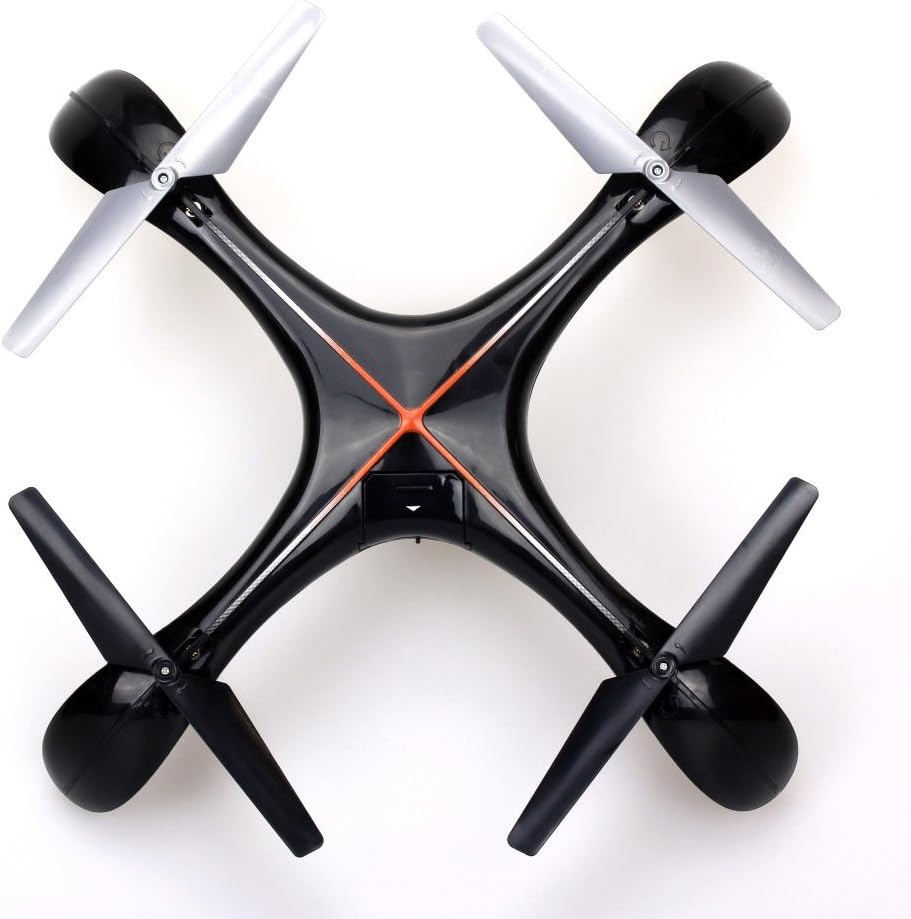
בילד 7.1: אויבן view of the Silverlit Xion FPV Drone, showing propeller orientation.
8. טראָובלעשאָאָטינג
| פּראָבלעם | מעגלעך סיבה | לייזונג |
|---|---|---|
| די דראָון רעאַגירט נישט אויף ווײַטקאָנטראָל. | Low battery in drone or remote; not paired correctly. | Charge drone battery, replace remote control batteries, re-attempt pairing process. |
| דראָון פליט אומגלייך אדער דריפט. | Drone not calibrated on a flat surface; damaged propeller. | Ensure drone is placed on a level surface during pairing/initialization. Check and replace damaged propellers. Refer to manual for calibration steps if available. |
| Poor video quality or no FPV feed. | Weak signal; FPV goggles not connected properly. | Ensure drone is within range. Check FPV goggle connection and battery. |
| קורץ פלי צייט. | באַטעריע נישט גאָר אויפגעלאָדן; אַלטע באַטעריע. | Ensure battery is fully charged (80-100 minutes). Consider replacing the battery if it's old and performance has degraded. |
9. ספּעסאַפאַקיישאַנז
- סאָרט: סילווערליט
- מאָדעל נאָמען: 84765
- עלטער קייט: קינד
- האַכלאָטע ווידעא רעקאָרדינג: 1080 פּ
- עפעקטיוו נאָך האַכלאָטע: 0.3 מפּ
- בקיעס לעוועל: Professional (Note: This may refer to advanced features, but basic operation is suitable for children with supervision)
- קאָנטראָל טיפּ: ווייַט קאָנטראָל
- באַטעריז אַרייַנגערעכנט: No (for remote control)
- רימאָוט קאָנטראָל אַרייַנגערעכנט: יא
- פּראָדוקט וואָג: 1.5 קילאָגראַמס
10. וואָראַנטי און שטיצן
For warranty information or technical support, please refer to the documentation provided with your purchase or contact Silverlit customer service. Keep your proof of purchase for any warranty claims.