
1. הקדמה
This manual provides detailed instructions for the setup, operation, and maintenance of your Enover TS18 7-Day Programmable Digital Timer. This device is designed to automate the control of electrical appliances by setting specific ON/OFF times throughout the week, offering convenience and energy management.
2. פּראָדוקט פֿעיִקייטן
- פלעקסיבלע סקעדזשולינג: Program up to 10 distinct ON/OFF cycles within a 7-day period. Each program repeats weekly.
- ענערגיע פאַרוואַלטונג: Automatically controls lamps, holiday lights, humidifiers, and other electrical devices. Includes a feature to protect devices from overcharge.
- Security Function: Features a random ON/OFF option to vary lighting times, simulating occupancy when away from home.
- באַניצער-פרייַנדלעך צובינד: Equipped with a large LCD display for clear visibility and a manual override switch for immediate control adjustments.
- באַטאַרייע באַקאַפּ: An integrated battery retains programmed settings during power outages, eliminating the need for reprogramming.

Image: Enover TS18 Digital Timer highlighting key features for easy home automation.
3. פּעקל אינהאַלט
דער פּעקל כולל די פאלגענדע זאכן:
- 1 x Enover Digital Timer Switch (Model TS18)
- 1 x באַניצער מאַנואַל

Image: Contents of the Enover TS18 Digital Timer package, including the timer and manual.
4. פּראָדוקט איבערview
The Enover TS18 Digital Timer features a clear LCD display and intuitive buttons for easy programming. It plugs directly into a standard electrical outlet.

בילד: פראָנט view of the Enover TS18 Digital Timer, displaying the time and control buttons.
קנעפּל פאַנגקשאַנז:
- וואָך: Sets the day(s) for programs.
- שעה: Adjusts the hour for time and program settings.
- מינוט: Adjusts the minute for time and program settings.
- RES/RCL: Resets or recalls settings.
- זייגער: Enters or exits clock setting mode.
- טיימער: Cycles through program settings (P1 ON, P1 OFF, P2 ON, etc.).
- ON/AUTO/OFF: Selects operating mode (Always ON, Automatic, Always OFF).
- טראַף: Activates or deactivates the random ON/OFF function.
- באַשטעטיק: Small button (requires a pointed object) to clear all settings and reset the device.
Video: A brief demonstration of the Enover Digital Timer's basic functions and display.
5. סעטאַפּ
5.1 ערשט אָפּצאָל
Before first use, plug the timer into an electrical outlet for approximately 5-10 minutes to charge the internal battery. This ensures the display is active and settings can be retained.
5.2 איינשטעלן די איצטיקע צייט און טאָג
- דריקן און האַלטן די זייגער קנעפּל.
- בשעת האלטן זייגער, דריקן די וואָך button repeatedly to set the current day of the week.
- בשעת האלטן זייגער, דריקן די שעה button repeatedly to set the current hour (AM/PM will display).
- בשעת האלטן זייגער, דריקן די מינוט קנעפּל איבער און איבער צו שטעלן די איצטיקע מינוט.
- מעלדונג די זייגער קנעפּל צו ראַטעווען די סעטטינגס.
6. אַפּערייטינג ינסטרוקטיאָנס
6.1 פּראָגראַמירן אָן/אויס ציקלען
The timer allows for up to 10 ON/OFF programs. Follow these steps to set a program:
- דרוק די TIMER קנעפל איין מאל. די דיספלעי וועט ווייזן "1 ON".
- דרוק וואָך to select the day(s) for this program (e.g., MO, TU, WE, TH, FR, SA, SU, MO TU WE TH FR, SA SU, MO TU WE TH FR SA SU, etc.).
- דרוק שעה to set the desired ON hour.
- דרוק מינוט to set the desired ON minute.
- דרוק די TIMER button again. The display will show "1 OFF".
- Repeat steps 2-4 to set the desired OFF time for Program 1. Ensure the correct day(s) are selected for the OFF time.
- פאָרזעצן דרינגלעך TIMER to cycle through and set additional programs (2 ON, 2 OFF, up to 10 ON, 10 OFF).
- נאכדעם וואס איר האט איינגעשטעלט אלע געוואונטשענע פראגראמען, דריקט דעם זייגער קנעפּל צו צוריקקומען צו דער איצטיקער צייט אַרויסווייַזונג.
- Ensure the timer is in AUTO mode for programs to execute. Press ON/AUTO/OFF צו ציקל צו AUTO.
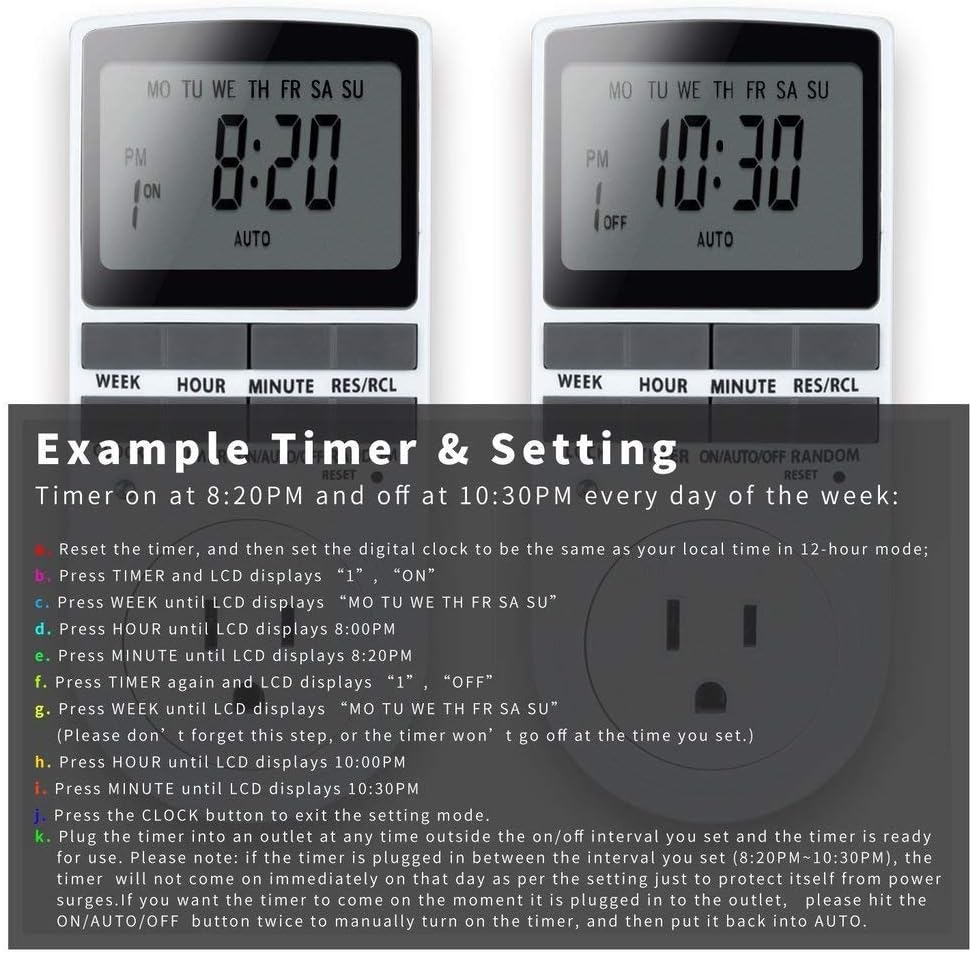
Image: Visual guide for setting an example timer program (ON at 8:20 PM, OFF at 10:30 PM daily).
6.2 Random Function (Anti-theft)
To activate the random ON/OFF feature:
- דרוק די ראַנדאָם button. The word "RANDOM" will appear on the display.
- In random mode, the timer will turn ON and OFF at varying times within a set period, typically around the programmed ON/OFF times, to simulate occupancy.
- To deactivate, press the ראַנדאָם קנעפּל ווידער.

Image: The anti-theft random feature of the Enover TS18 Digital Timer, designed to deter intruders.
6.3 מאַנואַל אָווועררייד
To manually switch the timer's output without affecting programmed settings:
- דרוק די ON/AUTO/OFF קנעפּל צו גיין דורך די מאָדעס: ON (always on), AUTO (follows programs), OFF (always off).
- Select the desired temporary mode. The timer will revert to AUTO mode at the next programmed ON/OFF event.
Video: A detailed demonstration of setting programs and using the manual override function on the Enover Digital Timer.
7. אַפּפּליקאַטיאָנס
The Enover TS18 Digital Timer can be used to automate various household devices, enhancing convenience and energy efficiency.
- Coffee Makers: Program your coffee maker to start brewing before you wake up.
- Aquarium Lights/Pumps: Automate the lighting and filtration cycles for your aquarium.
- Indoor Grow Lights: Maintain consistent light schedules for plants.
- יום טוּב דעקעריישאַנז: Set festive lights to turn on and off automatically.
- Fans/Humidifiers: Control environmental devices to operate only when needed.

בילד: עקסamples of automating daily routines with the Enover TS18 Digital Timer, such as a coffee maker and aquarium.
8. ספּעסאַפאַקיישאַנז
| מאָדעל נומער | TS18 |
| סאָרט | ענאָווער |
| קאָליר | ווייַס |
| מאַטעריאַל | פּלאַסטיק |
| נומער פון סעטטינגס | 10 (אויף/אויס פראגראמען) |
| Voltage | 120 וואלטס |
| וואָסtage | 1800 וואטס |
| Ampיראַגע קאַפּאַסיטי | 15 Amps |
| ייַנמאָנטירונג אופֿן | פּלוג-אין |
| מאַונטינג טיפּ | צאַפּן בארג |
| צאַפּן פֿאָרמאַטירונג | ב - אמעריקאנער סטיל מיט גראונד פּלאָג |
| ספּעציעלע פֿעיִקייטן | 3-wire grounded plug and 3-prong grounded outlet |
| באַניץ | דרינענדיק נוצן בלויז |
| פּונקט וואָג | 6.4 אונסעס |
| פּעקל דימענשאַנז | 5.67 X 3.31 X 2.6 אינטשעס |
| באַטאַרייע צעל טיפּ | NiMH |
| באַטערי לעבן | 100 days (backup) |
9. טראָובלעשאָאָטינג
- טייַמער טוט זיך נישט אָן/אויס ווי פּראָגראַמירט:
- Ensure the timer is in AUTO מאָדע.
- Verify that the current time and day are set correctly.
- Check that the ON and OFF times for the specific program are correctly entered and assigned to the desired days.
- Confirm the appliance connected to the timer is switched ON.
- דיספּליי איז ליידיק אָדער טונקל:
- Plug the timer into an active electrical outlet for 5-10 minutes to charge the internal battery.
- All settings lost after power outage:
- The internal battery may not be sufficiently charged. Ensure the timer is regularly plugged in to maintain battery charge.
- To clear all settings:
- Use a pointed object (like a pen tip) to press the באַשטעטיק button. This will clear all programs and reset the clock. You will need to re-enter all settings.
10. וואָראַנטי און שטיצן
For warranty information or technical support, please refer to the contact details provided on the product packaging or the official Enover webפּלאַץ. האַלטן דיין קויפן קאַבאָלע פֿאַר וואָראַנטי קליימז.