
1. הקדמה
This manual provides detailed instructions for the operation and maintenance of your Supersonic SC-1495BT Bluetooth AM/FM Boombox. Please read this manual thoroughly before using the device to ensure proper function and to maximize your listening experience.
2. זיכערקייַט אינפֿאָרמאַציע
- שטעלט נישט אויס דעם אַפּאַראַט צו רעגן אָדער פייכטקייט כּדי צו פאַרמייַדן פייער אָדער עלעקטרישע קלאַפּן.
- בלאָקירט נישט די ווענטילאַציע עפענונגען. זאָרגט פֿאַר גענוג פּלאַץ אַרום דעם אַפּאַראַט פֿאַר געהעריקן לופֿטפֿלוס.
- פֿאַרמײַדט צו שטעלן דעם אַפּאַראַט לעבן היץ־קוואַלן ווי ראַדיאַטאָרן, היץ־רעגיסטערס, אויוון, צי אַנדערע אַפּאַראַטן (אַרײַנגערעכנט ampליפיערס) וואָס פּראָדוצירן היץ.
- ניצן בלויז אַטאַטשמאַנץ / אַקסעסעריז ספּעסיפיעד דורך דער פאַבריקאַנט.
- אָפּשטויסן דעם אַפּאַראַט בעשאַס בליץ סטאָרמז אָדער ווען אַניוזד פֿאַר לאַנג פּיריאַדז.
- קאָנטאַקט אַלע קוואַלאַפייד סערוויס פּערסאַנעל. סערוויסינג איז פארלאנגט אויב די אַפּאַראַט איז דאַמידזשד אין קיין וועג.
3. פּעקל אינהאַלט
ביים אויספּאַקן, ביטע זיכער מאַכן אַז אַלע די זאכן וואָס זענען אויסגערעכנט אונטן זענען פאַראַן:
- Supersonic SC-1495BT Bluetooth AM/FM Boombox
- אַק מאַכט שנור
4. פּראָדוקט פֿעיִקייטן
The Supersonic SC-1495BT Boombox offers a variety of features for versatile audio playback:
- Bluetooth Version 3.0 for wireless music streaming
- Built-in USB input for media playback
- Built-in SD card and Micro SD card slot for media playback
- 3.5 mm Line-in (AUX) jack for external audio devices
- Four-band radio: AM, FM, SW1, SW2
- Integrated rechargeable battery for portable use
- קלאָר לקד אַרויסווייַזן
- Fast forward and rewind functions for media playback
- 360-degree rod antenna for enhanced radio reception
- קאָנטראָל פון די דריי - באַנד
- ירפאָון דזשאַק פֿאַר פּריוואַט צוגעהערט
- AC/DC operation for flexible power options
5. קאָנטראָלס און קאַנעקשאַנז
Familiarize yourself with the various controls and connection ports on your boombox.
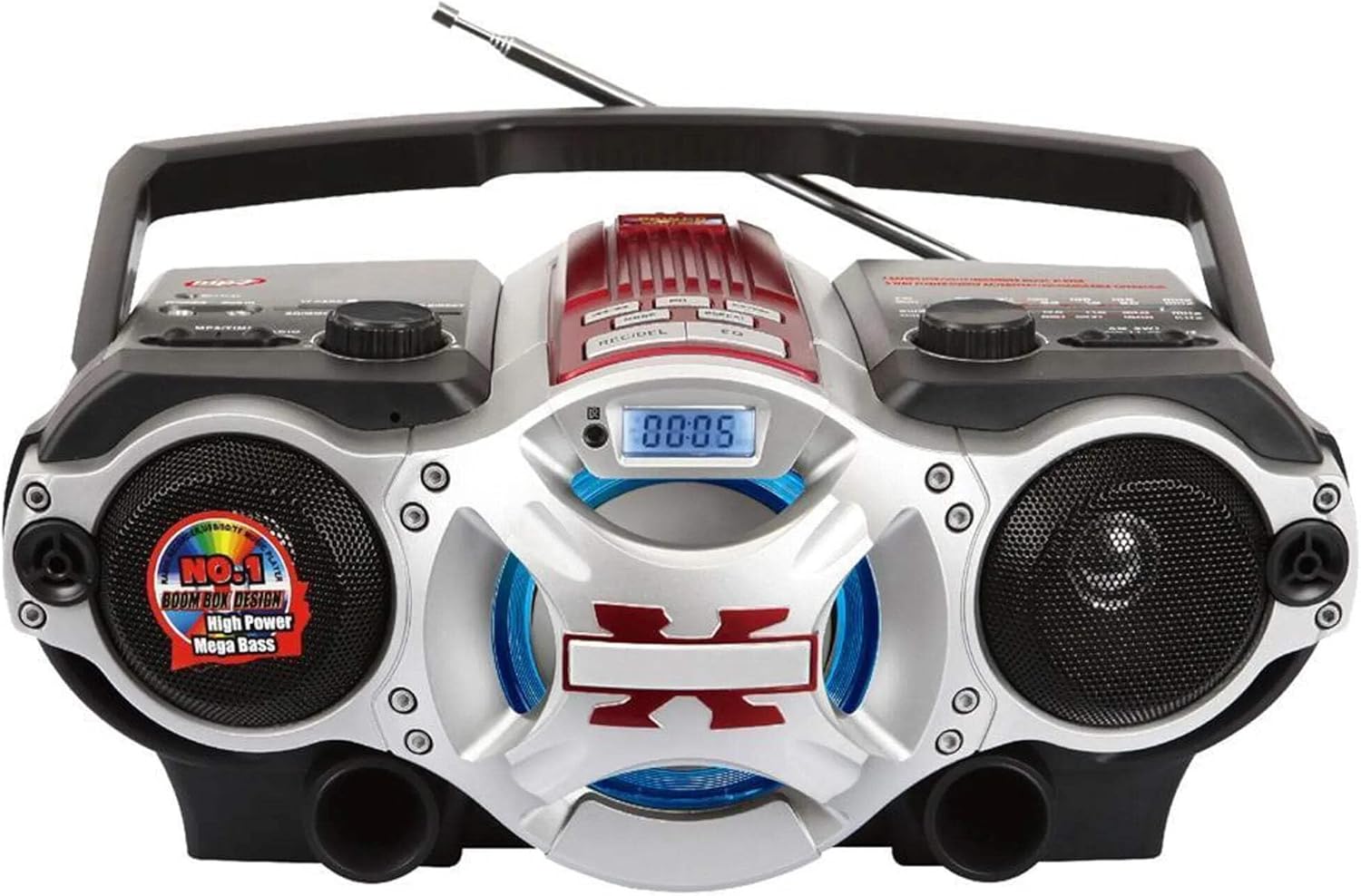
פיגורע 1: פראָנט view of the Supersonic SC-1495BT Boombox, showing the speakers, central display, and main control area.

פיגורע 2: Left side controls, including USB input, SD/Micro SD card slot, AUX IN, PHONES jack, BT/MP3/RADIO mode switch, and Rotary Volume control.

פיגורע 3: Right side controls, featuring the AM/FM/SW1/SW2 band selector, TUNING knob, and playback control buttons (Play/Pause, Skip, Mode, Clock, EQ).
6. סעטאַפּ
6.1 מאַכט קאַנעקשאַן
- AC מאַכט: Connect the included AC power cord to the AC input on the back of the boombox and then plug it into a standard wall outlet. The internal rechargeable battery will begin charging.
- DC Power (Battery): The boombox has a built-in rechargeable battery. Ensure it is charged before portable use. The unit can also operate on DC power from the internal battery when not connected to AC.
6.2 אַנטענע אַדזשאַסטמענט
Extend the 360-degree rod antenna for optimal radio reception, especially for FM and SW bands. Adjust its position for the clearest signal.
7. אַפּערייטינג ינסטרוקטיאָנס
7.1 אײַנשטעלן/אויסשטעלן און מאָדע אויסוואַל
- To power on the unit, slide the BT/MP3/RADIO switch to the desired mode (BT, MP3, or RADIO).
- צו אויסלאָשן, רוקט דעם קנעפּל צו דער "אויס" פּאָזיציע.
7.2 בלועטאָאָטה אָפּעראַציע
- רוק די מאָדע באַשטימען צו BT (Bluetooth). The LCD display will indicate Bluetooth mode, and the unit will enter pairing mode.
- אויף אייער בלוטוט-פארשטארקטע דעווייס (סמאַרטפאָן, טאַבלעט, אאז"וו), אַקטיווירט בלוטוט און זוכט פֿאַר פֿאַראַן דעווייסעס.
- Select "SC-1495BT" from the list of devices. Once paired, the unit will emit a confirmation sound.
- You can now play audio from your device through the boombox. Use your device or the boombox's playback controls (Play/Pause, Skip) to manage music.
7.3 Radio Operation (AM/FM/SW1/SW2)
- רוק די מאָדע באַשטימען צו RADIO.
- Select the desired band (AM, FM, SW1, or SW2) using the band selector switch.
- Extend and adjust the rod antenna for optimal reception.
- דרייען די טונינג knob to scan for radio stations. The frequency will be displayed on the LCD.
7.4 USB/SD קאַרטל ווידערשפּיל
- רוק די מאָדע באַשטימען צו mp3.
- Insert a USB flash drive into the USB input or an SD/Micro SD card into the corresponding slot. Ensure the card is inserted correctly.
- The unit will automatically detect and begin playing MP3 audio fileס פון די אריינגעשטעלטע מעדיע.
- Use the playback control buttons (Play/Pause, Skip, Fast Forward, Rewind) to navigate tracks.
7.5 Auxiliary (AUX) Input
- רוק די מאָדע באַשטימען צו mp3.
- פֿאַרבינדט אַן עקסטערנעם אַודיאָ מיטל (למשל, MP3 שפּילער, סמאַרטפאָון) צום AUX IN דזשעק ניצנדיק אַ 3.5 מם אַודיאָ קאַבל (נישט אַרייַנגערעכנט).
- Play audio from your external device. The sound will be routed through the boombox speakers. Control playback from your external device.
7.6 באַנד קאָנטראָל
דרייען די באַנד קנעפּל זייגערווייז צו פֿאַרגרעסערן דעם באַנד און קעגן זייגער צו עס פֿאַרקלענערן.
7.7 עאַרפאָנע דזשאַק
For private listening, plug standard 3.5mm earphones (not included) into the פאָנעס jack. The main speakers will be muted.
8. וישאַלט
- רייניקונג: ניצט אַ ווייכע, טרוקענע שטאָף צו רייניקן די אויסערלעכע זייט פון דעם אַפּאַראַט. ניצט נישט קיין שרײַבנדיקע רייניגער אָדער סאָלווענטן.
- סטאָרידזש: When not in use for extended periods, store the boombox in a cool, dry place away from direct sunlight and extreme temperatures.
- באַטערי זאָרגן: To prolong the life of the built-in rechargeable battery, avoid fully discharging it frequently. Charge the unit regularly, even if not in use.
9. טראָובלעשאָאָטינג
If you encounter issues with your boombox, refer to the following common problems and solutions:
| פּראָבלעם | מעגלעך סיבה | לייזונג |
|---|---|---|
| קיין מאַכט | AC cord not connected; Battery discharged; Power switch off | Ensure AC cord is securely plugged in; Charge the battery; Slide power switch to ON/BT/MP3/RADIO. |
| קיין געזונט | Volume too low; Mute activated (if applicable); Incorrect mode selected; Earphones connected | Increase volume; Ensure correct mode (BT, MP3, RADIO) is selected; Disconnect earphones. |
| בלועטאָאָטה איז נישט פּערינג | Boombox not in pairing mode; Device Bluetooth off; Too far from boombox | Ensure boombox is in BT mode; Enable Bluetooth on your device; Move device closer (within 30 feet/10 meters); Try re-pairing. |
| נעבעך ראַדיאָ אָפּטראָג | Antenna not extended/adjusted; Weak signal area | Fully extend and adjust the rod antenna; Try moving the unit to a different location. |
| USB/SD קאַרטל שפּילט נישט | אומרעכט file פֿאָרמאַטירן; קאַרטל/דרייוו נישט ריכטיק אַרײַנגעשטעלט; פֿאַרדאָרבן files | פאַרזיכערן files are MP3 format; Re-insert card/drive; Try a different USB drive or SD card. |
10. ספּעסאַפאַקיישאַנז
- מאָדעל: סק-1495בט
- סאָרט: סופּערסאַניק
- קאַנעקטיוויטי: Bluetooth (Ver. 3.0), USB, SD/Micro SD, 3.5mm AUX
- ראַדיאָ באַנדס: AM, FM, SW1, SW2
- שטיצט אַודיאָ פֿאָרמאַטירונגען: mp3
- מאַכט מקור: AC 110-220V, Built-in Rechargeable Battery
- רעדנער: 2 (סטערעאָ)
- דימענשאַנז (L x W x H): 15 X 10 X 12 אינטשעס
- וואָג: 4.3 פונט
- פאַבריקאַנט: Capitol Sales Company
- UPC: 639131814950
11. וואָראַנטי
This product comes with a 1-year limited warranty. Please retain your proof of purchase for warranty claims. For specific warranty terms and conditions, refer to the documentation included with your purchase or contact Supersonic customer support.
12. שטיצן
For further assistance, technical support, or inquiries regarding your Supersonic SC-1495BT Boombox, please visit the official Supersonic webזייטל אדער קאנטאקט זייער קאסטומער סערוויס דעפארטמענט. קאנטאקט אינפארמאציע קען געווענליך געפונען ווערן אויף די פאבריקאנט'ס webזייטל אדער פּראָדוקט פּאַקאַדזשינג.