
הקדמה
א דאנק פארן קויפןasing the Mitzu Kaiser PAK-8915 Dual Audio System. This system includes an amplified speaker and a passive speaker, designed to deliver powerful and clear sound. This manual provides essential information for the safe and efficient operation of your new audio system. Please read it thoroughly before use and retain it for future reference.
זיכערקייַט אינסטרוקציעס
- מאַכט מקור: פאַרזיכערן די מאַכט צושטעלן שוועבעלעך די וואָלtagעס איז ספּעסיפיעד אויף די אַפּאַראַט.
- ווענטילאַטיאָן: בלאָקירט נישט די ווענטילאַציע עפענונגען. האַלט גענוג פּלאַץ אַרום דעם אַפּאַראַט פֿאַר געהעריקן לופטפלוס.
- וואַסער און נעץ: Do not expose the unit to rain, moisture, or liquids. Keep away from water sources.
- היץ: שטעלט נישט דעם אַפּאַראַט לעבן היץ־קוואַלן ווי ראַדיאַטאָרן, היץ־רעגיסטערס, אויוון, אדער אַנדערע היץ־פּראָדוצירנדיקע אַפּאַראַטן.
- רייניקונג: Unplug the unit before cleaning. Use a dry cloth. Do not use liquid cleaners or aerosol cleaners.
- סערוויס: דו זאלסט נישט פּרווון צו דינען דעם פּראָדוקט זיך. קאָנטאַקט אַלע קוואַלאַפייד סערוויס פּערסאַנעל.
- אָרט: Place the speakers on a stable, level surface. The amplified speaker features a rear knob for stand mounting.
- קאַבלעס: Use only the provided cables and ensure they are not damaged or pinched.
פּעקל אינהאַלט
ביטע קאָנטראָלירט אַז אַלע די פאלגענדע זאכן זענען אַרייַנגערעכנט אין דיין פּעקל:
- 1 רענטגענ Amplified Speaker (with 15-inch woofer)
- 1 x Passive Speaker (with 15-inch woofer)
- 1 x רימאָוט קאָנטראָל
- Connection Cables (10 meters in length for speaker connection)
- מאַכט קאַבלע
פּראָדוקט איבערview
Amplified Speaker Rear Panel
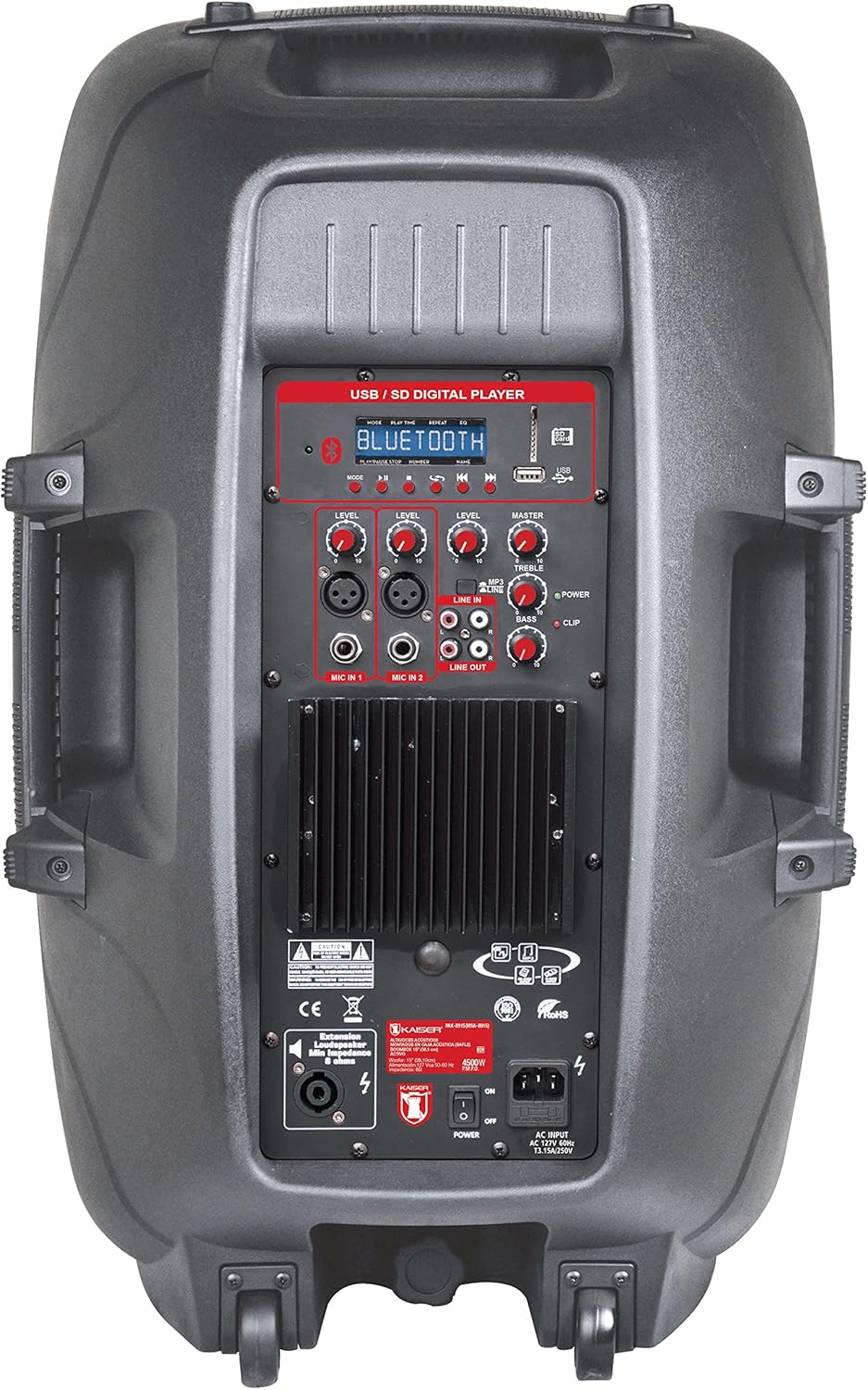
פיגורע 1: Amplified Speaker Rear Control Panel
די amplified speaker's rear panel houses all primary controls and connection ports:
- USB / SD Digital Player: Ports for USB drives and SD cards, along with a display and playback controls.
- בלועטאָאָטה מאָדולע: פֿאַר וויירלעס אַודיאָ סטרימינג.
- לעוועל קנעפּלעך: Adjust input levels for MIC 1, MIC 2, LINE IN, and MASTER volume.
- טון קאָנטראָלס: Knobs for TREBLE and BASS adjustment.
- מיקראָפאָן ינפּוץ: Two inputs (Cannon and 6.3mm) for connecting microphones.
- ליניע אריין (RCA): סטערעאָ RCA אינפּוטס פֿאַר קאַנעקטינג פונדרויסנדיק אַודיאָ דעוויסעס.
- שורה אָוט: RCA output to connect to another amplified speaker or audio system.
- רעדנער רעזולטאַט: Speakon connector for connecting the passive speaker.
- מאַכט סוויטש: On/Off switch for the unit.
- AC אַרייַנשרייַב: פֿאַר קאַנעקטינג די מאַכט קאַבלע.
- קליפ ינדיקאַטאָר: Lights up when the audio signal is clipping (distorting).
Passive Speaker Rear Panel

פיגורע 2: Passive Speaker Rear Panel
The passive speaker features simple input and output connections:
- אַרייַנשרייַב: Speakon input for connection from the ampליפיעד רעדנער.
- רעזולטאַט: Speakon output for daisy-chaining to another passive speaker (if applicable).
ווייַט קאָנטראָל
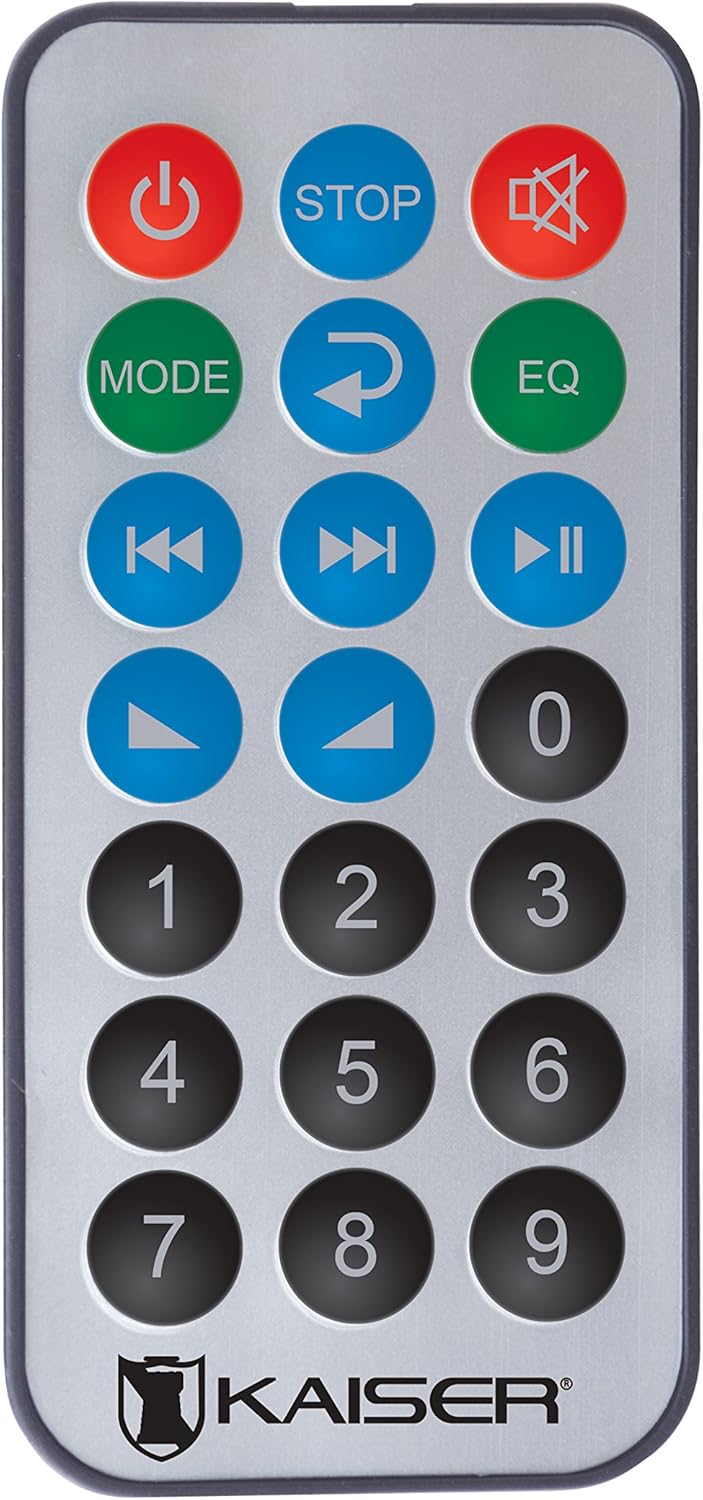
פיגורע 3: ווייַט קאָנטראָל
די ווײַטקאָנטראָל גיט באַקוועמען צוטריט צו פֿאַרשידענע פֿונקציעס:
- מאַכט קנעפּל: טוט אן/אויסדרייען דעם אַפּאַראַט.
- האַלטן: סטאַפּס פּלייבאַק.
- שטום: מוטשעט / ונמיוט דעם געזונט.
- DIRECTIONS: Switches between input modes (Bluetooth, USB, SD, FM, RCA).
- איבערחזרן: איבערחזרט דעם איצטיקן טרעק אדער פּלייַליסט.
- EQ: אויסקלייבט איקוואַלייזער פאָר-סעטס.
- פרייַערדיק / ווייַטער שפּור: שפּרינגט צום פֿריִערדיקן אָדער נעקסטן ליד.
- שפּיל / פּויזע: סטאַרץ אָדער פּאָזאַז פּלייבאַק.
- באַנד אַרויף / אַראָפּ: אַדדזשוסץ די בעל באַנד.
- נומעריק קיפּאַד: For direct track selection or FM station tuning.
סעטאַפּ
- אָרט: שטעלן די amplified and passive speakers in your desired location. The amplified speaker has handles and wheels for transport. Both speakers can be mounted on a stand using the rear knob on the ampליפיעד רעדנער.
- פאַרבינדן פּאַסיוו רעדנער: Use the provided speaker cable to connect the "Speaker Output" on the amplified speaker's rear panel to the "Input" on the passive speaker's rear panel. Ensure a secure connection.
- מאַכט קשר: Connect the power cable to the AC input on the amplified speaker and then plug it into a suitable power outlet.
- ערשט מאַכט אויף: Ensure all volume knobs are set to minimum before turning on the power switch.
אַפּערייטינג ינסטראַקשאַנז
מאַכט אויף / אַוועק
Flip the "POWER" switch on the rear panel of the amplified speaker to turn the system on or off. You can also use the power button on the remote control.
Selecting Input Mode
Press the "MODE" button on the control panel or remote control to cycle through available input sources: Bluetooth, USB, SD, FM Radio, and RCA Line In.
בלועטאָאָטה קאַנעקשאַן
- Switch the speaker system to Bluetooth mode using the "MODE" button. The display will show "Bluetooth" or a similar indicator.
- אויף אייער מאָבילער מיטל (סמאַרטפאָן, טאַבלעט, אאז"וו), אַקטיווירט בלועטוט און זוכט פֿאַר פֿאַראַן דעוויסעס.
- Select "Kaiser PAK-8915" or a similar name from the list of devices.
- Once paired, you will hear a confirmation sound, and your device will show a connected status. You can now stream audio wirelessly from up to 30 meters away.
וסב / סד פּלייבאַק
- אַרײַנשטעלן אַ USB פֿלעש דרייוו אָדער SD קאַרטל מיט אַודיאָ files into the respective port on the amplified speaker's rear panel.
- The system should automatically switch to USB or SD mode and begin playback. If not, press the "MODE" button to select the correct source.
- Use the playback controls (Play/Pause, Previous/Next, Stop) on the speaker panel or remote control to manage your music.
RCA Line In Connection
Connect an external audio device (e.g., DVD player, TV, computer) to the "LINE IN" RCA ports on the amplified speaker using an RCA cable. Select "LINE IN" mode using the "MODE" button.
מיקראָפאָן באַניץ
Plug your microphone(s) into the "MIC IN 1" (Cannon) or "MIC IN 2" (6.3mm) ports. Adjust the individual "MIC LEVEL" knobs to control the microphone volume. Ensure the MASTER volume is also adjusted appropriately.
עפעם ראַדיאָ
Switch to FM Radio mode using the "MODE" button. The system will automatically scan and store available stations. Use the Previous/Next track buttons to navigate between stations or the numeric keypad on the remote for direct tuning.
Volume and Tone Adjustment
Use the "MASTER" volume knob to control the overall output volume. Adjust the "BASS" and "TREBLE" knobs to fine-tune the audio's low and high frequencies. Individual input levels (MIC 1, MIC 2, LINE IN) can also be adjusted.
וישאַלט
- רייניקונג: Disconnect the power before cleaning. Use a soft, dry cloth to wipe the exterior surfaces. Do not use abrasive cleaners, waxes, or solvents.
- סטאָרידזש: If not in use for an extended period, store the speakers in a cool, dry place, away from direct sunlight and extreme temperatures.
- ווענטילאַטיאָן: Regularly check that the ventilation grilles are free from dust and debris to prevent overheating.
טראָובלעשאָאָטינג
| פּראָבלעם | מעגלעך סיבה | לייזונג |
|---|---|---|
| קיין מאַכט | Power cable not connected; Power switch off; Power outlet faulty. | Ensure power cable is securely connected. Turn the power switch ON. Test the power outlet with another device. |
| קיין געזונט רעזולטאַט | Volume too low; Incorrect input mode selected; Audio source not playing; Passive speaker not connected. | Increase MASTER volume. Select the correct input mode. Ensure the audio source is playing. Verify the passive speaker is correctly connected to the ampליפיעד רעדנער. |
| בלועטאָאָטה איז נישט קאַנעקטינג | Speaker not in Bluetooth mode; Device too far; Device already connected to another speaker. | Ensure the speaker is in Bluetooth mode. Move your device closer to the speaker (within 30m). Disconnect from other Bluetooth devices. |
| יו-עס-בי/עס-די שפילט נישט | אומרעכט file format; USB/SD card corrupted; Speaker not in USB/SD mode. | פאַרזיכערן אַודיאָ files are in a compatible format. Try another USB/SD card. Select USB/SD mode. |
| געזונט דיסטאָרשאַן | Volume too high (clipping); Input level too high. | Reduce MASTER volume. Adjust individual input levels (MIC, LINE IN) to prevent the CLIP indicator from lighting up. |
ספּעסאַפאַקיישאַנז
| סאָרט | מיטזו |
| מאָדעל | PAK-8915 |
| Amplified Speaker Power | 3500 וו PMPO |
| Passive Speaker Power | 3000 וו PMPO |
| וואָאָפער גרייס | 15 אינטשעס (38.1 סענטימעטער) |
| ימפּידאַנס | 8 Ω |
| קאַנעקטיוויטי טעכנאָלאָגיע | בלועטוט, RCA, USB |
| ווירעלעסס טעכנאָלאָגיע | בלועטאָאָטה |
| בלועטאָאָטה קייט | אַרויף צו 30 מעטער |
| אַודיאָ רעזולטאַט מאָדע | סטערעאָ |
| אָפטקייַט ענטפער | 4 KHz |
| קאָנטראָל מעטאָד | Buttons, Remote Control |
| מאַכט מקור | עלעקטריק קאַבלע |
| פּונקט וואָג | 34 קילאָגראַמס |
| רעקאָממענדעד ניצט | Smartphones, Tablets, Computers, DVD Players, TVs, Surround Sound Systems, Microphones |
וואָראַנטי און שטיצן
Specific warranty information for the Mitzu Kaiser PAK-8915 is not provided in this manual. Please refer to the warranty card included with your purchase or contact your retailer for details regarding warranty coverage and terms.
For technical support or service inquiries, please contact the Mitzu customer service department or your authorized dealer. Keep your purchase receipt as proof of purchase.