
Monitor Audio Apex AW-12-BK
Monitor Audio Apex AW-12 Subwoofer User Manual
Model: Apex AW-12-BK
הקדמה
Thank you for choosing the Monitor Audio Apex AW-12 Subwoofer. This compact, high-performance subwoofer is designed to deliver powerful and precise bass, enhancing your home audio experience. Featuring a 12-inch C-CAM driver, a 500-watt Class D amplifier, and a high-efficiency switched-mode power supply, the Apex AW-12 integrates seamlessly into any compatible A/V system. This manual provides essential information for safe installation, optimal operation, and proper maintenance of your subwoofer.
זיכערקייַט אינפֿאָרמאַציע
Please read all safety instructions before operating the subwoofer. Keep this manual for future reference.
- מאַכט מקור: Connect the subwoofer only to an AC power source as indicated on the unit.
- ווענטילאַטיאָן: זיכער מאַכן אַז עס איז דאָ גענוג ווענטילאַציע אַרום דעם אַפּאַראַט. נישט פֿאַרשטאָפּן די ווענטילאַציע עפענונגען.
- וואַסער און נעץ: שטעלט נישט אויס דעם אַפּאַראַט צו רעגן, פייכטקייט, אדער איבערגעטריבענע הומידיטי.
- היץ: האַלט דעם אַפּאַראַט אַוועק פון היץ קוועלער ווי ראַדיאַטאָרן, היץ רעגיסטערס, אויוון, אָדער אַנדערע אַפּאַראַטן וואָס פּראָדוצירן היץ.
- סערוויס: דו זאלסט נישט פּרווון צו דינען דעם פּראָדוקט זיך. קאָנטאַקט אַלע קוואַלאַפייד סערוויס פּערסאַנעל.
- רייניקונג: Disconnect from power before cleaning. Use a soft, dry cloth.
פּראָדוקט איבערview
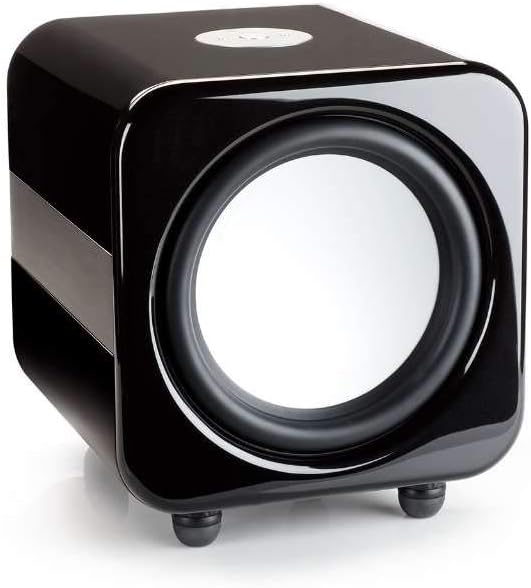
The Monitor Audio Apex AW-12 Subwoofer is designed for robust audio performance and aesthetic integration.


סעטאַפּ
קסנומקס. פּלאַסעמענט
The Apex AW-12 is designed as a floor-standing subwoofer. For optimal performance, place the subwoofer on a solid, level surface. Experiment with different positions in your room to find the best bass response, typically in a corner or along a wall.
2. קאַנעקשאַנז
Ensure all audio equipment is turned off before making connections.
- אַודיאָ אַרייַנשרייַב: Connect the subwoofer to your A/V receiver or processor's subwoofer output (LFE) using a high-quality RCA cable.
- 12V צינגל אַרייַנשרייַב: If your A/V receiver or processor has a 12V trigger output, connect it to the subwoofer's 12V trigger input. This allows for automatic power activation/deactivation with your main system.
- מאַכט קשר: Once all audio connections are made, connect the supplied AC power cord to the subwoofer's power inlet and then to a suitable wall outlet.
אַפּערייטינג
מאַכט אויף / אַוועק
If using the 12V trigger input, the subwoofer will power on automatically when your connected A/V receiver or processor is turned on. Otherwise, locate the power switch on the subwoofer and set it to the 'ON' position.
Volume and EQ Controls
The Apex AW-12 features top-mounted controls for volume and EQ settings. Adjust the volume to blend seamlessly with your main speakers. The EQ settings allow you to fine-tune the bass response to suit your room acoustics and personal preference. Refer to your A/V receiver's manual for initial setup and calibration of subwoofer levels.
וישאַלט
To ensure the longevity and optimal performance of your Monitor Audio Apex AW-12 Subwoofer, follow these maintenance guidelines:
- רייניקונג: Regularly wipe the cabinet with a soft, dry, lint-free cloth. Avoid using abrasive cleaners, waxes, or solvents, as these can damage the finish.
- שטויב: Use a soft brush or a vacuum cleaner with a brush attachment to gently remove dust from the driver and ventilation areas.
- סוויווע: Keep the subwoofer in a stable environment, away from direct sunlight, extreme temperatures, and high humidity.
- דורכקוקן: קאָנטראָלירט פּעריִאָדיש אַלע קאַבלע פֿאַרבינדונגען צו זיכער מאַכן אַז זיי זענען זיכער.
טראָובלעשאָאָטינג
If you experience issues with your Apex AW-12 Subwoofer, consult the following table for common problems and solutions.
| פּראָבלעם | מעגלעך סיבה | לייזונג |
|---|---|---|
| קיין קלאַנג פֿון סאַבוואָפֿער | שטראָם נישט פארבונדן אדער אנגעצונדן Audio cable loose or faulty Receiver/processor settings incorrect | Check power cord and power switch Ensure audio cable is securely connected at both ends; try a different cable Verify subwoofer output is enabled and volume is up on your receiver/processor |
| Distorted or weak bass | Subwoofer volume too high/low אומרעכטע EQ סעטטינגס נעבעך פּלייסמאַנט | Adjust subwoofer volume on the unit and/or receiver Experiment with EQ settings Try repositioning the subwoofer in the room |
| Subwoofer does not turn on with receiver (12V trigger) | 12V trigger cable loose or faulty Receiver's 12V trigger output not active | Check 12V trigger cable connection Consult your receiver's manual to ensure 12V trigger output is enabled |
If the problem persists after trying these solutions, please contact Monitor Audio customer support.
ספּעסאַפאַקיישאַנז
Key technical specifications for the Monitor Audio Apex AW-12 Subwoofer:
| שטריך | באַשרייַבונג |
|---|---|
| מאָדעל | Apex AW-12-BK |
| רעדנער טיפּ | סובוואָאָפער |
| סובוואָאָפער דיאַמעטער | 12 אינטשעס (30.48 סענטימעטער) |
| Ampליבער טיפּ | קלאַס די |
| וואָסtage / Max Output Power | 500 וואטס |
| מאַכט מקור | AC |
| מאַטעריאַל | מעטאַלליק |
| קאָליר | מעטאַלליק שווארצע |
| דימענשאַנז (די רענטגענ וו x ה) | 49.5 סענטימעטער X 47.5 סענטימעטער X 47.2 סענטימעטער (19.5 אין X 18.7 אין X 18.6 אין) |
| מאַונטינג טיפּ | שטאָק שטייענדיק |
וואָראַנטי אינפֿאָרמאַציע
Monitor Audio products are manufactured to the highest quality standards. For detailed warranty terms and conditions, please refer to the warranty card included with your product or visit the official Monitor Audio webזייטל. האַלט דיין קויפן באַווייַז פֿאַר וואָראַנטי קליימז.
קונה שטיצן
If you require further assistance or have questions not covered in this manual, please contact Monitor Audio customer support or your authorized dealer. Contact information can typically be found on the official Monitor Audio webוועבזייטל אדער אויף אייער פּראָדוקט פּאַקאַדזשינג.
Ask a question about this manual
Ask about setup, troubleshooting, compatibility, parts, safety, or missing instructions. Manuals+ will review the question and use this page’s manual context to help answer it.