
1. הקדמה
The GAMDIAS Hermes GKB3000 is a mechanical gaming keyboard designed for enhanced durability and performance. It features GAMDIAS Certified Blue Switches with a 50 million actuation lifecycle, a 7-color spectrum backlight with 14 lighting effects, and various functional keys for an optimized gaming and typing experience. This manual provides instructions for setting up, operating, and maintaining your keyboard.
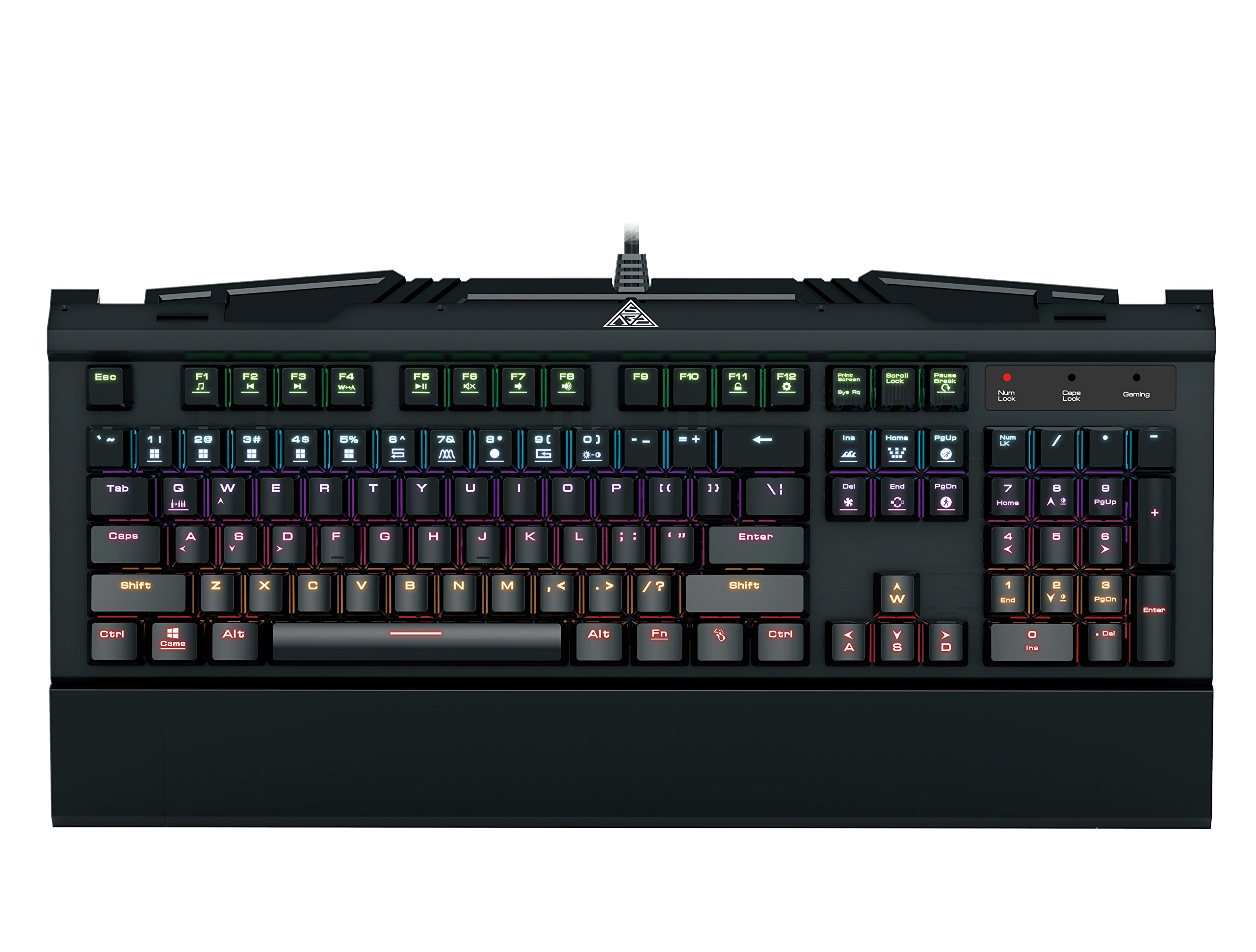
Image 1.1: The GAMDIAS Hermes GKB3000 Mechanical Gaming Keyboard. This image displays the full keyboard with its key layout and design, highlighting its compact yet robust build.
2. פּעקל אינהאַלט
ביטע קאָנטראָלירט דעם אינהאַלט פֿון דער פּאַקעט בײַם אויספּאַקן די קעסטל צו זיכער מאַכן אַז אַלע זאַכן זענען דאָ און נישט געשעדיגט.
- GAMDIAS Hermes GKB3000 Mechanical Gaming Keyboard
- באַניצער מאַנואַל (דעם דאָקומענט)
3. סעטאַפּ
Follow these steps to set up your GAMDIAS Hermes GKB3000 keyboard:
- ופשליסן די קלאַוויאַטור: נעמט פֿאָרזיכטיק אַרויס די קלאַוויאַטור פֿון איר פּאַקעט.
- פאַרבינדן צו קאָמפּיוטער: שטעקט אריין דעם USB-A קאנעקטאר פונעם קלאַוויאַטור קאַבל אין אַ פאַראַן USB פּאָרט אויף אייער קאָמפּיוטער.
- דרייווער ינסטאַלירונג: The keyboard is plug-and-play. Your operating system (e.g., Windows) will automatically detect and install the necessary drivers. No additional software installation is typically required for basic functionality.
- אָרט: Place the keyboard on a stable, flat surface for comfortable use.
4. אַפּערייטינג ינסטרוקטיאָנס
4.1. ליגהטינג עפפעקץ
The Hermes GKB3000 features a 7-color spectrum backlight with 14 sets of lighting effects. These include 9 preset effects and 5 customizable patterns.
- באַשטימען יפעקץ: Use the dedicated function keys (often combined with the Fn key) to cycle through the preset lighting effects. Refer to the keyboard's keycap legends for specific combinations.
- Customizing Effects: The keyboard supports 5 customizable lighting patterns. Instructions for programming these patterns are typically found in the full software suite available for download from the GAMDIAS website, if applicable.
- ברייטנאַס אַדזשאַסטמאַנט: Adjust backlight brightness using designated function key combinations.
4.2. Multimedia Control Keys
Access multimedia functions quickly using the dedicated multimedia control keys, often activated by holding the Fn קנעפל אין קאָמבינאַציע מיט די F-קנעפּלעך (F1-F12).
- באַנד קאָנטראָל: Increase, decrease, or mute audio.
- מעדיע פּלייבאַק: Play/pause, stop, previous track, next track.
- אנדערע פאַנגקשאַנז: May include opening default browser, email client, or calculator.
4.3. Special Gaming Functions
- WASD-Arrow Key Swap: This feature allows you to swap the functionality of the WASD keys with the arrow keys. This is useful for certain games or user preferences. Activate this function using a specific Fn key combination (e.g., Fn + W).
- Consecutive Attack Mode: This mode enhances rapid key input for gaming. Refer to the keyboard's specific documentation or GAMDIAS software for activation and configuration details.
- קלאַוויאַטור שלאָס: Temporarily disable the keyboard input to prevent accidental presses. Activate using a Fn שליסל קאָמבינאַציע.
- Windows Key Disable: Prevent accidental presses of the Windows key during gaming, which can minimize your game. Activate using a Fn key combination (e.g., Fn + Win key).
- N-Key Rollover: The GKB3000 supports N-key rollover, meaning multiple keys can be pressed simultaneously without ghosting or missed inputs. This ensures accurate and responsive commands during intense gaming sessions.
5. וישאַלט
געהעריגע אויפהאלטונג גאראנטירט די לאנגעוויטי און אפטימאלע פאָרשטעלונג פון אייער קלאַוויאַטור.
- רייניקונג:
- אָפּשטעקן די קלאַוויאַטור פֿון אייער קאָמפּיוטער איידער איר רייניקט.
- ניצן אַ ווייך, לינט-פֿרייַ שטאָף אַ ביסל דampאָפּגעוואַשן מיט וואַסער אָדער אַ מילד רייניקונג לייזונג צו ווישן די ייבערפלאַך.
- פֿאַר שטויב און שמוץ צווישן שליסלען, ניצט קאָמפּרעסירטע לופט.
- ויסמיידן ניצן שטרענגע כעמיקאַלן, אַברייסיוו רייניגער, אָדער סאָלוואַנץ.
- סטאָרידזש: האַלט די קלאַוויאַטור אין אַ קיל, טרוקן אָרט אַוועק פון דירעקט זונשייַן און עקסטרעמע טעמפּעראַטורן ווען נישט אין באַנוץ פֿאַר לענגערע פּעריאָדן.
- האַנדלינג: Avoid dropping the keyboard or exposing it to excessive force, as this can damage the mechanical switches or internal components.
6. טראָובלעשאָאָטינג
If you encounter issues with your GAMDIAS Hermes GKB3000 keyboard, refer to the following common solutions:
| פּראָבלעם | מעגלעך לייזונג |
|---|---|
| די קלאַוויאַטור רעאַגירט נישט. |
|
| Backlight is not working or is dim. |
|
| געוויסע קנעפּלעך אַרבעטן נישט. |
|
| WASD keys are acting as arrow keys. |
|
If the problem persists after trying these solutions, please contact GAMDIAS customer support for further assistance.
7. ספּעסאַפאַקיישאַנז
The following are the technical specifications for the GAMDIAS Hermes GKB3000 Mechanical Gaming Keyboard:
| שטריך | דעטאַל |
|---|---|
| סאָרט | GAMDIAS |
| מאָדעל נומער | GKB3000 |
| באַשטימען טיפּ | GAMDIAS Certified Mechanical Blue Switches |
| Actuation Lifecycle | 50 מיליאָן קיסטראָוקס |
| באַקלייט | 7-Color Spectrum, 14 Lighting Effects (9 preset, 5 customizable) |
| אַנטי-גהאָסטינג | N-Key ראָולאָוווער |
| קאַנעקטיוויטי | וסב-א |
| אָפּערייטינג סיסטעם | Windows |
| פּונקט וואָג | 2.42 פונט (אומגעפער 1.1 ק"ג) |
| פּראָדוקט דימענשאַנז (LxWxH) | 18.8 x 10.5 x 2 אינטשעס (אומגעפער 47.75 x 26.67 x 5.08 ס״מ) |
| מאַטעריאַל | Plastic with Elegant Metal Plate Design |
8. וואָראַנטי און שטיצן
GAMDIAS products are manufactured to the highest quality standards. For information regarding warranty coverage, terms, and conditions, please refer to the warranty card included with your product or visit the official GAMDIAS webפּלאַץ.
For technical support, troubleshooting assistance, or any product-related inquiries, please contact GAMDIAS customer support through their official webזייטל אדער די קאָנטאַקט אינפֿאָרמאַציע וואָס איז צוגעשטעלט אין אייער פּראָדוקט פּאַקאַדזשינג.
GAMDIAS Official Webפּלאַץ: www.gamdias.com


