
1. הקדמה
The BH Fitness Aquo Dual Rower R309U is designed for regular home use, supporting training sessions of 3 to 7 hours per week. This rowing machine features a magnetic brake system for smooth and silent operation with various tension levels. It includes a clear electronic display to monitor time, strokes per minute, total strokes, calorie consumption, and pulse. The rower offers 8 precise manual load adjustment points to select exercise intensity and supports wireless heart rate measurement with a 5 kHz chest strap (not included). Its central pulley system ensures direct rowing strokes, providing added value for both aerobic and anaerobic workouts. The Aquo Dual Rower is also designed for quick and easy folding, and includes transport wheels for convenient storage and movement within your home.

בילד 1.1: הויפּט view of the BH Fitness Aquo Dual Rower. This image shows the overall design of the rowing machine, highlighting its white and black color scheme and the "Aquo" branding.
2. זיכערקייַט אינפֿאָרמאַציע
Before using the BH Fitness Aquo Dual Rower, please read and understand all safety instructions. Keep this manual for future reference.
- באַראַטן זיך מיט אַ דאָקטער איידער איר אָנהייבן קיין געניטונג פּראָגראַם, ספּעציעל אויב איר האָט שוין פאַר-עקסיסטירנדיקע געזונטהייט פּראָבלעמען.
- Ensure the rowing machine is placed on a flat, stable surface with adequate clearance around it.
- האַלטן קינדער און פּעץ אַוועק פון די ויסריכט בעשאַס אָפּעראַציע.
- Inspect the rower for any loose or damaged parts before each use. Do not use if any components are compromised.
- טראָגט פּאַסיקע אַטלעטישע שיך און קליידער. פֿאַרמייַדט לויזע קליידער וואָס קענען זיך פֿאַרהאַנגען אין באַוועגלעכע טיילן.
- Do not overexert yourself. Stop exercising immediately if you feel faint, dizzy, or experience pain.
- The maximum user weight for this rower is 120 kg (264 lbs).
- Use the equipment only for its intended purpose as described in this manual.
3. סעטאַפּ און אַסעמבלי
The BH Fitness Aquo Dual Rower is designed for straightforward assembly. All necessary tools and hardware are included. Refer to the detailed assembly diagrams in the printed manual for step-by-step instructions.
- אויספּאַקן: Carefully remove all components from the packaging. Verify that all parts listed in the parts diagram are present.
- באַזע אַסעמבלי: באַפעסטיקט די פראָנט און הינטערשטע סטאַביליזאַטאָרן צום הויפּט ראַם מיט די צוגעשטעלטע באָלץ און וואַשערס. מאַכט זיכער אַז זיי זענען זיכער צוגעצויגן.
- Seat Rail Installation: Connect the seat rail to the main frame. The seat should slide smoothly along the rail.
- Footrest Attachment: Secure the footrests to the main frame. Ensure they pivot freely but are firmly attached.
- קאַנסאָול קשר: Connect the console cables to the main unit. Mount the console securely in its designated position.
- האַנדלעבאַר אַסעמבלי: Attach the handlebar to the rowing cord.
- לעצט טשעק: פארן ערשטן באַנוץ, קאָנטראָלירט נאכאמאל אלע באָלץ און פֿאַרבינדונגען צו זיכער מאַכן אַז זיי זענען פֿעסט און זיכער.

בילד 3.1: View of the rower's seat and aluminum rail. This image illustrates the comfortable seat and the robust rail structure, which are key components for smooth rowing motion.

בילד 3.2: Another perspective of the rower's seat and rail. This view provides additional detail on the construction and attachment points of the seat mechanism.

בילד 3.3: Close-up of the rower's footrests. This image shows the adjustable straps and textured surface designed to secure the user's feet during exercise.
4. אַפּערייטינג ינסטרוקטיאָנס
This section details how to operate your BH Fitness Aquo Dual Rower for an effective workout.
4.1. קאנסאל פונקציעס
The electronic console provides clear feedback on your workout. It measures time, strokes per minute, total strokes, calorie consumption, and pulse.

בילד 4.1: דעטאַילעד view of the rower's electronic console. This image displays the various metrics shown on the screen, including time, strokes, and calories, along with control buttons.

בילד 4.2: אן אנדער view of the rower's console, highlighting the control buttons. This image shows the 'down', 'up', 'start/stop', 'enter', and 'reset' buttons for navigating the console's features.

בילד 4.3: The rower's console with the handlebar in view. This image demonstrates the proximity of the console to the user's hands during a workout, allowing for easy interaction.
- מאַכט אויף / אַוועק: The console typically activates when you begin rowing or press any button. It will automatically power off after a period of inactivity.
- Display Metrics: Use the "MODE" or "DISPLAY" button (if available) to cycle through different metrics like Time, Strokes, Calories, and Pulse.
- באַשטעטיק: Press the "RESET" button to clear all workout data and start a new session.
- אָנהייב / האַלטן: Use the "START/STOP" button to pause or resume your workout tracking.
4.2. קעגנשטעל אַדזשאַסטמענט
The rower features 8 precise manual load adjustment points. This allows you to select the intensity of your exercise.
- Locate the resistance adjustment knob, usually found near the front of the machine.
- Turn the knob clockwise to increase resistance and counter-clockwise to decrease resistance.
- Adjust the resistance level to match your fitness goals and comfort.
4.3. האַרץ רייט מאָניטאָרינג
The Aquo Dual Rower supports wireless heart rate measurement using a 5 kHz chest strap (not included). This allows for high-intensity training while easily monitoring your heart rate on the console or a compatible mobile device.
- Wear a compatible 5 kHz wireless chest strap according to its manufacturer's instructions.
- Ensure the chest strap is properly paired or detected by the rower's console. Refer to your chest strap manual for pairing instructions.
- Your heart rate will be displayed on the console, providing real-time feedback during your workout.
4.4. Folding and Transport
The rower is designed for quick and easy folding to save space, and includes transport wheels for convenient movement.
- פאָלדינג: Follow the specific folding mechanism instructions provided in your printed manual. Typically, this involves releasing a locking pin and lifting the seat rail vertically.
- טראנספארט: Once folded, tilt the rower onto its transport wheels, located at the front stabilizer, and carefully roll it to your desired storage location.
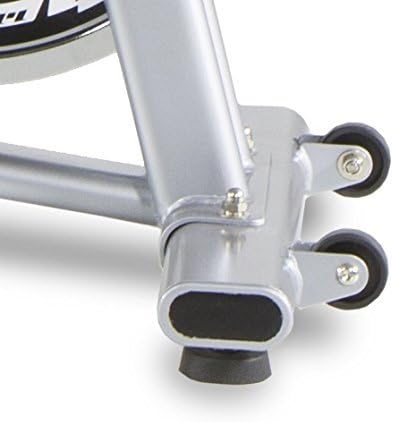
בילד 4.4: Close-up of the rower's transport wheels. These wheels facilitate easy movement and storage of the machine when not in use.

בילד 4.5: A user interacting with the rower's console, which includes a tablet holder. This image shows how a mobile device can be integrated for enhanced workout experiences or entertainment.
5. וישאַלט
Regular maintenance ensures the longevity and optimal performance of your BH Fitness Aquo Dual Rower.
- רייניקונג: Wipe down the rower with a damp טוך נאך יעדן באניץ צו באזייטיגן שווייס און שטויב. פארמיידט שווארצע רייניגער אדער סאָלווענטן.
- שמירן: Periodically check the seat rail for debris and clean it. If the seat movement becomes less smooth, apply a small amount of silicone-based lubricant to the rail.
- דורכקוקן: Regularly check all bolts, nuts, and connections for tightness. Tighten any loose fasteners. Inspect the rowing cord for any signs of wear or fraying.
- סטאָרידזש: When not in use for extended periods, store the rower in a clean, dry environment, ideally folded to save space.
6. טראָובלעשאָאָטינג
This section addresses common issues you might encounter with your BH Fitness Aquo Dual Rower.
| פּראָבלעם | מעגלעך סיבה | לייזונג |
|---|---|---|
| Footrests make noise during use. | Friction between pivoting plastic parts. | Apply a small amount of silicone lubricant to the pivot points. Consider adding thin washers between the moving parts if the noise persists (consult a technician if unsure). |
| די קאנסאל דיספלעי איז ליידיג אדער נישט שטענדיג. | Loose cable connection, low battery (if applicable), or power supply issue. | Check all console cable connections. Ensure the power adapter is securely plugged in (if applicable). If battery-operated, replace batteries. |
| Console beep is too loud or annoying. | Default console setting. | Check the console manual for options to adjust or disable sound feedback. If no option is available, consider contacting customer support. |
| Inaccurate calorie readings. | Calorie calculations are estimates and can vary between devices. | Calorie burn is an approximation. Focus on other metrics like time, strokes, and heart rate for a more consistent measure of effort. Ensure user profile settings (weight, age) are correctly entered if the console supports it. |
| Rower shifts during exercise. | Uneven floor surface or lack of grip. | Ensure the rower is on a level surface. Use an exercise mat underneath the rower to provide better grip and protect your floor. |
7. ספּעסאַפאַקיישאַנז
Detailed technical specifications for the BH Fitness Aquo Dual Rower R309U.
- מאָדעל נומער: R309U
- סאָרט: בה פיטנעסס
- קעגנשטעל מעקאַניזאַם: Magnetic Brake System
- קעגנשטעל לעוועלס: 8 (מאַנועלע אַדזשאַסטמענט)
- פליווהעל וואָג: 5.5 קג
- קאַנסאָול ווייַז: Electronic LCD (Time, Strokes/Min, Total Strokes, Calories, Pulse)
- האַרץ קורס מאָניטאָרינג: Wireless (5 kHz chest strap compatible, not included)
- מאַקסימום באַניצער וואָג: 120 קג (264 לבס)
- דימענשאַנז (L x W x H): 179 סענטימעטער X 50 סענטימעטער X 53 סענטימעטער (70.5 אין X 19.7 אין X 20.9 אין)
- פאָולדיד דימענשאַנז (L x W x H): 92 סענטימעטער X 51 סענטימעטער X 112 סענטימעטער (36.2 אין X 20.1 אין X 44.1 אין)
- פּראָדוקט וואָג: 29.5 קג (65 לבס)
- ראַם מאַטעריאַל: אייַזן
- מאַכט מקור: Electrical Cable (for console)
- ספּעציעלע פֿעיִקייטן: Quick and easy folding, Transport wheels, Central pulley system, Constant central structure inclination.
8. וואָראַנטי און שטיצן
For warranty information, please refer to the warranty card included with your product or visit the official BH Fitness website. For technical support, spare parts, or any inquiries not covered in this manual, please contact BH Fitness customer service through their official channels.
BH Fitness Official Webפּלאַץ: www.bhfitness.com


