
הקדמה
The Coleman Battery Lock Twist Lantern is a versatile and robust rechargeable lantern designed for outdoor activities and emergencies. Featuring a durable Lithium-Ion battery and Coleman's Battery Lock Technology, it provides reliable illumination and can also serve as a power bank for your USB-compatible devices. This manual provides essential information for the safe and efficient use of your lantern.
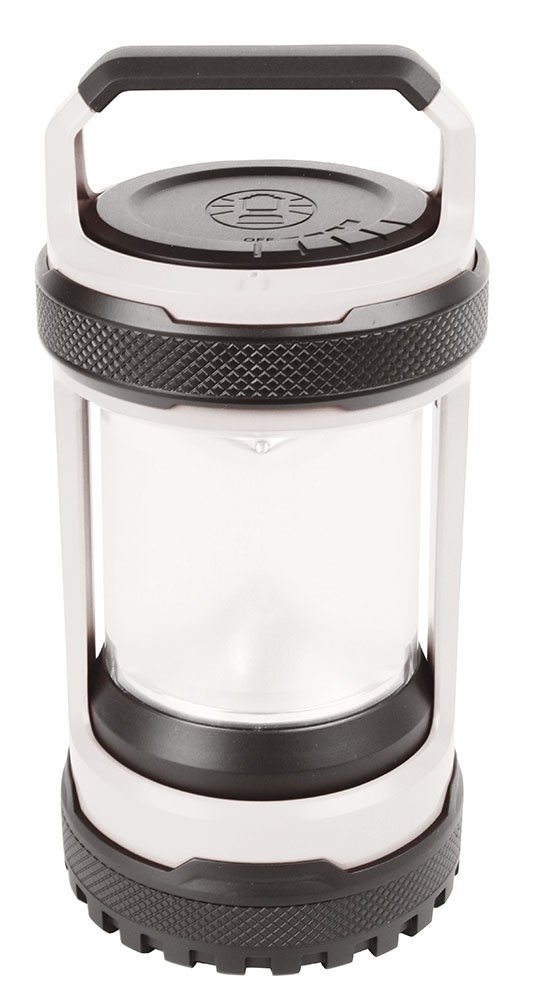
בילד: פראָנט view of the Coleman Battery Lock Twist Lantern. This image shows the lantern in its upright position, highlighting its handle and light-emitting section.
זיכערקייַט אינפֿאָרמאַציע
Please read all safety instructions before using the lantern. Failure to follow these instructions may result in electric shock, fire, or serious injury.
- Do not immerse in water: This lantern is not waterproof. Avoid exposure to heavy rain or submersion.
- באַטערי זיכערקייַט: Use only the specified Lithium-Ion battery. Do not attempt to open, crush, or expose the battery to extreme temperatures.
- טשאַרדזשינג: Use the provided USB cable and a compatible power adapter for charging. Do not overcharge.
- קינדער: האַלטן אויס פון דערגרייכן פון קינדער. דאָס איז נישט אַ צאַצקע.
- היץ: Do not place the lantern near heat sources or in direct sunlight for extended periods.
- באַזייַטיקונג: Dispose of batteries and the product according to local regulations.
פּעקל אינהאַלט
באַשטעטיקן אַז אַלע זאכן זענען פאַראַן אין פּעקל:
- Coleman Battery Lock Twist Lantern (Model 2000024923)
- אינטעגרירטע ליטהיום-יאָן באַטאַרייע
- וסב טשאַרדזשינג קאַבלע
סעטאַפּ
Your lantern comes with an integrated Lithium-Ion battery. Before first use, it is recommended to fully charge the lantern.
- געפֿינען טשאַרדזשינג פּאָרט: The USB charging port is typically located at the base or side of the lantern, often protected by a rubber cover.
- פאַרבינדן וסב קאַבלע: Plug the smaller end of the included USB charging cable into the lantern's charging port.
- פאַרבינדן צו מאַכט: Plug the larger end of the USB cable into a compatible USB power adapter (not always included) or a powered USB port (e.g., computer, power bank).
- טשאַרדזשינג ינדיקאַטאָר: An indicator light will typically illuminate to show that the lantern is charging. This light may change color or turn off when fully charged.
- ערשטער אָפּצאָל: Allow approximately 6-8 hours for the initial full charge.

בילד: זייט view of the Coleman Battery Lock Twist Lantern. This image provides a different angle of the lantern, potentially showing the charging port or control buttons.
אַפּערייטינג ינסטראַקשאַנז
The lantern features multiple light modes and the unique Battery Lock Technology.
Power On/Off and Brightness Modes:
- מאַכט קנעפּל: Locate the power button, usually on the front or top of the lantern.
- הויך מאָדע: Press the power button once for High brightness (300 lumens).
- מיטל מאָדע: Press the power button a second time for Medium brightness (120 lumens).
- נידעריק מאָדע: Press the power button a third time for Low brightness (50 lumens).
- אויסגעלאשן: Press the power button a fourth time to turn the lantern off.
- פלאַשינג מאָדע: Some models may include a flashing mode, typically activated by holding the power button down for a few seconds from any ON state. Refer to your specific model for details.
Battery Lock Technology:
Coleman's Battery Lock Technology prevents battery drain and reduces corrosion during storage. To activate or deactivate:
- Activate Battery Lock: Twist the base or a designated ring on the lantern to the "LOCK" position. This physically disconnects the battery, preventing parasitic drain.
- Deactivate Battery Lock: Twist the base or ring back to the "UNLOCKED" or "OPERATE" position to reconnect the battery and allow normal function.
Always engage the Battery Lock when storing the lantern for extended periods to preserve battery life.
Charging External Devices (Power Bank Function)
This lantern can be used to charge other USB-powered devices, such as smartphones.
- Locate Output Port: Identify the USB output port on the lantern (distinct from the input charging port).
- קאָננעקט דיווייס: Use your device's USB charging cable to connect it to the lantern's USB output port.
- אָנהייבן טשאַרדזשינג: The lantern should automatically begin charging your device. Some models may require pressing a button to activate the power bank function.
- מאָניטאָר אָפּצאָל: Monitor your device's charging status. The lantern's battery level will decrease as it charges an external device.
וישאַלט
- רייניקונג: ווישן די לאַנטערן מיט אַ ווייך, דamp שטאָף. דו זאלסט נישט נוצן אַברייסיוו קלינערז אָדער סאָלוואַנץ.
- סטאָרידזש: Store the lantern in a cool, dry place. Ensure the Battery Lock is engaged for long-term storage to prevent battery drain.
- באַטערי זאָרגן: For optimal battery life, fully charge the lantern every 3-6 months, even if not in use.
טראָובלעשאָאָטינג
| פּראָבלעם | מעגלעך סיבה | לייזונג |
|---|---|---|
| לאַנטערן טוט נישט קער אויף. | Battery is drained. Battery Lock is engaged. | Charge the lantern. Disengage the Battery Lock. |
| לאַנטערן טוט נישט אָפּצאָל. | USB cable is faulty. Power source is not active. | Try a different USB cable. Ensure the power source is working. |
| External device not charging from lantern. | Lantern battery is low. Incorrect USB port used. | Charge the lantern. Ensure you are using the USB output port. |
| ליכט רעזולטאַט איז טונקל. | Battery is low. Lantern is in a lower brightness mode. | Charge the lantern. Cycle through brightness modes to select High. |
ספּעסאַפאַקיישאַנז
| מאָדעל נומער | 2000024923 |
| ליכט רעזולטאַט (לומענס) | 300 (High) / 120 (Medium) / 50 (Low) |
| שטראַל דיסטאַנסע | 8m (High) / 5m (Medium) / 3m (Low) |
| ליכט מקור טיפּ | געפירט (ליכט ימיטינג דייאָוד) |
| מאַכט מקור | Lithium-Ion Rechargeable Battery (included) |
| נומער פון באַטעריז | 1 |
| מאַטעריאַל | מעטאַל |
| וואַסער קעגנשטעל מדרגה | ניט וואַסער קעגנשטעליק |
| דימענשאַנז (פּאַקאַץ) | 30.6 X 25 X 19 סענטימעטער |
| וואָג (פּאַקעט) | 771 ג |
וואָראַנטי און שטיצן
For warranty information and customer support, please refer to the official Coleman webזייטל אדער קאנטאקט זייער קאסטומער סערוויס דעפארטמענט. האלט אייער באווייז פון קויפן פאר יעדע גאראנטיע טענות.
Webפּלאַץ: www.coleman.com