
1. וויכטיק סאַפעטי אינפֿאָרמאַציע
Before using the FITFIU Fitness BEST-100 Static Bicycle, please read and understand all instructions in this manual. Keep this manual for future reference.
- באַראַטנ זיך אַ דאָקטער איידער איר אָנהייבן קיין געניטונג פּראָגראַם.
- Ensure the bicycle is placed on a flat, stable surface.
- האַלטן קינדער און פּעץ אַוועק פון די ויסריכט בעשאַס נוצן.
- The maximum recommended user weight is 100 kg.
- The maximum recommended user height is 1.65 m.
- טראָגט פּאַסיקע ספּאָרט קליידער און שיך.
- הער אויף צו טאָן געניטונגען גלייך אויב איר פילט זיך שוואַך, שווינדלדיק, אָדער דערפאַרט ווייטיק.
- Regularly inspect the bicycle for wear and tear, especially moving parts and connections.
2. פּראָדוקט איבערview
The FITFIU Fitness BEST-100 is an ultra-compact static bicycle designed for moderate exercise at home or for rehabilitation purposes. It features a 5 kg inertia disc and 8 levels of adjustable magnetic resistance.
The integrated LCD display provides essential workout data, including speed, time, distance, and calories burned. The pedals are equipped with adjustable straps for secure foot placement.

בילד 2.1: איבערview of the FITFIU Fitness BEST-100 Static Bicycle.
3. וואָס איז אין דער קעסטל
פֿאָרזיכטיק אויספּאַקן אַלע קאָמפּאָנענטן און זיכער מאַכן אַז איר האָט די פֿאָלגנדיקע זאַכן:
- 1x BEST-100 Static Bicycle (Grey)
- 1x אינסטרוקציע מאַנואַל (דאָס דאָקומענט)
- 1x Assembly Kit (includes necessary tools and fasteners)
If any parts are missing or damaged, do not proceed with assembly. Contact customer support for assistance.
4. אַסעמבלי אינסטרוקציעס
Assembly of the BEST-100 static bicycle requires careful attention to the provided diagrams and instructions. It is recommended to have a second person assist with certain steps.
- Base Stabilizers: Attach the front and rear stabilizer bars to the main frame using the provided bolts and nuts. Ensure they are securely tightened.
- פּעדאַלז: Identify the left (L) and right (R) pedals. Thread the left pedal counter-clockwise and the right pedal clockwise into their respective crank arms. Tighten firmly. Attach the foot straps to the pedals.
- Seat Post and Seat: Insert the seat post into the main frame. Adjust the height to your preference using the adjustment knob and secure it. Attach the seat to the seat post.
- Handlebar Post and Handlebars: Connect the handlebar post to the main frame. Attach the handlebars to the handlebar post. Ensure all connections are secure.
- Console/Display: Connect the sensor cables from the main frame to the LCD display unit. Mount the display unit onto the handlebar assembly.
- לעצט טשעק: Before first use, verify that all bolts, nuts, and connections are securely tightened. Ensure the bicycle is stable and does not wobble.

Image 4.1: Seat height adjustment mechanism. Adjust to ensure comfortable and effective pedaling.

Image 4.2: Pedals with adjustable straps for secure foot placement during exercise.
5. אַפּערייטינג ינסטרוקטיאָנס
5.1 אַדזשאַסטינג קעגנשטעל
The BEST-100 features 8 levels of magnetic resistance. To adjust the resistance, turn the knob located on the main frame below the handlebars. Turn clockwise to increase resistance for a more challenging workout, and counter-clockwise to decrease resistance for an easier workout.

Image 5.1: Resistance adjustment knob. Turn to select one of 8 resistance levels.
5.2 ניצן דעם LCD דיספּלעי
The LCD display tracks your workout progress. It typically shows the following metrics:
- SPEED: איצטיקע סייקלינג גיכקייט.
- צייט: די געדויער פון אייער טרענירונג.
- AFSTAND: גאַנץ דיסטאַנץ באדעקט בעת די טריינינג.
- קאַלאָריעס: עסטימאַטעד קאַלאָריעס פארברענט.
The display is battery-powered. If the display becomes dim or unresponsive, replace the batteries (type usually AAA, refer to the battery compartment for specifics).

Image 5.2: LCD display showing workout metrics and handlebars for support.
6. וישאַלט
Regular maintenance ensures the longevity and safe operation of your static bicycle.
- רייניקונג: Wipe down the bicycle with a damp טוך נאך יעדן באניץ צו באזייטיגן שווייס און שטויב. פארמיידט שווארצע רייניגער אדער סאָלווענטן.
- דורכקוק: קאָנטראָלירט פּעריִאָדיש אַלע באָלץ, ניסלעך און באַוועגלעכע טיילן פֿאַר פעסטקייט. פֿעסטציִען אַלע לויזע פֿעסטערס.
- שמירן: The magnetic resistance system is generally maintenance-free. Do not attempt to lubricate internal components unless specifically instructed by the manufacturer.
- סטאָרידזש: Store the bicycle in a dry, cool place away from direct sunlight and extreme temperatures.
7. טראָובלעשאָאָטינג
If you encounter issues with your BEST-100 static bicycle, refer to the following common problems and solutions:
| פּראָבלעם | מעגלעך סיבה | לייזונג |
|---|---|---|
| Bicycle is unstable or wobbles. | Loose assembly bolts; uneven floor. | Check and tighten all assembly bolts. Ensure the bicycle is on a level surface. |
| Pedaling movement is not smooth or makes noise. | Loose components; internal friction. | Verify all connections are tight. If noise persists, contact customer support. |
| LCD display is not working or shows incorrect data. | Dead batteries; loose sensor connection. | Replace the batteries in the display unit. Check that the sensor cable is securely connected. |
| Resistance adjustment is not effective. | אינערלעכע מעכאניזם פראבלעם. | Ensure the resistance knob is turning freely. If the issue persists, contact customer support. |
If the problem is not listed or persists after attempting the solutions, contact FITFIU Fitness customer support.
8. ספּעסאַפאַקיישאַנז
| שטריך | באַשרייַבונג |
|---|---|
| מאָדעל נומער | 1100005 |
| דימענסיעס (L X W X H) | 60 X 40 X 85 סענטימעטער |
| פּראָדוקט וואָג | 9 קג |
| מאַקסימום באַניצער וואָג | 100 קג |
| Inertia Disc Weight | 5 קג |
| קעגנשטעל לעוועלס | 8 (אַדזשאַסטאַבאַל) |
| קעגנשטעל מעקאַניזאַם | מאַגנעטיק |
| מאַטעריאַל | אַללוי סטיל |
| ווייַז טיפּ | לקד |
| ווייַז פאַנגקשאַנז | גיכקייַט, צייט, דיסטאַנסע, קאַלאָריעס |
| קאָליר | גרוי |
| מאַכט מקור (דיספּליי) | באַטערי אַפּערייטאַד |
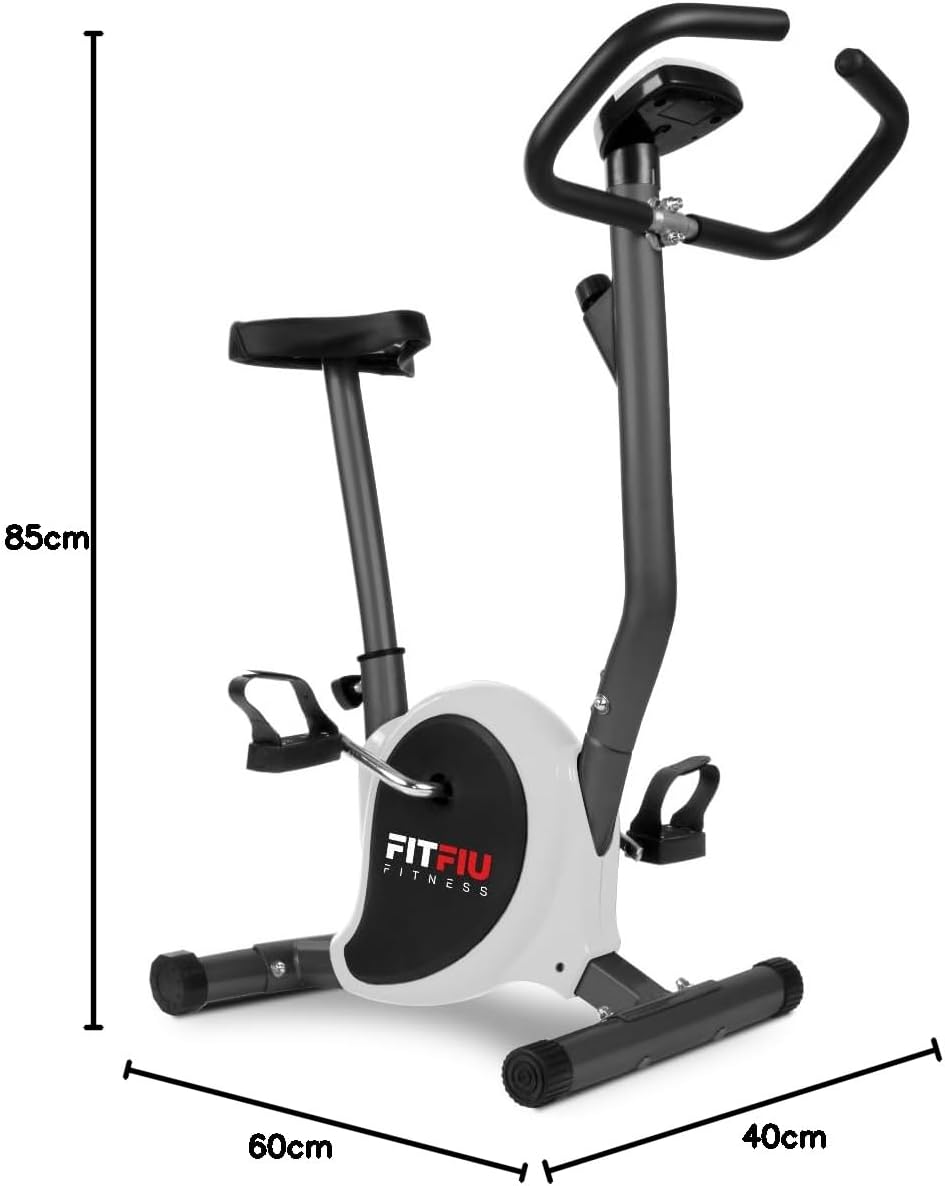
Image 8.1: Diagram showing the dimensions of the static bicycle.
9. וואָראַנטי און שטיצן
For warranty information, product support, or to purchase replacement parts, please contact FITFIU Fitness customer service. Refer to your purchase documentation for specific warranty terms and contact details.
You can typically find support information on the official FITFIU Fitness webוועבזייטל אדער דורך דעם פארקויפער וואו איר האט געקויפט דעם פראדוקט.