
1. הקדמה
This manual provides detailed instructions for the safe and efficient operation of your Audiocenter MX3200 Multi-channel Amplifier. Please read this manual thoroughly before using the product to ensure proper setup, optimal performance, and to prevent damage.
2. וויכטיק סאַפעטי אינסטרוקציעס
- מאַכט מקור: פאַרבינדן די amplifier only to the specified voltage and frequency as indicated on the unit.
- ווענטילאַטיאָן: זיכער מאַכן גענוג לופט-פלוס אַרום דעם amplifier. Do not block ventilation openings. Maintain at least 10 cm (4 inches) of clear space around the unit.
- נעץ: דו זאלסט נישט ויסשטעלן די amplifier to rain, moisture, dripping, or splashing liquids. Do not place objects filled with liquids, such as vases, on the apparatus.
- היץ: האַלטן די amplifier away from heat sources such as radiators, heat registers, stoves, or other apparatus (including ampליפיערס) וואָס פּראָדוצירן היץ.
- גראָונדינג: Ensure the power cord is properly grounded. Do not defeat the safety purpose of the polarized or grounding-type plug.
- סערוויס: איבערגעבן אלע סערוויסינג צו קוואַליפֿיצירטע סערוויס פּערסאָנעל. פּרוּווט נישט צו סערוויסן דעם פּראָדוקט אַליין.
- רייניקונג: נעמט ארויס דעם אַפּאַראַט פֿון דער עלעקטרישער אַוטלעט איידער איר רייניגט. ניצט נאָר אַ טרוקענעם שטאָף.
3. פּעקל אינהאַלט
באַשטעטיקן אַז אַלע זאכן זענען פאַראַן אין פּעקל:
- Audiocenter MX3200 Multi-channel Ampליפער
- מאַכט קאַבלע
- באַניצער מאַנואַל (דעם דאָקומענט)
4. פּראָדוקט איבערview
4.1 דערציען פּאַנעל אויסלייג
The rear panel of the MX3200 amplifier features all essential input, output, and control connections. Refer to the image below for a visual guide.
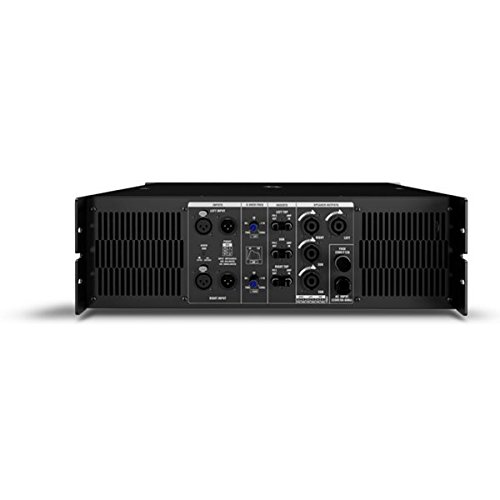
Figure 1: Rear Panel of Audiocenter MX3200 Amplifier. This image displays the various connection points and controls on the back of the amplifier, including XLR inputs, speaker outputs, and configuration switches.
- LEFT INPUT / RIGHT INPUT: XLR input connectors for audio signals.
- 2-WAY / 3-WAY Switch: Selects the crossover mode for the amplifier. Use 2-WAY for two-way speaker systems and 3-WAY for three-way speaker systems.
- MASTER Controls: Adjusts the overall output level for the respective channels.
- SPEAKER OUTPUTS (LEFT / RIGHT): SpeakON connectors for connecting to passive speakers.
- AC אַרייַנשרייַב: Standard IEC power inlet for connecting the power cable.
- מאַכט קאַנעקטער: Main power switch for turning the unit on or off.
5. סעטאַפּ
5.1 פּלייסמאַנט
שטעלן די amplifier on a stable, flat surface or mount it in a standard equipment rack. Ensure there is sufficient space around the unit for proper ventilation to prevent overheating.
5.2 Connecting Audio Inputs
- פֿאַרבינדט אײַער אַודיאָ מקור (למשל, מיקסער, פּרעampליפיער) צו די לינקס אַרייַנשרייַב און רעכט אַרייַנשרייַב XLR connectors on the rear panel.
- מאַכן זיכער אַז אַלע קאַנעקשאַנז זענען זיכער.
5.3 Connecting Speaker Outputs
- פאַרבינדן דיין פּאַסיוו ספּיקערז צו די SPEAKER OUTPUTS (LEFT / RIGHT) using appropriate SpeakON cables.
- Verify that the speaker impedance matches the amplifier's specifications to prevent damage.
5.4 מאַכט קאַנעקשאַן
- פאַרזיכערן די ampדער עלעקטרישער מאַכט קנעפּל איז אין דער אויסגעלאשן פּאָזיציע.
- פאַרבינדן די סאַפּלייד מאַכט קאַבלע צו די AC אַרייַנשרייַב on the rear panel and then to a suitable grounded electrical outlet.
6. אַפּערייטינג ינסטרוקטיאָנס
6.1 פּאַוערינג אויף / אַוועק
- To power on, ensure all connections are secure and turn the מאַכט קאַנעקטער באַשטימען צו די שטעלע ON.
- To power off, turn the מאַכט קאַנעקטער באַשטימען צו די אַוועק שטעלע.
6.2 Adjusting Output Levels
ניצן די MASTER Controls on the rear panel to adjust the output volume for the left and right channels independently. Start with the controls at a low setting and gradually increase to the desired listening level.
6.3 Crossover Mode Selection
די 2-WAY / 3-WAY Switch allows you to configure the amplifier's internal crossover. Select 2-WAY for systems with two frequency bands (e.g., woofer and tweeter) or 3-WAY for systems with three frequency bands (e.g., woofer, midrange, tweeter). Refer to your speaker system's specifications for the appropriate setting.
7. וישאַלט
- רייניקונג: ווישט רעגולער אויס די אויסערליכע זייט פון ampרייניגער מיט אַ ווייכן, טרוקענעם שטאָף. ניצט נישט פליסיקע רייניגער אדער סאָלווענטן.
- ווענטילאַטיאָן: Periodically check that the ventilation grilles are free from dust and obstructions. Use a soft brush or vacuum cleaner to remove any buildup.
- סטאָרידזש: אויב סטאָרינג די ampאויב איר ניצט דעם ליפט פאר א לענגערע צייט, זאלט איר עס אפשטעקן פון עלעקטריע, רייניגן עס, און אפהיטן עס אין א קיל, טרוקן ארט ווייט פון דירעקט זונשייַן און עקסטרעמע טעמפעראטורן.
8. טראָובלעשאָאָטינג
| פּראָבלעם | מעגלעך סיבה | לייזונג |
|---|---|---|
| קיין מאַכט | Power cable disconnected; Power outlet faulty; Amplifier power switch off. | Check power cable connection; Test power outlet with another device; Ensure power switch is ON. |
| קיין געזונט רעזולטאַט | Input cables disconnected; Speaker cables disconnected; Master controls set too low; Source device not playing. | Verify all input and speaker cable connections; Increase Master controls gradually; Check audio source. |
| פאַרקרימט געזונט | Input signal too high (clipping); Speaker impedance mismatch; Faulty cables. | Reduce input signal level from source; Verify speaker impedance; Replace suspect cables. |
| אָוווערכיטינג | פארשטאפטע ווענטילאציע; איבערגעטריבענע לאסט. | Ensure clear ventilation paths; Reduce output level or check speaker impedance. |
9. ספּעסאַפאַקיישאַנז
| שטריך | דעטאַל |
|---|---|
| מאָדעל | MX3200 |
| סאָרט | Audiocenter |
| פאַבריקאַנט | Audiocenter |
| גוף מאַטעריאַל | פּלאַסטיק |
| פּעקל דימענשאַנז | 48.3 X 39 X 13.2 סענטימעטער |
| פּונקט וואָג | 25 קג |
10. וואָראַנטי און שטיצן
For warranty information and technical support, please refer to the documentation provided with your purchase or visit the official Audiocenter webזייטל. פרובירט נישט צו פאררעכטן דעם איינהייט אליין, ווייל דאס קען בטל מאכן אייער גאראנטיע.