
1. הקדמה
The Aduro Amplify LED Wireless Speaker, model BSP15, is a portable audio device designed for wireless music playback and hands-free calling. It features integrated LED lighting with multiple settings to enhance the audio experience. This manual provides instructions for the proper setup, operation, and maintenance of your speaker.
וואָס איז אין די קעסטל:
- Aduro Amplify LED Wireless Speaker (BSP15)
- טשאַרדזשינג קאַבלע
2. זיכערקייַט אינפֿאָרמאַציע
- Do not expose the speaker to water or moisture. This product is not water-resistant.
- Avoid extreme temperatures. Do not place near heat sources or in direct sunlight for extended periods.
- פרובירט נישט צו צענעמען אדער מאדיפיצירן דעם רעדנער. דאס קען בטל מאכן די גאראנטיע און שאפן שאדן.
- ניצט נאָר דעם צוגעשטעלטן טשאַרדזשינג קאַבל אָדער אַ סערטיפיצירטן עקוויוואַלענט.
- האַלטן אויס פון דערגרייכן פון קינדער.
3. פּראָדוקט פֿעיִקייטן
- ווירעלעסס קאַנעקטיוויטי: Connects to smartphones, tablets, and other Bluetooth-enabled devices.
- Easy-Touch Pairing: Simplifies the process of connecting to your device.
- ינטעגראַטעד מיקראָפאָן: Allows for hands-free phone calls.
- הויך-קוואַליטעט סאָונד רעזולטאַט: Delivers clear and loud audio.
- Multiple LED Settings: Offers various light modes to complement your audio experience.
4. קאָנטראָלס איבערview
The Aduro Amplify speaker features intuitive controls located on the top panel for easy access to functions.
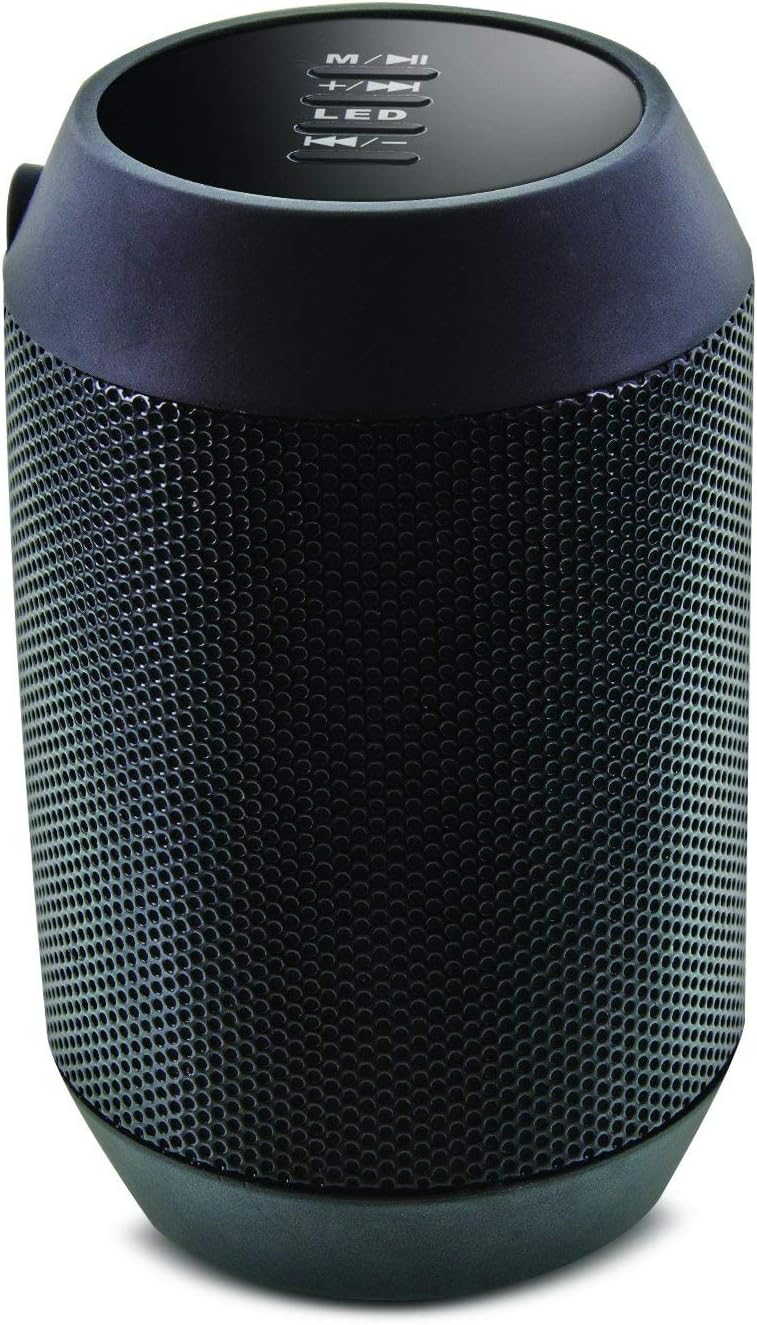
בילד: אויבן view of the Aduro Amplify speaker, highlighting the control panel. From top to bottom, buttons include: M/▶█ (Mode/Play/Pause), +/▶▶ (Volume Up/Next Track), LED (LED Mode Control), ◀◀/- (Volume Down/Previous Track).
- M/▶█ Button: Press to switch between modes (e.g., Bluetooth, AUX). Press and hold to power on/off. Short press to Play/Pause music.
- +/▶▶ Button: Short press to increase volume. Press and hold to skip to the next track.
- LED קנעפּל: Press to cycle through different LED light modes.
- ◀◀/- Button: Short press to decrease volume. Press and hold to go to the previous track.
5. סעטאַפּ אינסטרוקציעס
5.1 אויפלאָדן דעם רעדנער
Before first use, fully charge the speaker. Connect the provided charging cable to the speaker's charging port and the other end to a USB power source (e.g., computer USB port, USB wall adapter). The LED indicator will show charging status and turn off or change color when fully charged.
5.2 פּאַוערינג אויף / אַוועק
- צו מאַכט אויף: דריקן און האַלטן די M/▶█ button for approximately 3 seconds until you hear an audible prompt or see the LED indicator light up.
- צו מאַכט אַוועק: דריקן און האַלטן די M/▶█ button for approximately 3 seconds until you hear an audible prompt or the LED indicator turns off.
5.3 בלועטאָאָטה פּערינג
צו פֿאַרבינדן אייער רעדנער צו אַ בלוטוט-פֿאַרמעגלעכן מיטל:
- Ensure the speaker is powered on and in Bluetooth pairing mode. The LED indicator will typically flash rapidly, indicating it is ready to pair.
- On your smartphone, tablet, or other device, navigate to the Bluetooth settings.
- געבן בלועטאָאָטה און זוכן פֿאַר בנימצא דעוויסעס.
- Select "Aduro BSP15" (or similar name) from the list of found devices.
- Once paired, the speaker will emit an audible confirmation, and the LED indicator will typically stop flashing and remain solid.
- דער רעדנער וועט אויטאָמאַטיש פּרובירן זיך ווידער צו פֿאַרבינדן מיטן לעצטן פֿאַרבונדענעם מיטל ווען עס ווערט אָנגעצונדן.
5.4 דראָטיקע פֿאַרבינדונג (AUX)
For devices without Bluetooth, you can use a 3.5mm audio cable (not included) to connect to the speaker's AUX input port. Once connected, the speaker should automatically switch to AUX mode. If not, press the M/▶█ button to cycle to AUX mode.
6. אַפּערייטינג ינסטרוקטיאָנס
6.1 פּלייַינג אַודיאָ
- שפּיל / פּויזע: קורץ דריקן די M/▶█ קנעפּל.
- באַנד אַרויף: קורץ דריקן די +/▶▶ קנעפּל.
- באַנד אַראָפּ: קורץ דריקן די ◀◀/- קנעפּל.
- ווייַטער שפּור: דריקן און האַלטן די +/▶▶ קנעפּל.
- פֿריִערדיקע שפּור: דריקן און האַלטן די ◀◀/- קנעפּל.
6.2 הענט-פרייע רופן
When connected via Bluetooth, the speaker's built-in microphone allows for hands-free calling.
- ענטפער רופן: קורץ דריקן די M/▶█ קנעפּל ווען אַן אינקאַמינג רוף קלינגט.
- סוף רופן: קורץ דריקן די M/▶█ קנעפּל בעשאַס אַ רופן.
- אָפּוואַרפן רופן: דריקן און האַלטן די M/▶█ קנעפּל ווען אַן אינקאַמינג רוף קלינגט.
6.3 LED ליכט סעטטינגס
דרוק די געפירט button to cycle through the available light modes. The speaker offers various visual effects, including pulsating lights that react to music.
7. וישאַלט
7.1 רייניקונג
ווישט אָפּ דעם רעדנער מיט אַ ווייכן, טרוקענעם שטאָף. ניצט נישט קיין שרײַבנדיקע רייניגער, אַלקאָהאָל, אָדער אַנדערע כעמישע סאָלווענטן, ווײַל די קענען שאַטן די ייבערפלאַך.
7.2 סטאָרידזש
When not in use for extended periods, store the speaker in a cool, dry place away from direct sunlight and extreme temperatures. It is recommended to charge the battery periodically to maintain its lifespan.
8. טראָובלעשאָאָטינג
- רעדנער וועט נישט זיך אנצינדן:
זיכער מאַכן אַז די באַטאַרייע איז אויפגעלאָדן. פֿאַרבינדט דעם טשאַרדזשינג קאַבל און פּרוּווט ווידער נאָך אַ פּאָר מינוט. - קען נישט צוזאמענשטעלן מיט בלוטוט דעווייס:
Ensure the speaker is in pairing mode (LED flashing). Make sure Bluetooth is enabled on your device and it is within range (typically 10 meters/30 feet). Turn both devices off and on again, then try pairing. Ensure no other devices are currently connected to the speaker. - קיין קלאַנג אָדער נידעריקע באַנד:
Check the volume levels on both the speaker and your connected device. Ensure the speaker is correctly paired or the AUX cable is fully inserted. If using AUX, ensure the correct mode is selected. - LED לייץ ארבעטן נישט:
Press the LED button to cycle through modes. If still unresponsive, power cycle the speaker.
9. ספּעסאַפאַקיישאַנז

בילד: זייט view of the Aduro Amplify LED Wireless Speaker, showing its cylindrical design and speaker grille.
| מאָדעל נאָמען | BSP15 |
| נומער מאָדעל נומער | LU4-01-BSP15 |
| סאָרט | Aduro |
| מאַטעריאַל | פּלאַסטיק |
| רעדנער טיפּ | סובוואָאָפער |
| ספּעציעלע פֿעיִקייטן | איינגעבויטע מיקראָפאָן, פּאָרטאַטיוו |
| קאַנעקטיוויטי טעכנאָלאָגיע | ווירעלעסס (בלועטאָאָטה) |
| ווירעלעסס קאָמוניקאַציע | בלועטאָאָטה |
| אַודיאָ רעזולטאַט מאָדע | סטערעאָ |
| רעדנער מאַקסימום רעזולטאַט מאַכט | 5 וואטס |
| קאָנטראָל מעטאָד | ריר |
| פּראָדוקט דימענשאַנז | 6"ד רענטגענ 3.8"וו רענטגענ 3.5"ה |
| פּונקט וואָג | 6.7 אונס |
| וואַסער קעגנשטעל מדרגה | ניט וואַסער קעגנשטעליק |
| מאַכט מקור | עלעקטריש מיט שנור (פֿאַר טשאַרדזשינג) |
10. וואָראַנטי און שטיצן
10.1 לימיטעד וואָראַנטי
This Aduro product is covered by a limited warranty against defects in materials and workmanship under normal use. The duration and terms of the warranty may vary. Please refer to the warranty card included with your purchase or contact Aduro customer support for specific details.
10.2 קונה שטיצן
For technical assistance, warranty claims, or product inquiries, please contact Aduro customer support. Contact information can typically be found on the manufacturer's official webוועבזייטל אדער אויף דער פּראָדוקט פּאַקאַדזשינג.
Manufacturer: Aduro