
1. הקדמה
This manual provides essential information for the safe installation, operation, and maintenance of your CCEI Piccolo PIMT series power supply for pool projectors. The Piccolo PIMT series includes models such as PIMT31 (100W), PIMT33 (300W), and PIMT37 (600W), all operating at 230/12V. This device is designed to power pool projectors safely and efficiently.
Please read this manual thoroughly before installation and use to ensure proper function and to prevent potential hazards.
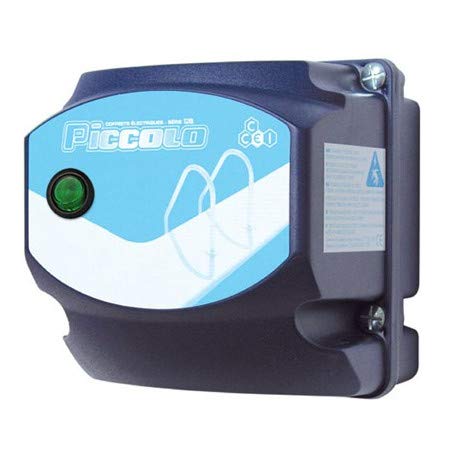
Figure 1: CCEI Piccolo PIMT Power Supply Unit, top view. This image shows the compact design and the rotary switch for operation.
2. זיכערקייַט אינסטרוקציעס
ווארענונג: עלעקטרישע אינסטאַלאַציע מוז דורכגעפירט ווערן דורך אַ קוואַליפֿיצירטן עלעקטריקער אין לויט מיט אַלע לאָקאַלע און נאַציאָנאַלע עלעקטרישע קאָודן.
- שטענדיק אָפּשטעקן די מאַכט איידער איר דורכפירן קיין ינסטאַלירונג, וישאַלט אָדער טראָובלעשווטינג.
- Ensure the power supply is installed in a dry, well-ventilated area, away from direct sunlight and excessive heat.
- The device is equipped with a waterproof on/off switch, but the main unit should not be submerged or exposed to direct water spray.
- The safety transformer complies with the NF EN61558 standard, ensuring safe operation when installed correctly.
- דו זאלסט נישט יקסיד די מאַקסימום וואַסערtage rating of the specific model (e.g., 100W for PIMT31, 300W for PIMT33, 600W for PIMT37).
- Use only original CCEI parts and accessories for replacement or repair.
3. סעטאַפּ און ייַנמאָנטירונג
The CCEI Piccolo PIMT power supply is designed for easy installation. Follow these steps carefully:
- מאָונטינג: Select a suitable location for mounting the power supply unit. Use the provided mounting screws and plugs to securely attach the unit to a vertical surface. Ensure the location allows for adequate ventilation and access for wiring.
- Power Connection (230V AC Input):
- זיכער מאַכן אַז די הויפּט מאַכט צושטעל איז אויסגעלאָשן בײַם קרייַז ברעאַקער.
- Connect the 230V AC input power cable to the designated terminals on the power supply unit. Refer to the wiring diagram inside the unit cover for correct polarity.
- באַזאָרגט אַלע פֿאַרבינדונגען פֿעסט.
- Projector Connection (12V AC Output):
- Connect the 12V AC output cables from the power supply to your pool projector(s).
- Utilize the provided cable glands to ensure a watertight seal where cables enter and exit the unit.
- באַשטעטיקן אַז די גאַנץ וואַטtage of all connected projectors does not exceed the maximum capacity of your Piccolo PIMT model.
- לעצט טשעקס: Double-check all wiring connections for security and correctness. Ensure all covers are properly closed and sealed.

Figure 2: CCEI Piccolo PIMT Power Supply, showing connection points. This view highlights the input/output terminals and the waterproof switch.
4. אַפּערייטינג ינסטרוקטיאָנס
Once the power supply is correctly installed and wired, operating it is straightforward:
- מאַכט אויף: Restore power to the unit at the main circuit breaker.
- Activate Projectors: Use the waterproof on/off switch located on the unit to turn your pool projectors ON or OFF. Rotate the switch to the 'ON' position to activate the projectors.
- מאַכט אַוועק: To turn off the projectors, rotate the switch to the 'OFF' position. For extended periods of non-use or maintenance, it is recommended to disconnect power at the main circuit breaker.
5. וישאַלט
Regular maintenance ensures the longevity and safe operation of your CCEI Piccolo PIMT power supply.
- רייניקונג: רייניקן פּעריִאָדיש די אויסערלעכע זייט פֿון דער אַפּאַראַט מיט אַ ווייכן, דamp cloth. Do not use abrasive cleaners or solvents. Ensure the unit is powered off before cleaning.
- דורכקוקן: Annually inspect all wiring connections for tightness and signs of corrosion or damage. Check cable glands for proper sealing.
- ווענטילאַטיאָן: Ensure that the ventilation openings (if any) are clear of debris to prevent overheating.
- פאַכמאַן טשעק: It is recommended to have a qualified electrician inspect the unit and its connections every few years.
6. טראָובלעשאָאָטינג
If you encounter issues with your CCEI Piccolo PIMT power supply, refer to the following table:
| פּראָבלעם | מעגלעך סיבה | לייזונג |
|---|---|---|
| Projectors do not turn ON. |
|
|
| Unit makes unusual noise or smells burnt. |
|
|
| Intermittent projector operation. |
|
|
If the problem persists after attempting these solutions, contact CCEI customer support or a qualified electrician.
7. ספּעסאַפאַקיישאַנז
| שטריך | דעטאַל |
|---|---|
| פאַבריקאַנט | CCEI |
| מאָדעל סעריעס | Piccolo PIMT (PIMT31, PIMT33, PIMT37) |
| אַרייַנשרייַב וואָלtage | 230V AC |
| רעזולטאַט חלקtage | 12V AC |
| Power Output (PIMT31) | 100 וו |
| Power Output (PIMT33) | 300 וו |
| Power Output (PIMT37) | 600 וו |
| זיכערקייַט סטאַנדאַרד | NF EN61558 |
| פֿעיִקייטן | Waterproof On/Off Switch, Cable Glands, Mounting Screws |
| פּונקט וואָג | 1.5 קג |
| ASIN | B019YDRZ38 |
| ערשטער בנימצא טאָג | 21 פעברואר 2020 |
8. וואָראַנטי און שטיצן
CCEI products are manufactured to high-quality standards. For specific warranty information, please refer to the warranty card included with your product or visit the official CCEI webזייטל. האַלט דיין קויפן באַווייַז פֿאַר וואָראַנטי קליימז.
For technical support, spare parts, or service inquiries, please contact your authorized CCEI dealer or visit the CCEI official webפּלאַץ פֿאַר קאָנטאַקט דעטאַילס.