
1. הקדמה
א דאנק פארן קויפןasing the ipega PG-9057 Wireless Game Controller. This manual provides detailed instructions for setting up, operating, and maintaining your device. Please read this manual carefully before use to ensure optimal performance and longevity of your controller.
2. פּראָדוקט פֿעיִקייטן
- ווירעלעסס קאַנעקטיוויטי: Enjoy gaming freedom with wireless connection technology.
- מולטי-פּלאַטפאָרם קאַמפּאַטאַבילאַטי: Supports Android devices (smartphones, tablets, TV boxes) and Windows PCs.
- High Durability Buttons: Equipped with high-quality, durable buttons for extended gaming sessions.
- פּינטלעכקייַט קאָנטראָלס: Features a D-pad with pressure sensitivity and a 360-degree joystick with no dead zone for accurate input.
- ערגאָנאָמיק פּלאַן: Designed for comfortable grip and prolonged use.
- ינאַגרייטיד טעלעפאָן האָלדער: Conveniently mount your smartphone for mobile gaming.
3. פּעקל אינהאַלט
ביטע טשעק די אינהאַלט פון די פּאַקעט ווען איר עפֿנט עס אויס:
- ipega PG-9057 ווירעלעסס שפּיל קאָנטראָללער
- וסב טשאַרדזשינג קאַבלע
- User Manual (Japanese version included)
4. סעטאַפּ
4.1. אויפלאָדן דעם קאָנטראָללער
Before first use, fully charge the controller using the provided USB cable. Connect the small end of the USB cable to the controller's charging port and the other end to a USB power source (e.g., PC, USB wall adapter).
4.2. Device Compatibility Overview
The ipega PG-9057 controller supports various devices and connection methods as shown below:

This image displays the ipega PG-9057 Wireless Game Controller, highlighting its compatibility with various devices including smartphones, tablets, personal computers, and VR headsets.
4.3. Connection Methods and System Environment
The controller offers multiple connection options depending on your device and operating system. Refer to the table below for detailed compatibility.

This table outlines the system requirements and connection methods for the ipega PG-9057 controller, detailing compatibility with Android smartphones, tablets, and TV boxes via Bluetooth 4.0 or USB, and PCs via USB.
4.3.1. Bluetooth Connection (Android Devices)
- מאַכן זיכער אַז די קאָנטראָללער איז טשאַרדזשינג.
- דריקן און האַלטן די היים קנעפּל און די A button simultaneously until the indicator light flashes rapidly. This puts the controller into pairing mode.
- On your Android device, go to Bluetooth settings and turn Bluetooth on.
- זוכן פֿאַר available devices and select "ipega PG-9057" (or similar name) from the list.
- אַמאָל פּערד, וועט די אינדיקאַטאָר ליכט אויף די קאָנטראָללער ווערן האַרט.
4.3.2. USB Wired Connection (Windows PC / Android Devices)
- Connect the controller to your Windows PC or Android device using the USB cable.
- The device should automatically recognize the controller. No special drivers are usually required for basic functionality.
5. אַפּערייטינג ינסטרוקטיאָנס
5.1. גרונטלעכע קאנטראלן
The ipega PG-9057 features standard gamepad controls for intuitive gaming.

א דיטיילד view of the ipega PG-9057 controller's D-pad, joystick, and A/B/X/Y buttons, illustrating their high sensitivity and precise input capabilities.
- ד-פּאַד: For directional input, offering pressure sensitivity.
- Left/Right Joysticks: 360-degree movement with no dead zone for precise control.
- A/B/X/Y קנעפּלעך: Standard action buttons with zero delay response.
- L1/R1, L2/R2 Triggers: Shoulder buttons and triggers for various in-game actions.
- אויסקלייבן/אָנהייבן קנעפּלעך: For in-game menu navigation and actions.
- HOME קנעפּל: To power on/off the controller or return to the main menu.
5.2. Using with a Smartphone
The controller includes an integrated holder for smartphones, allowing for a portable gaming experience.
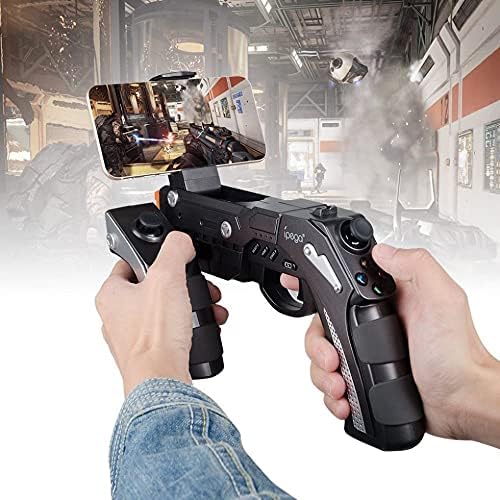
A user is shown holding the ipega PG-9057 Wireless Game Controller with a smartphone securely attached, actively engaged in mobile gaming.
- Extend the phone holder located on the top of the controller.
- לייגט פֿאָרזיכטיק אײַער סמאַרטפאָן אין דעם האַלטער, און מאַכט זיכער אַז עס איז זיכער געהאַלטן.
- Connect the controller to your smartphone via Bluetooth as described in Section 4.3.1.
- Launch your desired game and configure controller settings if necessary.
6. וישאַלט
To ensure the longevity and optimal performance of your ipega PG-9057 controller, follow these maintenance guidelines:
- רייניקונג: Use a soft, dry cloth to wipe the surface of the controller. Do not use harsh chemicals or abrasive cleaners.
- סטאָרידזש: האַלט דעם קאָנטראָללער אין אַ קיל, טרוקן אָרט אַוועק פון דירעקט זונשייַן און עקסטרעמע טעמפּעראַטורן.
- ויסמיידן טראפנס: Protect the controller from drops and impacts, as this can damage internal components.
- טשאַרדזשינג: Do not overcharge the battery. Disconnect the charging cable once the controller is fully charged.

The ipega PG-9057 Wireless Game Controller is shown, emphasizing its construction from high-quality, durable ABS material.
7. טראָובלעשאָאָטינג
If you encounter issues with your controller, please refer to the following common solutions:
- קאָנטראָללער פֿאַרבינדט זיך נישט:
- זיכער מאַכן אַז דער קאָנטראָללער איז גאָר אויפגעלאָדן.
- Verify that Bluetooth is enabled on your device and the controller is in pairing mode.
- פּרוּווט ריסטאַרטן ביידע דעם קאָנטראָללער און דיין דעווייס.
- If using USB, ensure the cable is securely connected and try a different USB port.
- קנעפּלעך אדער דזשויסטיקס רעאַגירן נישט:
- Check if the controller is properly connected to your device.
- Restart the controller and reconnect.
- Ensure the game you are playing supports external controllers.
- פאַרהאַלטונג אָדער אַרייַנשרייַב פאַרהאַלטונג:
- Ensure there are no obstructions or excessive distance between the controller and your device.
- מינימיזירן אריינמישונג פון אנדערע וויירלעס דעווייסעס.
- For critical gaming, consider using a wired USB connection if supported by your device.
8. ספּעסאַפאַקיישאַנז
| באַשרייַבונג | ווערט |
|---|---|
| סאָרט | ipega |
| מאָדעל | PG-9057 |
| קאַמפּאַטאַבאַל דעוויסעס | אַנדרויד, ווינדאָוז |
| קאָנטראָללער טיפּ | שפּיל בלאָק |
| קאַנעקשאַן טעכנאָלאָגיע | ווירעלעסס |
| פֿעיִקייטן | ווירעלעסס |
| קאַמפּאַטאַבאַל יטעמס | אַנדרויד, ווינדאָוז |
| קשר אופֿן | ווירעלעסס |
| ספּעציעלע פֿעיִקייטן | ווירעלעסס |
| ייַזנוואַרג פּלאַטפאָרמע | שטעלן-שפּיץ קעסטל |
| מאַכט מקור | באַטאַרייע פּאַוערד |
| Number of Package Items | 1 |
| UPC | 602747571722 |
| ASIN | B018TSBFE4 |
| GTIN | 602747571722 |
9. וואָראַנטי און שטיצן
For warranty information and customer support, please refer to the documentation provided with your purchase or visit the official ipega webזייטל. האַלט דיין קויפן באַווייַז פֿאַר קיין וואָראַנטי קליימז.