
הקדמה
The Reflexion PS07BT is a versatile mobile karaoke system designed for portable entertainment. This unit combines powerful audio output with various connectivity options, including Bluetooth, USB, and AUX-in, along with microphone and guitar inputs. It features integrated light effects and a rechargeable battery, making it suitable for both indoor and outdoor use. This manual provides essential information for the safe and effective operation of your PS07BT system.
זיכערקייַט אינפֿאָרמאַציע
ביטע ליינט אלע זיכערהייט אינסטרוקציעס קערפול איידער איר ניצט דעם אפאראט. האלט דעם מאנואל פאר שפעטערדיגע רעפערענץ.
- שטעלט נישט אויס דעם אַפּאַראַט צו רעגן, פייכטקייט, אדער עקסטרעמע טעמפּעראַטורן.
- Avoid placing the unit near heat sources such as radiators, stoves, or other heat-producing appliances.
- ניצן בלויז די מאַכט אַדאַפּטער סאַפּלייד מיט די אַפּאַראַט.
- נישט עפענען דעם סיasinז. איבערגעבן אלע סערוויסינג צו קוואַליפֿיצירטע פּערסאָנעל.
- האַלטן די אַפּאַראַט אַוועק פון שטאַרק מאַגנעטיק פעלדער.
- זאָרגט פֿאַר געהעריקע ווענטילאַציע און פֿאַרשטאָפּט נישט קיין ווענטילאַציע עפענונגען.
- Handle the microphone and cables with care to prevent damage.
פּעקל אינהאַלט
באַשטעטיקן אַז אַלע זאכן זענען פאַראַן אין פּעקל:
- Reflexion PS07BT Mobile Karaoke System
- מיקראָפאָן
- באַניצער מאַנואַל
- Power Adapter (not explicitly listed but implied for charging)
פּראָדוקט איבערview
Familiarize yourself with the components and controls of your Reflexion PS07BT system.

פיגורע 1: פראָנט view of the Reflexion PS07BT Mobile Karaoke System, showcasing the speaker grille and blue LED light effects.

פיגורע 2: איבערview of the PS07BT system, highlighting its dimensions (49cm height, 20cm width), LCD display, and karaoke function.
קאָנטראָל פּאַנעל
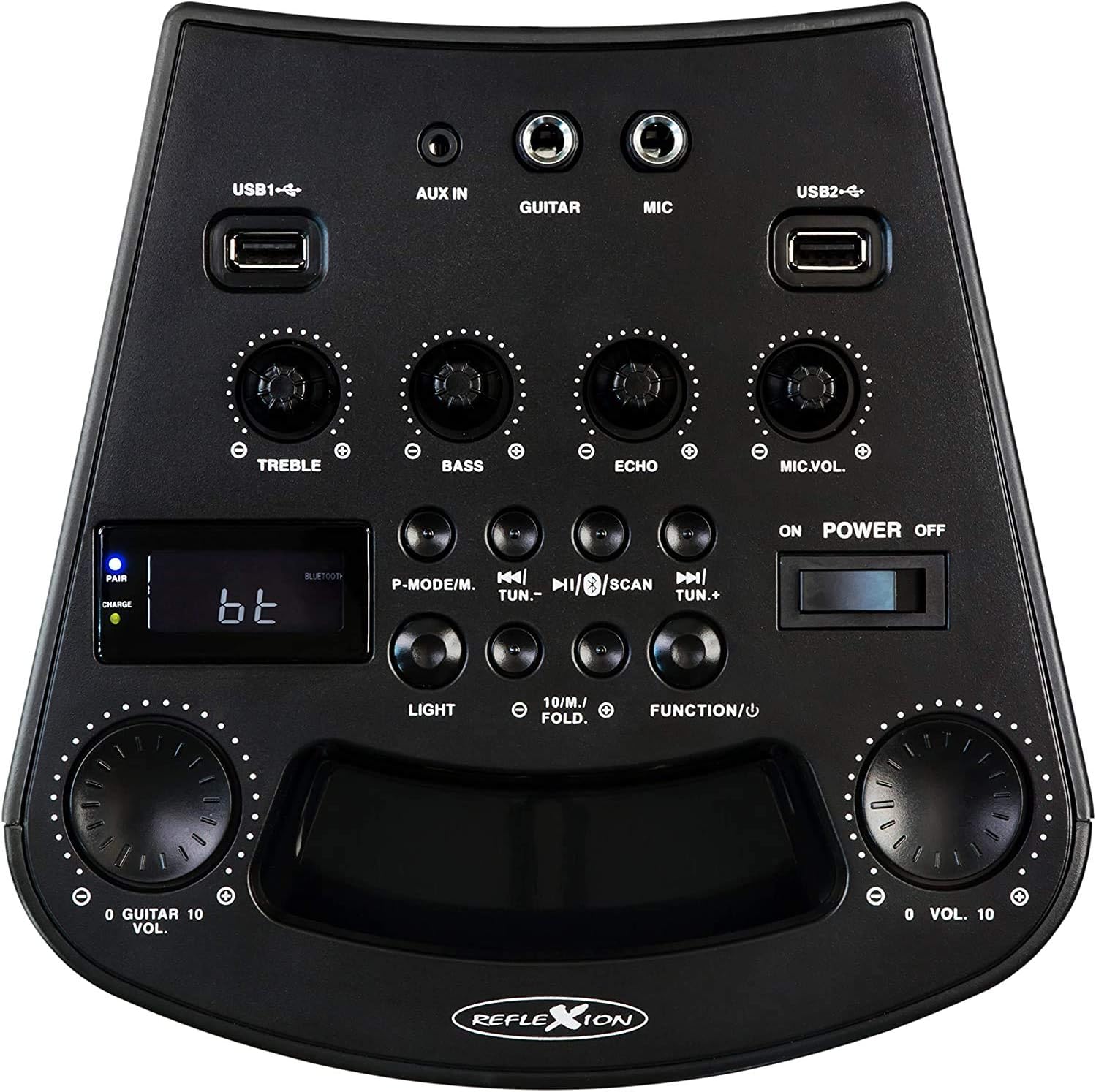
פיגורע 3: דעטאַילעד view of the PS07BT control panel, showing input ports, sound adjustment knobs, and function buttons.
- USB1 / USB2 Ports: For playing audio from USB storage devices.
- AUX IN: 3.5mm input for external audio sources.
- גיטאַרע: 6.3 מ״מ אינפוט פֿאַר פֿאַרבינדן אַ גיטאַר.
- MIC: 6.3mm input for connecting the microphone.
- טרעבל קנופּ: אַדזשאַסטירט הויך-פרעקווענץ געזונט.
- באַס קנופּ: אַדזשאַסטירט נידעריק-פרעקווענץ געזונט.
- ECHO קנעפּל: Adjusts the echo effect for microphone input.
- מיק.וואָל קנעפּל: אַדזשאַסטיד די מיקראָפאָן באַנד.
- P-MODE/M Button: Program mode / Mode selection.
- TUN.- / TUN.+ Buttons: Tune down / Tune up for FM radio.
- SCAN קנעפּל: Scans for FM radio stations.
- LIGHT קנעפּל: Controls the LED light effects.
- FUNCTION/U Button: Switches between input modes (Bluetooth, USB, AUX, FM).
- VOL. Knob: בעל באַנד קאָנטראָל.
- POWER ON/OFF Switch: טורנס די אַפּאַראַט אויף אָדער אַוועק.
- LCD ווייַז: ווײַזט איצטיקן מאָדע, ליד אינפֿאָרמאַציע, אָדער FM פֿרעקווענץ.
- PAIR/CHARGE Indicators: Bluetooth pairing status and battery charging status.
דערציען פּאַנעל

Figure 4: Rear panel of the PS07BT, displaying the AC power input and product information label.
- אַק מאַכט אַרייַנשרייַב: Connect the power adapter here for charging and operation.
- פּראָדוקט פירמע: Contains model number, serial number, and electrical specifications.
סעטאַפּ
טשאַרדזשינג די באַטאַרייע
The PS07BT features a built-in rechargeable battery. Before first use, fully charge the unit.
- Connect the supplied power adapter to the AC power input on the rear of the unit.
- צאַפּן די מאַכט אַדאַפּטער אין אַ וואַנט ווענטיל.
- The CHARGE indicator light will illuminate during charging.
- A full charge takes approximately 4 hours. The CHARGE indicator may change or turn off once fully charged (refer to specific indicator behavior in the quick start guide if available).
א פול אויפגעלאדענע באַטעריע גיט ביז 4 שעה פון שפּילן צייט.
Connecting Microphone and Guitar
To use the karaoke or instrument features:
- Insert the microphone cable into the MIC input on the control panel.
- If connecting a guitar, insert its cable into the גיטאַרע אַרייַנשרייַב.
- סטרויערן די MIC.VOL און ECHO knobs as desired during operation.
אַפּערייטינג ינסטראַקשאַנז
מאַכט אויף / אַוועק
רוק די מאַכט אויף / אַוועק switch to the 'ON' position to turn on the unit. Slide it to 'OFF' to power down.
Selecting Input Mode
דרוק די FUNCTION/U button repeatedly to cycle through available input modes: Bluetooth (bt), USB, AUX, and FM Radio.
בלועטאָאָטה קאַנעקשאַן
- Turn on the PS07BT and select 'bt' mode using the FUNCTION/U button. The 'PAIR' indicator will flash, indicating it's ready for pairing.
- אַקטיווירן בלועטוט אויף אייער מאָביל מיטל (סמאַרטפאָן, טאַבלעט, אאז"וו).
- זוכן פֿאַר available devices and select 'Reflexion PS07BT' from the list.
- Once connected, the 'PAIR' indicator will stop flashing and remain solid. You can now play audio from your device through the PS07BT.
וסב פּלייַבאַקק
- Insert a USB storage device (e.g., USB flash drive) containing audio files into either the USB1 or USB2 פּאָרט.
- Select 'USB' mode using the FUNCTION/U קנעפּל.
- די אַפּאַראַט וועט אויטאָמאַטיש אָנהייבן שפּילן אַודיאָ files from the USB device. Use the track control buttons (usually combined with TUN.-/TUN.+) to navigate tracks.
AUX-In Connection
- Connect an external audio source (e.g., MP3 player, laptop) to the AUX IN פּאָרט ניצנדיק אַ 3.5 מם אַודיאָ קאַבל.
- Select 'AUX' mode using the FUNCTION/U קנעפּל.
- Play audio from your external device. The volume can be controlled via both the external device and the PS07BT's master volume knob.
עפעם ראַדיאָ אָפּעראַציע
- Select 'FM' mode using the FUNCTION/U קנעפּל.
- דרוק די יבערקוקן button to automatically scan and save available FM radio stations.
- ניצן די טון.- און TUN.+ buttons to manually tune to stations or select saved stations.
קאַראַאָקע פונקציע
מיט אַ מיקראָפאָן פֿאַרבונדן צום MIC input, you can sing along to music playing from any source (Bluetooth, USB, AUX, FM). Adjust the MIC.VOL knob to control your voice volume and the ECHO knob for an echo effect.
ליכט יפעקץ
דרוק די ליכט button to activate or change the integrated blue LED light effects, which can synchronize with the music beat.
באַנד און סאָונד אַדזשאַסטמאַנץ
- בעל באַנד: ניצט די גרויסע VOL. knob to adjust the overall sound output level.
- דרייבאַל / באַס: ניצן די טרעבל און באַס קנעפּ צו פיין-טונען די הויכע און נידעריגע פרעקווענצן פון די אַודיאָ.
וישאַלט
רייניקונג
ווישט אָפּ דעם אַפּאַראַט מיט אַ ווייכן, טרוקענעם שטאָף. ניצט נישט קיין שרײַבנדיקע רייניגער, וואַקסן אָדער סאָלווענטן, ווײַל זיי קענען שאַטן דעם ענדיק. מאַכט זיכער אַז דער אַפּאַראַט איז אויסגעלאָשן און אַרויסגעטראָגן פֿון דער פּלאַטע איידער איר רייניקט.
סטאָרידזש
When not in use for extended periods, store the unit in a cool, dry place, away from direct sunlight and extreme temperatures. It is recommended to fully charge the battery before storing and to recharge it every few months to maintain battery health.
טראָובלעשאָאָטינג
If you encounter issues with your PS07BT, refer to the following common problems and solutions:
| פּראָבלעם | מעגלעך לייזונג |
|---|---|
| קיין מאַכט | Ensure the power adapter is securely connected and plugged into a working outlet. Check if the battery is charged. Slide the POWER switch to ON. |
| קיין געזונט | Increase the master VOL. knob. Check the volume on your connected audio source (e.g., phone). Ensure the correct input mode (Bluetooth, USB, AUX, FM) is selected. Check all cable connections. |
| בלועטאָאָטה איז נישט קאַנעקטינג | Ensure the unit is in 'bt' mode and the 'PAIR' indicator is flashing. Turn off and on Bluetooth on your device. Move your device closer to the PS07BT. Forget the device from your phone's Bluetooth list and try pairing again. |
| מיקראָפאָן טוט נישט אַרבעטן | Ensure the microphone is securely plugged into the MIC input. Increase the MIC.VOL knob. Check if the microphone has its own ON/OFF switch and is turned on. |
| פּראָבלעמען מיט USB ווידערשפּיל | Ensure the USB device is formatted correctly (FAT32 recommended) and contains compatible audio fileס. פרובירט אן אנדער USB דעווייס. |
ספּעסאַפאַקיישאַנז
Technical details for the Reflexion PS07BT Mobile Karaoke System:
- מאָדעל נאָמען: PS07BT
- דימענשאַנז (L x W x H): 20.2 X 49 X 20.1 סענטימעטער
- וואָג: 2 קילאָגראַמס
- מאַקס רעדנער אַרויסגאַנג מאַכט: 320 וואטס
- קאַנעקטיוויטי טעכנאָלאָגיע: בלועטאָאָטה
- אַודיאָ רעזולטאַט מאָדע: סטערעאָ
- מאַטעריאַל: פּלאַסטיק
- רעדנער טיפּ: סובוואָאָפער
- ספּעציעלע פֿעיִקייטן: Bluetooth, USB Port
- דורכשניטלעך באַטאַרייע לעבן: 4 שעה
- טשאַרדזשינג צייט: 4 שעה
- קאָנטראָל אופֿן: Touch (referring to buttons/knobs)
- Total USB 2.0 Ports: 2
- קאָליר: שוואַרץ
- מאַכט מקור: עלעקטריש מיט שנור / באַטעריע

Figure 5: The PS07BT's integrated handle allows for easy portability.
וואָראַנטי און שטיצן
The Reflexion PS07BT comes with a spare parts availability period of 1 year. For technical support or warranty inquiries, please contact your retailer or the manufacturer's customer service. Keep your proof of purchase for warranty claims.