
1. הקדמה
This manual provides essential instructions for the installation, operation, maintenance, and troubleshooting of the APC Smart-UPS SRT3000RMXLT 3kVA 208V Rackmount Uninterruptible Power Supply (UPS). Please read this manual thoroughly before installing or operating the equipment to ensure proper usage and safety.
2. זיכערקייַט אינפֿאָרמאַציע
Observe all warnings and operating instructions in this manual. Failure to do so may result in injury or equipment damage.
- עלעקטריקאַל זיכערקייַט: דעם אַפּאַראַט כּולל כאַזערדאַס וואָלtages. Do not attempt to disassemble the UPS. Servicing should only be performed by qualified personnel.
- באַטערי זיכערקייַט: Batteries can present a risk of electrical shock and high short-circuit current. Remove watches, rings, or other metal objects before handling batteries. Use tools with insulated handles.
- וואָג: The UPS is heavy. Use proper lifting techniques and ensure adequate support during installation.
- סוויווע: Install the UPS indoors in a controlled environment, free from excessive dust, moisture, and extreme temperatures.
3. פּעקל אינהאַלט
Carefully unpack the UPS and inspect for shipping damage. The package should contain the following items:
- APC Smart-UPS SRT3000RMXLT Unit
- Power Supply (Built-In)
- געשטעל-מאַונטינג ייַזנוואַרג
- דאָקומענטאַטיאָן קאָמפּאַקטדיסק
- וסב קאַבלע
- סיריאַל קאַבלע
4. סעטאַפּ
4.1 גשמיות ינסטאַלירונג
The SRT3000RMXLT is designed for rack installation. Ensure the rack is stable and capable of supporting the UPS weight (approximately 69 pounds).
- Mount the UPS into a standard 19-inch rack using the provided rack-mounting hardware.
- זיכער מאַכן אַז עס איז גענוג לופט שטראָם אַרום דעם אַפּאַראַט. נישט פאַרשפּאַרן די ווענטילאַציע עפענונגען.

פיגורע 4.1: פראָנט view of the APC Smart-UPS SRT3000RMXLT. This image shows the front panel with the display and ventilation grille.
4.2 קאַנעקטינג די אַפּס
Connect the UPS to the utility power and your equipment.
- Connect the UPS input power cord to a dedicated 208V AC outlet. The UPS uses a Type B - 3 pin (North American) power plug.
- Connect your equipment to the output receptacles on the rear of the UPS. The unit provides 12 IEC 320 C13/C14 outlets.
- For communication, connect the USB cable or serial cable from the UPS to your computer or network management card.
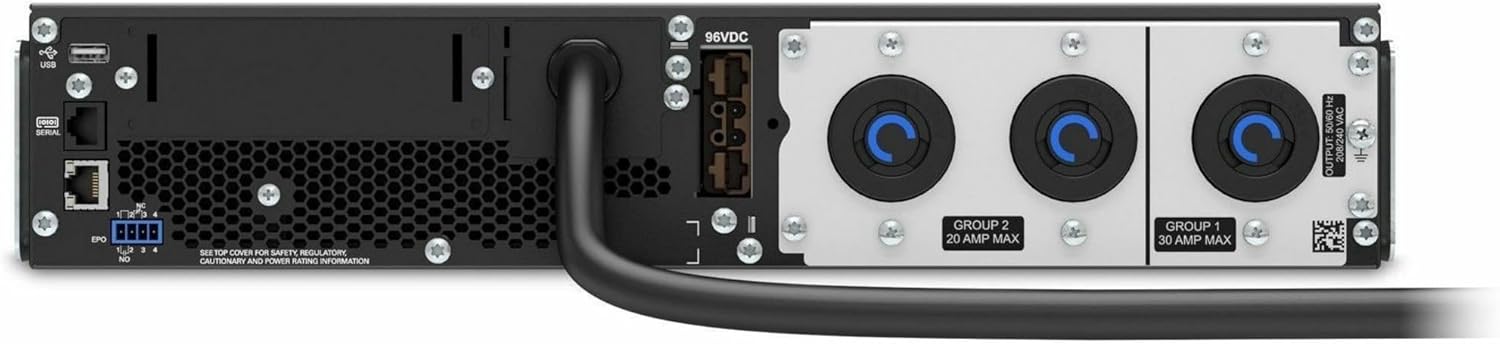
פיגורע 4.2: דערציען view of the APC Smart-UPS SRT3000RMXLT. This image displays the various input and output ports, including USB, serial, EPO, and the 12 output receptacles, along with the main power input.
4.3 ערשט מאַכט-אַרויף
After all connections are secure:
- Press the power button on the front panel to turn on the UPS.
- The UPS will perform a self-test and the display will show the current status.
- Allow the batteries to charge for at least 6 hours before relying on them for extended backup time.
5. אפערירן די UPS
5.1 פראָנט פּאַנעל אַרויסווייַזונג און קאָנטראָלס
The front panel features an LCD display and control buttons for monitoring and configuring the UPS.
- LCD ווייַז: Shows real-time status, load, battery charge, input/output voltage, and event logs.
- ESC קנעפּל: Exits the current menu or cancels an operation.
- OK קנעפּל: קאַנפערמז אַ סעלעקציע אָדער גייט אריין אַ מעניו.
- אַרויף / אַראָפּ אַראָוז: נאַוויגירן דורך מעניו אָפּציעס אָדער סטרויערן סעטטינגס.
5.2 יקערדיק אָפּעראַציע
- קער אויף: דריק און האלט דעם מאַכט קנעפּל ביז דער עקראַן באַלויכטנט זיך.
- אויסגעלאשן: Press and hold the power button until the UPS powers down. Ensure all connected equipment is safely shut down first.
- באַטערי מאָדע: אין די געשעעניש פון אַ מאַכט אָtage, the UPS will automatically switch to battery power. The display will indicate 'On Battery'.
- זעלבסט-טעסט: Initiate a manual self-test through the front panel menu to verify battery and UPS functionality.
6. וישאַלט
6.1 באַטערי פאַרבייַט
The UPS uses sealed lead-acid batteries. Battery life is typically 3-5 years, depending on environmental conditions and usage. Replace batteries when the UPS indicates a 'Battery Fault' or 'Replace Battery' warning.
- Contact APC support or a certified service technician for battery replacement.
- Always use genuine APC replacement battery cartridges (RBCs) to ensure compatibility and optimal performance.
- Recycle old batteries responsibly.
6.2 רייניקונג
Keep the UPS free from dust and debris to ensure proper ventilation.
- Use a soft, dry cloth to clean the exterior of the UPS.
- ניצט נישט פליסיקע רייניגער אדער סאָלווענטן.
- פאַרזיכערן די ווענטאַליישאַן אָופּאַנינגז זענען קלאָר פון אַבסטראַקשאַנז.
7. טראָובלעשאָאָטינג
די סעקציע גיט לייזונגען צו געוויינטלעכע פראבלעמען. פאר מער קאמפליצירטע פראבלעמען, קאנטאקטירט טעכנישע שטיצע.
| פּראָבלעם | מעגלעך סיבה | לייזונג |
|---|---|---|
| UPS טוט זיך נישט אנצינדן | No input power; Battery disconnected or discharged | Check power cord connection; Ensure utility power is present; Allow batteries to charge. |
| די UPS ביפּט כסדר | On battery power; Overload condition | Check utility power; Reduce connected load. |
| 'Replace Battery' indicator | באַטערי נאָענט צו סוף פון לעבן | Order and replace the battery cartridge. |
| UPS not providing power to outlets | Output circuit breaker tripped; UPS in fault mode | Reset circuit breaker; Check display for fault codes and consult manual. |
8. ספּעסאַפאַקיישאַנז
Key technical specifications for the APC Smart-UPS SRT3000RMXLT.
| שטריך | באַשרייַבונג |
|---|---|
| מאָדעל נומער | SRT3000RMXLT |
| סאָרט | APC |
| אַרויסגאַנג מאַכט קאַפּאַציטעט | 3000 וואַ / 2700 וואטס |
| נאָמינאַל אָוטפּוט וואָלtage | 208V AC |
| נאָמינאַל אַרייַנשרייַב וואָלtage | 208V AC / 230V AC |
| אַרייַנשרייַב אָפטקייַט | 60 הז |
| רעזולטאַט קאַנעקשאַנז | 12 x IEC 320 C13/C14 |
| באַטערי טיפּ | פירן זויער |
| טיפּיש ריטשאַרדזש צייט | 6 שעה |
| Typical Backup Time (Full Load) | קסנומקס מינוט |
| פאָרם פאַקטאָר | געשטעל |
| דימענשאַנז (H X W X D) | 9 X 23 X 34 אינטשעס |
| וואָג | 69 פונט |
| אַפּערייטינג טעמפּעראַטור | 0 - 40 °C (32 - 104 °F) |
9. וואָראַנטי און שטיצן
9.1 וואָראַנטי אינפֿאָרמאַציע
APC provides a standard warranty for this product. Please refer to the warranty card included with your product or visit the official APC webוועבזייטל פֿאַר דעטאַלירטע וואָראַנטי טערמינען און באַדינגונגען ספּעציפֿיש פֿאַר אייער געגנט.
9.2 טעכניש שטיצן
For technical assistance, product information, or troubleshooting beyond the scope of this manual, please contact APC customer support. Have your model number (SRT3000RMXLT) and serial number ready when contacting support.
- Visit the official APC webזייטל פֿאַר שטיצע רעסורסן, אָפֿט געשטעלטע פֿראַגעס, און קאָנטאַקט אינפֿאָרמאַציע.
- Online resources often include updated manuals, firmware, and diagnostic tools.