
esinkin W29
esinkin Bluetooth Audio Adapter User Manual
מאָדעל: W29
Brand: esinkin
הקדמה
The esinkin Bluetooth Audio Adapter is designed to bring wireless music streaming capabilities to your existing sound systems. Connect it to computer speakers, home stereo systems, or other speaker systems via 3.5mm or RCA cables, and then pair it with your Bluetooth-enabled devices like smartphones or tablets to stream audio wirelessly. This adapter acts as a Bluetooth receiver, enabling your non-Bluetooth audio equipment to receive wireless signals.
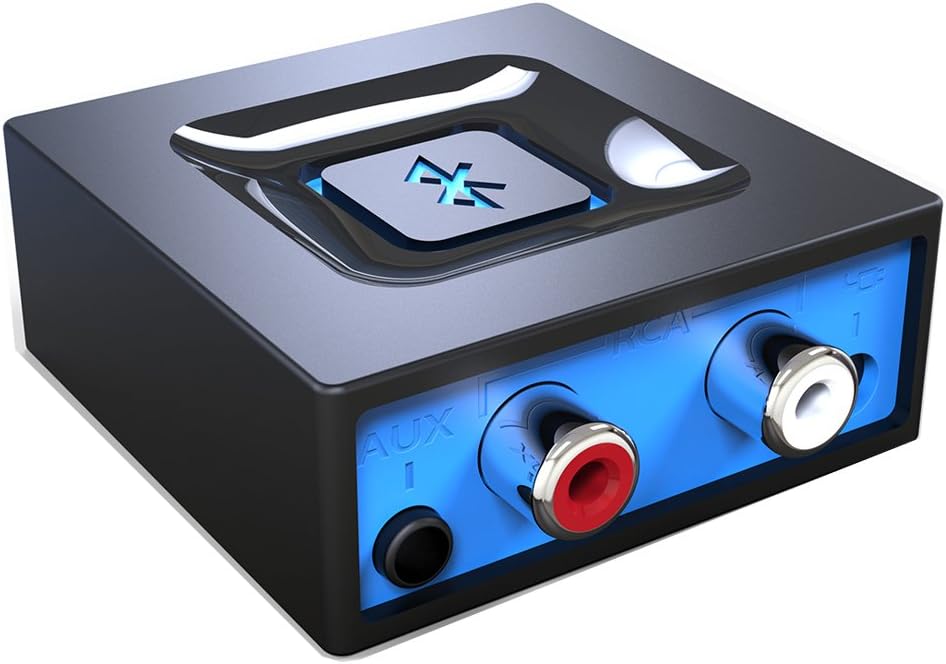
בילד: פראָנט view of the esinkin Bluetooth Audio Adapter, showing the AUX and RCA input ports.
וואָס איז אין די קעסטל
ווען איר עפנט דעם פעקל, ביטע זיכער מאכן אז אלע פאלגנדע זאכן זענען דא:
- 1 x בלועטאָאָטה ופנעמער
- 1 x AC to DC Power adapter
- 1 x 3.5mm to RCA Audio cable
- 1 קס וסב מאַכט קאַבלע
- 1 x באַניצער מאַנואַל
 Image: All included accessories for the esinkin Bluetooth Audio Adapter.
סעטאַפּ
Follow these steps to set up your esinkin Bluetooth Audio Adapter:
- פאַרבינדן צו מאַכט: Connect the Bluetooth adapter to a power source using either the provided AC to DC power adapter or the USB cable. Note that this adapter does not have a built-in battery and requires continuous power.
- פאַרבינדן צו אַודיאָ סיסטעם: Connect the adapter to your computer speakers, home stereo system, or other speaker system using either the 3.5mm audio cable or the RCA cable. Ensure the connection is secure.
- מאַכט אויף: The device will power on when connected to power.
- פּערינג מאָדע: Press and hold the large Bluetooth symbol button in the middle of the adapter for approximately 3 seconds until the blue light starts blinking. This indicates the adapter is in pairing mode.
- פאַרבינדן מיט דיין מיטל: On your Bluetooth-enabled device (smartphone, tablet, computer), go to the Bluetooth settings and search for available devices. Select the esinkin Bluetooth Audio Adapter from the list to pair. Once paired, the blue light on the adapter will become solid.

Image: Connection diagram for the esinkin Bluetooth Audio Adapter.

Image: Illustrates the function of the main Bluetooth button for power and playback control.
אַפּערייטינג ינסטראַקשאַנז
Once successfully set up and paired, operating the esinkin Bluetooth Audio Adapter is straightforward:
- מוזיק סטרימינג: After pairing, music played on your Bluetooth-enabled device will stream wirelessly to the connected audio system.
- פּלייבאַק קאָנטראָל:
- Click the Bluetooth symbol button once to אָנהייב / פּויזע מוזיק פּלייבאַק.
- Hold the Bluetooth symbol button for 3 seconds to turn the device ON/OFF.
- Automatic Reconnect: The adapter is designed to automatically reconnect with the last paired device when both are within range and Bluetooth is enabled.
- ווירעלעסס קייט: The effective wireless range indoors (without significant obstacles) is approximately 30-40 feet (10-12 meters).

Image: Demonstrates wireless music streaming from mobile devices to a home stereo via the adapter.
וישאַלט
To ensure the longevity and optimal performance of your esinkin Bluetooth Audio Adapter, please observe the following maintenance guidelines:
- רייניקונג: Use a soft, dry cloth to clean the surface of the adapter. Avoid using liquid cleaners or abrasive materials.
- מאַכט שוץ: To protect the adapter from potential damage due to power surges or brown-outs, especially during electrical supply issues or storms, it is recommended to unplug the unit from the wall outlet.
- סטאָרידזש: ווען נישט אין באַנוץ פֿאַר לענגערע פּעריאָדן, זאָל מען האַלטן דעם אַדאַפּטער אין אַ קיל, טרוקן אָרט, אַוועק פֿון דירעקטער זון און עקסטרעמע טעמפּעראַטורן.
- קעסיידערדיק אָפּעראַציע: The adapter is designed to remain powered when connected to a power source. To completely turn it off, disconnect it from the power outlet.
טראָובלעשאָאָטינג
If you encounter issues with your esinkin Bluetooth Audio Adapter, please refer to the following common solutions:
| פּראָבלעם | מעגלעך סיבה / לייזונג |
|---|---|
| קיין קלאַנג אָדער נידעריקע באַנד: |
|
| קען נישט צוזאמענשטעלן מיטן אפאראט: |
|
| אומגעריכטע פֿאַרבינדונג אָדער שלעכטע ראַנגע: |
|
| Adapter is always on: |
|
ספּעסאַפאַקיישאַנז
| שטריך | דעטאַל |
|---|---|
| סאָרט | עסינקין |
| מאָדעל נומער | W29 |
| ווירעלעסס טיפּ | בלועטאָאָטה |
| פּונקט וואָג | 3.52 אונסעס |
| פּראָדוקט דימענשאַנז (LxWxH) | 1.97 X 1.97 X 0.94 אינטשעס |
| קאָליר | שוואַרץ |
| קאַמפּאַטאַבאַל דעוויסעס | Smartphone, Tablet, Home Stereo System |
| קאַנעקטער טיפּ | RCA, Auxiliary (3.5mm) |
| מאַכט אַרייַנשרייַב | 5וו === 150מאַ |
וואָראַנטי און שטיצן
For warranty information or technical support, please refer to the documentation included with your purchase or visit the official esinkin webזייטל. קאָנטאַקט דעטאַלן פֿאַר קונה סערוויס זענען טיפּיש בנימצא אויף דער פּראָדוקט פּאַקאַדזשינג אָדער די בראַנד ס אָנליין שטיצע בלאַט.
פֿאַר נאָך רעסורסן און פּראָדוקט אינפֿאָרמאַציע, קענט איר באַזוכן די esinkin Store on Amazon.