
1. פּראָדוקט איבערview
The Dino-Lite AM4113ZT is a versatile USB digital microscope designed for detailed observation and analysis. It features 1.3-megapixel resolution, offering true optical magnification from 20x to 50x, and up to 200x. This model includes integrated polarized light to reduce glare on reflective surfaces, MicroTouch for convenient image capture, and measurement capabilities through its accompanying software.

Image 1.1: The Dino-Lite AM4113ZT USB Digital Microscope, showcasinג זײַן קאָמפּאַקטן דיזײַן.

בילד 1.2: איבערview of the Dino-Lite AM4113ZT's primary features, including magnification range, software compatibility, and specialized functions.
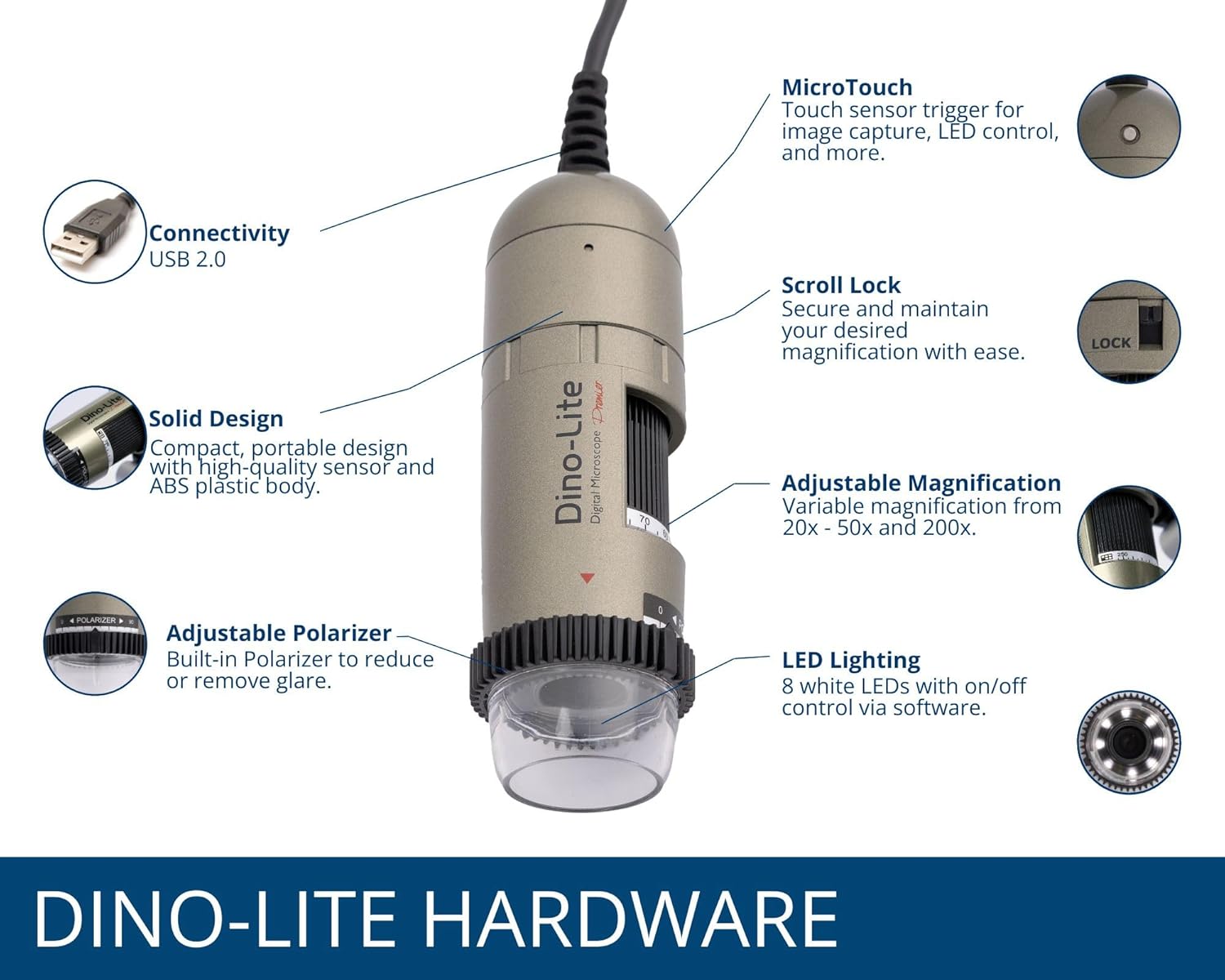
Image 1.3: Detailed illustration of the Dino-Lite AM4113ZT hardware, highlighting its various components and their functions.
2. פּעקל אינהאַלט
באַשטעטיקט אַז אַלע זאכן וואָס זענען אויסגערעכנט אונטן זענען פאַראַן אין אייער פּראָדוקט פּאַקעט:
- Dino-Lite AM4113ZT USB Digital Microscope
- שנעל אָנהייב גייד
- Software Download Link/Information
- טראגן טאַש
- Calibration Target + Cover
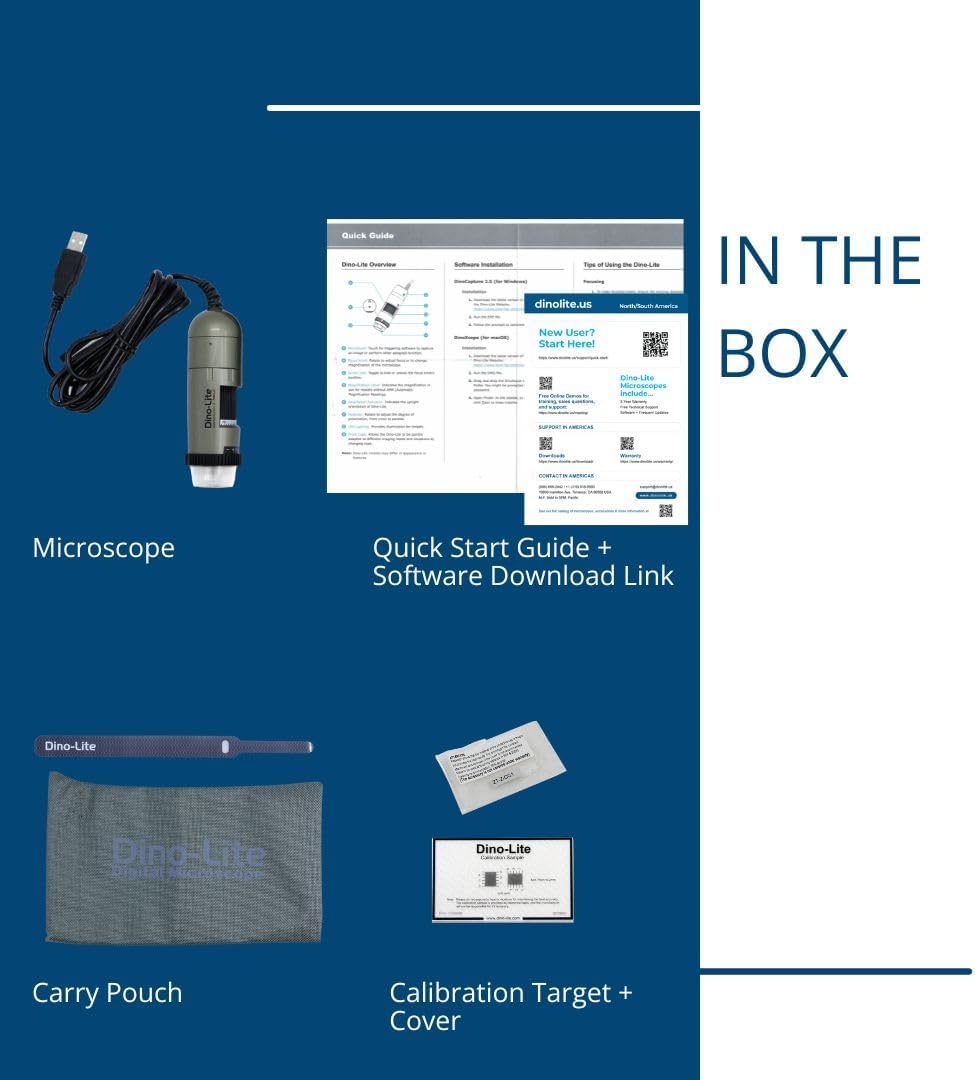
Image 2.1: Visual representation of the items included in the Dino-Lite AM4113ZT product box.
3. סעטאַפּ
3.1 ווייכווארג ינסטאַלירונג
- אראפקאפיע ווייכווארג: Visit the official Dino-Lite website or use the provided software download link to obtain the latest version of DinoCapture (for Windows) or DinoXcope (for Mac).
- ינסטאַלירן ווייכווארג: גיי די אינסטרוקציעס אויף דעם עקראַן צו ינסטאַלירן די ווייכווארג אויף דיין קאָמפּיוטער.
- סיסטעם רעקווירעמענץ: Ensure your operating system (Windows or Mac) meets the minimum requirements specified by the software.

Image 3.1: The DinoCapture software interface displayed on a laptop, demonstrating its functionality for image capture and analysis.
3.2 פֿאַרבינדן דעם מיקראָסקאָפּ
- Connect the USB cable from the Dino-Lite AM4113ZT microscope to an available USB port on your computer.
- The operating system should automatically detect the device.
- Launch the DinoCapture (Windows) or DinoXcope (Mac) software. The microscope's live feed should appear in the software window.
The Dino-Lite AM4113ZT can be used handheld for quick inspections or mounted on an optional stand (sold separately) for more stable and precise observations.

Image 3.2: The Dino-Lite AM4113ZT shown in both handheld use and mounted on a stand, demonstrating its adaptability for various inspection needs.
4. אַפּערייטינג ינסטרוקטיאָנס
4.1 אַדזשאַסטירן פאַרגרעסערונג
The AM4113ZT offers variable optical magnification from 20x to 50x, and a fixed 200x magnification. To adjust the magnification:
- Rotate the magnification dial on the microscope body.
- Observe the live image in the software to achieve the desired level of detail.
- For stable observation at a specific magnification, use the scroll lock mechanism to secure the dial.

Image 4.1: Close-up of the magnification dial and scroll lock on the Dino-Lite AM4113ZT.
4.2 Using Polarized Light
The integrated adjustable polarizer helps reduce glare on reflective surfaces, improving image clarity:
- Rotate the polarizer ring located at the front of the microscope.
- Adjust until glare is minimized and surface details become clearer.

Image 4.2: The adjustable polarizer ring, designed to control reflections and enhance image quality.
4.3 Image Capture and LED Control
- MicroTouch: Gently touch the MicroTouch sensor on the microscope body to capture a still image.
- Software Capture: Use the capture button within the DinoCapture/DinoXcope software to take photos or record videos.
- LED לייטינג: The microscope features 8 white LEDs. Control their on/off status and brightness through the software interface.
4.4 מעסטונג פונקציעס
The DinoCapture/DinoXcope software provides advanced measurement tools:
- After capturing an image, use the software to perform various measurements such as length, area, and angles.
- Ensure proper calibration using the included calibration target for accurate measurements.

Image 4.3: The Dino-Lite AM4113ZT positioned on a stand, illustrating a stable setup for detailed observation and measurement tasks.
5. וישאַלט
5.1 רייניקונג
- לענס: Use a soft, lint-free cloth specifically designed for optical lenses to gently wipe the microscope lens. Avoid abrasive materials or harsh chemicals.
- גוף: ווישט אָפּ דעם מיקראָסקאָפּ קערפּער מיט אַ ווייכן, טרוקענעם שטאָף. אויב נייטיק, אַ ביסל ווייכער.amp cloth with mild soap can be used, followed by a dry cloth. Ensure no liquid enters the device.
- ויסמיידן: Do not use alcohol, benzene, thinners, or other chemical solvents, as they may damage the plastic components.
5.2 סטאָרידזש
- Store the microscope in its protective carry pouch when not in use.
- Keep the device in a cool, dry place, away from direct sunlight, extreme temperatures, and high humidity.
- Avoid storing in dusty environments.
6. טראָובלעשאָאָטינג
6.1 קיין בילד נישט געוויזן
- זיכער מאַכן אַז דער USB קאַבל איז זיכער פארבונדן צו ביידע דעם מיקראָסקאָפּ און דעם קאָמפּיוטער.
- Verify that the DinoCapture/DinoXcope software is running and the correct device is selected.
- פּרוּווט קאַנעקטינג צו אַ אַנדערש וסב פּאָרט אויף דיין קאָמפּיוטער.
- ריסטאַרט די ווייכווארג און/אָדער דיין קאָמפּיוטער.
6.2 Blurry or Unfocused Image
- Adjust the magnification dial to bring the object into focus.
- Ensure the microscope is held steady or mounted on a stable stand.
- Check the working distance between the microscope lens and the object. Adjust as needed for optimal focus at the selected magnification.
- Clean the microscope lens if smudges or dust are present.
6.3 Software Issues (Crashing, Freezing)
- זיכער מאַכן אַז אייער ווייכווארג איז דערהייַנטיקט צו דער לעצטער ווערסיע.
- Check your computer's system resources (RAM, CPU) to ensure they meet the software's requirements.
- Close other demanding applications running in the background.
- Reinstall the software if the issue persists.
6.4 Glare on Specimen
- Rotate the adjustable polarizer ring on the microscope to minimize reflections.
- Adjust the intensity of the LED lighting through the software.
- Change the angle of the microscope relative to the specimen.
7. ספּעסאַפאַקיישאַנז
| שטריך | דעטאַל |
|---|---|
| מאָדעל נאָמען | AM4113ZT |
| בילד האַכלאָטע | 1.3 מעגאַפּיקסעלס (1280 x 1024) |
| פאַרגרעסערונג | 20x - 50x, 200x (Optical) |
| ווידעא פריים קורס | אַרויף צו 30 FPS |
| קאַנעקטיוויטי | וסב 2.0 |
| ליכט מקור | 8 White LEDs (adjustable via software) |
| ספּעציעלע פֿעיִקייטן | MicroTouch, Measurement, Adjustable Polarized Light |
| קאַמפּאַטאַבאַל דעוויסעס | Personal Computer, Laptop (Windows/Mac) |
| פּראָדוקט דימענשאַנז | 6.5"ל x 7.3"בר x 2.6"ה |
| פּונקט וואָג | 0.11 קילאָגראַמס (3.87 אונסעס) |
| מאַטעריאַל | פּלאַסטיק |
| Voltage | 5 Volts (via USB) |
8. וואָראַנטי און שטיצן
8.1 וואָראַנטי אינפֿאָרמאַציע
For detailed warranty information regarding your Dino-Lite AM4113ZT USB Digital Microscope, please refer to the warranty card included in your product packaging or visit the official Dino-Lite webזייטל. גאַראַנטיע טערמינען און באדינגונגען קענען זיין אַנדערש לויט געגנט און קויף דאַטע.
8.2 טעכניש שטיצן
If you encounter issues not covered in this manual or require further assistance, please contact Dino-Lite customer support. Contact information can typically be found on the official Dino-Lite webוועבזייטל אדער אין אייער פּראָדוקט דאָקומענטאַציע.
- אָנליין רעסורסן: Check the Dino-Lite website for FAQs, driver updates, and additional support materials.
- קאָנטאַקט: Refer to your product's quick start guide or the manufacturer's website for specific contact details (phone, email, or support portal).