
1. הקדמה
This manual provides detailed instructions for the installation, operation, and maintenance of your Zmodo ZM-KW1001-O4-1TB HD Camera System. Please read this manual thoroughly before using the product to ensure proper setup and functionality. Keep this manual for future reference.
2. פּראָדוקט איבערview
2.1 שליסל פֿעיִקייטן
- 720p HD video for clear and sharp images.
- Smartlink wireless configuration for quick setup.
- Motion detection alerts to notify you of activity.
- IP66 rated outdoor cameras for weather resistance.
- Infrared night vision for surveillance in low-light conditions.
- Integrated 1TB hard drive for local video storage.
2.2 סיסטעם קאַמפּאָונאַנץ
The Zmodo ZM-KW1001-O4-1TB system typically includes the following components:
- Wireless Network Video Recorder (NVR) with 1TB HDD
- HD Wireless Cameras (quantity may vary, typically 4)
- מאַכט אַדאַפּטערז פֿאַר NVR און קאַמעראַס
- עטהערנעט קאַבלע
- מאַונטינג סקרוז און אַנגקערז
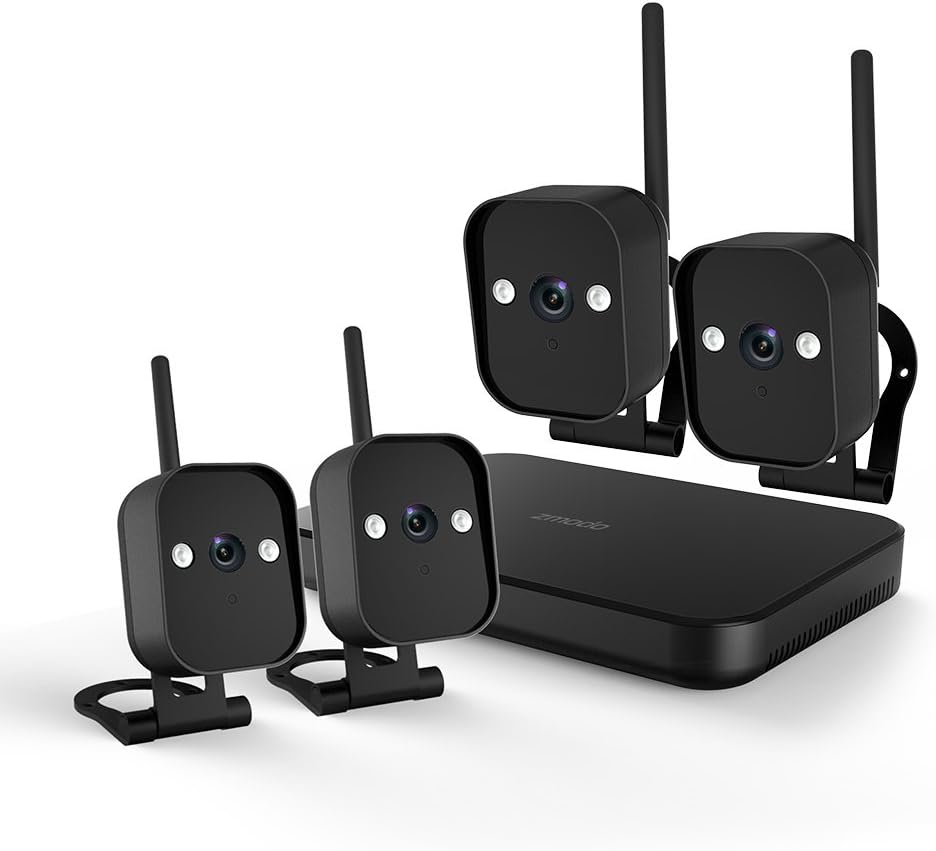
פיגורע 1: איבערview of the Zmodo ZM-KW1001-O4-1TB HD Camera System, showing the NVR unit and four wireless cameras.
3. סעטאַפּ אינסטרוקציעס
3.1 אויספּאַקן די קעסטל און ערשטע דורכקוק
Carefully unpack all components and verify that all items listed in Section 2.2 are present and undamaged. If any items are missing or damaged, contact customer support.
3.2 NVR פֿאַרבינדונג
- פֿאַרבינדט דעם NVR צו אַן עלעקטרישן ווענטיל מיטן צוגעשטעלטן מאַכט אַדאַפּטער.
- For initial setup and optimal performance, connect the NVR to your router using the supplied Ethernet cable.
- Connect the NVR to a monitor via HDMI or VGA cable (not included) if local viewינג איז געוואלט.

פיגורע 2: The Zmodo Network Video Recorder (NVR) unit, which stores recordings and manages camera connections.
3.3 קאַמעראַ אינסטאַלאַציע און פּערינג
The cameras are designed for both indoor and outdoor use with an IP66 weather-resistant rating. Ensure cameras are placed within range of the NVR's wireless signal.
- אײַנשאַלטן קאַמעראַס: Connect each camera to its respective power adapter and plug into a power outlet.
- Smartlink Pairing: The cameras should automatically attempt to pair with the NVR. Follow the on-screen prompts on the connected monitor or use the Zmodo app for Smartlink setup. If pairing fails, refer to the troubleshooting section.
- מאָונטינג: Choose suitable locations for your cameras. Use the provided screws and anchors to securely mount the cameras. Ensure a clear line of sight and optimal viewינג ווינקל.

פיגורע 3: A Zmodo wireless camera shown with its wall-mounting bracket, suitable for outdoor installation.

פיגורע 4: A Zmodo wireless camera shown with its stand mount, ideal for indoor placement on flat surfaces.
3.4 Mobile App Configuration
- Download the Zmodo app from the App Store (iOS) or Google Play Store (Android).
- Create a new account or log in to an existing one.
- Follow the in-app instructions to add your Zmodo NVR system. This typically involves scanning a QR code on the NVR or manually entering device details.
- Once added, you should be able to view לעבעדיגע פידס פון אייערע קאַמעראַס.
4. אַפּערייטינג ינסטרוקטיאָנס
4.1 לעבן View
Access the Zmodo app or the NVR's local interface to view live video streams from your cameras. You can typically select individual cameras or view קייפל פידז גלײַכצײַטיק.
4.2 באַוועגונג דעטעקציע און וואָרענונגען
The system is equipped with motion detection capabilities. When motion is detected, the system can record footage and send alerts to your mobile device.
- קאַנפיגיעריישאַן: In the Zmodo app or NVR settings, navigate to the motion detection section. You can customize detection zones, sensitivity levels, and alert schedules.
- אַלערץ: Ensure push notifications are enabled for the Zmodo app on your mobile device to receive timely alerts.
4.3 רעקאָרדינג און פּלייבאַק
The NVR includes a 1TB hard drive for continuous or motion-activated recording.
- רעקאָרדינג סעטטינגס: Configure recording modes (continuous, scheduled, motion-activated) via the NVR's local interface or the Zmodo app.
- פּלייבאַק: צו שייַעךview רעקאָרדעד פוtage, access the playback feature in the Zmodo app or directly on the NVR. Select the desired date and time to view געשעענישן.
4.4 נאַכט זעאונג
The cameras feature infrared night vision, allowing them to capture clear video in low-light or complete darkness. The system automatically switches to night vision mode when ambient light levels are insufficient.
5. וישאַלט
- קאַמעראַ רייניקונג: רייניקן די קאַמעראַ לענסעס פּעריִאָדיש מיט אַ ווייכן, דamp שטאָף צו זיכער מאַכן אַ קלאָרע בילד קוואַליטעט. פֿאַרמייַדן אַברייסיוו רייניגער.
- Firmware דערהייַנטיקונגען: Check the Zmodo app or website regularly for firmware updates. Keeping your system updated ensures optimal performance and security.
- האַרט דרייוו פאַרוואַלטונג: The 1TB hard drive will automatically overwrite the oldest footage when full. If you need to preserve specific recordings, back them up to an external device before they are overwritten.
- מאַכט צושטעלן: Ensure all power adapters are securely connected and free from damage.
6. טראָובלעשאָאָטינג
- קיין ווידעא פיד:
- Check if the NVR and cameras are powered on.
- Verify network connectivity for the NVR.
- זיכער מאַכן אַז קאַמעראַס זענען אין דער וויירלעסער ראַנגע פון די NVR.
- Re-pair cameras if they have lost connection.
- Motion Alerts Not Received:
- Confirm motion detection is enabled in the app settings.
- Check motion detection zones and sensitivity.
- Ensure push notifications are enabled for the Zmodo app on your mobile device.
- נעבעך בילד קוואַליטעט:
- ריין די אַפּאַראַט אָביעקטיוו.
- זיכער מאַכן אַז עס זענען נישטאָ קיין שטערונגען אין דער קאַמעראַ'ס פֿעלד פֿון view.
- Check for strong interference if using wireless connection.
- Cameras Not Connecting to Wi-Fi:
- Ensure the NVR's Wi-Fi is enabled and functioning.
- Move cameras closer to the NVR to improve signal strength.
- Reset cameras and attempt Smartlink pairing again.
7. ספּעסאַפאַקיישאַנז
| שטריך | באַשרייַבונג |
|---|---|
| מאָדעל נומער | ZM-KW1001-O4-1TB |
| ווידעא האַכלאָטע | 720 פּ הד |
| קאַנעקטיוויטי טעכנאָלאָגיע | ווירעלעסס |
| נומער פון טשאַנאַלז | 4 |
| סטאָרידזש קאַפּאַסיטי | 1 TB (Terabyte) |
| ספּעציעלע פֿעיִקייטן | Wireless, Motion Detection, Night Vision, IP66 Weatherproof |
| אַפּערייטינג סיסטעם קאַמפּאַטאַבילאַטי | אַנדרויד, יאָס |
| מאַכט מקור | Wireless (Power Adapters for components) |
| קאָליר | שוואַרץ |
| פּעקל דימענשאַנז | 26.8 X 20 X 16 סענטימעטער |
| פּונקט וואָג | 1.5 קילאָגראַמס |
8. וואָראַנטי און שטיצן
For warranty information and technical support, please refer to the official Zmodo website or contact Zmodo customer service directly. Details regarding warranty periods and service procedures are typically available on the manufacturer's support pages.
אָנליין שטיצן: Visit the Zmodo official webפּלאַץ פֿאַר FAQ, טראָובלעשאָאָטינג פירער און קאָנטאַקט אינפֿאָרמאַציע.
קאָנטאַקט שטיצן: If you require further assistance, please have your product model number (ZM-KW1001-O4-1TB) and purchase details ready when contacting support.