
1. הקדמה
The Sony SBH54 is a versatile Stereo Bluetooth Headset designed for wireless communication and audio playback. It offers both handset and headset functionalities, allowing you to take and make calls, view messages, listen to music, and tune into FM radio directly from its display. Crafted from premium metal with a splash-proof design, it combines elegance with durability.
Key features include Bluetooth Wireless 3.0, NFC technology for easy pairing, an OLED display, and built-in noise cancellation for clear audio during calls. The headset supports A2DP profile and can connect to two devices simultaneously.
2. פּראָדוקט איבערview
The SBH54 features a compact design that fits comfortably in your hand. It includes an OLED display for information at a glance and physical controls for media and call management.
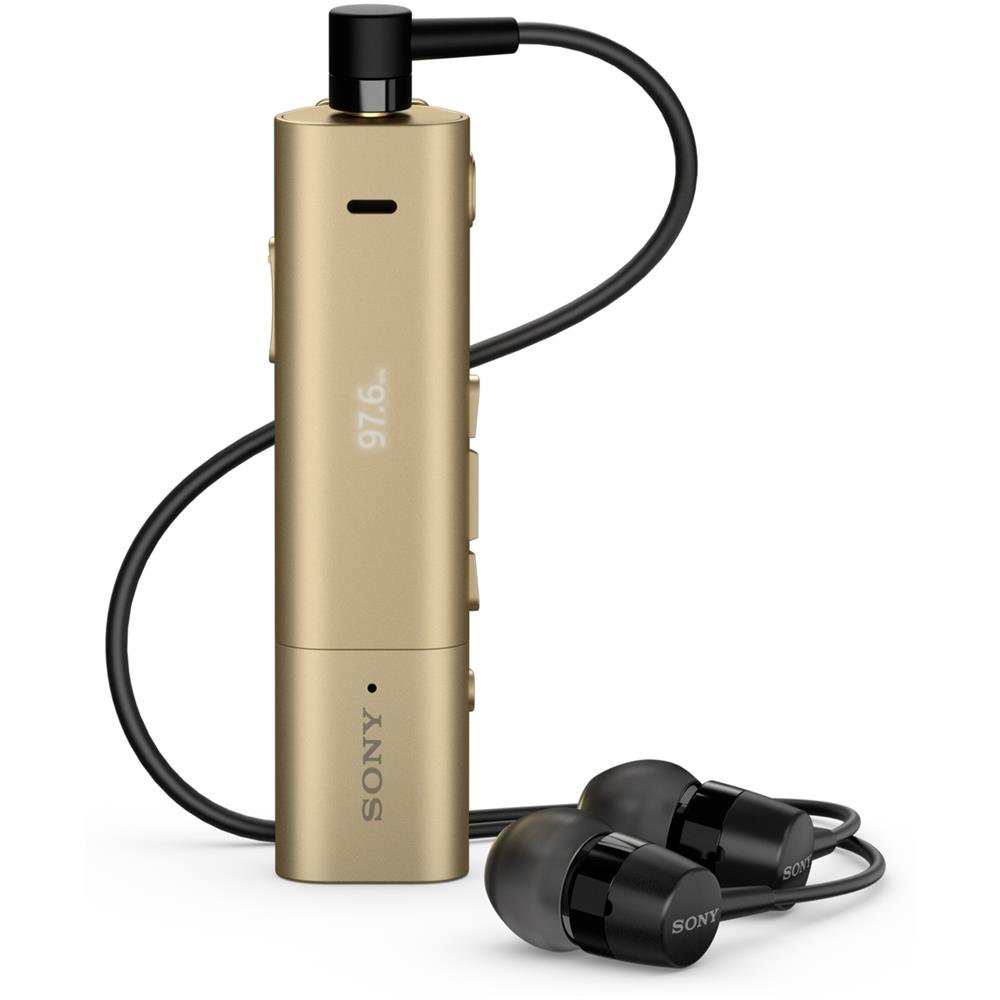
Image: Sony SBH54 Gold Stereo Bluetooth Headset. This image displays the compact, gold-colored headset with its integrated clip and display screen.
קאָנטראָלס און ינדיקאַטאָרס:
- OLED ווייַז: Shows caller ID, messages, music track information, and FM radio frequency.
- מולטי-פונקציע קנעפּל: For call answering/ending, play/pause music.
- באַנד קנעפּלעך: אַדזשאַסטירן אַודיאָ באַנד.
- נאַוויגאַציע קנעפּלעך: For menu navigation and track skipping.
- מיקראָפאָן: Integrated for voice calls.
- כעדפאָון דזשאַק: 3.5mm port for connecting the included premium headphones.
- טשאַרדזשינג פּאָרט: מיקראָ USB פּאָרט פֿאַר טשאַרדזשינג די מיטל.
3. סעטאַפּ
3.1 אויפלאָדן דעם כעדסעט
- Connect the supplied USB cable to the headset's charging port and to a USB power adapter or a computer's USB port.
- דער באַטעריע אינדיקאַטאָר אויף דעם עקראַן וועט ווייַזן דעם טשאַרדזשינג סטאַטוס.
- טשאַרדזש די כעדסעט גאָר איידער ערשטער נוצן.
3.2 פארבינדן מיט א דעווייס (בלוטוט)
- זיכער מאַכן אַז די כעדסעט איז אויפגעלאָדן און אויסגעלאָשן.
- Press and hold the power button until the headset enters pairing mode (indicated by a specific light pattern or message on the display).
- אויף אייער סמאַרטפאָון אָדער אַנדער בלוטוט-ענייבאַלד מיטל, אַקטיוויזירט בלוטוט און זוכט פֿאַר בנימצא דעוויסעס.
- אויסקלייבן "SBH54" פון דער ליסטע פון געפונענע דעווייסעס.
- אויב געבעטן, אַרייַן די פּאַראָל "0000" (פיר נולן).
- אַמאָל פּערד, וועט די כעדסעט אָנווייַזן אַ געראָטן פֿאַרבינדונג.
3.3 Pairing with a Device (NFC)
For devices with NFC (Near Field Communication):
- זיכער מאַכן אַז NFC איז אַקטיווירט אויף אייער סמאַרטפאָון און דער עקראַן איז אַנלאַקט.
- Touch the NFC detection area of your smartphone to the NFC detection area on the SBH54 headset.
- גיי קיין פּראַמפּס אויף דעם עקראַן צו פאַרענדיקן דעם פּערינג פּראָצעס.
4. אפערירן די כעדסעט
4.1 מאַכט אויף / אַוועק
- צו מאַכט אויף: דריקן און האַלטן די מאַכט קנעפּל ביז די אַרויסווייַזן לייץ.
- צו מאַכט אַוועק: דריק און האלט דעם מאַכט קנעפּל ביז דער עקראַן שליסט זיך אויס.
4.2 מאַכן און באַקומען קאַללס
- ענטפֿערן אַ רוף: When a call comes in, press the multi-function button.
- ענדיקן אַ רוף: During a call, press the multi-function button.
- פארווארפן א רוף: Press and hold the multi-function button when a call comes in.
- מאַכן אַ רוף: Dial the number on your phone. The call will automatically route to the headset. You can also use voice commands if supported by your phone.
- Handset Function: The compact SBH54 can be used as an unobtrusive handset for calls.
- ראַש קאַנסאַליישאַן: The headset features echo, wind, and noise cancellation for clear voice transmission.
- HD קול: Enhances voice clarity for both parties during a call.
4.3 מוזיק פּלייבאַק
- שפּיל / פּויזע: דריק דעם מולטי-פונקציע קנעפּל.
- ווייַטער שפּור: Press the forward navigation button.
- פֿריִערדיקע שפּור: Press the backward navigation button.
- באַנד קאָנטראָל: ניצט די באַנד אַרויף/אַראָפּ קנעפּלעך.
4.4 עפעם ראַדיאָ
- אַקטאַווייט FM ראַדיאָ: Navigate through the headset menu to select the FM Radio function.
- שטעל סטאַנציעס: Use the navigation buttons to scan or manually tune to FM frequencies.
- היט פּרעסעץ: The headset may allow saving favorite stations (refer to on-screen prompts).
5. וישאַלט
- רייניקונג: Wipe the headset with a soft, dry cloth. Avoid using harsh chemicals or abrasive materials.
- וואַסער קעגנשטעל: The SBH54 has a splash-proof design. This means it can withstand light splashes of water but should not be submerged or exposed to heavy rain. Ensure the charging port cover is securely closed.
- סטאָרידזש: האַלט די כעדסעט אין אַ קיל, טרוקן אָרט אַוועק פון דירעקט זונשייַן און עקסטרעמע טעמפּעראַטורן.
- באַטערי זאָרגן: כדי צו פארלענגערן די לעבן פון די באַטעריע, זאָלט איר נישט אָפט אויסלאָדן די באַטעריע. לאָדט זי אָפט אויף.
6. טראָובלעשאָאָטינג
פּראָסט ישוז און סאַלושאַנז:
- כעדסעט גייט נישט אן: זיכער מאַכן אַז די באַטאַרייע איז אויפגעלאָדן. פֿאַרבינדט עס צו אַ מאַכט מקור און פּרוּווט ווידער.
- קען נישט צוזאמענשטעלן זיך מיט א דעווייס:
- זיכער מאַכן אַז די כעדסעט איז אין פּערינג מאָדע.
- מאַכן זיכער אַז בלועטאָאָטה איז ענייבאַלד אויף דיין מיטל.
- מאַך די כעדסעט נעענטער צו דיין מיטל.
- ריסטאַרט ביידע די כעדסעט און דיין דעווייס.
- ויסמעקן פריערדיקע בלועטוט קאַנעקשאַנז אויף דיין מיטל און פּרוּווט ווידער צו פאַרבינדן.
- קיין אַודיאָ אָדער שלעכטע אַודיאָ קוואַליטעט:
- קאָנטראָלירט די וואָלומען לעוועלס אויף ביידע די כעדסעט און אייער פֿאַרבונדענע מיטל.
- Ensure the headset is within range of your device.
- דיסקאַנעקט און ריקאַנעקט די בלועטאָאָטה פֿאַרבינדונג.
- Ensure the headphones are properly plugged into the 3.5mm jack.
- FM ראַדיאָ אַרבעט נישט: Ensure you are in an area with good FM signal reception.
7. ספּעסאַפאַקיישאַנז
| שטריך | דעטאַל |
|---|---|
| סאָרט | סאָני |
| מאָדעל נומער | SBH54GD |
| קאָליר | גאָלד |
| אויער פּלייסמאַנט | אין אויער |
| פאָרם פאַקטאָר | אין אויער |
| ראַש קאָנטראָל | אַקטיוו ראַש קאַנסאַליישאַן |
| פּונקט וואָג | 0.1 קילאָגראַמס |
| אַודיאָ דרייווער טיפּ | דינאַמיש דרייווער |
| אָפטקייַט ראַנגע | 20 הערץ - 20,000 הערץ |
| אָפּצוימונג מאַטעריאַל | מעטאַל |
| קאַמפּאַטאַבאַל דעוויסעס | Smartphones, Laptops, Tablets, Bluetooth-enabled Devices |
| וואַסער קעגנשטעל מדרגה | Water Resistant (Splash-proof) |
| קאַנעקטיוויטי טעכנאָלאָגיע | בלועטאָאָטה, NFC |
| ווירעלעסס טעכנאָלאָגיע | בלועטאָאָטה, NFC |
| בלועטאָאָטה ווערסיע | 3.0 |
| קאָנטראָל טיפּ | מעדיע קאָנטראָל |
| קאָנטראָל מעטאָד | ווייַט |
8. וואָראַנטי און שטיצן
For warranty information and customer support, please refer to the documentation included with your purchase or visit the official Sony support webזייטל. ספּעציפֿישע וואָראַנטי טערמינען קענען זיין אַנדערש לויט געגנט און הענדלער.
אָנליין שטיצן: www.sony.com/electronics/support