
הקדמה
The myTouchSmart Plug-In Indoor/Outdoor Digital Timer is designed to simplify the automation of your lighting and appliances. This weather-resistant timer features two grounded outlets, offering versatile control for landscape, patio, and seasonal lighting. It provides both customizable "My On/Off Time" settings and convenient daily preset options, along with a 24-hour countdown feature. The large LCD screen and blue LED indicators ensure easy programming and monitoring of active programs. Compatible with various light sources including CFL, LED, incandescent, and halogen, this UL listed product is built for convenience and energy efficiency.
פּראָדוקט פֿעיִקייטן
- Easy-to-set digital timer with two grounded outlets for landscape, patio, and seasonal lights and appliances.
- Features simple daily preset options, fully customizable "My On/Off Time" settings, and a custom, up to 24-hour countdown feature.
- Weather resistant for both outdoor and indoor use. Includes an attached bracket for easy mounting and installation.
- Compatible with CFL, LED, incandescent, and halogen light sources.
- Large LCD screen and blue LED indicators to show active programs.
- Electrical Rating: 125V/60Hz, 15A/1875W General purpose/resistive.
- CSA listed for safety.

Figure 1: Control outdoor or indoor lights with the myTouchSmart timer.

Figure 2: The timer is weather resistant and suitable for outdoor use.
סעטאַפּ אינסטרוקציעס
- ערשט מאַכט-אַרויף: Plug the timer into a standard 125V AC outlet. The LCD screen will illuminate. If the screen is blank or not reading, plug it in for at least one hour to charge the internal battery.
- שטעלן די איצטיקע צייט:
- דרוק די זייגער קנעפּל.
- ניצן די אַרויף (▲) און אַראָפּ (▼) arrows to adjust the hour.
- דרוק זייגער again to move to minutes, then use the arrows to adjust.
- דרוק זייגער a third time to confirm and exit time setting.
- מאָונטינג: Use the integrated mounting bracket to securely attach the timer near your desired outlet. Ensure the timer is positioned to prevent water accumulation.

Figure 3: Simple setup involves setting the current time and custom ON/OFF times.
Video 1: An instructional video demonstrating how to set the current time and program ON/OFF times on the myTouchSmart timer.
אַפּערייטינג ינסטראַקשאַנז
Setting Custom ON/OFF Times ("My On/Off Time")
- שטעלן אן צייט:
- דרוק די MY ON TIME button. The display will show the current ON time setting.
- ניצן די אַרויף (▲) און אַראָפּ (▼) arrows to adjust the desired ON hour.
- דרוק MY ON TIME again to move to minutes, then use the arrows to adjust.
- דרוק MY ON TIME a third time to confirm and save the ON time. The blue LED indicator next to "my on time" will illuminate when active.
- אויסשטעלן צייט:
- דרוק די MY OFF TIME button. The display will show the current OFF time setting.
- ניצן די אַרויף (▲) און אַראָפּ (▼) arrows to adjust the desired OFF hour.
- דרוק MY OFF TIME again to move to minutes, then use the arrows to adjust.
- דרוק MY OFF TIME a third time to confirm and save the OFF time. The blue LED indicator next to "my off time" will illuminate when active.
Using Preset Schedules
The timer offers three convenient preset schedules:
- Evening (5pm-12am): דרוק די אָוונט קנעפּל.
- Morning (5am-8am): דרוק די מאָרגן קנעפּל.
- All Night (6pm-6am): דרוק די ALL NIGHT קנעפּל.
To activate a preset, simply press the corresponding button. The blue LED indicator next to the selected preset will light up.
24-Hour Countdown
To use the countdown feature:
- דרוק די MY COUNTDOWN קנעפּל.
- ניצן די אַרויף (▲) און אַראָפּ (▼) arrows to set the desired countdown duration (up to 24 hours).
- דרוק MY COUNTDOWN again to start the countdown. The timer will turn ON for the set duration and then turn OFF.

Figure 4: Program custom ON/OFF times or select from convenient preset schedules.
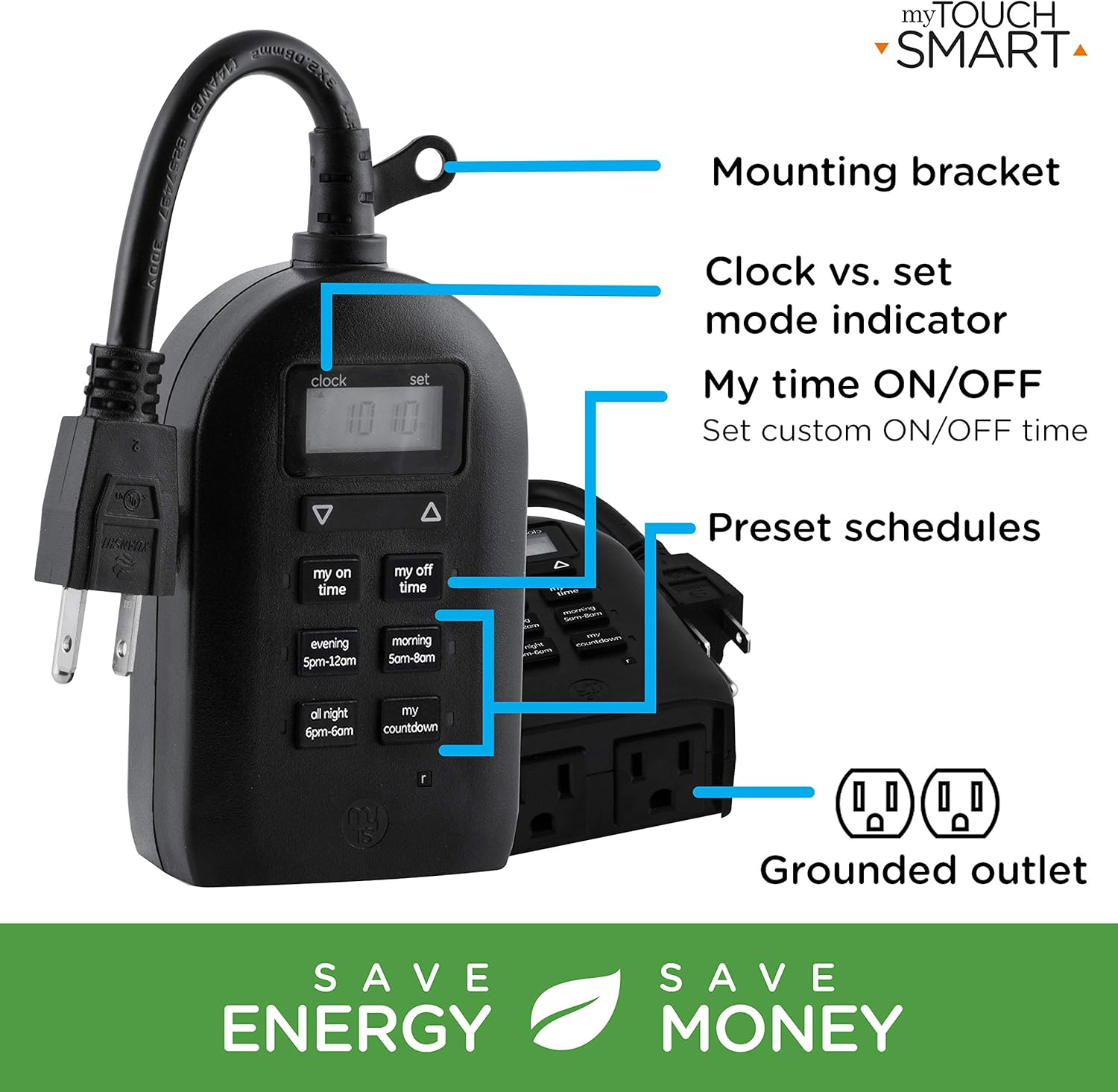
Figure 5: Key features and controls of the myTouchSmart timer.
וישאַלט
- רייניקונג: אָפּשטעקן דעם טייַמער פֿון דער עלעקטרישער אַוטלעט איידער איר רייניקט. ווישט אָפּ די אויסערלעכע זייט מיט אַ ווייכן, טרוקן שטאָף.amp שטאָף. דו זאלסט נישט נוצן האַרב קעמיקאַלז אָדער אַברייסיוו קלינערז.
- סטאָרידזש: ווען נישט אין באַנוץ פֿאַר לענגערע פּעריאָדן, האַלט דעם טייַמער אין אַ קיל, טרוקן אָרט אַוועק פון דירעקט זונשייַן און עקסטרעמע טעמפּעראַטורן.
- אינערלעכער באַטערי: The timer contains an internal battery to maintain settings during power outages. If the display is dim or blank, plug the timer into an outlet for at least one hour to recharge the battery.
טראָובלעשאָאָטינג
| פּראָבלעם | מעגלעך סיבה | לייזונג |
|---|---|---|
| דער טייַמער אַרויסווייַז איז ליידיק אָדער טונקל. | Internal battery is low or depleted. | Plug the timer into a live outlet for at least one hour to charge the internal battery. |
| Connected device does not turn ON/OFF. |
|
|
| Timer is not responding to button presses. | צייטווייליגע ווייכווארג פראבלעם אדער נידריגע באטעריע. | Unplug the timer from the outlet for a few minutes, then plug it back in. Allow the internal battery to charge if the display was dim. |
ספּעסאַפאַקיישאַנז
| שטריך | דעטאַל |
|---|---|
| מאָדעל נומער | 26898-P1 |
| עלעקטריקאַל שאַץ | 125V AC, 60Hz, 15A, 1875W (General Purpose/Resistive) |
| אַוטלעץ | 2 גראָונדעד אַוטלעץ |
| דימענשאַנז | 3.2"ד x 7"ברייט x 7.5"ה (אומגעפער) |
| פּונקט וואָג | 9.92 אונסעס |
| ווייַז טיפּ | לקד |
| מאַונטינג טיפּ | פּלוג-אין בארג |
| סערטיפיקאַטיאָנס | UL Listed, CSA Listed |
| ינערלעך באַטערי | Yes (for settings retention) |

Figure 6: Product dimensions for the myTouchSmart timer.
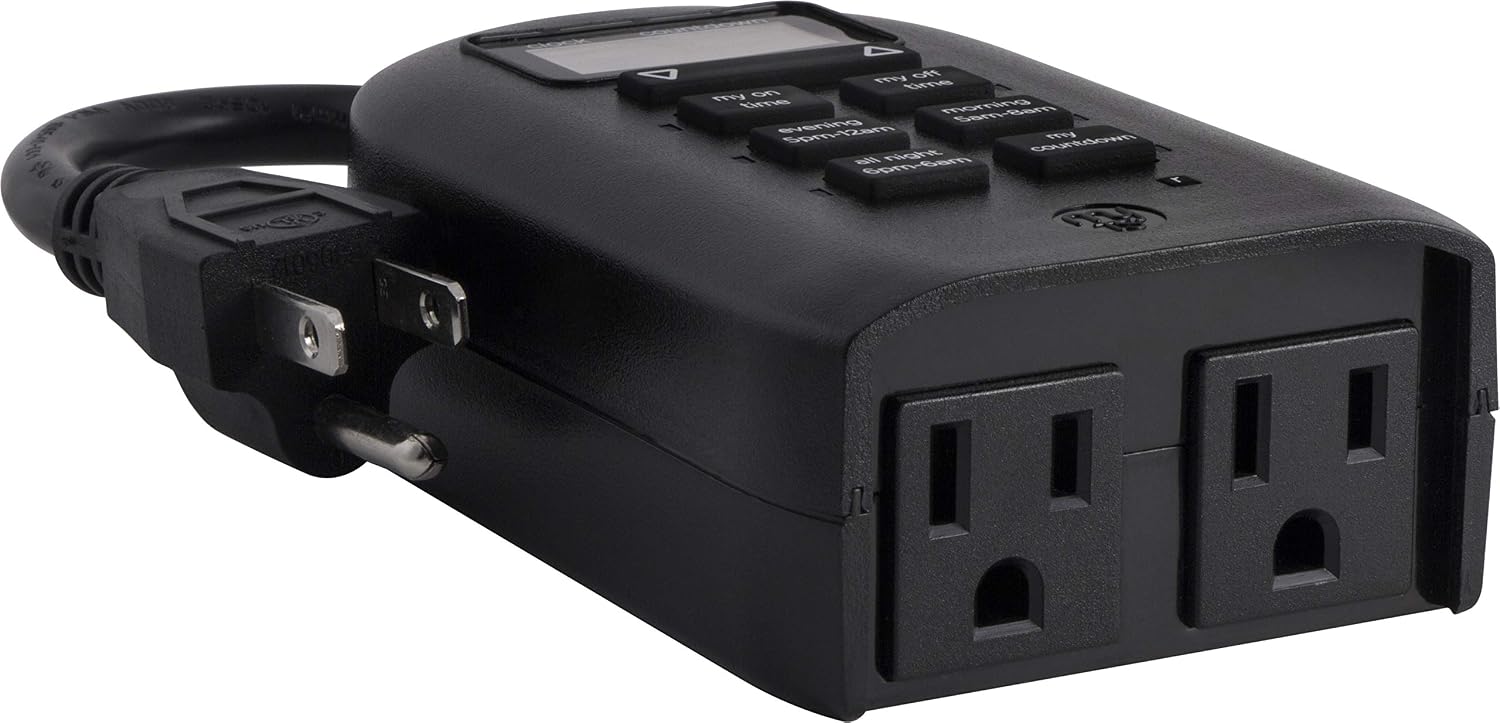
Figure 7: Dual grounded outlets for connecting devices.
וואָראַנטי און שטיצן
This myTouchSmart timer is backed by a איין יאָר לימיטעד וואָראַנטי from the date of purchase. For warranty claims or technical support, please refer to the contact information provided with your product packaging or visit the official myTouchSmart webפּלאַץ.
פֿאַר נאָך רעסורסן, קענט איר אויך זיך ווענדן צו די אָפֿיציעלע באַניצער מאַנואַל (פּדף) or אינסטאַלאַציע מאַנואַל (PDF) בנימצא אָנליין.