
הקדמה
This manual provides essential information for the safe and efficient operation, installation, and maintenance of your HP 5065-5262 DYNAMITE Power Supply. This 340-watt power supply is designed with integrated cooling fans for reliable performance in disk systems. Please read this manual thoroughly before installation and use.
זיכערקייַט אינפֿאָרמאַציע
שטענדיק אָבסערווירן די פאלגענדע זיכערהייט מיטלען צו פאַרמייַדן שאָדן אָדער שעדיקן צו די ויסריכט:
- Ensure the power supply is disconnected from the main power source before installation, removal, or servicing.
- בלויז קוואַלאַפייד פּערסאַנעל זאָל דורכפירן ינסטאַלירונג און וישאַלט.
- עפֿנט נישט די מאַכט־צושטעל casing. There are no user-serviceable parts inside, and dangerous voltagעס זענען פאָרשטעלן.
- פאַרזיכערן געהעריק גראַונדינג צו פאַרמייַדן עלעקטריקאַל קלאַפּ.
- Operate the power supply within its specified voltagE און קראַנט רייטינגז.
- Maintain adequate ventilation around the power supply to prevent overheating.
סעטאַפּ און ינסטאַלירונג
Follow these steps for proper installation of the HP 5065-5262 DYNAMITE Power Supply:
- צוגרייטונג: Before beginning, ensure your system is powered off and unplugged from the wall outlet. Discharge any static electricity by touching a grounded metal object.
- אַראָפּנעמען אַלטע מאַכט צושטעלן (אויב אָנווענדלעך): Disconnect all cables from the existing power supply. Unscrew and carefully remove the old unit from the chassis.
- Insert New Power Supply: Gently slide the HP 5065-5262 DYNAMITE Power Supply into the designated bay in your disk system chassis. Ensure it aligns correctly with the mounting holes.
- Secure the Power Supply: Use the appropriate screws to firmly secure the power supply to the chassis. Do not overtighten.
- פאַרבינדן קאַבלעס: Connect all necessary power cables from the power supply to the motherboard, disk drives, and any other components requiring power. Refer to your system's motherboard manual for specific power connector locations.
- לעצט טשעק: Double-check all connections to ensure they are secure and correctly seated. Ensure no loose cables are obstructing airflow.
- מאַכט אויף: Close the system chassis, plug the system back into a grounded power outlet, and power on the system.
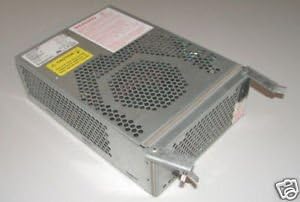
פיגור 1: ווינקלדיק view of the HP 5065-5262 DYNAMITE Power Supply, illustrating its size and design for integration into a disk system.
אַפּערייטינג ינסטראַקשאַנז
The HP 5065-5262 DYNAMITE Power Supply operates automatically once installed and connected. It provides stable power to your disk system components.
- מאַכט אויף / אַוועק: The power supply is controlled by the system's main power switch. When the system is powered on, the power supply will activate and deliver power.
- קאָאָלינג פאַנס: The integrated cooling fans will operate automatically to maintain optimal internal temperatures. Ensure fan vents are not obstructed.
- סטאַטוס ינדיקאַטאָרס: Some systems may have diagnostic LEDs on the motherboard or chassis that indicate power supply status. Refer to your system's manual for details.
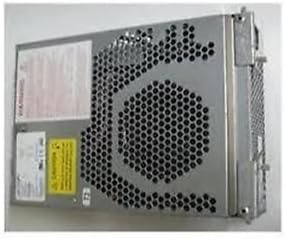
פיגורע 2: זייַט view of the HP 5065-5262 DYNAMITE Power Supply, highlighting the ventilation design crucial for its cooling system.
וישאַלט
Regular maintenance helps ensure the longevity and stable operation of your power supply:
- באַזייַטיקונג פון שטויב: Periodically (e.g., every 6-12 months), power off and unplug your system. Use compressed air to gently clear dust from the power supply's fan vents and internal components. Hold the fan blades to prevent them from spinning too fast during cleaning.
- קאַבלע דורכקוק: Check all power cables connected to the power supply for any signs of wear, fraying, or loose connections. Replace damaged cables immediately.
- ינווייראַנמענאַל טנאָים: Ensure the operating environment is clean, dry, and within the recommended temperature range to prevent dust buildup and moisture damage.
טראָובלעשאָאָטינג
אויב איר טרעפט פּראָבלעמען מיט אייער מאַכט צושטעלן, זעט די פאלגענדע געוויינטלעכע פּראָבלעמען און לייזונגען:
| פּראָבלעם | מעגלעך סיבה | לייזונג |
|---|---|---|
| סיסטעם טוט נישט מאַכט אויף. | לויזער מאַכט קאַבל פֿאַרבינדונג. פאָלטי וואַנט ווענטיל. מאַכט צושטעלן דורכפאַל. | Check all power connections (wall, power supply, motherboard). פּרובירן די ווענטיל מיט אן אנדער מיטל. If possible, test with a known good power supply. |
| סיסטעם צינדט זיך אן אבער שליסט זיך אויס אומגעריכט. | Overheating (poor ventilation). Overload (too many components). Power supply instability. | Ensure proper airflow; clean dust from vents. אָפּשטעקן נישט-וויכטיגע קאָמפּאָנענטן צו קאָנטראָלירן פֿאַר איבערלאַסטונג. Consider professional diagnosis or replacement. |
| Loud fan noise from power supply. | Dust buildup in fan. Worn fan bearing. | Clean fan with compressed air. If noise persists, the fan may be failing; consider professional service or replacement of the power supply. |
If these steps do not resolve the issue, contact HP support or a qualified technician.
ספּעסאַפאַקיישאַנז
| שטריך | דעטאַל |
|---|---|
| סאָרט | HEWLETT PACKARD |
| מאָדעל נומער | 5065-5262 |
| וואָסtage | 340 וואטס |
| קאָאָלינג אופֿן | Air (with integrated fans) |
| ASIN | B014S277MO |
| UPC | 787322237757 |
| ערשטער בנימצא | יולי 9, 2013 |
וואָראַנטי און שטיצן
This HP 5065-5262 DYNAMITE Power Supply is typically covered by Hewlett Packard's standard manufacturer warranty. For specific warranty terms and conditions, please refer to the documentation provided with your original system or contact HP customer support directly.
For technical support, service, or to inquire about replacement parts, please visit the official Hewlett Packard support website or contact their customer service line. Have your product model number (5065-5262) and serial number (if applicable) ready when contacting support.
HP שטיצן Webפּלאַץ: https://www.hp.com/support