
הקדמה
The Electro-Harmonix KEY9 Electric Piano Machine Pedal is designed to emulate a variety of classic electric pianos and other keyboard instruments. This pedal allows guitarists to transform their instrument's sound, offering a versatile range of tones from iconic Wurlitzer and Rhodes sounds to mallets and steel drums. Each of the 9 presets provides control over fundamental parameters that define the instrument's sound, often including adjustable modulation effects such as tremolo, phaser, and chorus. The KEY9 is a powerful tool for expanding your sonic palette.

Figure 1: The KEY9 Electric Piano Machine Pedal positioned on a keyboard.
סעטאַפּ
To begin using your KEY9 pedal, follow these steps:
- מאַכט קשר: Connect the included 9.6VDC 500mA power supply to the 9V power jack on the pedal.
- אַרייַנשרייַב קשר: Connect your guitar to the INPUT jack on the right side of the pedal using a standard 1/4-inch instrument cable.
- רעזולטאַט קשר: Connect the KEYS OUTPUT jack on the left side of the pedal to your amplifier or mixer using a standard 1/4-inch instrument cable. An additional DRY OUTPUT jack is available to send your unaffected guitar signal to a separate amplifier or input.
- ערשט סעטטינגס: Ensure all control knobs (DRY, VOL, KEYS, CTRL 1, CTRL 2) are set to their minimum positions before powering on to avoid sudden volume changes.

פיגור 2: פון אויבן אַראָפּ view of the KEY9 pedal showing input and output connections.
אַפּערייטינג ינסטראַקשאַנז
The KEY9 pedal features intuitive controls for shaping your sound. Familiarize yourself with the knobs and presets to unlock its full potential.
קאָנטראָלס:
- טרוקן קנופּ: Controls the volume of your unaffected guitar signal at the KEYS OUTPUT.
- VOL קנופּ: Controls the overall volume of the selected KEY9 preset sound.
- KEYS Knob: Controls the volume of the selected KEY9 preset sound at the KEYS OUTPUT.
- CTRL 1 & CTRL 2 Knobs: These controls adjust different parameters depending on the selected preset. They typically modify aspects like modulation speed/depth, tone, or attack characteristics.
- Preset Selector Knob: A 9-position rotary switch to select between the different electric piano and keyboard sounds.
- בייפּאַס פאָאָטסוויטש: Toggles the effect on/off. When the effect is active, the LED illuminates red.
אויסגאבעס:
- KEYS OUTPUT: Delivers the processed KEY9 sound, mixed with the dry signal if the DRY knob is raised.
- DRY OUTPUT: Provides a buffered bypass of your guitar signal, allowing you to send your unaffected signal to a separate destination.
פּרעסעץ:
The KEY9 offers 9 distinct presets, each emulating a unique keyboard or percussive instrument. The CTRL 1 and CTRL 2 knobs will have different functions for each preset.
- Dynamo: Emulates a classic Fender Rhodes electric piano, known for its smooth, ambient tones. CTRL 1 and CTRL 2 adjust overtones and low-end response.
- Wurli: Recreates the distinct sound of a Wurlitzer electric piano, often featuring a built-in tremolo. CTRL 1 and CTRL 2 typically control tremolo speed and depth.
- טשעמאָדאַן: A variation of the electric piano sound, often characterized by a phase shifter effect. CTRL 1 and CTRL 2 adjust phaser speed and depth.
- Mallets: Produces marimba-like or other mallet percussion sounds. This preset is highly responsive to playing dynamics.
- Eighty Eight: Another Rhodes electric piano emulation, often with a bright, bell-like quality and tremolo. CTRL 1 and CTRL 2 adjust tremolo and tone.
- Tri-Glorious: Emulates a three-voice chorus rack effect, providing lush, swirling textures. CTRL 1 and CTRL 2 control chorus depth and rate.
- Vibes: Recreates the sound of a vibraphone, typically with a distinct tremolo. CTRL 1 and CTRL 2 adjust tremolo speed and depth.
- אָרגאַן: A classic organ sound, offering rich, sustained tones. CTRL 1 and CTRL 2 may adjust attack and decay or modulation.
- Steel Drums: Produces the bright, percussive sound of steel drums. This preset is highly dynamic and responsive.
Video 1: Official demonstration of the Electro-Harmonix KEY9 Electric Piano Machine Pedal, showcasing its various presets and controls.
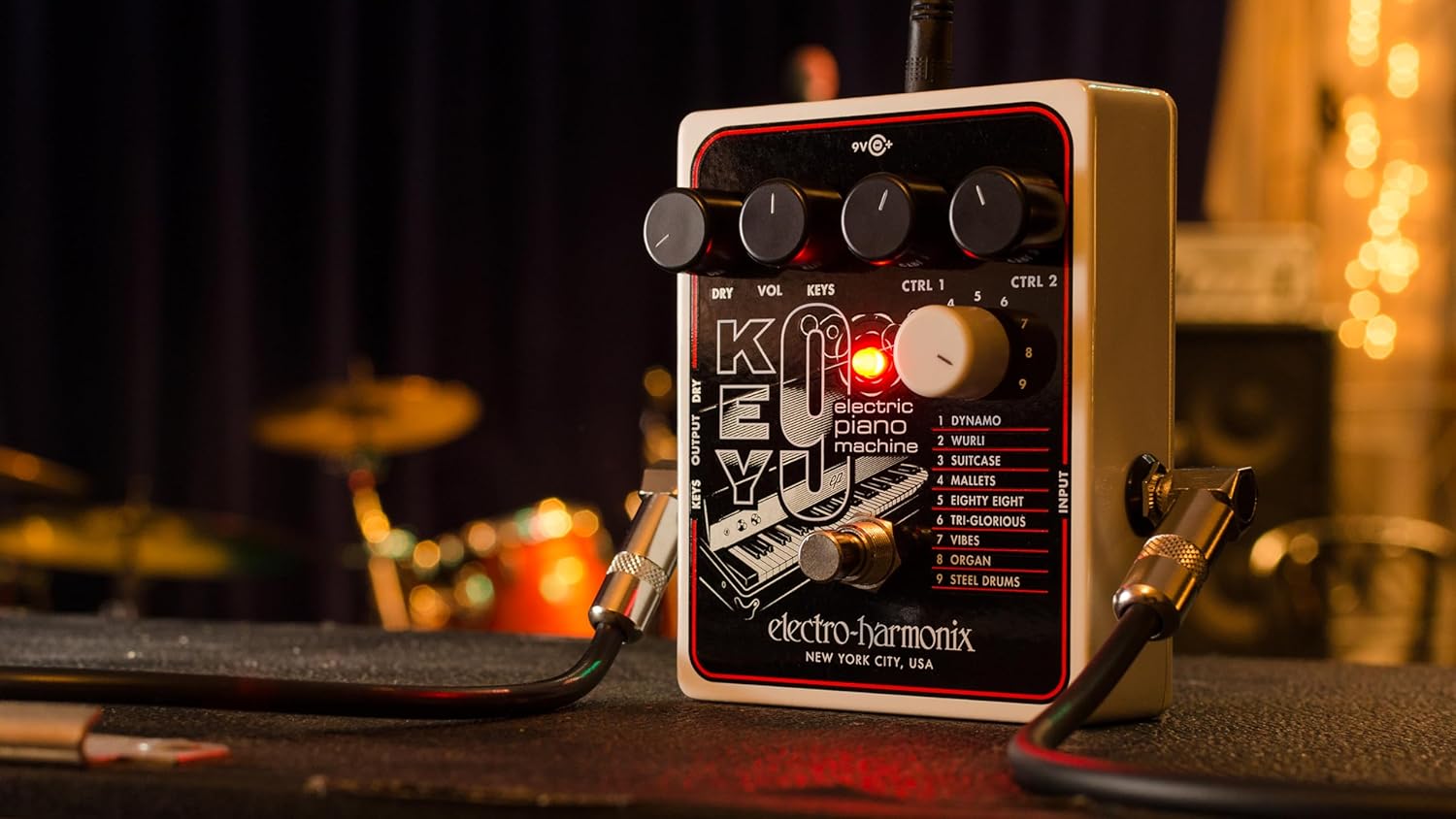
פיגור 3: ווינקלדיק view of the KEY9 pedal, highlighting the control knobs and jacks.
וישאַלט
To ensure the longevity and optimal performance of your Electro-Harmonix KEY9 pedal, follow these maintenance guidelines:
- רייניקונג: ניצט אַ ווייכע, טרוקענע שטאָף צו רייניקן די אויסערלעכע זייט פון דעם פּעדאַל. פֿאַרמייַדט אַברייסיוו רייניגער אָדער סאָלווענטן.
- סטאָרידזש: האַלט דעם פּעדאַל אין אַ קיל, טרוקן אָרט אַוועק פון דירעקט זונשייַן און עקסטרעמע טעמפּעראַטורן ווען נישט אין באַנוץ.
- מאַכט צושטעלן: Always use the included 9.6VDC 500mA power supply or a compatible, regulated power supply to prevent damage.
- פֿאַרבינדונגען: קאָנטראָלירט פּעריִאָדיש אַלע קאַבל פֿאַרבינדונגען פֿאַר אָפּנוץ און טרער. מאַכט זיכער אַז די דזשעקס זענען פֿרײַ פֿון שטויב און שמוץ.
טראָובלעשאָאָטינג
If you encounter issues with your KEY9 pedal, consult the following common troubleshooting steps:
- קיין קול:
- קאָנטראָלירט אַלע קאַבלע קאַנעקשאַנז (אַרייַנגאַנג, אַוטפּוט, מאַכט).
- זיכער מאַכן אַז די מאַכט צושטעל איז ריכטיק פארבונדן און אַרבעטנדיק.
- באַשטעטיקן אַז דיין ampדער ליפייער אדער מיקסער איז אנגעצינדן און זיין וואָלומען איז העכער.
- Adjust the DRY and KEYS/VOL knobs on the pedal.
- שלעכטע קלאַנג קוואַליטעט/גערויש:
- Ensure you are using a proper, regulated 9.6VDC power supply.
- קוק נאָך דעפעקטיווע קייבלס.
- Experiment with different guitar pickups or guitar settings.
- Adjust the CTRL 1 and CTRL 2 knobs, as some settings may introduce unwanted artifacts depending on your guitar and playing style.
- ווירקונג נישט אינטערעסאנט:
- Press the footswitch firmly to ensure it engages. The LED should illuminate.
- If the LED does not light up, check the power supply.
ספּעסאַפאַקיישאַנז
| פּונקט וואָג | 1.1 פונט |
| פּראָדוקט דימענשאַנז | 4.75"ל x 4"בר x 2.25"ה |
| נומער מאָדעל נומער | KEY9 |
| מאַכט מקור | Corded Electric (9.6VDC 500mA power supply included) |
| ייַזנוואַרג צובינד | 1/4-אינטש אַודיאָ |
| סיגנאַל פֿאָרמאַט | אַנאַלאָג |
| מאַטעריאַל טיפּ | Plastic (brushed aluminum finish) |
| פּראָפיסיענסי מדרגה | ינטערמידייט, אַוואַנסירטע |
וואָראַנטי און שטיצן
עלעקטראָ-האַרמאָניקס פּראָדוקטן זענען דיזיינד פֿאַר פֿאַרלעסלעכקייט און פאָרשטעלונג. פֿאַר וואָראַנטי אינפֿאָרמאַציע, טעכנישע שטיצע, אָדער סערוויס פֿראַגעס, ביטע זען די באַאַמטער עלעקטראָ-האַרמאָניקס וועבזייטל. webזייטל אדער קאנטאקט זייער קאסטומער סערוויס דעפארטמענט. האלט אייער קויף קוויטל אלס באווייז פון קויפן פאר יעדע גאראנטיע טענות.