
1. הקדמה
This manual provides detailed instructions for the setup, operation, and maintenance of your Zmodo Mini WiFi 720p HD Wireless Indoor Home Video Security Camera. Please read this manual thoroughly before using the device to ensure proper functionality and safety. This camera is designed for indoor surveillance, offering 720p HD video, two-way audio, and remote access capabilities.
2. פּראָדוקט איבערview
Familiarize yourself with the components of your Zmodo Mini WiFi Camera.

בילד 2.1: Zmodo Mini WiFi Camera mounted on a wall, showing its compact design and lens. This image illustrates the camera's appearance and typical indoor placement.

בילד 2.2: Zmodo Mini WiFi Camera held in a person's hand, demonstrating its small and portable size. This helps visualize the camera's dimensions.
בילד 2.3: Zmodo Mini WiFi Camera displayed with its power adapter and a quick guide. This shows the main items included in the product package.
2.1 פּעקל אינהאַלט
- Zmodo Mini WiFi Camera
- מאַכט אַדאַפּטער
- שנעל אָנהייב גייד
3. סעטאַפּ אינסטרוקציעס
3.1 אַפּ אראפקאפיע
צו קאָנטראָלירן און view your camera, download the MeShare app. זוכן פֿאַר "MeShare" in the Apple App Store (for iOS 6 and up) or Google Play Store (for Android 2.3 and up).
3.2 מאַכט אויף
- פֿאַרבינדט דעם מאַכט אַדאַפּטער צום קאַמעראַ'ס מאַכט אַרייַנגאַנג פּאָרט.
- צאַפּן די מאַכט אַדאַפּטער אין אַ נאָרמאַל עלעקטריקאַל ווענטיל.
- Wait for the camera's indicator light to show a specific status (refer to the app for light status meanings during setup).
3.3 Network Connection (SmartLink)
The camera uses 2.4GHz Wi-Fi for connectivity. It is not compatible with 5GHz networks.
- Open the MeShare app and create an account or log in.
- גיי די אין-אַפּ ינסטראַקשאַנז צו לייגן אַ נייַ מיטל.
- Select the SmartLink setup option. The app will guide you through connecting the camera to your home Wi-Fi network.
- Ensure your mobile device is connected to the 2.4GHz Wi-Fi network you intend to connect the camera to during setup.
4. אַפּערייטינג ינסטרוקטיאָנס
4.1 לעבן View און ווייטער צוטריט
Access your camera's live 720p HD video feed from anywhere using the MeShare app on your Android, iPhone, or iPad device. You can also access it via a web בלעטערער בייַ user.meshare.com/user/login.

בילד 4.1: A laptop, tablet, and smartphone simultaneously displaying live video feeds from Zmodo cameras. This illustrates the multi-device remote access capability.
4.2 צוויי-וועג אַודיאָ
The camera features two-way audio, allowing you to listen to the environment around the camera and speak through its built-in speaker using the MeShare app.
4.3 באַוועגונג דעטעקשאַן
The camera is equipped with a motion sensor that can detect movement. You can configure motion alerts within the MeShare app to receive notifications when motion is detected.

בילד 4.2: A smartphone screen showing a Zmodo alert for motion detected, with video clips available for review. This demonstrates the motion alert feature.
4.4 נאַכט זעאונג
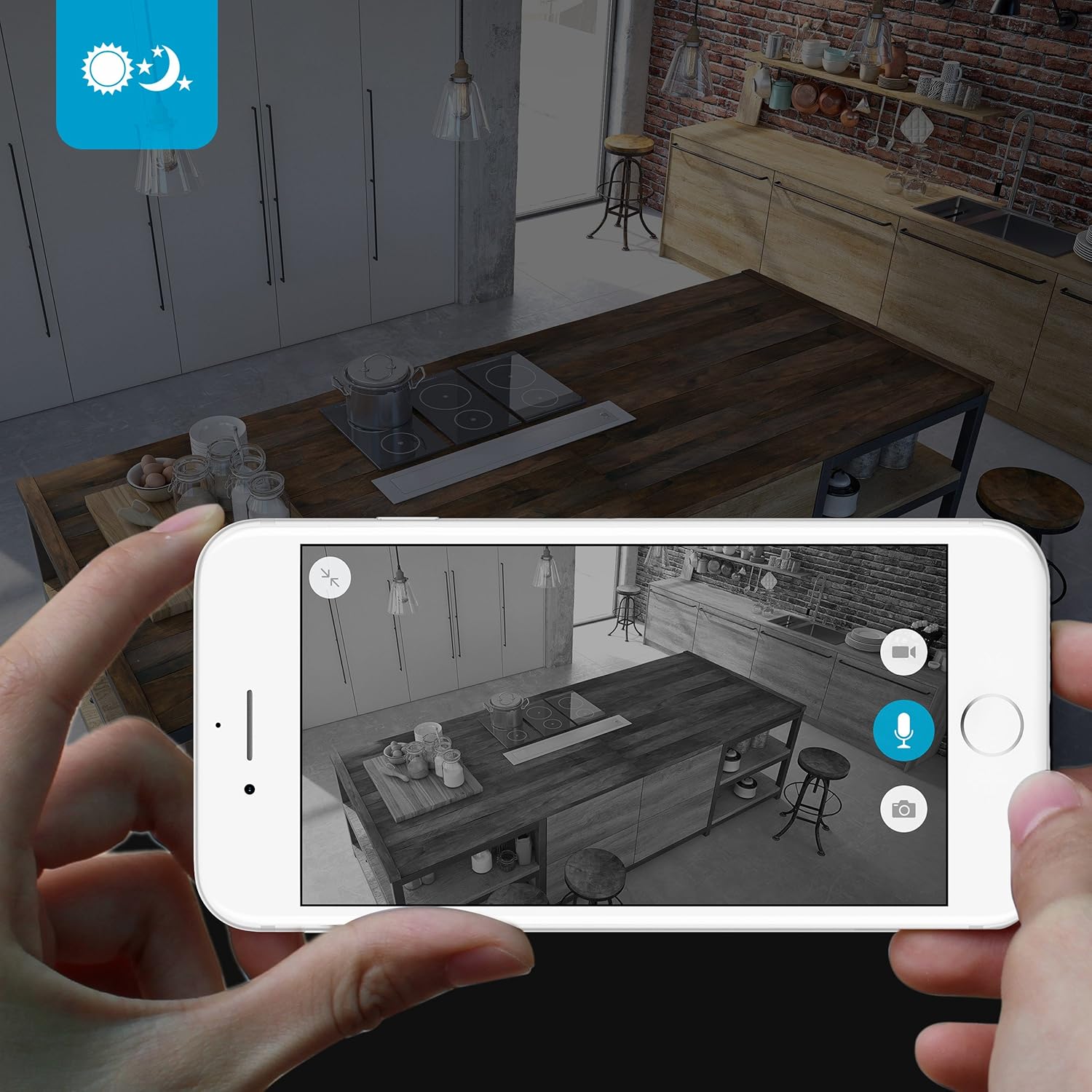
The camera provides clear surveillance even in low-light conditions with its night vision capabilities, offering a range of up to 30 feet. It automatically switches between color day mode and black & white night mode using infrared light.

בילד 4.3: A smartphone screen showing a black and white night vision view from the Zmodo camera in a kitchen setting. This illustrates the camera's low-light performance.
4.5 ברייט ווינקל View
The camera features a 115° wide-angle lens, allowing for a broad view of your indoor space.

בילד 4.4: A smartphone screen showing a wide-angle view from the Zmodo camera in a bedroom, capturing a broad area. This highlights the 115-degree field of view.
5. וישאַלט
5.1 רייניקן די קאַמעראַ
- זיכער מאַכן אַז די קאַמעראַ איז אויסגעלאָשן איידער רייניקונג.
- Use a soft, dry cloth to gently wipe the camera body.
- For the lens, use a lens cleaning cloth specifically designed for optics to avoid scratches.
- Do not use liquid cleaners or aerosol sprays directly on the camera.
5.2 ענוויראָנמענטאַל קאַנסידעריישאַנז
- דער אַפּאַראַט איז דיזיינד בלויז פֿאַר דרינענדיק נוצן.
- פֿאַרמײַדט צו שטעלן די קאַמעראַ אין דירעקטער זון אָדער לעבן היץ־קוואַלן.
- האַלט די קאַמעראַ אַוועק פון פייכטקייט און עקסטרעמע טעמפּעראַטורן.
6. טראָובלעשאָאָטינג
6.1 פּראָסט ישוז און סאַלושאַנז
- קאַמעראַ פֿאַרבינדט זיך נישט צו Wi-Fi: Ensure your Wi-Fi network is 2.4GHz. Verify your Wi-Fi password. Try restarting your router and the camera.
- נעבעך ווידעא קוואַליטעט: קאָנטראָלירט אייער אינטערנעט פֿאַרבינדונג גיכקייט. מאַכט זיכער אַז די קאַמעראַ לינז איז ריין און פֿרײַ פֿון שטערונגען.
- No audio or distorted audio: Verify microphone and speaker settings in the MeShare app. Ensure there are no physical obstructions blocking the microphone or speaker.
- Motion alerts not working: Check motion detection settings in the MeShare app. Ensure notifications are enabled for the app on your mobile device.
- אַפּאַראַט אָפפלינע: Check if the camera is powered on. Verify your Wi-Fi network is active and stable. Try restarting the camera.
7. ספּעסאַפאַקיישאַנז
| שטריך | באַשרייַבונג |
|---|---|
| מאָדעל נומער | WAUBMAKGCUVDD |
| ווידעא קאַפּטורע רעסאָלוטיאָן | 720 פּ הד |
| קאַנעקטיוויטי טעכנאָלאָגיע | וויירלעס (Wi-Fi 2.4GHz) |
| צוויי-וועג אַודיאָ | יא |
| ברייט ווינקל | 115° |
| נאַכט וויזשאַן ראַנגע | Up to 30 Feet (Infrared) |
| באַוועגונג סענסאָר | Yes (Motion Only Alert Type) |
| מאַכט מקור | AC/DC (5 Volts, 5 Watts) |
| דרינענדיק / דרויסנדיק באַניץ | דרינענדיק |
| דימענסיעס (L X W X H) | 7 X 2.1 X 4.5 אינטשעס |
| פּונקט וואָג | 12 אונסעס |
| קאַמפּאַטאַבאַל דעוויסעס | Video Monitor (Android, iPhone, iPad) |
8. וואָראַנטי און שטיצן
For warranty information or technical support, please refer to the official Zmodo website or contact Zmodo customer service directly. Keep your purchase receipt for warranty claims.
פֿאַר ווייַטער הילף, באַזוכן די Zmodo Store on Amazon.