
Alpine IVA-W520E
Alpine IVA-W520E User Manual
Model: IVA-W520E
1. הקדמה
The Alpine IVA-W520E is a full-featured 2DIN DVD player solution designed for in-car entertainment and media. It integrates advanced video and audio technologies, including a 7-inch LED touchscreen and a Burr-Brown 24-bit DAC, to deliver high-quality sound and clear images. This manual provides essential information for the proper installation, operation, and maintenance of your IVA-W520E unit.
2. זיכערקייַט אינפֿאָרמאַציע
Please read all safety instructions carefully before installing or operating the unit. Failure to follow these instructions may result in injury or damage to the unit or vehicle.
- פאַכמאַן ינסטאַלירונג רעקאַמענדיד: Due to the complexity of car audio-visual systems, professional installation is highly recommended to ensure proper wiring and functionality.
- מאַכט מקור: Connect the unit only to a 12V DC negative ground power supply.
- ויסמיידן דיסטראַקשאַנז: Do not operate the unit's controls or view video content while driving, as this can lead to accidents. Always pull over to a safe location before making adjustments.
- ווענטילאַטיאָן: זיכערט זיך אז די ווענטילאציע איז גענוג גוט ארום דעם איינהייט כדי צו פארמיידן איבערהיצונג. בלאקירט נישט די ווענטילאציע עפענונגען.
- מויסטשער און ליקווידס: Keep the unit away from moisture and liquids. Do not expose it to rain or water.
- רייניקונג: ניצט אַ ווייכע, טרוקענע שטאָף פֿאַר רייניקונג. פֿאַרמייַדט אַברייסיוו רייניגער אָדער סאָלווענטן.
3. פּעקל אינהאַלט
באַשטעטיקן אַז אַלע זאכן זענען פאַראַן אין דעם פּעקל איידער איר גייט ווייטער מיט דער אינסטאַלאַציע:
- Alpine IVA-W520E Head Unit
- מאַכט / רעדנער כאַרניס
- מאָנטירונג האַרדווער (שרויף, קלאַמערן)
- טרים רינג
- באַניצער מאַנואַל (דעם דאָקומענט)
- וואָראַנטי אינפֿאָרמאַציע
4. סעטאַפּ און ייַנמאָנטירונג
4.1. ינסטאַלירונג גיידליינז
Proper installation is crucial for optimal performance and safety. It is highly recommended to have the unit installed by a qualified professional.
- דיסקאַנעקט באַטערי: Before starting any electrical work, disconnect the vehicle's negative battery terminal to prevent short circuits.
- מאָונטינג: Securely mount the unit in the vehicle's double-DIN opening using the provided mounting brackets and screws. Ensure it is stable and does not obstruct any vehicle controls.
- וויירינג: Connect the power harness, speaker wires, and other input/output cables according to the wiring diagram provided in the separate installation guide. Pay close attention to ground connections.
- Antenna and External Devices: Connect the radio antenna and any external devices such as a reverse camera or external ampליפערז.
4.2. ערשט סעטאַפּ
After installation, reconnect the battery and power on the unit for the first time.
- שפּראַך סעלעקציע: פֿאָלגט די אינסטרוקציעס אויף דעם עקראַן צו אויסקלײַבן אײַער בילכער שפּראַך.
- צייט און דאַטע: Set the correct time and date for accurate display.
- אַודיאָ סעטטינגס: Adjust basic audio settings such as volume, balance, and fader.
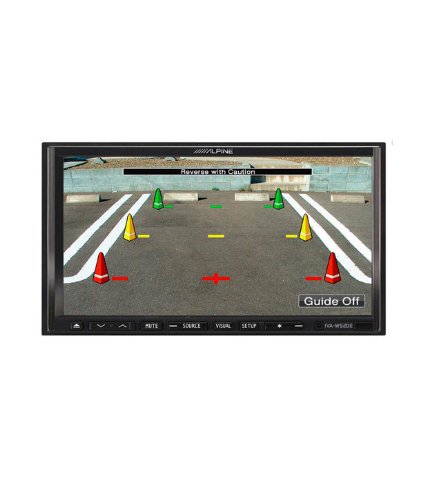
פיגורע 4.1: עקסample of the IVA-W520E displaying a reverse camera feed, showing parking guidelines. This feature aids in safe vehicle maneuvering.
5. אַפּערייטינג די אַפּאַראַט
5.1. טאָוטשסקרין און קנעפּל קאָנטראָלס
The IVA-W520E features a responsive 7-inch LED touchscreen for primary control, supplemented by physical buttons for quick access to common functions.
- טאָוטשסקרעען: Navigate menus, select sources, and control playback by touching the screen.
- באַנד קאָנטראָל: Use the dedicated volume buttons or on-screen controls to adjust audio levels.
- מקור קנעפּל: Press to cycle through available audio/video sources (Radio, DVD, USB, iPod, AUX, Bluetooth).
- שטיל קנעפּל: מאַכט צייטווייליק שטיל די אַודיאָ אַרויסגאַנג.
- סעטאַפּ קנעפּל: אַקסעס די סיסטעם סעטטינגס מעניו.
5.2. אַודיאָ פּלייַבאַקק
The unit supports various audio formats and sources, enhanced by its Burr-Brown 24-bit DAC for superior sound quality.
- וסב אַודיאָ: פֿאַרבינדט אַ USB מיטל מיט אַודיאָ files. The unit will display track information and allow navigation through folders.
- iPod/iPhone Connectivity: Connect your iPod or iPhone for direct audio playback and control.
- DVD/CD פּלייבאַק: Insert a DVD or CD into the disc slot for audio or video playback.
- ראַדיאָ טונער: צוטריט צו AM/FM ראַדיאָ סטאַנציעס.
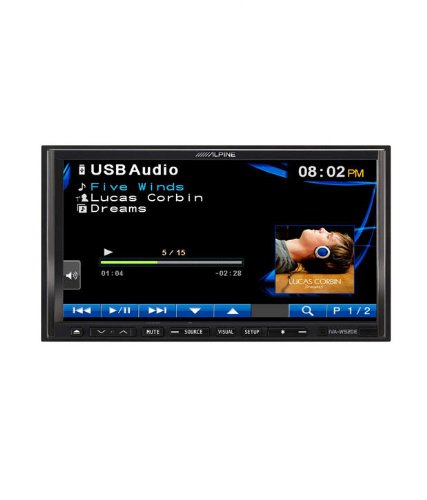
Figure 5.1: The IVA-W520E displaying the USB Audio interface, showing current track, artist, and playback controls. This allows for easy navigation of digital music files.
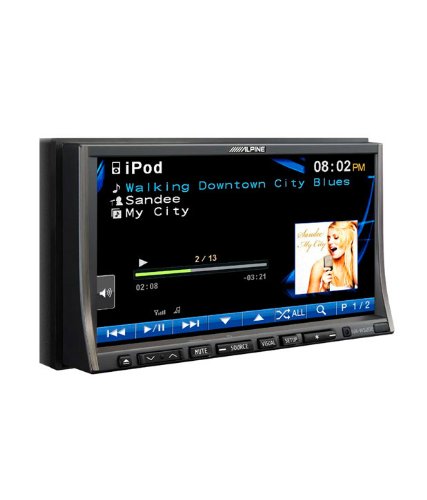
Figure 5.2: The IVA-W520E displaying the iPod interface, showing a list of songs and album art. This demonstrates seamless integration with Apple devices for music playback.
5.3. ווידעא פּלייַבאַקק
The 7-inch LED screen provides enhanced image quality with higher resolution, better contrast, and improved color reproduction compared to standard LCD screens.
- DVD Video: Insert a video DVD for playback. Ensure the parking brake safety wire is correctly connected for video to display while the vehicle is stationary.
- External Video Input: The unit supports external video sources, such as a reverse camera or other video devices.
5.4. בלועטאָאָטה קאַנעקטיוויטי
The IVA-W520E is upgradable for Bluetooth hands-free system functionality, allowing for safe and convenient communication while driving.
- פּאָרינג: Refer to the separate Bluetooth module manual (if applicable) for pairing instructions with your mobile phone.
- הענט-פריי רופן: Make and receive calls directly through the unit.
- אַודיאָ סטרימינג: סטרים אודיאָ פֿון אייער בלוטוט-ענייבאַלד מיטל.
5.5. Navigation System (Upgradable)
The unit is designed to be upgradable with a navigation system. Consult your Alpine dealer for compatible navigation modules and installation.
6. וישאַלט
Regular maintenance helps ensure the longevity and optimal performance of your Alpine IVA-W520E.
- סקרין רייניקונג: ווישט אָפּ דעם טאָוטשסקרין מיט אַ ווייכן, לינט-פֿרייעם שטאָף. פֿאַר שווערע פֿלעקן, ווישט אַ ביסלampen the cloth with water or a screen-specific cleaner. Do not spray cleaner directly onto the screen.
- דיסק שפּעלטל: Keep the disc slot free of dust and debris. Avoid inserting bent, scratched, or irregular discs.
- אַלגעמיינע רייניקונג: Use a soft, dry cloth to wipe the unit's exterior. Avoid harsh chemicals or abrasive materials.
7. טראָובלעשאָאָטינג
If you encounter issues with your IVA-W520E, refer to the following common problems and solutions:
| פּראָבלעם | מעגלעך סיבה | לייזונג |
|---|---|---|
| קיין מאַכט | אויפגעבראכענע פיוז, אומריכטיגע דראטן, פרייע פארבינדונג. | Check vehicle fuses and unit's fuse. Verify power and ground wiring connections. Ensure battery is connected. |
| קיין געזונט | די וואליום איז צו נידעריג, שטום איז אקטיווירט, פראבלעם מיט די רעדנער-וויירינג, אומרעכטע מקור אויסגעקליבן. | פֿאַרגרעסערן די וואָלומען. דעאַקטיווירן די שטום. קאָנטראָלירן די רעדנער פֿאַרבינדונגען. אויסקלײַבן די ריכטיקע אַודיאָ מקור. |
| דיסק טעות | Dirty, scratched, or incompatible disc. | Clean the disc. Try a different, known-good disc. Ensure disc format is supported. |
| ווידעא ווערט נישט געוויזן (בשעתן דרייוון) | Parking brake safety wire not connected or incorrectly connected. | This is a safety feature. Video playback is disabled while the vehicle is in motion. Ensure the parking brake wire is correctly connected to the vehicle's parking brake circuit. |
| בלועטאָאָטה פּערינג ישוז | Bluetooth module not connected, phone not in pairing mode, interference. | Ensure optional Bluetooth module is correctly installed. Put phone in pairing mode. Move closer to the unit. |
If the problem persists after trying these solutions, please contact your authorized Alpine dealer or customer support.
8. ספּעסאַפאַקיישאַנז
Key technical specifications for the Alpine IVA-W520E:
- מאָדעל: IVA-W520E
- ווייַז גרייס: 7 אינטשעס (18 סענטימעטער)
- ווייַז טיפּ: LED LCD Touchscreen
- רעזאלוציע: 480 X 272 בילדצעלן
- אַודיאָ DAC: Burr-Brown 24-bit
- קאַמפּאַטאַבאַל דעוויסעס: Smartphone (via USB/iPod, Bluetooth upgradable)
- ספּעציעלע פֿעיִקייטן: Touchscreen, Bluetooth (upgradable)
- אַודיאָ רעזולטאַט מאָדע: רעדנער
- פאַבריקאַנט: אַלפּיין
- ערשטער בנימצא: 20 אויגוסט 2015
9. וואָראַנטי און שטיצן
For detailed warranty information, please refer to the warranty card included with your product package or visit the official Alpine webזייטל. האַלט אייער קויף קוויטל ווי אַ באַווייַז פון קויפן.
For technical support, service, or inquiries about compatible accessories and upgrades (such as navigation modules or Bluetooth kits), please contact your authorized Alpine dealer or visit the Alpine customer support portal online.
אַלפּיין באַאַמטער Webפּלאַץ: www.alpine.com
Ask a question about this manual
Ask about setup, troubleshooting, compatibility, parts, safety, or missing instructions. Manuals+ will review the question and use this page’s manual context to help answer it.