
Solight TE09
Solight TE09 Weather Station User Manual
מאָדעל: TE09
הקדמה
Thank you for choosing the Solight TE09 Weather Station. This manual provides essential information for the proper setup, operation, and maintenance of your device. Please read it thoroughly before use and retain it for future reference.
זיכערקייַט אינפֿאָרמאַציע
- שטעלט נישט אויס דעם אפאראט צו עקסטרעמע טעמפעראטורן, דירעקטע זונשייַן, אדער הויכע הומידיטי.
- ויסמיידן דראַפּינג אָדער אונטערטעניק די מיטל צו שטאַרק ימפּאַקץ.
- פרובירט נישט צו צענעמען אדער מאדיפיצירן דעם אפאראט. דאס וועט בטל מאכן די גאראנטיע.
- האַלטן באַטעריז אויס פון דערגרייכן פון קינדער. אויב סוואַלאָוד, זוכן באַלדיק מעדיציניש ופמערקזאַמקייַט.
- פּאָטער פון געוויינט באַטעריז לויט די היגע רעגיאַליישאַנז.
- רייניקט דעם אַפּאַראַט מיט אַ ווייכן, טרוקענעם שטאָף. ניצט נישט קיין שרײַבנדיקע רייניגערס אדער סאָלווענטן.
פּעקל אינהאַלט
ביטע קאָנטראָלירט דעם אינהאַלט פֿון דער פּאַקעט בײַם אויספּאַקן. אויב עפּעס פֿעלט אָדער איז צעבראָכן, קאָנטאַקטירט אײַער פֿאַרקויפֿער.
- Solight TE09 Weather Station Unit
- באַניצער מאַנואַל (דעם דאָקומענט)
פּראָדוקט איבערview
The Solight TE09 Weather Station is designed to provide accurate indoor temperature and humidity readings. Its compact design makes it suitable for various indoor environments.
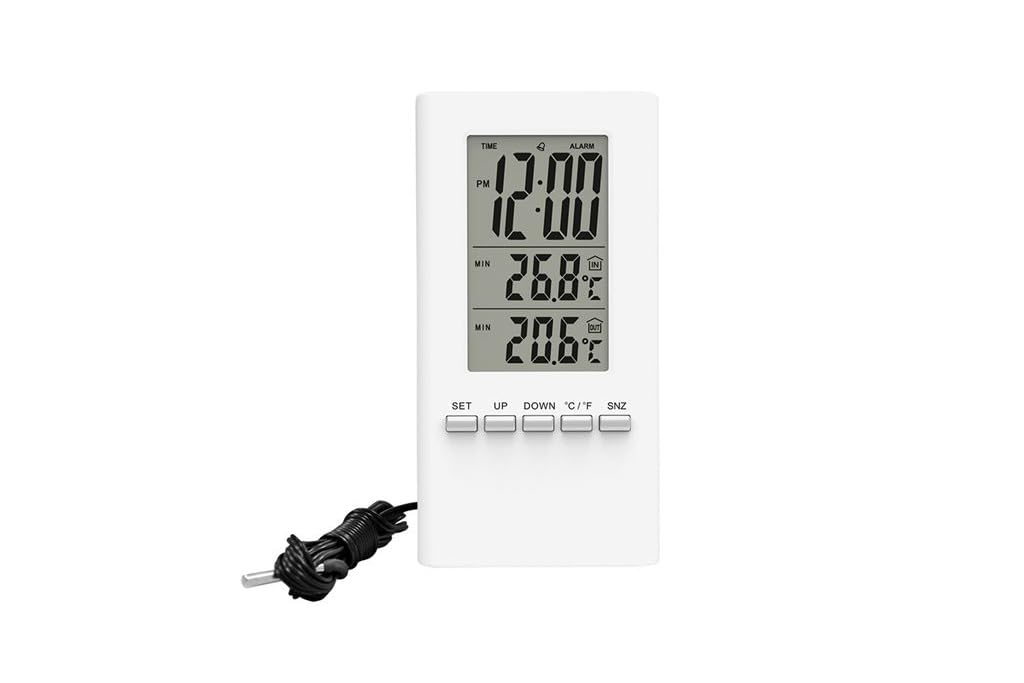
בילד 1: פראָנט view of the Solight TE09 Weather Station, displaying its screen and compact white casing.
שליסל קאַמפּאָונאַנץ:
- LCD ווייַז: Shows temperature, humidity, and other relevant information.
- קאָנטראָל קנעפּלעך: For setting time, units, and other functions.
- באַטערי אָפּטייל: ליגן אויף די צוריק פון די אַפּאַראַט.
סעטאַפּ
1. באַטאַרייע ייַנמאָנטירונג
- Locate the battery compartment cover on the back of the Solight TE09 Weather Station.
- שלעפּט אָדער נעמט אַראָפּ דעם דעקל צו עפֿענען עס.
- Insert 1.5V AAA alkaline batteries (not included) according to the polarity indicators (+ and -) inside the compartment.
- פאַרמאַכן די באַטאַרייע אָפּטייל דעקן סיקיורלי.
באַמערקונג: Ensure batteries are inserted correctly. Incorrect insertion may damage the device.
2. Initial Power-On and Placement
- Once batteries are installed, the device will power on automatically and display initial readings.
- Place the weather station in a suitable indoor location, away from direct sunlight, heat sources, and drafts, which could affect temperature and humidity accuracy.
- Allow the device a few minutes to stabilize and display accurate readings after initial setup.
אַפּערייטינג ינסטראַקשאַנז
1. Displaying Temperature and Humidity
The main display continuously shows the current indoor temperature and humidity. No specific action is required to view these readings.
2. Changing Temperature Units (Celsius/Fahrenheit)
צו בייטן צווישן צעלזיוס (°C) און פאַהרענהייט (°F):
- Locate the "°C/°F" button, usually on the back or side of the unit.
- Press the button once to toggle between the two temperature units. The display will update accordingly.
3. Setting Time and Date (if applicable)
באַמערקונג: The Solight TE09 is primarily a temperature and humidity monitor. If your model includes time/date functionality, follow these general steps:
- Press and hold the "SET" or "MODE" button for a few seconds until the time display starts flashing.
- Use the "UP" or "DOWN" buttons to adjust the hour, then press "SET" or "MODE" to confirm and move to minutes.
- Repeat for minutes, then for date (year, month, day) if available.
- Press "SET" or "MODE" again to exit the setting mode.
וישאַלט
1. רייניקונג די מיטל
- Wipe the exterior of the weather station with a soft, dry, or slightly damp שטאָף.
- Do not use abrasive cleaners, alcohol, or corrosive chemicals, as these can damage the surface and internal components.
- זיכער מאַכן אַז קיין פליסיקייט זאָל נישט אַרייַן אין דעם מיטל.
2. באַטערי פאַרבייַט
- When the display becomes dim or the device stops functioning, it's time to replace the batteries.
- Follow the "Battery Installation" steps in the Setup section to replace the old batteries with new 1.5V AAA alkaline batteries.
- Dispose of old batteries responsibly according to local environmental regulations.
3. סטאָרידזש
If the device will not be used for an extended period, remove the batteries to prevent leakage and store the unit in a cool, dry place.
טראָובלעשאָאָטינג
| פּראָבלעם | מעגלעך סיבה | לייזונג |
|---|---|---|
| קיין דיספּלעי אדער טונקעל דיספּלעי. | באַטעריעס זענען טויט אָדער נישט ריכטיק אַרײַנגעשטעלט. | Replace batteries with new 1.5V AAA alkaline batteries, ensuring correct polarity. |
| נישט פּינקטלעכע טעמפּעראַטור/פֿײַכטקייט מעסטונגען. | Device placed near heat sources, direct sunlight, or drafts. | Relocate the weather station to a stable indoor environment away from interfering factors. Allow time for readings to stabilize. |
| די קנעפּלעך זענען נישט ריספּאַנדינג. | צייטווייליגע ווייכווארג פראבלעם אדער נידריגע באטעריע. | Remove and reinsert batteries to reset the device. If the issue persists, replace batteries. |
ספּעסאַפאַקיישאַנז
- מאָדעל: Solight TE09
- קאָליר: ווייַס
- מאַטעריאַל: פּלאַסטיק
- מאַכט מקור: Battery (AAA alkaline, 1.5V)
- באַטעריז אַרייַנגערעכנט: ניין
- GTIN: 08592718012212
- פאַבריקאַנט: סאָלייט
- ערשטער פאַראַנען דאַטע: אקטאבער 7, 2018
וואָראַנטי און שטיצן
פֿאַר וואָראַנטי אינפֿאָרמאַציע און טעכנישע שטיצע, ביטע זען די דאָקומענטאַציע וואָס איז צוגעשטעלט געוואָרן ביים קויפן אָדער קאָנטאַקט אייער הענדלער. האַלט אייער קויף קוויטל ווי אַ באַווייַז פון קויפן.
Ask a question about this manual
Ask about setup, troubleshooting, compatibility, parts, safety, or missing instructions. Manuals+ will review the question and use this page’s manual context to help answer it.