
וויכטיק סאַפעטי אינפֿאָרמאַציע
ווארענונג: Installation and servicing of this furnace control board must be performed by a qualified service technician. Failure to follow these instructions could result in property damage, personal injury, or death.
- Disconnect all power to the furnace before installing or servicing this control board.
- Verify all wiring connections are secure and correct according to the furnace manufacturer's specifications.
- דו זאלסט נישט בייפּאַס קיין זיכערקייַט דעוויסעס.
- פאַרזיכערן געהעריק גראַונדינג.
פּראָדוקט איבערview
The Amana 50A51-215 is an OEM replacement two-stage integrated furnace control board designed for specific Amana furnace models. It manages the ignition sequence, monitors safety limits, and controls the furnace's operational cycles.
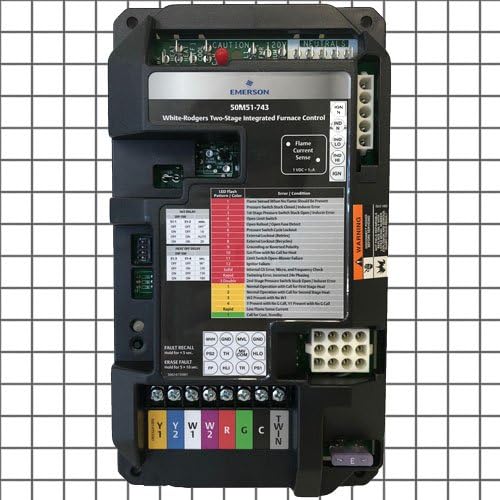
פיגורע 1: Amana 50A51-215 Furnace Control Board. This image displays the front view of the control board, showing various terminals, connectors, LED indicators, and labels for components like "Flame Current Sense" and "Fault Recall."
שליסל קאַמפּאָונאַנץ
- טערמינאַל בלאַקס: For connecting power, thermostat wires (Y1, Y2, W, R, G, C), and other furnace components.
- LED ינדיקאַטאָרס: Provide diagnostic feedback through flash patterns and colors.
- Flame Current Sense: Monitors the presence of a flame during operation.
- Fault Recall Button: Used to retrieve stored fault codes.
- Erase Fault Button: Used to clear stored fault codes.
סעטאַפּ און ינסטאַלירונג
This section provides general guidelines. Always refer to the specific furnace manufacturer's service manual for detailed installation instructions.
- מאַכט דיסקאַנעקשאַן: Turn off all electrical power to the furnace at the main service panel.
- צוטריט קאָנטראָל ברעט: געפינען און עפֿענען די אויוון צוטריט פּאַנעל צו אַנטדעקן די עקזיסטירנדיקע קאָנטראָל ברעט.
- דאָקומענט וויירינג: Carefully label all wires connected to the old control board before disconnecting them. Take photographs for reference if necessary.
- אַראָפּנעמען אַלטע ברעט: Disconnect all wires and mounting screws, then remove the old control board.
- אינסטאַלירן אַ נייע ברעט: Mount the new Amana 50A51-215 control board in the same location using the existing mounting hardware.
- פאַרבינדן וויירינג: Reconnect all wires to the new board, ensuring each wire is attached to its corresponding terminal as documented in step 3. Pay close attention to the "CAUTION 120V" and "NEUTRALS" connections, as well as thermostat wires (Y1, Y2, W, R, G, C).
- באַשטעטיקן קאַנעקשאַנז: Double-check all wiring for correctness and secure connections.
- ומקערן מאַכט: Close the furnace access panel and restore electrical power to the furnace.
- טעסט אָפּעראַציע: אָנהייבן אַ הייצונג ציקל צו באַשטעטיקן געהעריק אויוון אָפּעראַציע.
אַפּערייטינג ינסטראַקשאַנז
Once installed, the control board operates automatically in conjunction with your thermostat to manage the furnace's heating cycles.
געפירט ינדיקאַטאָר
The integrated LED on the control board provides status and diagnostic information. During normal operation, the LED will typically flash slowly. Refer to the Troubleshooting section for specific flash patterns and their meanings.
שולד צוריקרופן
To recall the last stored fault code, press and hold the שולד צוריקרופן button for approximately 2 seconds. The LED will then display the fault code.
Erase Fault
To erase all stored fault codes, press and hold the ERASE FAULT קנעפּל פֿאַר בעערעך 5 סעקונדעס.
וישאַלט
The Amana 50A51-215 control board itself requires no routine maintenance. However, regular maintenance of the entire furnace system is crucial for its longevity and efficient operation.
- Ensure furnace filters are replaced or cleaned regularly according to the furnace manufacturer's recommendations.
- Have the furnace inspected and serviced annually by a qualified technician.
- Keep the area around the furnace clear of obstructions and combustible materials.
טראָובלעשאָאָטינג
The LED indicator on the control board provides diagnostic codes to assist in troubleshooting. Observe the flash pattern and color, then refer to the table below.
| LED Flash Pattern / Color | צושטאַנד |
|---|---|
| 1 רויט פלאַש | Flame Sense Current When No Flame Should Be Present |
| 2 רויט פלאַשיז | Pressure Switch Stuck Closed | Inducer Error |
| 3 רויט פלאַשיז | 1 טער שtage Pressure Switch Stuck Open | Inducer Error |
| 4 רויט פלאַשיז | עפֿן לימיט סוויטש |
| 5 רויט פלאַשיז | Open Rollout | Open Fuse Detect |
| 6 רויט פלאַשיז | Pressure Switch Cycle Lockout |
| 7 רויט פלאַשיז | יגנישאַן לאַקאַוט |
| 8 רויט פלאַשיז | External Lockout (Recycled) |
| 9 רויט פלאַשיז | Grounding or Reversed Polarity |
| 10 רויט פלאַשיז | Call for Heat with No Call for Heat |
| 11 רויט פלאַשיז | Limit Switch Open - Motor Failure |
| 12 רויט פלאַשיז | יגנישאַן דורכפאַל |
| 13 רויט פלאַשיז | Invalid Line Voltage, Micro, and Frequency Check |
| 14 רויט פלאַשיז | Blower Error, Incorrect Idle Proving |
| 15 רויט פלאַשיז | 2 טער שtage Pressure Switch Stuck Open | Inducer Error |
| 1 געל פלאַש | Normal Operation with Call for First Stage היץ |
| 2 געל פלאַשיז | Normal Operation with Call for Second Stage היץ |
| 3 געל פלאַשיז | רופן פֿאַר היץ |
| 4 געל פלאַשיז | 1 טער שtage Heat with No C-Call, Y1 Present with No C-Call |
| 5 געל פלאַשיז | Low Flame Sense Current |
| Rapid Yellow Flashes | Call for Cool, Humidity |
If troubleshooting steps do not resolve the issue, contact a qualified HVAC technician.
ספּעסאַפאַקיישאַנז
- מאָדעל: 50A51-215
- טיפּ: OEM Replacement Furnace 2 Stage Control Circuit Board
- פאַבריקאַנט: Amana
- פּראָדוקט דימענשאַנז: 9 X 7 X 10 אינטשעס
וואָראַנטי און שטיצן
For specific warranty information, please refer to the documentation provided with your purchase or contact Amana customer support.
For technical assistance or service, it is recommended to contact a certified HVAC professional.