
הקדמה
א דאנק פארן קויפןasing the Audioengine A2+ Powered Desktop Speakers. These speakers are designed to provide clear, full audio and can easily connect to various devices. This manual provides essential information for setting up, operating, and maintaining your speakers.

Image: A pair of red Audioengine A2+ powered desktop speakers, showcasinג זייער קאָמפּאַקטן פּלאַן.
וואָס איז אַרייַנגערעכנט
Your Audioengine A2+ package includes the following components:
- Pair of Audioengine A2+ Powered Speakers (one active, one passive)
- 2m Speaker Wire for connecting the active and passive speakers
- מאַכט סופּפּלי & שנור
- USB cable for digital audio input
- 1.5m Mini-Jack Audio Cable for analog audio input
- Microfiber Speaker bags and Cable Bags for protection
- Setup Guide and Brochure

Image: All cables and the power supply unit included with the Audioengine A2+ speakers.
סעטאַפּ
Follow these steps to set up your Audioengine A2+ speakers:
- אָרט: Position the active (left) speaker and passive (right) speaker on your desktop or desired location. Ensure adequate space for ventilation.
- פֿאַרבינדן רעדנערס: Use the included speaker wire to connect the active speaker's "Out to Right" terminals to the passive speaker's input terminals. Match the positive (+) and negative (-) terminals.
- פאַרבינדן מאַכט: Connect the power supply to the active speaker's "Power" input, then plug the power cord into a wall outlet.
- אַודיאָ אַרייַנשרייַב: קלייַבט אייער בילכערדיקע אַודיאָ אַרייַנשרייַב מעטאָד:
- וסב אַודיאָ: Connect the USB cable from your computer to the "USB Input" on the active speaker.
- Mini-Jack Audio: Use the 1.5m mini-jack cable to connect your device's headphone output to the "Input" mini-jack on the active speaker.
- RCA אַודיאָ: Use RCA cables (not included) to connect your device's RCA outputs to the "Input" RCA jacks on the active speaker.
- מאַכט אויף: Turn the volume knob on the active speaker clockwise to power on the unit.
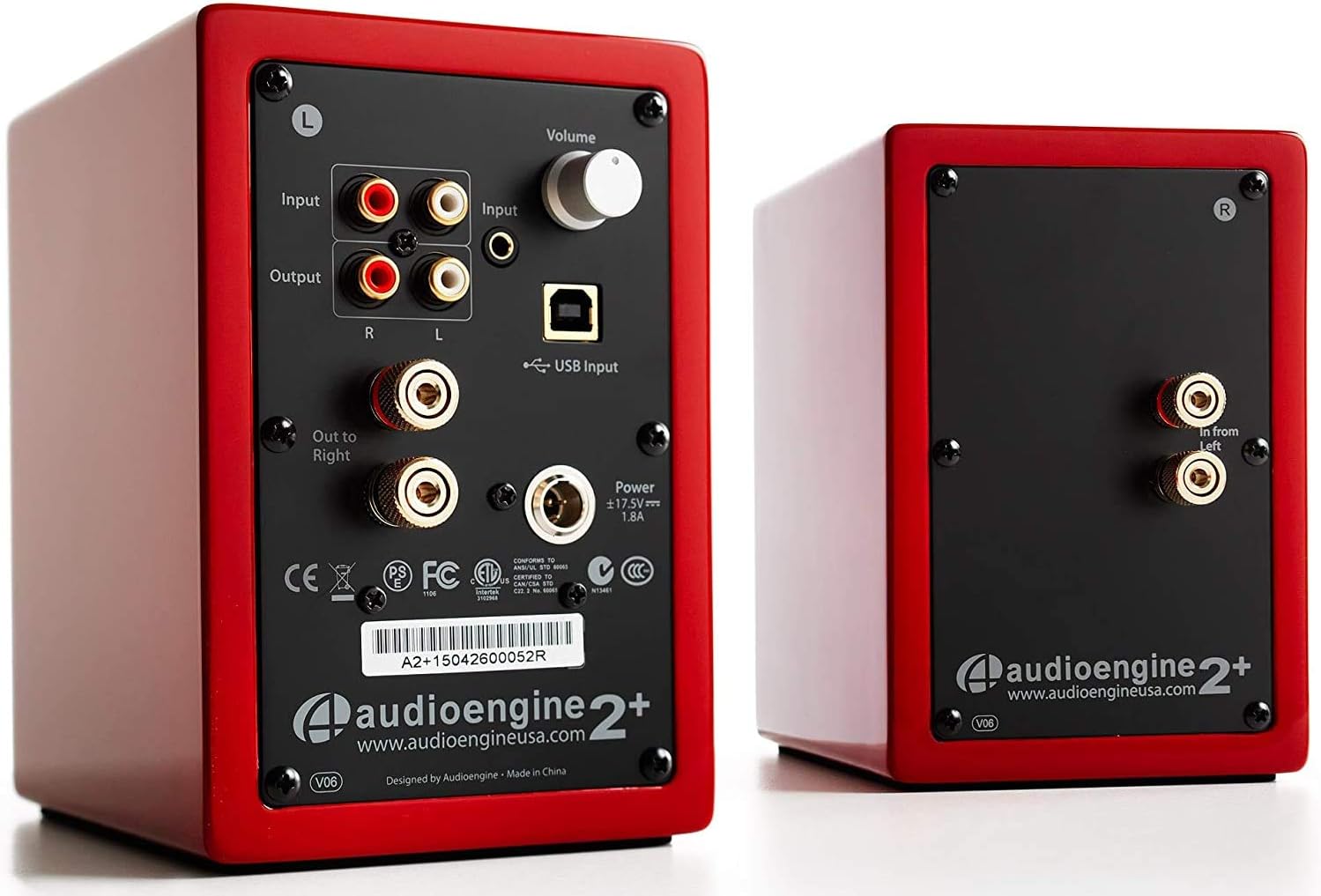
Image: Rear panel of the active speaker, highlighting various input and output connections.

Image: A detailed diagram of the A2+ speaker connections, including volume, inputs, and outputs.
ווידעא: אן איבערview of the Audioengine A2+ speakers, demonstrating setup and features.
אפערירן אייערע רעדנערס
Once set up, operating your A2+ speakers is straightforward:
- באַנד קאָנטראָל: Adjust the volume using the knob on the active speaker. You can also control volume from your connected device.
- אַרייַנשרייַב סעלעקציע: The A2+ automatically detects and prioritizes active inputs. If multiple inputs are connected, ensure only one is playing audio at a time for optimal performance.
- בלועטאָאָטה קאַנעקטיוויטי: The A2+ features Bluetooth for wireless audio streaming. Refer to your device's Bluetooth pairing instructions and select "Audioengine A2+" from the available devices.
- סובוואָאָפער רעזולטאַט: The variable audio output allows for easy connection to a subwoofer (e.g., Audioengine S8) for enhanced bass.

Image: Versatile playback options for the A2+ speakers, illustrating connections for phone, USB, and turntable.
Video: Demonstrates various ways to play music through Audioengine speakers, highlighting different connectivity options.
וישאַלט
To ensure the longevity and optimal performance of your Audioengine A2+ speakers, follow these maintenance guidelines:
- רייניקונג: Use a soft, dry cloth to clean the speaker cabinets. Avoid using harsh chemicals or abrasive cleaners.
- שטויב שוץ: When not in use, consider covering the speakers with the included microfiber bags to protect them from dust.
- ווענטילאַטיאָן: Ensure the speakers have adequate airflow around them to prevent overheating. Do not block the rear panel.
- ויסמיידן נעץ: Keep the speakers away from water and excessive humidity.
טראָובלעשאָאָטינג
If you encounter issues with your A2+ speakers, try the following common troubleshooting steps:
- קיין קול:
- Check all cable connections (power, speaker wire, audio input).
- Ensure the volume knob on the active speaker is turned up.
- Verify the volume on your connected device is not muted or too low.
- If using USB, ensure your computer's audio output is set to the A2+ speakers.
- פאַרקרימט סאָונד:
- Reduce the volume on both the speakers and your source device.
- קוק פֿאַר פרייַ קאַנעקשאַנז אָדער דאַמידזשד קייבאַלז.
- זייט זיכער אז די אודיאָ מקור איז נישט איבערגעטריבן.
- בלועטאָאָטה פּערינג ישוז:
- Ensure the speakers are in pairing mode (refer to your device's Bluetooth settings).
- ריקט אייער דעווייס נענטער צו די רעדנערס.
- Forget the device on your source and re-pair.
פֿאַר מער דעטאַלירטע פּראָבלעם־לייזונג, זעט די באַאַמטער באַניצער מאַנואַל (פּדף).
ספּעסאַפאַקיישאַנז
| שטריך | דעטאַל |
|---|---|
| מאָדעל נאָמען | A2+ Red |
| רעדנער טיפּ | ביכערשעלף |
| ספּעציעלע שטריך | ווירעלעסס |
| רעקאָממענדעד ניצט | מוזיק |
| קאַמפּאַטאַבאַל דעוויסעס | Smartphone, Tablet, MP3 Player, Desktop, Television, Laptop |
| רעדנער מאַקסימום רעזולטאַט מאַכט | 60 וואטס |
| קאַנעקטיוויטי טעכנאָלאָגיע | Bluetooth - Wired |
| אַודיאָ רעזולטאַט מאָדע | סטערעאָ |
| פּראָדוקט דימענשאַנז | 5.25"ד רענטגענ 4"וו רענטגענ 6"ה |
| פּונקט וואָג | 3.6 פונט |
| וואָאָפער דיאַמעטער | 2 אינטשעס |
| סיגנאַל-צו-נויז ראַטיאָ | 95 דב |
וואָראַנטי און שטיצן
Audioengine stands behind the quality of their products. All Audioengine products come with a 3-יאָר טראַנספעראַבאַל וואָראַנטי. For warranty claims or technical support, please refer to the official Audioengine webזייטל אדער די קאָנטאַקט אינפֿאָרמאַציע וואָס איז צוגעשטעלט אין אייער פּראָדוקט פּאַקאַדזשינג.
Additional resources can be found in the comprehensive באַניצער מאַנואַל (פּדף).