
1. פּראָדוקט איבערview
The UDIRC U818A-HD is a 2.4GHz 4-channel, 6-axis headless RC quadcopter equipped with an HD camera. It is designed for both beginners and experienced pilots, offering stable flight and easy control. Key features include headless mode for simplified orientation, 6-axis gyro for stability, and 360-degree eversion capabilities.

Image: The UDIRC U818A-HD quadcopter and its remote control unit.
2. פּעקל אינהאַלט
באַשטעטיקן אַז אַלע זאכן זענען פאַראַן אין פּעקל:
- UDI U818A-HD RC Quadcopter
- ווייַט קאָנטראָל
- LiPO Battery (2 included)
- 4 גיגאבייט מיקראָ סד זכּרון קאַרטל
- וסב טשאַרדזשער
- ספּער פּראַפּעלערז
- שרויפנ - ציער
- ינסטראַקשאַנז מאַנואַל
3. סעטאַפּ
3.1 באַטאַרייע ייַנמאָנטירונג
- Open the battery compartment on the quadcopter's underside.
- Connect the LiPO battery to the quadcopter's power connector.
- לייגט פֿאָרזיכטיק די באַטאַרייע אַרײַן אין דעם אָפּטייל און פֿאַרמאַכט דעם דעקל.
3.2 פּראָפּעלער ינסטאַלירונג
Ensure propellers are correctly oriented. Propellers marked 'A' should be installed on motor shafts 'A', and 'B' on 'B'. Secure them with the provided screws.
3.3 אַפּאַראַט ינסטאַלירונג
Attach the HD camera to the designated slot on the quadcopter's underside. Connect the camera cable to the port. Insert the 4GB Micro SD card into the camera's slot.

בילד: אונטערזייט view of the quadcopter, highlighting the camera and LED lights.
3.4 רימאָוט קאָנטראָל סעטאַפּ
Insert 4 AA batteries (not included) into the remote control. Power on the remote control.
3.5 Binding and Calibration
- שטעלט דעם קוואַדקאָפּטער אויף אַ פלאַכער, גלייכער ייבערפלאַך.
- Turn on the quadcopter, then turn on the remote control.
- Move the left joystick (throttle) all the way up, then all the way down. The quadcopter's lights will stop flashing, indicating successful binding.
- To calibrate the gyroscope, move both joysticks to the bottom-right corner simultaneously until the lights flash and then become solid.

Image: The UDIRC U818A-HD quadcopter and its remote control, ready for operation.
4. אַפּערייטינג ינסטרוקטיאָנס
4.1 גרונטלעכע פלי קאָנטראָלן
- גאז (לינקער דזשויסטיק אַרויף/אַראָפּ): קאָנטראָלירט הייך.
- יאָ (לינקער דזשויסטיק לינקס/רעכטס): Rotates the quadcopter horizontally.
- פאָרווערטס/צוריק (רעכטער דזשויסטיק אַרויף/אַראָפּ): קאָנטראָלירט פאָרווערטס און צוריקווערטס באַוועגונג.
- לינקס/רעכטס זייטיק פלי (רעכטער דזשויסטיק לינקס/רעכטס): Controls sideward movement.
4.2 Headless Mode (IOC)
The Headless/IOC function allows the quadcopter to fly based on the pilot's orientation, regardless of the drone's actual front direction. This simplifies control for beginners. Activate and deactivate using the dedicated button on the remote control.
4.3 360° Eversion
Press the 360° Eversion button on the remote control, then move the right joystick in any direction to perform a continuous roll. Ensure sufficient altitude before attempting this maneuver.
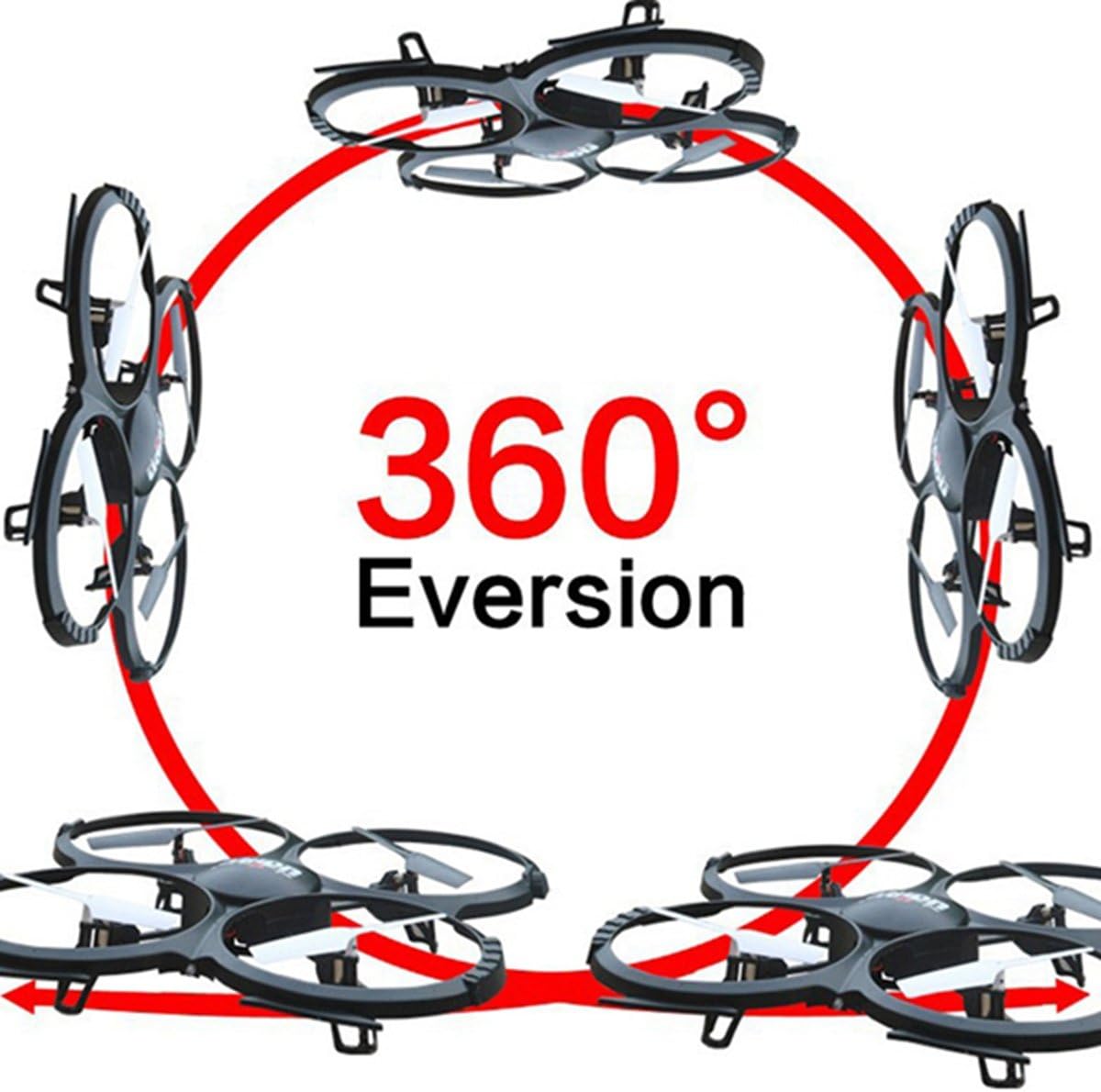
Image: Diagram showing the quadcopter performing a 360-degree eversion.
4.4 נעמען בילדער און ווידיאס
Use the dedicated buttons on the remote control to capture photos or start/stop video recording. Ensure the Micro SD card is inserted correctly in the camera. Recorded media can be accessed by removing the SD card and inserting it into a computer.
5. וישאַלט
- באַטערי זאָרגן: Charge batteries using the provided USB charger. Do not overcharge. Store batteries in a cool, dry place.
- רייניקונג: Use a soft, dry cloth to clean the quadcopter. Avoid water or harsh chemicals.
- פּראָפּעלער פאַרבייַט: If propellers are damaged, replace them with spare parts. Ensure correct 'A' and 'B' propeller placement.
6. טראָובלעשאָאָטינג
- Quadcopter not responding: Ensure the battery is charged, the remote control has fresh batteries, and the quadcopter is properly bound and calibrated.
- נישט-סטאַבילער פלי: Recalibrate the gyroscope on a flat surface. Check for damaged propellers and replace if necessary.
- קאַמעראַ רעקאָרדירט נישט: Verify the Micro SD card is inserted correctly and has sufficient free space. Ensure the camera cable is securely connected.
7. ספּעסאַפאַקיישאַנז
| שטריך | באַשרייַבונג |
|---|---|
| סאָרט | יודירק |
| מאָדעל נאָמען | U818A |
| קאָנטראָל טיפּ | RC |
| קאַנעקטיוויטי טעכנאָלאָגיע | וסב, ראַדיאָ אָפטקייַט |
| ווידעא קאַפּטורע רעסאָלוטיאָן | 720p (1280 x 720 Pixels) |
| עפעקטיוו נאָך האַכלאָטע | 1 מפּ |
| באַטאַרייע קאַפּאַציטעט | 500 מיליamp שעהן |
| פּונקט וואָג | 0.41 קילאָגראַמס |
| מאַקסימום קייט | 100 מעטער |
| מאַטעריאַל | פּלאַסטיק |
| נומער דימענשאַנז ל x וו x ה | 13.4"ל x 13"בר x 2.2"ה |
8. וואָראַנטי און שטיצן
פֿאַר וואָראַנטי אינפֿאָרמאַציע און טעכנישע שטיצע, ביטע זען די פאַבריקאַנט'ס באַאַמטער webזייטל אדער קאנטאקט זייער קאסטומער סערוויס דעפארטמענט. האלט אייער קויף קוויטל אלס באווייז פון קויפן.