
1. הקדמה
The Flexson Analog to Digital Converter is designed to bridge the gap between audio devices with analog outputs and modern audio systems that primarily use digital inputs, such as the SONOS PLAYBAR. This device allows you to connect older televisions, CD players, or other audio sources with analog audio outputs (e.g., RCA or 3.5mm headphone jack) to a digital audio input (optical TOSLINK) on your sound system. It ensures reliable and lossless audio signal transmission, integrating your existing equipment with digital-only setups.
2. זיכערקייַט אינפֿאָרמאַציע
- מאַכט צושטעלן: ניצט נאָר דעם צוגעשטעלטן מאַכט אַדאַפּטער. זיכערט זיך אַז דער וואָלומען איזtage שוועבעלעך דיין היגע מאַכט צושטעלן.
- נעץ: Do not expose the device to water, rain, or excessive humidity. Avoid placing liquids near the unit.
- ווענטילאַטיאָן: Ensure adequate ventilation around the unit. Do not block any ventilation openings.
- היץ: האַלט דעם אַפּאַראַט אַוועק פון היץ קוועלער ווי ראַדיאַטאָרן, היץ רעגיסטערס, אויוון, אָדער אַנדערע היץ-פּראָדוצירנדיקע אַפּאַראַטן.
- רייניקונג: אָפּשטעקן די עלעקטריציטעט איידער איר רייניגט. ניצט אַ טרוקענעם, ווייכן שטאָף. ניצט נישט קיין פליסיקע רייניגער אדער אַעראָזאָל רייניגער.
- סערוויס: דו זאלסט נישט פּרווון צו דינען דעם פּראָדוקט זיך. קאָנטאַקט אַלע קוואַלאַפייד סערוויס פּערסאַנעל.
3. פּעקל אינהאַלט
ביטע אָפּהאַקן דאָס קעסטל פֿאַר די פֿאָלגנדיקע זאַכן:
- Flexson Analog to Digital Converter Unit
- מאַכט אַדאַפּטער
- באַניצער מאַנואַל (דעם דאָקומענט)
- Note: Audio cables (RCA, 3.5mm, Optical) are typically sold separately.
4. סעטאַפּ
Follow these steps to connect your Flexson Analog to Digital Converter:
- פֿאַרבינדן אַנאַלאָג אַודיאָ מקור: Connect an analog audio cable (e.g., 3.5mm stereo jack or RCA stereo cables) from your source device (e.g., TV headphone output, CD player RCA output) to the corresponding analog input port on the Flexson converter.
- פֿאַרבינדן דיגיטאַלע אַודיאָ אַרויסגאַנג: Connect an optical TOSLINK cable from the 'Optical Out' port on the Flexson converter to the digital optical input on your SONOS PLAYBAR or other digital audio system.
- פאַרבינדן מאַכט: Plug the provided power adapter into the 'DC 5V' input on the Flexson converter, then plug the adapter into a wall outlet. The converter will power on automatically.
- Select Input on Audio System: On your SONOS PLAYBAR or digital audio system, select the optical input as the audio source.
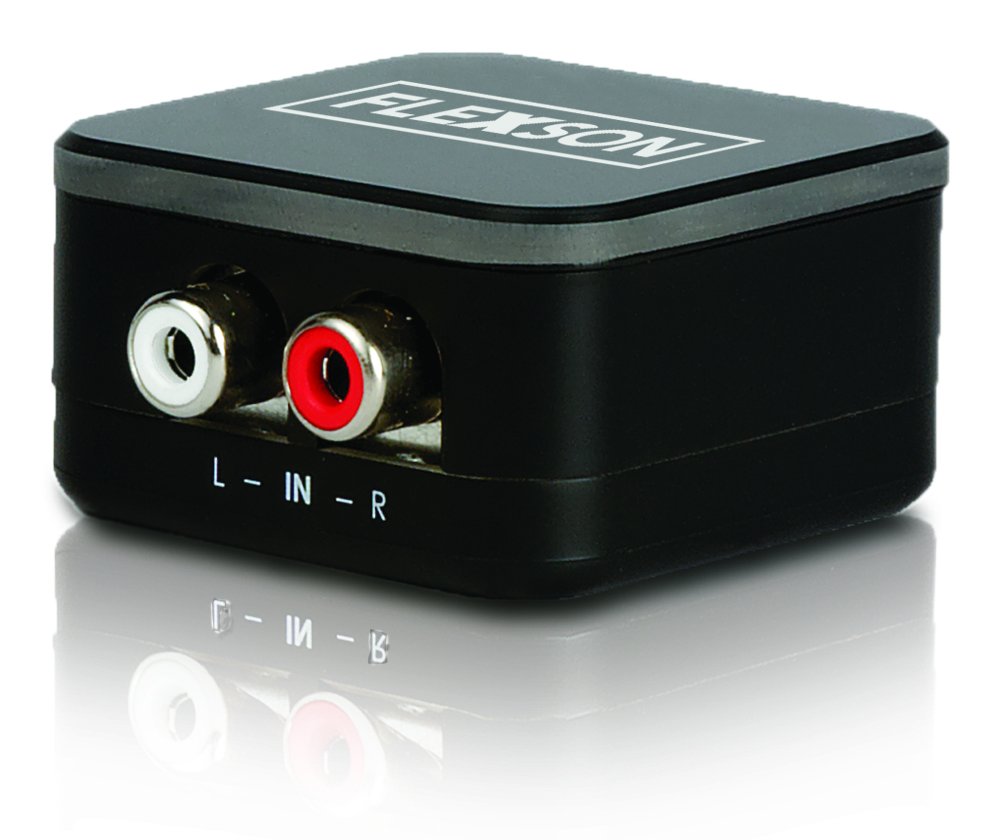
Image showing the compact Flexson Analog to Digital Converter unit with its various ports for analog input and digital optical output.
5. אָפּערייטינג
Once properly connected and powered, the Flexson Analog to Digital Converter operates automatically. It converts the incoming analog audio signal into a digital optical signal without requiring any user interaction. Ensure your source device is playing audio and your digital audio system is set to the correct input to hear sound.
6. וישאַלט
- רייניקונג: Use a soft, dry cloth to wipe the exterior of the converter. Do not use abrasive cleaners or solvents.
- סטאָרידזש: If storing the device for an extended period, disconnect it from power and store it in a cool, dry place away from direct sunlight.
- קאַבלע פאַרוואַלטונג: Ensure all cables are connected securely and are not under strain or bent sharply.
7. טראָובלעשאָאָטינג
קיין סאָונד רעזולטאַט
- טשעק מאַכט: Ensure the power adapter is securely connected to the converter and a working power outlet.
- באַשטעטיקן קאַנעקשאַנז: Double-check that all analog and digital audio cables are firmly connected to their respective ports on the source, converter, and audio system.
- מקור מיטל אויסגאַנג: Confirm that your analog source device (e.g., TV) is outputting audio through the connected port and its volume is turned up.
- Audio System Input: Ensure your SONOS PLAYBAR or digital audio system is set to the correct optical input.
- קאַבלע אָרנטלעכקייַט: Test with different audio cables if possible, to rule out faulty cables.
שלעכטע קלאַנג קוואַליטעט / דיסטאָרשאַן
- מקור באנד: Ensure the analog source device's volume is not set too high, which could cause distortion before conversion.
- קאַבלע קוואַליטעט: Use high-quality audio cables to minimize interference.
- ינטערפיראַנס: Keep the converter and audio cables away from strong electromagnetic fields or other electronic devices that might cause interference.
8. ספּעסאַפאַקיישאַנז
| סאָרט | פלעקסאָן |
| מאָדעל | FLXA2D1021 |
| ינפּוט צובינד | Analog (e.g., 3.5mm, RCA stereo) |
| רעזולטאַט צובינד | אָפּטיש (TOSLINK) |
| פּונקט וואָג | 0.16 קילאָגראַמס |
| מאַכט צושטעלן | גלייכשטראָם 5V (דורך די אַרייַנגעשלאָסענעם אַדאַפּטער) |
9. וואָראַנטי און שטיצן
This Flexson product comes with a standard manufacturer's warranty. Please refer to the warranty card included with your purchase or visit the official Flexson website for detailed warranty terms and conditions. For technical support, troubleshooting assistance, or to inquire about replacement parts, please contact Flexson customer support through their official channels.