
Bios 4745928
בייאָוס פּראַפעשאַנאַל ווירעלעסס פלייש טערמאָמעטער
מאָדעל: 4745928
הקדמה
The BIOS Professional Wireless Meat Thermometer is designed to accurately measure the internal temperature of various meats during cooking. It features a wireless monitor that receives temperature readings from a stainless steel probe, allowing you to monitor your food from a distance. This manual provides instructions for setup, operation, maintenance, and troubleshooting to ensure optimal performance of your device.

Image: The BIOS Professional Wireless Meat Thermometer, showing the main display unit, the stainless steel probe connected by a wire, and the base unit.
פּראָדוקט קאַמפּאָונאַנץ
Your BIOS Professional Wireless Meat Thermometer package includes the following components:
- Wireless Display Unit: The main unit with a digital screen for displaying temperature and timer.
- ומבאַפלעקט שטאָל פּראָבע: A durable probe designed to be inserted into meat for temperature measurement.
- Probe Cable: Connects the stainless steel probe to the display unit.
- Base Unit/Stand: Provides stability for the display unit and may house the wireless transmitter.
- גאַרטל קליפּ: Located on the back of the display unit for easy portability.

בילד: א נאָענטע בילד view of the stainless steel meat probe and its connecting cable.
סעטאַפּ
- ייַנמאָנטירונג פון באַטאַרייע:
Locate the battery compartment on the back of the wireless display unit. Insert the required batteries (typically AAA, not included) ensuring correct polarity (+/-). Close the battery compartment securely.
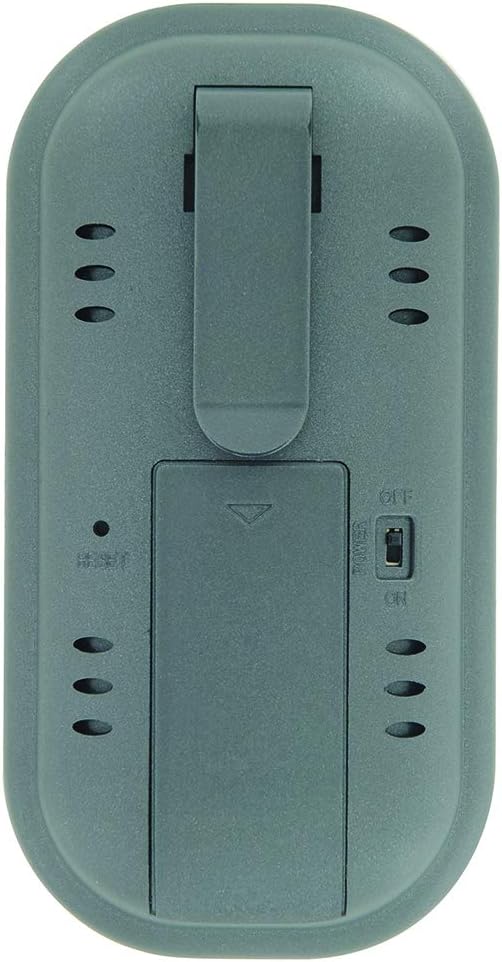
Image: The rear side of the thermometer, displaying the battery compartment cover and the integrated belt clip.
- פּראָבע קשר:
Insert the jack end of the stainless steel probe cable firmly into the designated port on the side of the wireless display unit. Ensure a secure connection for accurate readings.
- מאַכט אויף:
Slide the ON/OFF switch, usually located on the back or side of the unit, to the "ON" position. The display should illuminate.
אַפּערייטינג ינסטראַקשאַנז
1. Selecting Meat Type and Doneness (Pre-programmed Settings)
- דרוק די פלייש button to cycle through different meat types (e.g., Beef, Poultry, Pork, Fish).
- Once the desired meat type is selected, press the געשמאַק button to select the desired doneness level (e.g., Rare, Medium, Well Done). The target temperature will automatically adjust based on your selection.
2. Manual Temperature Setting
If you prefer to set a custom target temperature:
- דרוק די מאָדע button until the target temperature setting is highlighted or blinking.
- ניצן די MIN און סעק buttons (or up/down arrows if present) to adjust the target temperature to your desired value.
- דרוק מאָדע again to confirm the setting or to exit the setting mode.
3. ניצן די טיימער פונקציע
The thermometer includes a count up/down timer:
- To set a countdown timer: דרוק די MIN און סעק buttons to set the desired time. Press אָנהייב / האַלטן צו אָנהייבן.
- צו ניצן ווי אַ צייל-אַרויף טייַמער: Ensure the timer is at 0:00, then press אָנהייב / האַלטן.
- דרוק קלאָר צו באַשטעטיק די טייַמער.
4. אריינשטעלן די פּראָבע
Carefully insert the stainless steel probe into the thickest part of the meat, avoiding bones or gristle. Ensure the probe tip is fully embedded for accurate internal temperature readings.
5. Monitoring Temperature and Alarm
The current internal temperature of the meat will be displayed on the screen. When the meat reaches the set target temperature, an alarm will sound to notify you. The wireless range is approximately 30 meters (100 feet), allowing you to monitor from a distance.
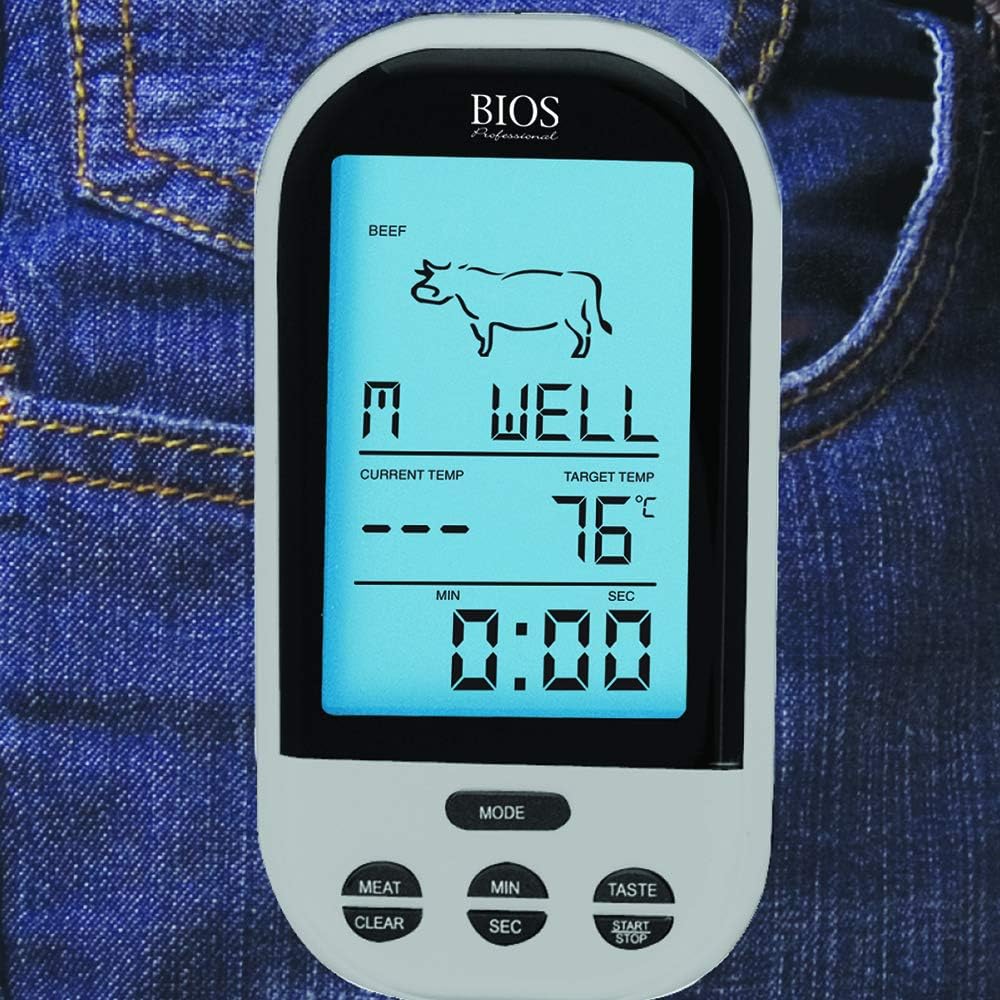
Image: The wireless display unit shown clipped to a jeans pocket, demonstrating its portability during use.
וישאַלט
- רייניקונג די פּראָבע: After each use, carefully clean the stainless steel probe with warm, soapy water. Wipe thoroughly with a damp שטאָף און טרוקן גאָר. Do not immerse the probe cable or the display unit in water. The product care instructions specify "Hand Wash Only" for the probe.
- רייניקונג פון די דיספּליי יוניט: Wipe the display unit with a soft, damp שטאָף. דו זאלסט נישט נוצן אַברייסיוו קלינערז אָדער ייַנטונקען אין וואַסער.
- סטאָרידזש: האַלט דעם טערמאָמעטער און פּראָבע אין אַ ריינעם, טרוקענעם אָרט ווען זיי ווערן נישט גענוצט.
- באַטערי פאַרבייַט: Replace batteries when the display becomes dim or the unit stops functioning correctly. Remove batteries if storing for extended periods to prevent leakage.
טראָובלעשאָאָטינג
| פּראָבלעם | מעגלעך סיבה | לייזונג |
|---|---|---|
| קיין דיספּלעי אָדער טונקעל דיספּלעי | נידעריגע אדער טויטע באַטעריעס; אומרעכטע באַטעריע אינסטאַלאַציע. | Replace batteries with new ones; Check battery polarity. |
| ומפּינקטלעך טעמפּעראַטור רידינגז | Probe not fully inserted; Probe tip touching bone/gristle; Damaged probe or cable. | Re-insert probe into thickest part of meat, away from bones; Inspect probe and cable for damage. If damaged, replace probe. |
| קיין וויירליס קשר | Out of range; Obstructions between units; Interference. | Move display unit closer to the probe; Reduce obstructions; Avoid strong electromagnetic sources. |
| דער שרעק קלינגט נישט | Alarm function not enabled; Volume too low. | Ensure alarm is activated in settings; Check for volume controls if available. |
ספּעסאַפאַקיישאַנז
| שטריך | דעטאַל |
|---|---|
| מאָדעל נומער | 4745928 |
| סאָרט | ביאָס |
| קאַנעקטיוויטי טעכנאָלאָגיע | ווירעלעסס |
| ווירעלעסס ראַנגע | אַרויף צו 30 עם (100 פט) |
| ווייַז טיפּ | דיגיטאַל |
| מאַטעריאַל | Stainless Steel (Probe), Plastic (Unit) |
| ספּעציעלע פֿעיִקייטן | Temperature Alarm, Count up/down timer, Pre-programmed settings, Manual temperature setting, Easy-Use Belt Clip |
| פּראָדוקט דימענשאַנז | 5.08 x 6.6 x 13.51 ס״מ (אומגעפער 2 x 2.6 x 5.3 אינטשעס) |
| פּונקט וואָג | 185 ג (אומגעפער 0.4 פונט) |
| מאַכט מקור | באַטערי |
וואָראַנטי און שטיצן
For information regarding warranty coverage, product support, or to purchase replacement parts, please refer to the manufacturer's official webזייטל אדער קאנטאקט זייער קאסטומער סערוויס דעפארטמענט. האלט אייער קויף קוויטל אלס באווייז פון קויפן פאר גאראנטיע קליימס.
Manufacturer: Thermor LTD
Ask a question about this manual
Ask about setup, troubleshooting, compatibility, parts, safety, or missing instructions. Manuals+ will review the question and use this page’s manual context to help answer it.