
1. סעטאַפּ
1.1 אויספּאַקן און אינהאַלט
Carefully remove the TV and all accessories from the packaging. Ensure all components are present:
- Sharp LC-40LE653U 40-Inch Smart LED TV
- ווייַט קאָנטראָל
- 2 אַאַ באַטעריז
1.2 שטיין ייַנמאָנטירונג
If placing the TV on a table, attach the included stand. Refer to the diagram below for proper assembly. Ensure all screws are securely fastened.
1.3 קאַנעקטינג פונדרויסנדיק דעוויסעס
Connect your external devices such as cable boxes, Blu-ray players, or gaming consoles to the TV's input ports. The TV features multiple connectivity options.


Available ports include:
- הדמי: 2 ports for high-definition audio and video. One HDMI port supports MHL (Mobile High-Definition Link).
- וסב: 1 port for media playback or connecting a USB device.
- עטהערנעט: פֿאַר אַ דראָטיקער נעץ פֿאַרבינדונג.
- Component/Video: For older video devices.
- DTV/TV (Antenna): פֿאַר פֿאַרבינדן אַן אַנטענע אָדער קאַבל טעלעוויזיע פֿיד.
- אַודיאָ אָוט: Optical for digital audio, and RCA for analog audio.
1.4 מאַכט קאַנעקשאַן
After connecting all necessary devices, plug the TV's power cord into a wall outlet.
1.5 ערשט סעטאַפּ
Upon first power-on, the TV will guide you through an initial setup process. This includes language selection, time zone, and network configuration. For Wi-Fi setup, select your network and enter the password.
2. אַפּערייטינג ינסטרוקטיאָנס
2.1 רימאָוט קאָנטראָל פאַנגקשאַנז
The remote control allows you to access all TV functions. Insert the two AA batteries into the remote control, ensuring correct polarity.

- מאַכט (רויטער קנעפּל): טורנס די טעלעוויזיע אויף אָדער אַוועק.
- אַרייַנשרייַב: Selects the input source (HDMI, TV, USB, etc.).
- VOL +/-: אַדזשאַסץ די באַנד מדרגה.
- CH +/-: טוישט טעלעוויזיע קאַנאַלן.
- נאַוויגאַציע קנעפּלעך (אַרויף/אַראָפּ/לינקס/רעכטס/אַרייַן): געניצט צו נאַוויגירן מעניוז און אויסקלייבן אָפּציעס.
- קלוג: Accesses the Smart Central Apps menu.
- מעניו: Opens the main TV menu for settings adjustments.
- נעטפליקס: Direct access button for the Netflix application.
2.2 Smart TV Features (Smart Central Apps)
The Sharp LC-40LE653U features Smart Central Apps, providing access to various online services and a web browser. Ensure your TV is connected to the internet via Wi-Fi or Ethernet.

- אַקסעס אַפּפּס: Press the 'SMART' button on your remote to open the Smart Central Apps menu.
- שטיצט סערוויסעס: Includes Hulu Plus, Netflix, Pandora, Vudu, and YouTube.
- Web בלעטערער: ניצן די געבויט-אין web browser for general internet browsing. Navigation is done via the remote control.
2.3 Wallpaper Mode
When the TV is turned off, Wallpaper Mode can display virtually any image. To use this feature, connect a USB drive containing your desired images to the TV's USB port. Navigate to the Wallpaper Mode settings in the TV menu to select and configure your images.
3. וישאַלט
3.1 רייניקן דעם טעלעוויזאר
צו רייניקן דעם עקראַן, ווישט עס אָפּ מיט אַ ווייכן, טרוקענעם, לינט-פֿרײַעם שטאָף. פֿאַר שווערע פֿלעקן, ווישט עס אַ ביסלampen the cloth with water or a specialized screen cleaner. Avoid using harsh chemicals, abrasive cleaners, or direct spraying of liquids onto the screen or cabinet.
Clean the TV cabinet with a soft, dry cloth. Ensure the TV is unplugged before cleaning.
3.2 ווייכווארג דערהייַנטיקונגען
Periodically check for software updates through the TV's settings menu to ensure optimal performance and access to the latest features. Updates can be performed via the internet connection.
4. טראָובלעשאָאָטינג
If you encounter issues with your Sharp LC-40LE653U TV, refer to the following common solutions:
- קיין מאַכט: Ensure the power cord is securely plugged into both the TV and a working wall outlet. Check if the power indicator light on the TV is on.
- קיין בילד/קלאַנג: Verify the correct input source is selected using the 'Input' button on the remote. Check all cable connections (HDMI, component, etc.) are secure.
- שלעכטע בילד קוואַליטעט: אַדזשאַסטירן בילד סעטטינגס (ברייטקייט, קאָנטראַסט, שאַרפקייט) אין די טעלעוויזיע מעניו. זיכער מאַכן אַז די אַרייַנשרייַב מקור גיט אַ הויך-קוואַליטעט סיגנאַל.
- קיין אינטערנעט פֿאַרבינדונג: Check your Wi-Fi router or Ethernet cable connection. Re-enter your Wi-Fi password in the TV's network settings. Restarting your router may resolve connectivity issues.
- רימאָוט קאָנטראָל נישט ארבעטן: טוישט די באַטעריעס אין דער ווײַטקאָנטראָל. מאַכט זיכער אַז עס זענען נישטאָ קיין שטערונגען צווישן דער ווײַטקאָנטראָל און דעם טעלעוויזיע'ס IR סענסאָר.
For more detailed troubleshooting steps, consult the full online manual or contact customer support.
5. ספּעסאַפאַקיישאַנז
Key technical specifications for the Sharp LC-40LE653U 40-Inch Smart LED TV:
| שטריך | באַשרייַבונג |
|---|---|
| מאָדעל נומער | LC-40LE653U |
| פאַרשטעלן גרייס | 39.5 אינטשעס (40-אינטש קלאַס) |
| ווייַז טעכנאָלאָגיע | לקד |
| האַכלאָטע | 1080p (פול HD) |
| דערפרישן קורס | 60 הז |
| אַספּעקט פאַרהעלטעניש | 16:9 |
| קאַנעקטיוויטי טעכנאָלאָגיע | ווי-פי |
| ייַזנוואַרג צובינד | עטהערנעט, הדמי, וסב |
| Total Number of HDMI Ports | 2 (one with MHL support) |
| גאַנץ וסב פּאָרץ | 1 |
| אַודיאָ אַרייַנשרייַב | HDMI, אָפּטיש, USB |
| רעדנער מאַקסימום רעזולטאַט מאַכט | 20 וואטס |
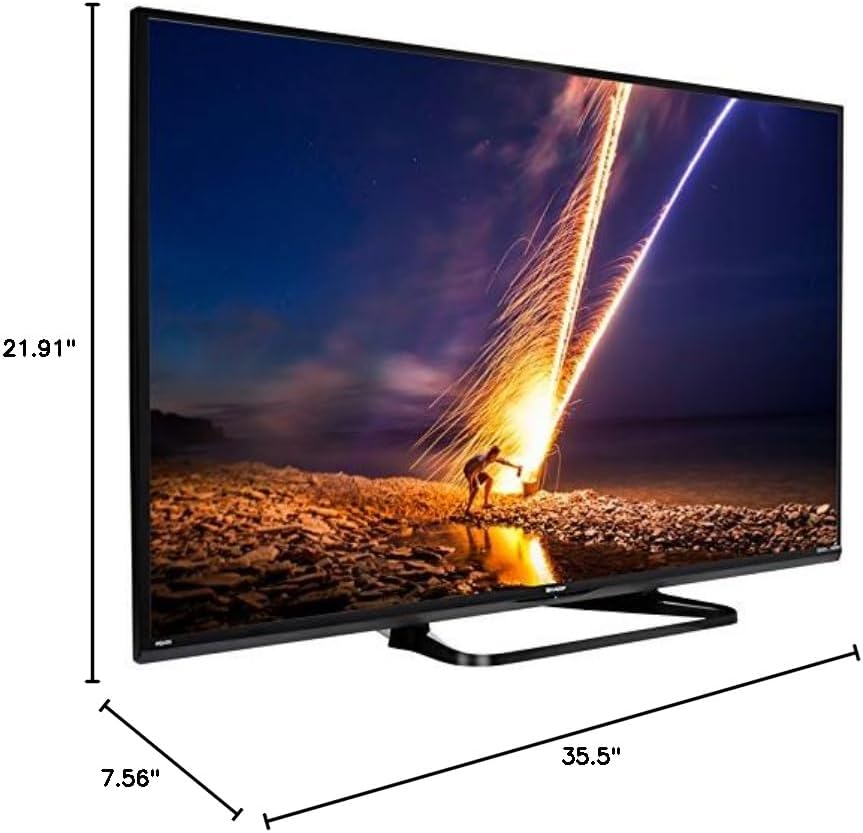
| פּראָדוקט דימענשאַנז (ד רענטגענ וו רענטגענ ה) | 7.56" x 35.5" x 21.91" |
| פּונקט וואָג | 16.3 פונט |
| מאַונטינג טיפּ | טיש בארג |
| שטיצט אינטערנעט באַדינונגס | Hulu Plus, Netflix, Pandora, Vudu, YouTube |
| סערטיפיקאַטעד ענערגיע שטערן | יא |
6. וואָראַנטי און שטיצן
6.1 פּראָדוקט וואָראַנטי
This Sharp LC-40LE653U TV comes with a 1-יאָר לימיטעד וואָראַנטיביטע באַהאַלטן אייער קויפן-באַווייַז פֿאַר וואָראַנטי-קליימז. די וואָראַנטי דעקט פאַבריקאַציע-דעפעקטן אונטער נאָרמאַלע באַניץ-באַדינגונגען.
6.2 קונה שטיצן
For technical assistance, troubleshooting beyond this manual, or warranty service, please contact Sharp customer support. Refer to the official Sharp webוועבזייטל אדער אייער פּראָדוקט רעגיסטראַציע קאַרטל פֿאַר די מערסט אַקטועלע קאָנטאַקט אינפֿאָרמאַציע.