
הקדמה
א דאנק פארן קויפןasing the Soundmaster DAB500SI Portable Digital Radio. This manual provides essential information for the safe and efficient operation of your device. Please read it thoroughly before use and retain it for future reference.
פּראָדוקט איבערview
The Soundmaster DAB500SI is a compact and versatile digital radio, offering both DAB/DAB+ and FM reception. It features a clear display, intuitive controls, and a headphone output for personal listening. Its portable design allows for use in various locations.
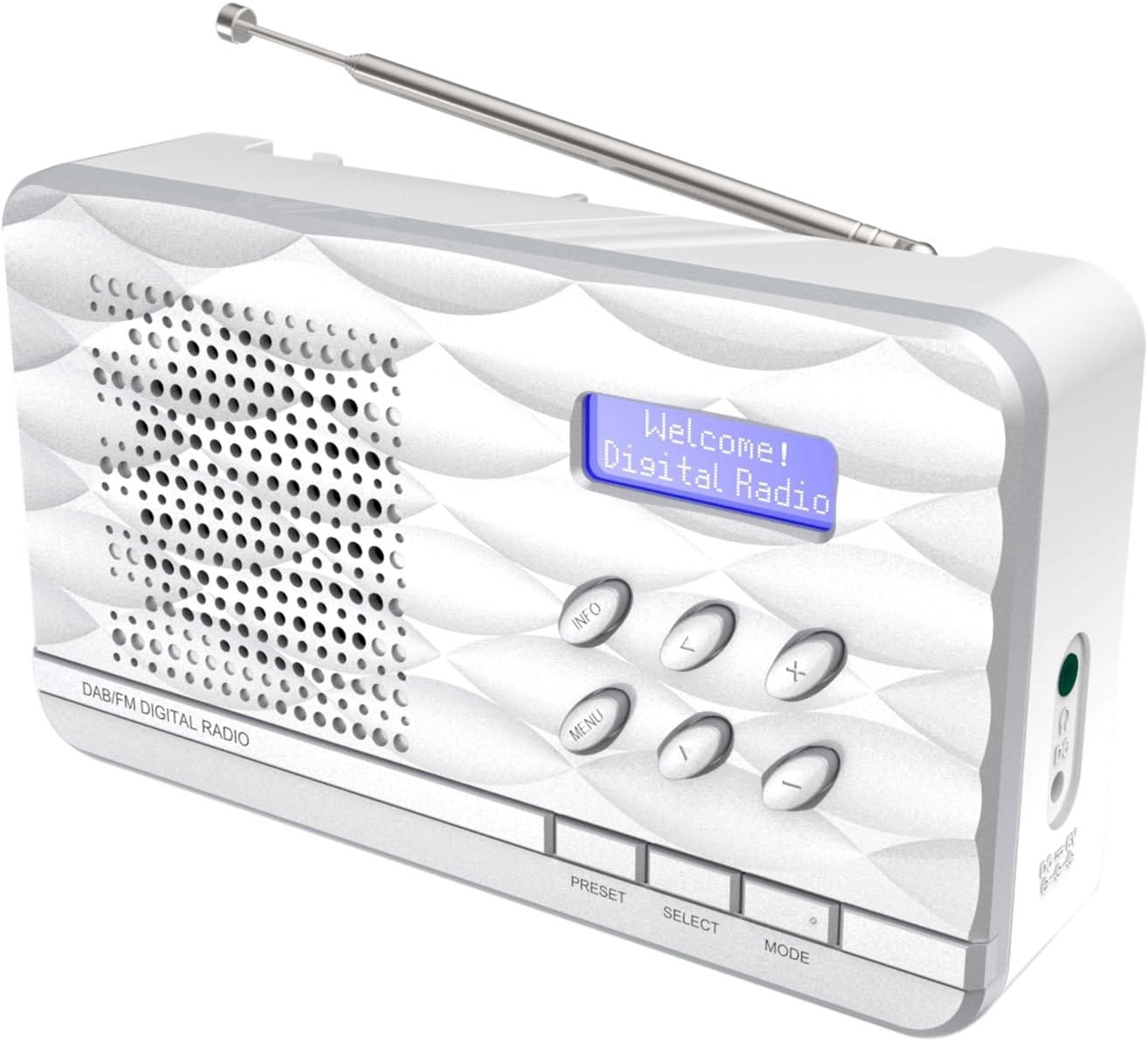
פיגורע 1: Soundmaster DAB500SI Portable Digital Radio. The image shows the silver radio with its extendable antenna, front speaker grille, blue backlit display showing "Welcome! Digital Radio", and control buttons labeled INFO, MENU, PRESET, SELECT, MODE, and navigation arrows. Dimensions are indicated as 19cm (width), 11cm (height), and 7cm (depth).
סעטאַפּ
1. ונפּאַקקינג
Carefully remove the radio from its packaging. Ensure all components are present: the DAB500SI radio unit and this user manual.
2. מאַכט קאַנעקשאַן
The DAB500SI is powered by mains electricity. Locate the DC IN port on the side of the unit. Connect the provided power adapter to this port and then plug it into a standard wall outlet.
Alternatively, the unit can be powered by 4x AA batteries (not included) for portable use. Open the battery compartment on the rear of the unit and insert the batteries, observing correct polarity.
3. אַנטענע אַדזשאַסטמענט
Extend the telescopic antenna fully for optimal DAB/DAB+ and FM reception. Adjust its position to achieve the best signal quality.
אַפּערייטינג ינסטראַקשאַנז
1. מאַכט אויף / אויסגעלאשן
דרוק די מאַכט button (usually combined with the MODE button or a dedicated button) to turn the radio on or off.
2. Mode Selection (DAB/FM)
דרוק די מאָדע button to switch between DAB/DAB+ and FM radio modes.
3. DAB/DAB+ Radio Operation
- ערשטער מאָל סעטאַפּ: When first powered on in DAB mode, the radio will automatically perform a full scan for available stations. This may take a few minutes.
- סטאַנציע סעלעקציע: ניצן די לינקס / רעכט navigation buttons (labeled < and > on the device) to browse through the list of available DAB stations. Press אויסקלייַבן צו באַשטעטיקן דיין ברירה.
- מאַנואַל סקאַן: If you move the radio to a new location or wish to update the station list, press MENU, then navigate to "Full Scan" or "Auto Scan" and press אויסקלייַבן.
- אינפֿאָרמאַציע ווייַז: דרוק די INFO button repeatedly to cycle through various information displays such as program type, signal strength, time, date, and DLS (Dynamic Label Segment) text.
4. עפעם ראַדיאָ אָפּעראַציע
- אַוטאָ סקאַן: אין FM מאָדע, דריקן און האַלטן די אויסקלייַבן button to perform an auto scan. The radio will scan and store available stations.
- מאַנואַל טונינג: ניצן די לינקס / רעכט navigation buttons (labeled < and > on the device) to manually tune the frequency in small increments.
- RDS Information: If available, RDS (Radio Data System) information such as station name and program type will be displayed. Press INFO to cycle through available RDS data.
5. פּרעסעץ
The radio supports up to 20 preset stations for both DAB and FM modes.
- Storing a Preset: שטעלט איין צו דער געוואונטשענער סטאנציע. דריקט און האלט די קנעפל PRESET button until "Preset Store" appears on the display. Use the navigation buttons to select a preset number (1-20) and press אויסקלייַבן צו באַשטעטיקן.
- צוריקרופן א פאָרסעט: דרוק די PRESET button briefly. Use the navigation buttons to select the desired preset number and press אויסקלייַבן צו שטימען צו אים.
6. באַנד קאָנטראָל
ניצן די +/- buttons (labeled + and - on the device) to adjust the volume level.
7. נוצן פון כעדפאָונז
Connect standard 3.5mm headphones to the headphone jack on the side of the unit for private listening. The internal speaker will be muted automatically.
וישאַלט
1. רייניקונג
Wipe the radio with a soft, dry cloth. Do not use abrasive cleaners, waxes, or solvents as they may damage the finish. Ensure the unit is unplugged before cleaning.
2. סטאָרידזש
If storing the radio for an extended period, remove the batteries to prevent leakage. Store in a cool, dry place away from direct sunlight and extreme temperatures.
3. באַטערי פאַרבייַט
When using batteries, replace all four AA batteries simultaneously when the low battery indicator appears or audio quality degrades. Ensure correct polarity when inserting new batteries.
טראָובלעשאָאָטינג
| פּראָבלעם | מעגלעך סיבה | לייזונג |
|---|---|---|
| קיין מאַכט | שטראָם אַדאַפּטער נישט פארבונדן אָדער דעפעקטיוו; באַטעריעס אויסגעשעפּט אָדער נישט ריכטיק אַרײַנגעשטעלט. | Check power adapter connection and wall outlet. Replace batteries, ensuring correct polarity. |
| Poor DAB/FM reception | Antenna not extended or poorly positioned; weak signal area. | Fully extend and adjust the telescopic antenna. Try repositioning the radio. Perform a full scan in DAB mode. |
| קיין געזונט פון רעדנער | די קול איז צו נידעריג; די כעדפאָונז זענען פארבונדן. | Increase volume. Disconnect headphones if not desired. |
| Radio freezes or becomes unresponsive | צייטווייליגע ווייכווארג פראבלעם. | Disconnect power for a few seconds, then reconnect. If using batteries, remove and reinsert them. |
ספּעסאַפאַקיישאַנז
- מאָדעל נומער: DAB500SI
- סאָרט: סאָונדמאַסטער
- שטיצט ראַדיאָ באַנדס: AM, DAB, DAB+, FM
- פּריסעט סטיישאַנז: 20 (DAB/FM)
- מאַקסימום רעדנער רעזולטאַט מאַכט: 1 וואט
- קאַנעקטיוויטי טעכנאָלאָגיע: Auxiliary (3.5mm headphone jack)
- מאַכט מקור: Mains (AC adapter) or 4x AA Batteries (not included)
- ווייַז: באַקלייט לקד
- נומער וואָג: 400 גראַמז
- דימענשאַנז (בעערעך): 19 סענטימעטער (ברייט) X 11 סענטימעטער (הייך) X 7 סענטימעטער (טיפקייַט)
- קאָליר: זילבער
- אַרייַנגערעכנט קאַמפּאָונאַנץ: Radio unit, User Manual
וואָראַנטי און שטיצן
וואָראַנטי אינפֿאָרמאַציע
ביטע זעט די וואָראַנטי קאַרטל וואָס איז אַרייַנגערעכנט מיט אייער פּראָדוקט פֿאַר דעטאַלירטע וואָראַנטי טערמינען און באַדינגונגען. האַלט אייער קויף קוויטל ווי אַ באַווייַז פון קויפן פֿאַר קיין וואָראַנטי קליימז.
קונה שטיצן
For technical assistance, troubleshooting, or spare parts inquiries, please contact your retailer or the Soundmaster customer service department. Contact details can typically be found on the manufacturer's official webוועבזייטל אדער אויף דער פּראָדוקט פּאַקאַדזשינג.
Note: Spare parts availability information is not provided by the manufacturer. Software updates are not guaranteed.