
הקדמה
The Ozeri WeightMaster II Digital Body Weight Scale is designed to provide a comprehensive and simple solution for measuring and tracking your weight. This scale features BMI measurement, automatic user recognition, and advanced weight change detection technology to help you monitor your progress effectively. It supports a maximum weight capacity of 440 lbs (200 kg).
Please read this manual thoroughly before using your new scale to ensure proper operation and to maximize its features.
זיכערקייַט אינפֿאָרמאַציע
- Do not use this scale on wet or slippery surfaces. Ensure the scale is placed on a firm, flat, and dry surface before use.
- Avoid dropping the scale or subjecting it to strong impacts, as this may damage the device.
- Do not immerse the scale in water or use abrasive cleaning agents. Clean with a damp שטאָף.
- די וואָג איז בלויז פֿאַר הויזגעזינד נוצן און נישט פֿאַר מעדיצינישע אָדער געשעפטלעכע צוועקן.
- האַלטן באַטעריז אויס פון דערגרייכן פון קינדער. אויב סוואַלאָוד, זוכן באַלדיק מעדיציניש ופמערקזאַמקייַט.
פּעקל אינהאַלט
- Ozeri WeightMaster II 440 lbs Digital Bath Scale
- באַניצער מאַנואַל
- 2 אַאַ באַטעריז
סעטאַפּ
1. באַטאַרייע ייַנמאָנטירונג
- Open the battery compartment cover on the underside of the scale.
- Insert the two included AA batteries, ensuring correct polarity (+/-).
- פאַרמאַכן די באַטאַרייע אָפּטייל דעקן סיקיורלי.
2. ערשטע פּלאַצירונג
שטעלט די וואָג אויף אַ האַרטער, פלאַכער און סטאַבילער ייבערפלאַך. פֿאַרמייַדט טעפּיכער אָדער אומגלייכע פֿוסבאָדן, ווײַל דאָס קען אַפֿעקטירן די אַקיעראַסי.
3. Unit Selection (lbs/kg)
On the underside of the scale, locate the unit switch. Toggle the switch to select your preferred unit of measurement: pounds (lb) or kilograms (kg).
4. באַניצער פּראָfile Setup (for BMI and Auto-Recognition)
The scale can store data for up to 8 unique users. To set up a user profile and enable BMI calculation:
- Press the 'SET' button on the scale. The display will show a user number (P1-P8). Use the arrow buttons to select your desired user number.
- Press 'SET' again. The display will prompt for height. Use the arrow buttons to adjust your height.
- Press 'SET' to confirm. Your profile is now set.
- The scale will automatically recognize you based on your weight when you step on it, provided your weight is within a reasonable range of your last recorded weight for that profile.
אַפּערייטינג ינסטראַקשאַנז
1. גענומען אַ מעזשערמאַנט
- זיכער מאַכן אַז די וואָג איז אויף אַ האַרטער, גלאַטער ייבערפלאַך.
- Gently step onto the scale with bare feet. The scale will automatically turn on.
- שטייט שטיל ביז אייער וואָג ווערט געוויזן און סטאַביליזירט זיך.
- The scale will then display your Body Mass Index (BMI).
- Following the BMI, the scale will show your weight change detection data (L1, L3, L7, L30) with color alerts.
- Step off the scale. It will automatically power off after a few seconds.

Image: The Ozeri WeightMaster II scale display showing initial zero reading.
2. Weight Change Detection and Color Alert Technology
The WeightMaster II provides immediate feedback on your weight trends using its unique Weight Change Detection and Color Alert Technology:
- L1: Displays your net weight change from your last weigh-in.
- L3: Displays your net weight change from the average of your last 3 weigh-ins.
- L7: Displays your net weight change from the average of your last 7 weigh-ins.
- L30: Displays your net weight change from the average of your last 30 weigh-ins.
The display illuminates in different colors to indicate your trend:
- GREEN Illumination: Indicates weight loss.
- RED Illumination: Indicates weight gain.
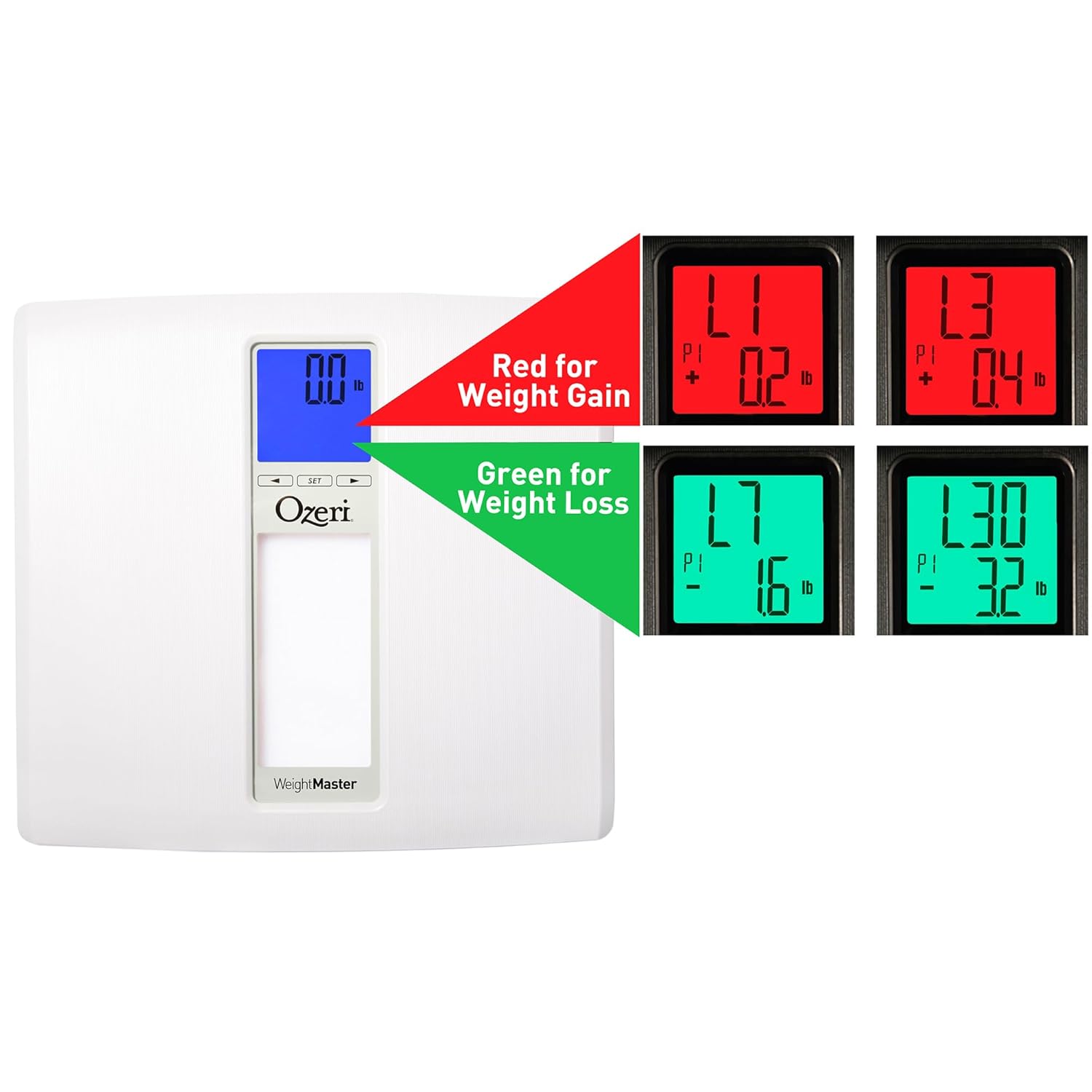
Image: The scale display illustrating red for weight gain and green for weight loss.

Image: Close-up of the display showing 'L1' in red, indicating a net weight gain from the previous recorded weight.
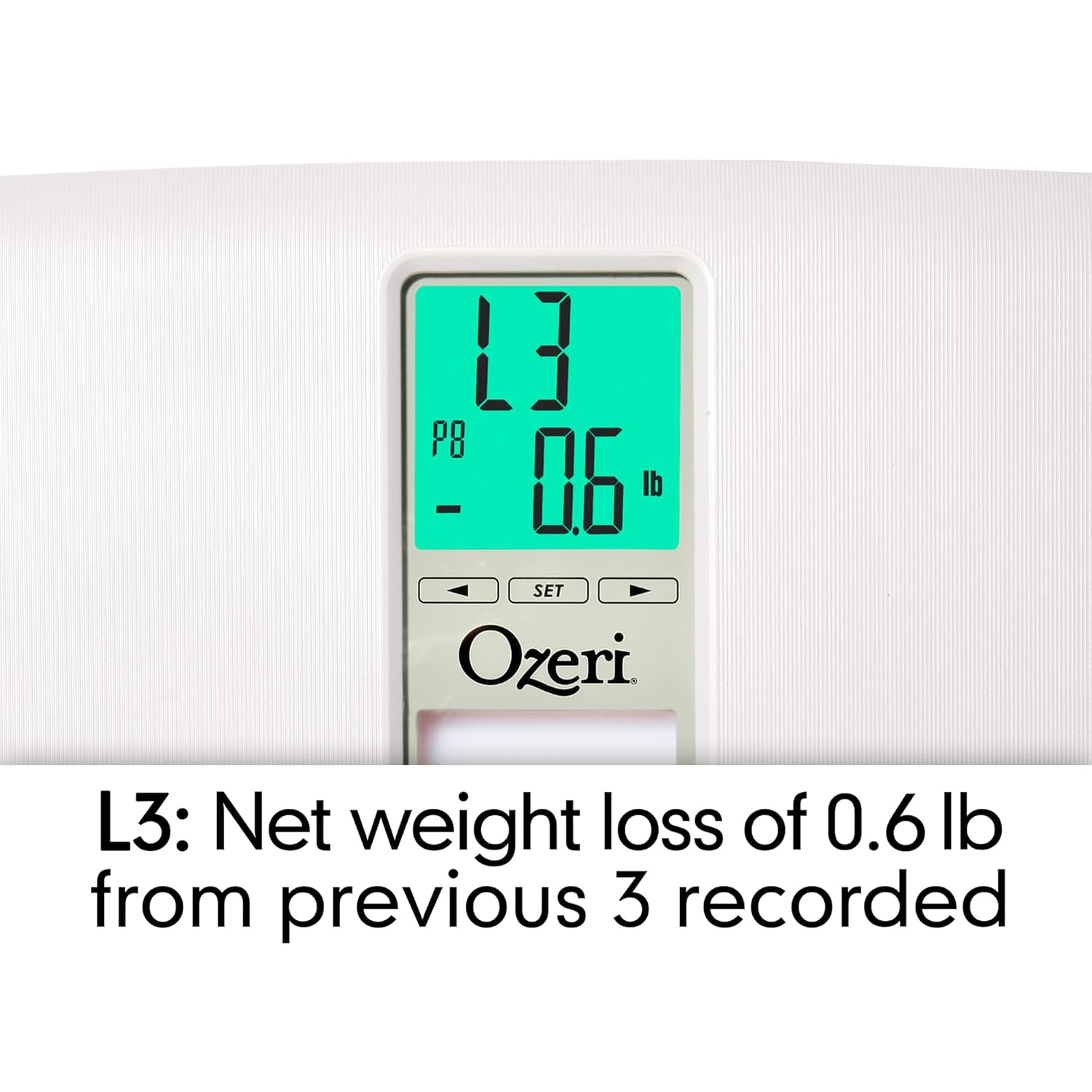
Image: Close-up of the display showing 'L3' in green, indicating a net weight loss from the average of the last 3 recorded weights.
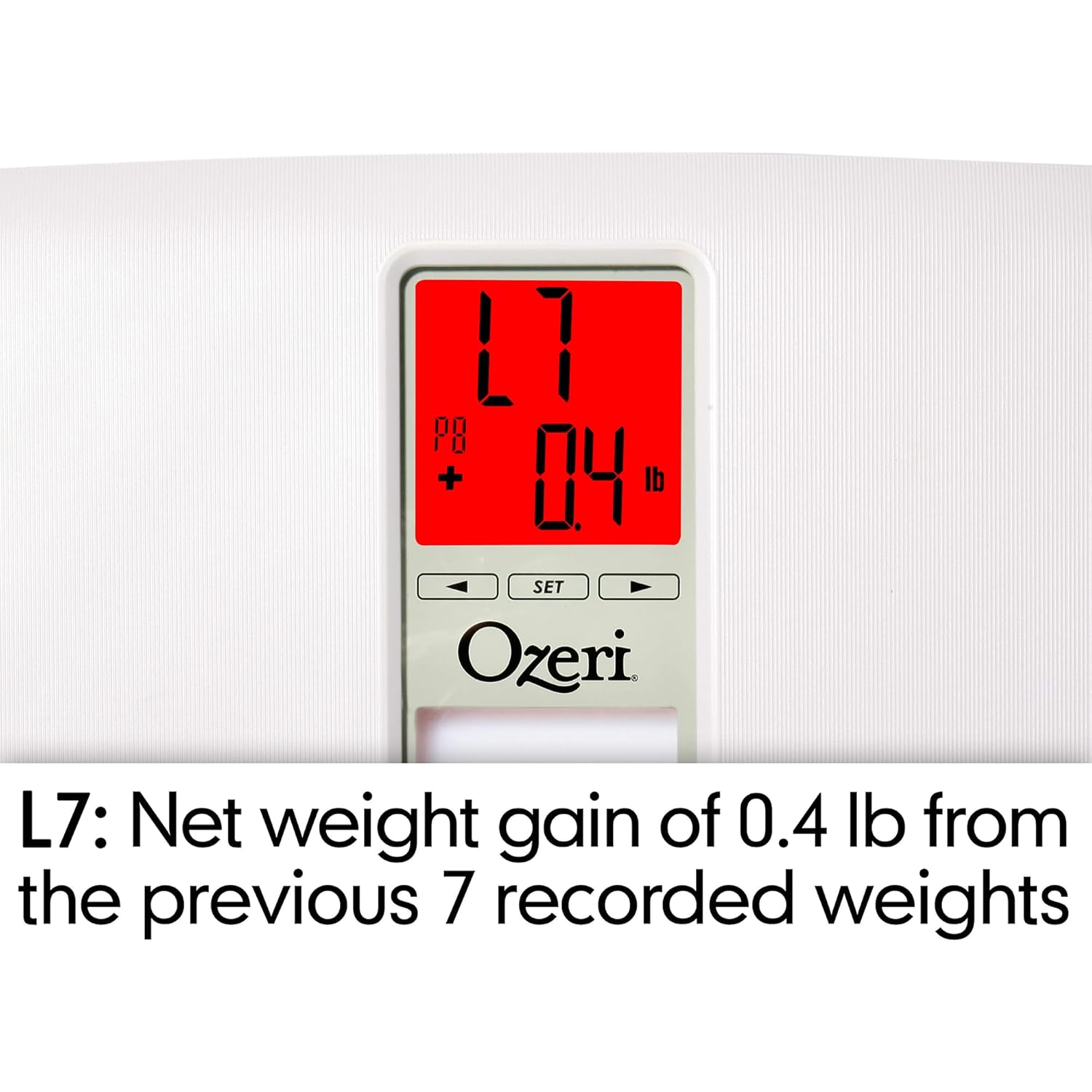
Image: Close-up of the display showing 'L7' in red, indicating a net weight gain from the average of the last 7 recorded weights.

Image: Close-up of the display showing 'L30' in green, indicating a net weight loss from the average of the last 30 recorded weights.
וישאַלט
רייניקונג
- ווישט די וואָג ייבערפלאַך מיט אַ ווייכן, דamp שטאָף.
- Do not use abrasive cleaners or chemical solvents, as these can damage the finish and electronic components.
- זיכער מאַכן אַז די וואָג איז טרוקן איידער סטאָרידזש אָדער ווייַטער נוצן.
באַטערי פאַרבייַט
If the display becomes dim or shows a 'Lo' indicator, it is time to replace the batteries. Follow the battery installation steps in the 'Setup' section.
סטאָרידזש
האַלט די וואָג אין אַ קיל, טרוקן אָרט אַוועק פון דירעקט זונשייַן און עקסטרעמע טעמפּעראַטורן. לייגט נישט קיין שווערע זאַכן אויף דער וואָג ווען זי איז נישט אין באַנוץ.
טראָובלעשאָאָטינג
| פּראָבלעם | מעגלעך סיבה | לייזונג |
|---|---|---|
| וואָג טוט נישט קער אויף. | באַטעריז זענען טויט אָדער ינקערעקטלי אינסטאַלירן. | קאָנטראָלירט די פּאָלאַריטעט פון די באַטעריע אָדער פאַרבייטן מיט נייע AA באַטעריעס. |
| נישט פּינקטלעכע אָדער נישט קאָנסיסטענטע לייענונגען. | Scale is on an uneven surface; scale needs re-calibration; user is moving during measurement. | Place scale on a hard, flat surface. Step off and then back on to allow auto-calibration. Stand still during measurement. |
| די דיספּלעי ווײַזט "Err" אדער "O-Ld". | וואָג איז העכער ווי די מאַקסימום קאַפּאַציטעט (440 פונט / 200 ק"ג). | רעדוצירן וואָג אויף דער וואָג. |
| Scale shows 440 lbs (or max weight) for all users. | Internal error or severe calibration issue. | Remove batteries for 10 seconds, then reinsert. If problem persists, contact customer support. |
| דיספּליי ווייזט "לאָ". | נידעריק באַטאַרייע מאַכט. | פאַרבייַטן באַטעריז. |
| Scale does not recognize user. | באַניצער פּראָfile not set or significant weight change from last recorded weight. | Ensure your user profile is set. If your weight has changed significantly, the scale may not recognize you immediately; it will assign the reading to the closest profile or a new one. |
ספּעסאַפאַקיישאַנז
- מאָדעל: ZB20-W
- סאָרט: עוזערי
- וואָג קאַפּאַציטעט: 440 לבס (200 קג)
- לייענען די אַקיעראַסי: 0.1 לב (0.05 קג)
- ווייַז טיפּ: LCD with Color Alert Technology
- מאַטעריאַל: ABS exterior with tempered glass interior
- דימענסיעס: 11.75 X 12.5 X 1 אינטשעס (29.8 X 31.75 X 2.54 סענטימעטער)
- נומער וואָג: 3.75 פונט (1.7 קג)
- מאַכט מקור: 2 x אַאַ באַטעריז (אַרייַנגערעכנט)
- ספּעציעלע פֿעיִקייטן: Body Mass Index (BMI) measurement, Weight Change Detection (L1, L3, L7, L30), Auto-recognition for up to 8 users, Step-on technology, Auto-power off.
וואָראַנטי און שטיצן
Ozeri products are manufactured to high-quality standards. For specific warranty information regarding your Ozeri WeightMaster II scale, please refer to the warranty card included with your purchase or visit the official Ozeri webפּלאַץ.
If you encounter any issues or have questions not covered in this manual, please contact Ozeri customer support for assistance. Contact details can typically be found on the product packaging or the official Ozeri webפּלאַץ.