
1. הקדמה
The D-Link DCS-6100LHV2 Full HD Wi-Fi Compact Camera is designed for indoor home monitoring, offering 1080p resolution, night vision, and two-way audio. This manual provides essential information for setting up, operating, and maintaining your camera, ensuring optimal performance and security.
2. פּעקל אינהאַלט
באַשטעטיקן אַז אַלע זאכן זענען פאַראַן אין דיין פּעקל:
- DCS-6100LHV2 Full HD Compact Wi-Fi Camera
- Micro USB Power Adapter
- שנעל ינסטאַללאַטיאָן גייד
- וואנט בארג קיט
3. פּראָדוקט איבערview
מאַכט זיך באַקאַנט מיט די קאַמעראַ'ס קאָמפּאָנענטן.
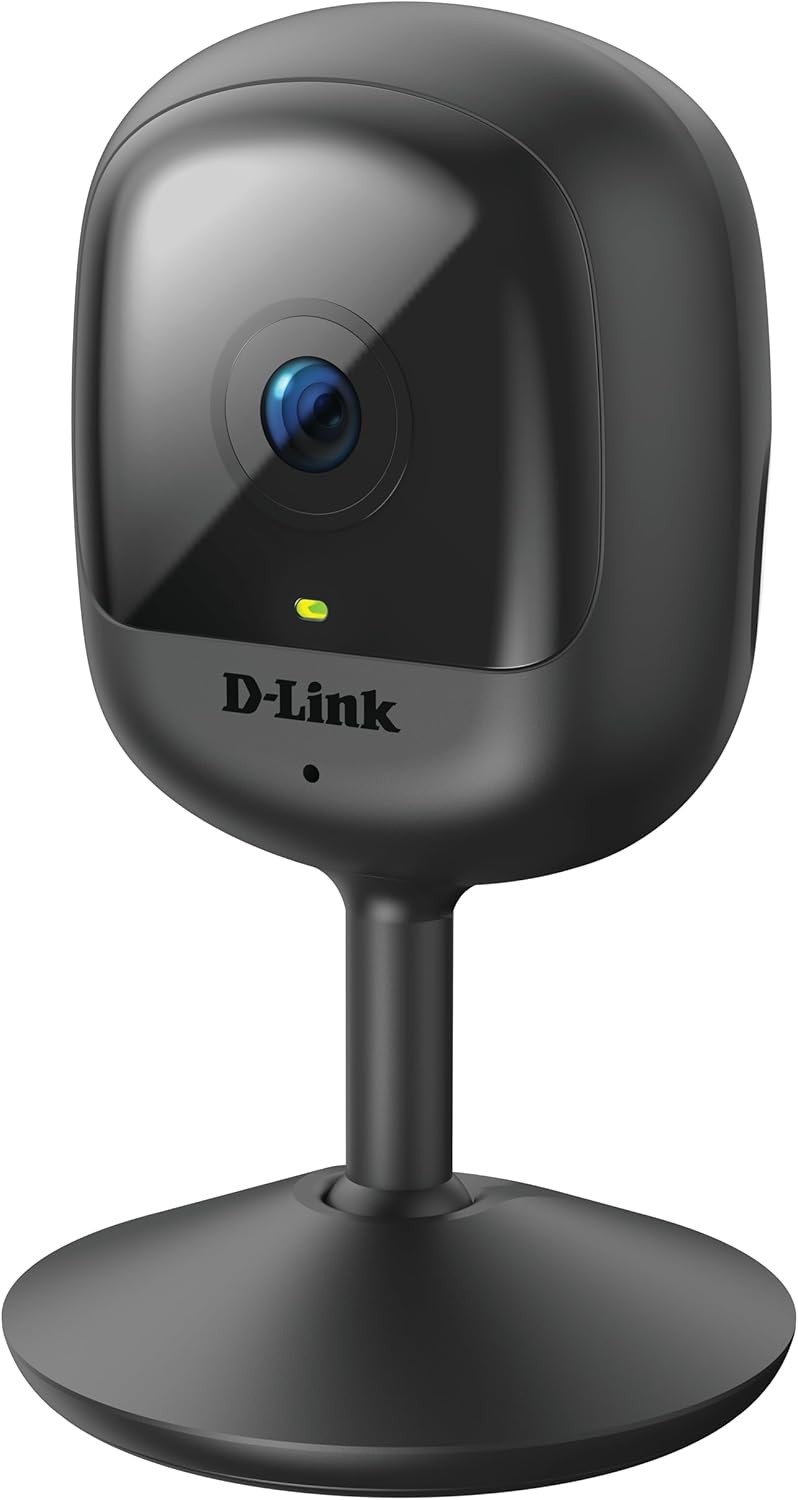
פיגורע 3.1: פראָנט view of the D-Link DCS-6100LHV2 camera, showing the lens and status LED.

פיגורע 3.2: דערציען view of the D-Link DCS-6100LHV2 camera, highlighting the speaker, reset button, and power port.
שליסל קאַמפּאָונאַנץ:
- אַפּאַראַט לענס: Captures Full HD 1080p video.
- סטאַטוס געפירט: Indicates camera status (e.g., power, connection).
- מיקראָפאָן: פֿאַר אַודיאָ אַרייַנגאַנג און צוויי-וועג קאָמוניקאַציע.
- רעדנער: פֿאַר אַודיאָ אַרויסגאַנג און צוויי-וועג קאָמוניקאַציע.
- באַשטעטיק קנעפּל: געניצט צו צוריקשטעלן די פאַבריק פעליקייַט סעטטינגס.
- מיקראָ וסב מאַכט פּאָרט: קאַנעקץ צו די מאַכט אַדאַפּטער.
- מיקראָסד קאָרט שפּעלטל: For local video storage (supports up to 128 GB).
4. סעטאַפּ
4.1. אַפּ ינסטאַללאַטיאָן
- אָפּלאָדירן די מידלינק אַפּ פֿון די אַפּ סטאָר (iOS) אָדער גוגל פּליי סטאָר (אַנדרויד).
- ינסטאַלירן די אַפּ אויף דיין סמאַרטפאָנע אָדער טאַבלעט.
- עפֿנט די mydlink אַפּ און שאַפֿט אַ נײַעם אַקאַונט אָדער לאָגט זיך אײַן מיט אַן עקזיסטירנדיקן.
4.2. Powering On and Wi-Fi Connection
- Connect the micro USB power adapter to the camera's power port and plug it into a power outlet.
- Wait for the camera's status LED to blink orange, indicating it is ready for setup.
- In the mydlink app, tap the "Add a Device" icon and follow the on-screen instructions to connect your camera to your Wi-Fi network. Ensure your Wi-Fi network is 2.4 GHz.
- Once connected, the status LED will turn solid green.
4.3. מאָונטינג די קאַמעראַ
The camera can be placed on a flat surface or mounted to a wall.
- טאַבלעטאָפּ אָרט: Simply place the camera on a stable, flat surface within range of your Wi-Fi signal and a power outlet.
- וואַנט מאָונטינג: Use the provided wall mount kit. Secure the mount to the desired location on the wall using screws, then attach the camera to the mount. Adjust the camera angle as needed.

פיגורע 4.1: The D-Link DCS-6100LHV2 camera discreetly placed in a home environment.
5. אַפּערייטינג ינסטרוקטיאָנס
5.1. לייוו View
Open the mydlink app and select your camera from the device list to view the live video feed. You can pinch to zoom and pan across the image.
5.2. Recording Options (MicroSD & Cloud)
- מיקראָסד קאַרטל רעקאָרדינג: Insert a microSD card (up to 128 GB, not included) into the camera's slot for local storage of recorded events. Configure recording settings (e.g., continuous, event-based) via the mydlink app.
- mydlink Cloud Recording: The camera supports cloud recording. A 1-year free mydlink cloud subscription is included, allowing remote storage and access to video clips. Manage cloud recording settings and view stored videos through the mydlink app.
5.3. Motion and Sound Detection
The camera features integrated motion and sound detection. When motion or sound is detected, the camera can automatically start recording and send push notifications to your mobile device. Sensitivity levels and detection zones can be customized in the mydlink app settings.
5.4. צוויי-וועגיק אודיאָ
Utilize the camera's built-in microphone and speaker for two-way audio communication. From the live view in the mydlink app, tap the microphone icon to speak through the camera, and listen to audio from the camera's location.
5.5. נאַכט זעאונג
The camera automatically switches to night vision mode in low-light conditions, providing clear black-and-white video up to 5 meters (16 feet) in complete darkness.
5.6. קלוגע היים אינטעגראַציע
The D-Link DCS-6100LHV2 is compatible with Amazon Alexa and Google Assistant. Follow the instructions in the mydlink app or your smart home assistant's app to link your camera and enable voice control for features like viewing the live feed on compatible smart displays.
6. וישאַלט
6.1. רייניקונג
To clean the camera, gently wipe the exterior with a soft, dry cloth. Do not use liquid cleaners or aerosols, as they may damage the device. Ensure the lens is free of dust and smudges for optimal image clarity.
6.2. פירמוואַרע דערהייַנטיקונגען
Regularly check for and install firmware updates via the mydlink app. Firmware updates often include performance improvements, new features, and security enhancements.
7. טראָובלעשאָאָטינג
7.1. Camera Not Connecting to Wi-Fi
- Ensure your Wi-Fi network is 2.4 GHz. The camera does not support 5 GHz networks.
- Verify that the camera is within range of your Wi-Fi router.
- קאָנטראָלירט אייער Wi-Fi פּאַראָל פֿאַר אַקיעראַסי.
- פּרוּווט ריסטאַרטן דיין Wi-Fi ראַוטער און די קאַמעראַ.
- If issues persist, perform a factory reset on the camera by pressing and holding the reset button for 10 seconds, then attempt setup again.
7.2. No Video Recording
- For microSD recording, ensure a compatible microSD card is inserted and properly formatted via the mydlink app.
- Check recording schedules and event detection settings in the mydlink app.
- For cloud recording, verify your mydlink cloud subscription status.
7.3. שלעכטע בילד קוואַליטעט
- זיכער מאַכן אַז די קאַמעראַ לינז איז ריין און פריי פון שטערונגען.
- קאָנטראָלירט אייער אינטערנעט פֿאַרבינדונג גיכקייט. אַ סטאַבילע און שנעלע פֿאַרבינדונג איז נויטיק פֿאַר אָפּטימאַלן סטרימינג.
- אַדזשאַסטירט די קאַמעראַ'ס פּאָזיציע צו ויסמיידן בלינדונג אָדער שטאַרקע הינטערליכטונג.
7.4. Two-Way Audio Issues
- זיכער מאַכן אַז דער מיקראָפאָן און רעדנער אויף דער קאַמעראַ זענען נישט פאַרשטאָפּט.
- Check the volume settings on your mobile device and within the mydlink app.
- Verify that your internet connection is stable, as audio streaming requires consistent bandwidth.
8. ספּעסאַפאַקיישאַנז
| שטריך | דעטאַל |
|---|---|
| מאָדעל נאָמען | DCS-6100LHV2 |
| ווידעא האַכלאָטע | גאַנץ הד 1080 פּ |
| Viewינג אַנגלע | 120 דיגריז |
| נאַכט וויזשאַן ראַנגע | אַרויף צו 5 מעטער (16 פֿיס) |
| קאַנעקטיוויטי | ווי-פי (2.4 GHz) |
| סטאָרידזש אָפּציעס | MicroSD card (up to 128 GB), mydlink Cloud Recording |
| אַודיאָ | Two-Way Audio (Built-in Microphone and Speaker) |
| דעטעקשאַן | Motion Detection, Sound Detection |
| סמאַרט היים קאַמפּאַטאַבילאַטי | אַמאַזאָן אַלעקסאַ, Google אַססיסטאַנט |
| מאַכט אַרייַנשרייַב | Micro USB, 220V, 4W |
| דימענסיעס (L X W X H) | 6 X 6 X 10.4 סענטימעטער |
| וואָג | 65 גראַמז |
| מאַטעריאַל | פּלאַסטיק |
| אַפּערייטינג סוויווע | דרינענדיק נוצן |
9. וואָראַנטי אינפֿאָרמאַציע
The D-Link DCS-6100LHV2 camera comes with a 2 יאָר וואָראַנטי from the date of purchase. This warranty covers defects in materials and workmanship under normal use. Please retain your proof of purchase for warranty claims. The warranty does not cover damage caused by misuse, accidents, unauthorized modifications, or external factors.
10. שטיצן
For further assistance, technical support, or to access additional resources, please visit the official D-Link support website or contact their customer service. Refer to the Quick Installation Guide included in your package for specific contact details for your region.