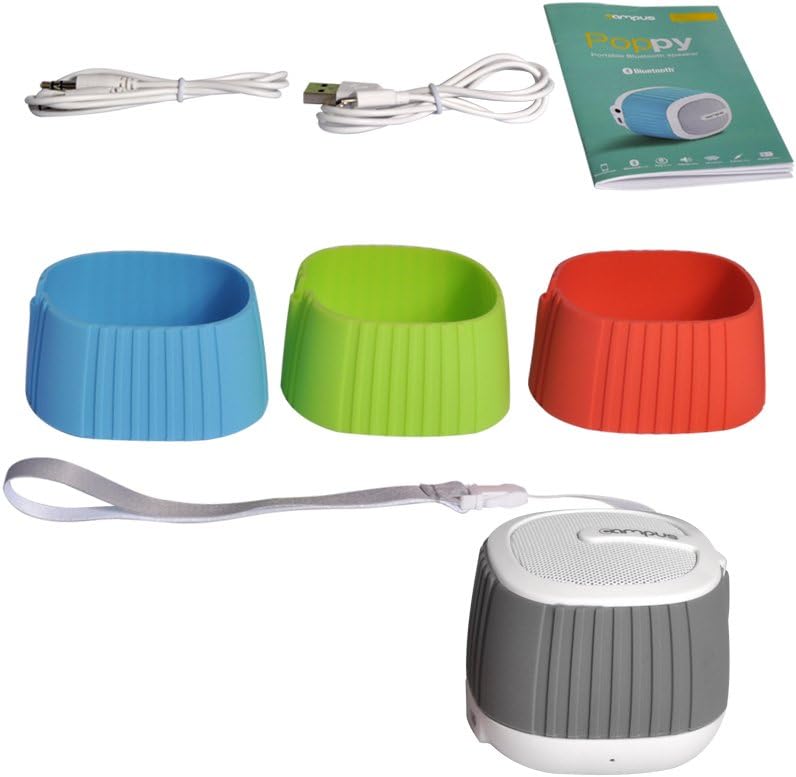
די סיAMPUS Poppy Music is a compact and portable Bluetooth 3.0 speaker designed for on-the-go music enjoyment. It features a unique pop-art design with interchangeable silicone covers, allowing you to customize its appearance. Equipped with a built-in microphone, it also supports hands-free calling.
בילד: די CAMPUS Poppy Music speaker, showcasing its compact design and blue silicone cover.
בלועטאָאָטה 3.0 קאַנעקטיוויטי: Seamlessly connect to smartphones, tablets, and other Bluetooth-enabled devices.
Interchangeable Silicone Covers: Comes with four vibrant colors (red, blue, green, gray) to personalize your speaker.
לאנג באַטאַרייע לעבן: Enjoy 5 to 8 hours of playback on a single charge.
For optimal performance, fully charge the speaker before first use.
Connect the supplied Micro-USB cable to the charging port (DC 5V) on the speaker.
פֿאַרבינדט דעם אַנדערן עק פֿונעם USB קאַבל צו אַ USB מאַכט אַדאַפּטער (נישט אַרייַנגערעכנט) אָדער אַ קאָמפּיוטער'ס USB פּאָרט.
דער LED אינדיקאַטאָר וועט זיך אָנצינדן בעתן אויפלאָדן.
Charging typically takes 2 to 3 hours. The LED indicator will change or turn off once fully charged.
3. Changing Silicone Covers
Customize your speaker's look by easily swapping the silicone covers.
Image: A disassembled view of the speaker, showing how the silicone cover can be removed and replaced.
Gently peel off the current silicone cover from the speaker body.
Select your desired color cover.
Align the new cover with the speaker and carefully stretch it over the body until it fits snugly.
Image: Four CAMPUS Poppy Music speakers, each with a different colored silicone cover (red, blue, green, gray), demonstrating the customization options.
אַפּערייטינג ינסטראַקשאַנז
1. מאַכט אויף / אויסגעלאשן
צו מאַכט אויף: Locate the power button (often integrated with play/pause or a dedicated switch) and press and hold it until you hear an audible prompt or the LED indicator lights up.
Connect the other end to the headphone jack of your audio device (e.g., MP3 player, computer).
דער רעדנער וועט זיך אויטאָמאַטיש איבערקערן צו AUX מאָדע.
וישאַלט
רייניקונג: Use a soft, dry cloth to wipe the speaker's surface. For silicone covers, a damp cloth with mild soap can be used, then dry thoroughly. Do not use harsh chemicals or abrasive cleaners.
סטאָרידזש: האַלט דעם רעדנער אין אַ קיל, טרוקן אָרט אַוועק פון דירעקט זונשייַן און עקסטרעמע טעמפּעראַטורן.
באַטערי זאָרגן: כדי צו פארלענגערן די לעבן פון די באַטעריע, זאָלט איר נישט אָפט אויסלאָדן די באַטעריע. לאָדט דעם רעדנער רעגולער אויף, אפילו אויב עס ווערט נישט גענוצט פאר לענגערע צייטן.
וואַסער קעגנשטעל: This speaker is not water-resistant. Avoid exposure to liquids.
טראָובלעשאָאָטינג
פּראָבלעם
מעגלעך סיבה
לייזונג
דער רעדנער לאָזט זיך נישט אָנ.
די באַטעריע איז נידעריק אָדער אויסגעשעפּט.
לאָדט דעם רעדנער פֿאַר 2-3 שעה.
קען נישט פארבינדן דורך בלוטוט.
דער רעדנער איז נישט אין פּערינג מאָדע.
בלועטוט איז אויסגעלאשן אויף אייער דעווייס.
Speaker is already connected to another device.
Too far from the device.
Ensure speaker is powered on and LED is flashing (pairing mode).
געבן בלועטאָאָטה אויף דיין מיטל.
Disconnect from other devices or turn off their Bluetooth.
ריקט דעם רעדנער נענטער צו אייער דעווייס (אינערהאלב 10 מעטער).
Ensure correct mode is active (Bluetooth connected or AUX cable inserted).
Check if audio is playing on your source device.
נעבעך געזונט קוואַליטעט.
אריינמישונג אדער דיסטאַנץ.
נידעריק באַטאַרייע.
Move speaker closer to the device, away from obstacles or other wireless devices.
באַשולדיקן די רעדנער.
ספּעסאַפאַקיישאַנז
סאָרט
Campus
מאָדעל נאָמען
Poppy Music
מאָדעל נומער
SP-FY24
קאַנעקטיוויטי טעכנאָלאָגיע
Bluetooth 3.0, AUX (3.5mm)
רעדנער מאַקסימום רעזולטאַט מאַכט
3 וואט רמס
באַטערי לעבן
5 צו 8 שעה
טשאַרדזשינג צייט
2 to 3 hours (via Micro-USB, 5V)
קאַמפּאַטאַבאַל דעוויסעס
Smartphones, Tablets, Bluetooth-enabled devices
דימענשאַנז (פּאַקאַץ)
15.4 X 9.2 X 8.2 סענטימעטער
וואָג (פּאַקעט)
240.4 ג
קאָנטראָללער טיפּ
Touchpad (Pekplatta)
וואָראַנטי און שטיצן
This product is covered by standard consumer warranty laws in your region. Please retain your proof of purchase for any warranty claims.
For technical support or further assistance, please refer to the contact information provided by your retailer or visit the official Campus webפּלאַץ.
Note: Software updates are not guaranteed for this product.
Ask a question about this manual
Ask about setup, troubleshooting, compatibility, parts, safety, or missing instructions. Manuals+ will review the question and use this page’s manual context to help answer it.