
1. הקדמה
This manual provides essential information for the proper setup, operation, and maintenance of your Sony SLV-FT5 VHS Video Cassette Recorder (VCR). Please read these instructions thoroughly before using the unit to ensure optimal performance and safety.
2. זיכערקייַט אינפֿאָרמאַציע
שטענדיק פֿאָלגן די גרונטלעכע זיכערהייט מיטלען ווען איר ניצט דעם פּראָדוקט צו רעדוצירן דעם ריזיקאָ פֿון פֿײַער, עלעקטרישן קלאַפּ און שאָדן.
- דו זאלסט נישט ויסשטעלן די אַפּאַראַט צו רעגן אָדער נעץ.
- דו זאלסט נישט עפענען די קאַבינעט. אָפּשיקן סערוויסינג בלויז צו קוואַלאַפייד פּערסאַנעל.
- זיכער מאַכן אַז די ווענטילאַציע איז ריכטיק; נישט פאַרשפּאַרן די ווענטילאַציע עפענונגען.
- ניצט נאָר די מאַכט צושטעל וואָס איז ספּעציפֿיצירט פֿאַר דעם אַפּאַראַט.
- האַלטן די אַפּאַראַט אַוועק פון היץ קוואלן און דירעקט זונשייַן.
3. סעטאַפּ
3.1 אַנפּאַקינג
Carefully remove the VCR and all accessories from the packaging. Verify that all components are present: the SLV-FT5 VCR unit, remote control, and necessary connection cables (e.g., RCA audio/video cables).
3.2 פֿאַרבינדן זיך צו אַ טעלעוויזיע
To connect the VCR to your television, use the provided RCA audio/video cables. Match the colored plugs to the corresponding colored jacks on both the VCR and your TV (Yellow for Video, White for Left Audio, Red for Right Audio).

פיגורע 1: Rear panel of the Sony SLV-FT5 VCR. This image displays the various input and output ports, including RCA jacks for audio and video, and the power input. The product label with model number SLV-FT5 and power specifications (100V 18W 50/60Hz) is also visible.
3.3 מאַכט קאַנעקשאַן
Plug the VCR's power cord into a standard electrical outlet (AC 100V, 50/60Hz). Ensure the power outlet is easily accessible.
3.4 רימאָוט קאָנטראָל סעטאַפּ
Open the battery compartment on the back of the remote control and insert two AA batteries, observing the correct polarity (+/-). Close the compartment securely.

פיגורע 2: The Sony RMT-V219 remote control, designed for the SLV-FT5 VCR. This image also shows the included RCA audio/video cables, which are typically used for connecting the VCR to a television.
4. Operating the VCR
4.1 פּאַוערינג אויף / אַוועק
דרוק די מאַכט button on the VCR's front panel or the remote control to turn the unit on or off.
4.2 Loading and Unloading a VHS Tape
- לאָדן: Insert a VHS cassette into the tape slot on the front of the VCR with the tape window facing forward. The VCR will automatically pull the tape in.
- אַנלאָודינג: דרוק די אַרויסוואַרפן button on the VCR or remote control. The tape will be ejected.
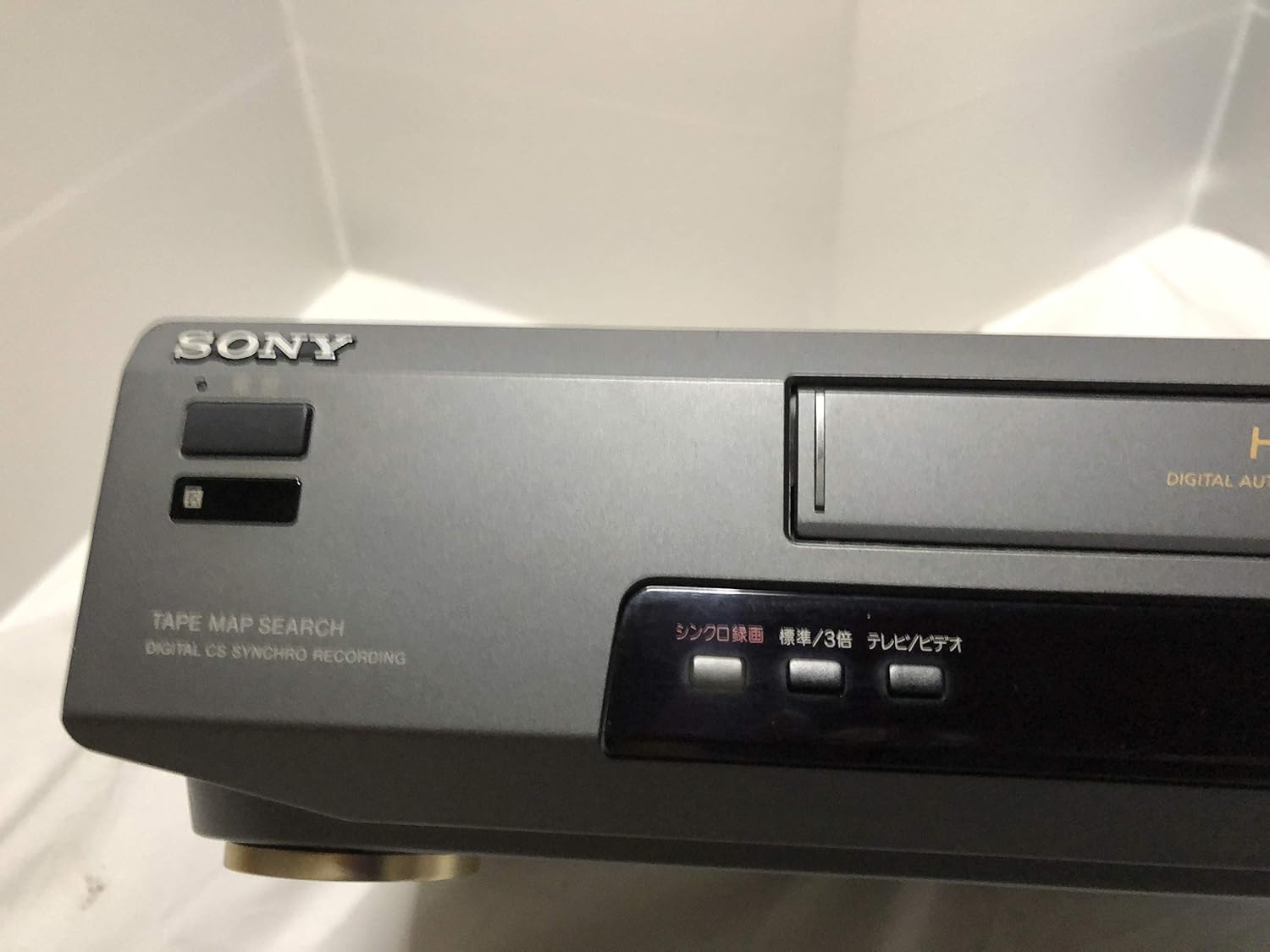
פיגורע 3: Front left section of the Sony SLV-FT5 VCR. This view highlights the tape loading slot and the 'TAPE MAP SEARCH' feature, which assists in navigating recorded content on a tape.
4.3 פּלייבאַק
After loading a tape, press the שפּיל button (►) on the VCR or remote control to begin playback. Use the פּויזע (∥), האַלטן (■), ריוויינד (◀◀), and שנעל פאָרויס (►►) buttons to control playback.

פיגורע 4: Front right section of the Sony SLV-FT5 VCR. This image displays the main playback controls (Play, Stop, Rewind, Fast Forward, Pause) and additional buttons for 'Quick Timer' and 'Tracking' adjustments.
4.4 רעקאָרדינג
To record, ensure a blank or recordable tape is inserted. Select the desired input source (e.g., TV channel). Press the REC (●) button on the VCR or remote control. Press האַלטן (■) to end recording.
4.5 Tracking Adjustment
If the picture quality during playback is poor (e.g., horizontal lines or noise), use the טראַקינג buttons on the front panel or remote control to fine-tune the tape's alignment with the VCR's heads.
5. וישאַלט
5.1 רייניקונג די אַפּאַראַט
Wipe the exterior of the VCR with a soft, dry cloth. For stubborn stains, use a cloth lightly dampגעוואשן מיט אַ מילדן וואַשפּולווער לייזונג, און דערנאָך ווישן טרוקן. ניצט נישט קיין שרײַבנדיקע רייניגערס אדער סאָלווענטן.
5.2 קאָפּ רייניקונג
Over time, VCR heads can accumulate dirt, leading to poor picture and sound quality. Use a commercially available dry-type VHS head cleaning cassette according to its instructions. Avoid wet-type cleaners as they can damage the heads.
5.3 סטאָרידזש
When not in use for extended periods, disconnect the VCR from the power outlet. Store the unit in a cool, dry place, away from dust and direct sunlight.
6. טראָובלעשאָאָטינג
If you encounter issues with your VCR, refer to the following common problems and solutions before seeking professional service.
| פּראָבלעם | מעגלעך סיבה | לייזונג |
|---|---|---|
| קיין מאַכט | שטראָם קאַבל אָפּגעטיילט; פּראָבלעם מיט שטראָם אַוטלעט | קאָנטראָלירט די פֿאַרבינדונג פֿון דער עלעקטרישער שנור; פּרוּווט אַן אַנדער אַוטלעט. |
| קיין בילד / געזונט | Incorrect TV input; loose A/V cables | Select correct TV input (e.g., Video 1, AV); ensure A/V cables are securely connected. |
| Poor picture quality (snowy, lines) | Dirty VCR heads; tracking issue; old/damaged tape | Clean VCR heads; adjust tracking; try a different tape. |
| טייפּ וועט נישט אַרויסוואַרפן | Power issue; mechanical malfunction | Ensure power is on; try pressing EJECT multiple times. If issue persists, seek service. |
| ווייַט קאָנטראָל נישט ארבעטן | טויטע באַטעריעס; פארשטאפטער סענסאָר | Replace batteries; ensure no obstacles between remote and VCR sensor. |
7. ספּעסאַפאַקיישאַנז
| שטריך | באַשרייַבונג |
|---|---|
| סאָרט | סאָני |
| מאָדעל נומער | SLV-FT5 |
| מעדיע טיפּ | VHS |
| האַכלאָטע | 720 X 480 בילדצעלן |
| פּראָדוקט וואָג | 4160 גראַמז |
| אַודיאָ רעזולטאַט מאָדע | סטערעאָ |
| שטיצט אַודיאָ פֿאָרמאַטירונגען | Monaural, Stereo |
| ווידעא קאָדירונג | אַנאַלאָג |
| קאַמפּאַטאַבאַל דעוויסעס | טעלעוויזיע |
| אינפוט ווידעא קאמפאטיבילעטי | NTSC |
| מאַכט רעקווירעמענץ | 100V, 18W, 50/60Hz |
8. וואָראַנטי און שטיצן
For warranty information and customer support, please refer to the documentation included with your purchase or visit the official Sony webזייטל. האַלט דיין קויפן באַווייַז פֿאַר וואָראַנטי קליימז.