
1. הקדמה
The Cellet Portable Bluetooth Wireless Keyboard BKP200 offers a convenient and functional solution for typing on the go. Its foldable design and QWERTY layout with low-profile keys provide an efficient typing experience. The built-in rechargeable lithium battery ensures extended use, making it ideal for smartphones, tablets, laptops, and other Bluetooth-enabled devices.
וואָס איז אין די קעסטל
- Wireless foldable keyboard
- Keyboard case (doubles as a phone holder stand)
- מיקראָ וסב טשאַרדזשינג קאַבלע
- באַניצער מאַנואַל

Image: The Cellet Portable Bluetooth Wireless Keyboard, shown unfolded, alongside its protective case which functions as a phone/tablet stand, and a micro USB charging cable.
2. וויכטיק סאַפעטי אינסטרוקציעס
Before using this product, please read all instructions carefully and retain them for future reference. Adherence to these guidelines ensures safe operation and prevents damage.
- This product may be used by children and individuals with physical, sensory, or mental disabilities, or those lacking experience and knowledge, provided they receive proper supervision or instruction regarding safe use and understanding of associated hazards.
- רייניקונג און וישאַלט זאָל ניט זיין געטאן דורך קינדער אָן השגחה.
- קינדער זאָל זיין סופּערווייזד צו ענשור אַז זיי טאָן ניט שפּילן מיט די אַפּפּליאַנסע.
- ניצן די פּראָדוקט בלויז פֿאַר זייַן בדעה ציל.
- For indoor use only. Do not expose the product to water, excessive moisture, or snow.
- Do not place the product in or near flammable, explosive, or hazardous objects.
- דו זאלסט נישט אַרבעטן די פּראָדוקט מיט אַ דאַמידזשד שנור אָדער צאַפּן.
- דו זאלסט נישט נוצן דעם פּראָדוקט אויב עס איז דאַמידזשד אין קיין וועג.
- דו זאלסט נישט דיסאַסעמבאַל די פּראָדוקט. דיסאַסעמבאַל קען רעזולטאַט אין זיכערקייַט כאַזערדז.
- Avoid throwing or shaking the product.
3. סעטאַפּ
ערשט טשאַרדזשינג
Before first use, fully charge the keyboard for approximately 1.5 to 2 hours using the provided Micro USB charging cable. The charging indicator light will glow red during charging and turn off once fully charged. If the battery is low, the Bluetooth status light will flash.
בלועטאָאָטה פּערינג סטעפּס
- שריט 1: Unfold the keyboard. The Bluetooth status indicator light will illuminate for 3 seconds and then turn off.
- שריט 2: דרוק די Fn + C buttons simultaneously. The Bluetooth indicator light will begin blinking, indicating it is in pairing mode.
- שריט 3: On your device (smartphone, tablet, etc.), activate Bluetooth and search for available devices. Select "Cellet BKP200 Keyboard" from the list to connect.
- שריט 4: Once successfully connected, the Bluetooth indicator light on the keyboard will turn off.

Image: The Cellet foldable keyboard displayed with a tablet and smartphone, illustrating its universal compatibility.
4. אַפּערייטינג ינסטרוקטיאָנס
אָפּערייטינג סיסטעם סעלעקציע
To optimize keyboard functionality for your device, select the correct operating system:
- For Android devices: Press and hold Fn + Q.
- For Windows devices: Press and hold פן + וו.
- For iOS devices: Press and hold Fn + E.
דורכוועג שליסל פאַנגקשאַנז
To use the shortcut keys, press and hold the Fn key while simultaneously pressing the desired shortcut key.
| פֿונקציע | שליסל קאָמבינאַציע | הערות |
|---|---|---|
| פֿריִערדיקע שפּירט | fn+1 | |
| באַנד אַראָפּ | fn+2 | |
| באַנד אַרויף | fn+3 | |
| שפּיל / פּויזע | fn+4 | |
| באַשטימען שפּראַך | fn+5 | |
| זוכן | fn+6 | |
| קאָפּי | fn+7 | |
| שנייַדן | fn+8 | |
| אויסקלייַבן אַלע | fn+9 |
System-Specific Functions:
| אַנדרויד סיסטעמס | פֿונקציע |
|---|---|
| PgUp | לעצטע בלאַט |
| PgDn | ווייַטער בלאַט |
| iOS Systems | פֿונקציע |
|---|---|
| היים | היים |
| PgUp | Cursor to the top |
| PgDn | Cursor to the bottom |
| Windows סיסטעמען | פֿונקציע |
|---|---|
| Web בלעטערער | עפענען web בלעטערער |
| ESC | אַנטלויפן |
| PgUp | לעצטע בלאַט |
| PgDn | ווייַטער בלאַט |

Image: The keyboard case is shown transforming into a stand, holding both a smartphone and a tablet in landscape orientation for convenient viewשרייבן בשעתן טייפן.
5. וישאַלט
Proper care and maintenance will extend the life of your Cellet keyboard.
- ריין די קלאַוויאַטור מיט אַ ווייך שטאָף דampמיט וואַסער אָדער אַלקאָהאָל.
- האַלטן די קלאַוויאַטור אַוועק פון שאַרף אַבדזשעקץ.
- דו זאלסט נישט שטעלן שווער אַבדזשעקץ אויף די קלאַוויאַטור.
- Do not microwave the keyboard.
- דו זאלסט נישט קראַפט אָדער פאַרקרימען די קלאַוויאַטור.
- Keep away from any oil, chemicals, or other organic liquids.
6. טראָובלעשאָאָטינג
If you encounter issues with your keyboard, consider the following:
- קלאַוויאַטור נישט פּערינג: Ensure the keyboard is fully charged and in pairing mode (Bluetooth indicator blinking). Check your device's Bluetooth settings to ensure it's discoverable and try re-scanning for devices.
- קנעפּלעך רעאַגירן נישט: Verify the keyboard is connected to your device. If connected, try restarting both the keyboard and your device. Ensure no debris is lodged under the keys.
- אומגעריכטע פֿאַרבינדונג: Ensure the keyboard is within the 10-meter operating range of your device and there are no significant obstructions. Other wireless devices might cause interference.
- אומרעכטע אותיות געשריבן: Confirm that you have selected the correct operating system for your device (Fn + Q for Android, Fn + W for Windows, Fn + E for iOS).
- באַטערי נישט טשאַרדזשינג: Check the Micro USB cable and charging port for damage. Try using a different charging cable or power source.
If problems persist, refer to the Cellet support webזייטל אדער קאנטאקט קאסטומער סערוויס פאר ווייטערדיגע הילף.
7. ספּעסאַפאַקיישאַנז
Detailed technical specifications for the Cellet BKP200 Portable Bluetooth Wireless Keyboard:
| שטריך | באַשרייַבונג |
|---|---|
| בלועטאָאָטה ווערסיע | 5.1 |
| צובינד | יו-עס-בי-סי (פֿאַר טשאַרדזשינג) |
| אַפּערייטינג דיסטאַנסע | אַרויף צו 10 מעטער |
| מאָדולאַטיאָן סיסטעם | גפסק |
| אַפּערייטינג וואָלtage | 3.0-4.2וו |
| אַפּערייטינג קראַנט | <3.0mA |
| סטאַנדביי קראַנט | <0.3mA |
| שלאָפן קראַנט | <0.1mA |
| טשאַרדזשינג קראַנט | <200mA |
| סטאַנדביי צייט | אַרום 100 טעג |
| אָפּצאָל צייט | <2 שעה |
| ליטהיום באַטערי קאַפּאַציטעט | 110 מאַה |
| אַנינטעראַפּטיד אַרבעט צייט | >40 שעה |
| ליטהיום באַטאַרייע לעבן | 3 יאָר |
| Lithium Battery Dimensions | 30 X 15 X 23 מם |
| שליסל קראַפט | 50-80ג |
| שליסל לעבן | 3 מיליאָן סטראָקעס |
| ארבעטן טעמפּעראַטור | -10 צו +55 ℃ |
| פּונקט וואָג | 7.5 אונסעס |
| פּראָדוקט דימענשאַנז (פאָולדיד) | 5.75 X 3.5 X 0.75 אינטשעס |
| פּראָדוקט דימענשאַנז (אַנפאָולדיד) | 11.5 x 3.3 x 0.27 אינטשעס (אומגעפער, גענומען פון בילד) |
| קאָליר | שוואַרץ |
| קאַמפּאַטאַבאַל אַפּערייטינג סיסטעמס | אַנדרויד, יאָס, ווינדאָוז |
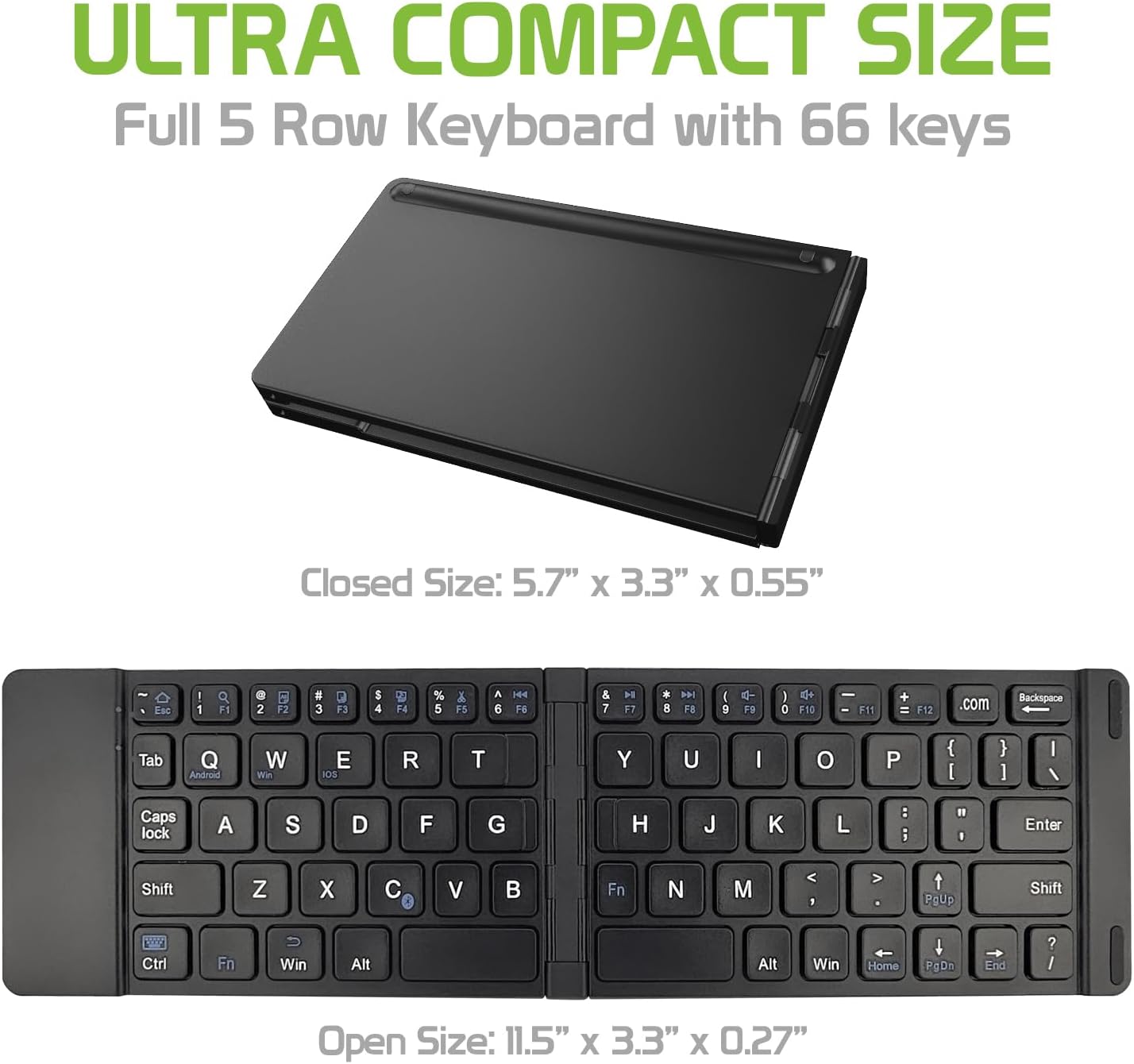
Image: The Cellet keyboard in both its closed, compact state and its unfolded, full-size state, with dimensions indicating its portability and functional size.
8. וואָראַנטי און שטיצן
For warranty information or technical support, please visit the official Cellet webזייטל אדער קאנטאקט זייער קאסטומער סערוויס דעפארטמענט. האלט אייער קויף קוויטל פאר גאראנטיע טענות.
ינווייראַנמענאַלי פרייַנדלעך באַזייַטיקונג
To dispose of the product responsibly, follow these guidelines:
- Carefully pry up the plastic top to remove it completely. This action will likely render the keyboard unusable.
- Turn the top over and remove any tape securing the battery.
- Separate the battery from the circuit board.
- Dispose of the battery according to local regulations and laws. Recycle remaining keyboard parts where possible.