
1. הקדמה
This user manual provides essential information for the safe and efficient installation, operation, and maintenance of your Supermicro YM-5201D ATX & EPS12V Power Supply. Please read this manual thoroughly before using the product to ensure proper functionality and to prevent damage.

Figure 1: Supermicro YM-5201D ATX & EPS12V Power Supply, showing the main unit and attached power cables.
2. זיכערקייַט אינפֿאָרמאַציע
שטענדיק האַלטן די פאלגענדע זיכערהייט מיטלען צו פאַרמייַדן שאָדן אָדער שאָדן צו דער מאַכט צושטעל און פֿאַרבונדענע קאָמפּאָנענטן:
- Ensure the power supply is disconnected from the AC outlet before installation or removal.
- עפֿנט נישט די מאַכט־צושטעל casing. There are no user-serviceable parts inside, and opening it voids the warranty and exposes you to dangerous voltages.
- אינסטאלירט די מאַכט צושטעל אין אַ גוט-ווענטילאַטעד אָרט צו פאַרמייַדן איבערהיצונג.
- Use only the cables provided or approved by Supermicro for this power supply.
- פֿאַרמײַדן אויסצושטעלן די מאַכט צושטעל צו פֿײַכטקייט אָדער עקסטרעמע טעמפּעראַטורן.
- Ensure proper grounding of the computer system.
3. פּעקל אינהאַלט
באַשטעטיקן אַז אַלע זאכן זענען פאַראַן אין פּעקל:
- Supermicro YM-5201D ATX & EPS12V Power Supply
- AC מאַכט שנור (רעגיאָן ספּעציפֿיש)
- מאַונטינג סקרוז
- באַניצער מאַנואַל (דעם דאָקומענט)
4. סעטאַפּ און ייַנמאָנטירונג
Follow these steps to install the power supply into your computer chassis:
- צוגרייטן די סיסטעם: Disconnect the computer from the AC power outlet. Open the computer case according to its manufacturer's instructions.
- אַראָפּנעמען אַלטע מאַכט צושטעלן (אויב אָנווענדלעך): Unscrew and remove the existing power supply. Disconnect all power cables from the motherboard, graphics card, drives, and other components.
- Install New Power Supply: Carefully slide the Supermicro YM-5201D power supply into the designated power supply bay in your chassis. Ensure the fan is oriented correctly for optimal airflow (typically facing downwards or towards the rear vent).
- Secure the Power Supply: Align the screw holes on the power supply with those on the chassis. Secure the power supply using the provided mounting screws.
- פאַרבינדן קאַבלעס:
- 24-פּין ATX מוטערבאָרד קאַנעקטאָר: Connect the large 24-pin connector to the corresponding port on your motherboard. Ensure it clicks into place.
- 8-pin (4+4) EPS12V CPU Connector: Connect the 8-pin or split 4+4-pin connector to the CPU power port on your motherboard.
- PCIe Connectors (if applicable): If your graphics card requires additional power, connect the appropriate 6-pin or 8-pin PCIe power connectors.
- SATA מאַכט קאַנעקטערז: Connect SATA power cables to your hard drives, SSDs, and optical drives.
- Molex Connectors (if applicable): Connect Molex power cables to any legacy devices or case fans that require them.
- קאַבלע פאַרוואַלטונג: Route cables neatly to improve airflow and aesthetics within the case.
- נאָענט שאַסי: אַמאָל אַלע קאַנעקשאַנז זענען זיכער, פאַרמאַכן דעם קאָמפּיוטער קעסטל.
- קאָננעקט AC מאַכט: Connect the AC power cord to the power supply's inlet and then to a grounded wall outlet or surge protector.
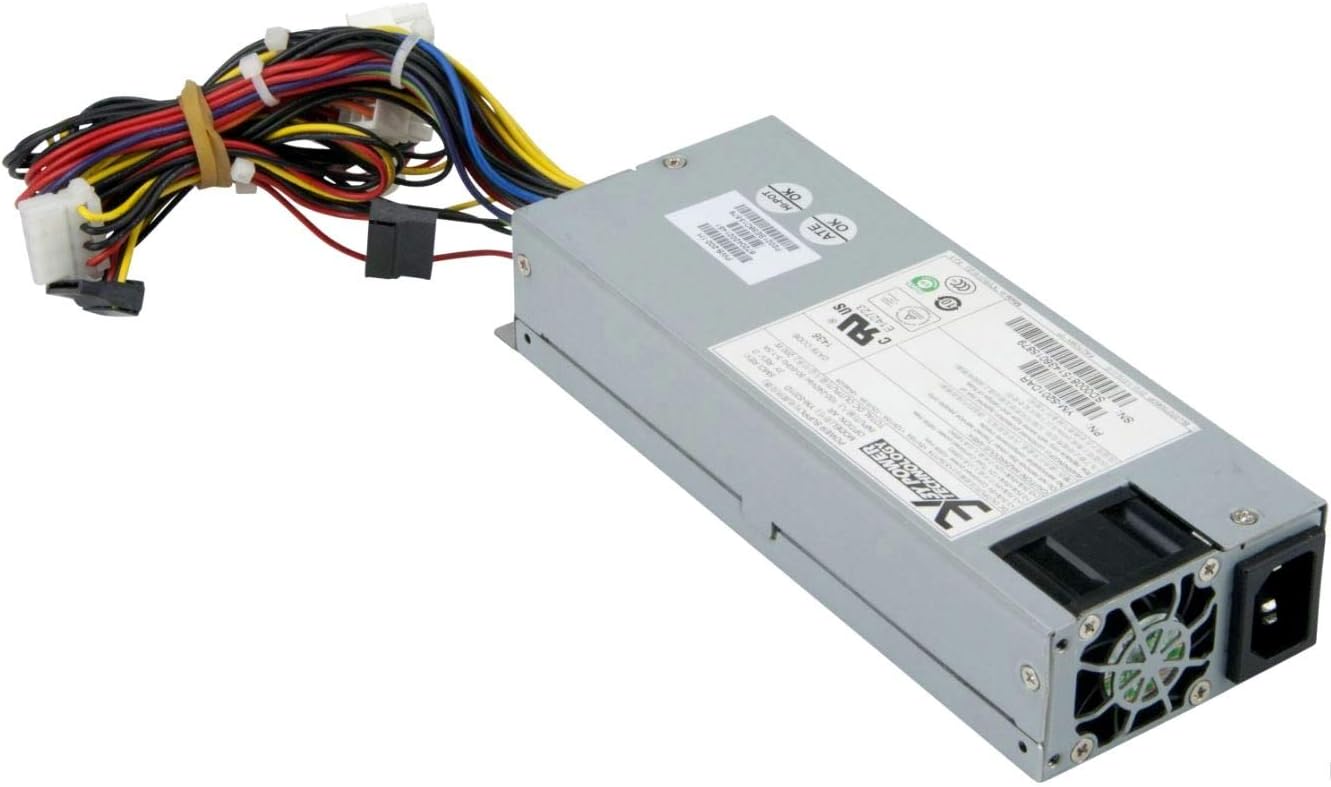
פיגורע 2: דערציען view of the Supermicro YM-5201D Power Supply, highlighting the cooling fan and AC power input.
5. אַפּערייטינג ינסטרוקטיאָנס
After successful installation, operating the power supply is straightforward:
- מאַכט אויף: Ensure the power switch on the rear of the power supply (if present) is in the 'ON' (I) position. Then, press the power button on your computer case.
- מאַכט אַוועק: Shut down your computer through the operating system. Once the system is off, you can flip the power switch on the power supply to the 'OFF' (O) position for complete power disconnection.
- נאָרמאַל אָפּעראַציע: The power supply will automatically regulate power delivery to your components based on demand. Ensure adequate ventilation around your computer to prevent heat buildup.
6. וישאַלט
Regular maintenance helps prolong the life of your power supply:
- באַזייַטיקונג פון שטויב: Periodically (e.g., every 3-6 months), disconnect the power supply from the AC outlet and use compressed air to gently blow dust out of the power supply's fan and vents. Do not open the casing.
- קאַבלע דורכקוק: Occasionally check all power cables for any signs of wear, fraying, or loose connections.
- ווענטילאַטיאָן: Ensure that the computer case's ventilation openings are not obstructed.
7. טראָובלעשאָאָטינג
אויב איר טרעפט פּראָבלעמען, זעט די פאלגענדע געוויינטלעכע פּראָבלעמען און לייזונגען:
| פּראָבלעם | מעגלעך סיבה | לייזונג |
|---|---|---|
| דער קאָמפּיוטער גייט נישט אָן. | Power cable loose; Power switch off; Faulty component; Insufficient power. | Check AC power cord connection. Ensure power supply switch is ON. Verify all internal power connections (24-pin, 8-pin CPU). Test with minimal components. |
| סיסטעם צינדט זיך אן אבער שליסט זיך אפ גלייך. | Overload; Overheating; Short circuit. | פאַרזיכערן גאַנץ וואָסtage draw is within PSU limits. Check for proper ventilation. Inspect for any loose screws or components that might be causing a short. |
| הויך פען ראַש פון PSU. | Dust buildup; Fan bearing issue; High load. | Clean dust from fan and vents using compressed air. If noise persists and is excessive, consider professional inspection. |
If troubleshooting steps do not resolve the issue, contact Supermicro technical support.
8. ספּעסאַפאַקיישאַנז
Key technical specifications for the Supermicro YM-5201D Power Supply:
| שטריך | דעטאַל |
|---|---|
| מאָדעל נאָמען | YM-5201D |
| נומער מאָדעל נומער | PWS-202-1H |
| סאָרט | סופּערמיקראָ |
| פאָרם פאַקטאָר | 1U |
| רעזולטאַט וואָסtage | 200 וואטס |
| קאַנעקטער טיפּ | אַטקס |
| קאַמפּאַטאַבאַל דעוויסעס | Desktop Computers, Servers, Desktop Components |
| קאָאָלינג אופֿן | לופט |
| פּראָדוקט דימענשאַנז (L x W x H) | 1.1 X 9.7 X 6.5 אינטשעס |
| פּונקט וואָג | 6.6 פונט |
| ערשטער דאַטע בנימצא | 14 נאוועמבער 2012 |
9. וואָראַנטי און שטיצן
פֿאַר וואָראַנטי אינפֿאָרמאַציע און טעכנישע שטיצע, ביטע זען די באַאַמטער סופּערמיקראָ webזייטל אדער קאנטאקט זייער קאסטומער סערוויס גלייך. האלט אייער באווייז פון קויפן פאר גאראנטיע פארלאנגען.
סופּערמיקראָ אפיציעל Webפּלאַץ: www.supermicro.com