
1. הקדמה
This manual provides essential information for the safe and efficient operation of your LD Systems Road LDRJ8 Portable PA System. Please read this manual thoroughly before using the device to ensure proper setup, operation, and maintenance. Keep this manual for future reference.
The LD Systems Road LDRJ8 is an 8-channel portable PA system designed for versatile audio applications. It features battery-powered operation for mobility and offers multiple connectivity options including XLR, Speakon, Auxiliary, and USB. The system is equipped with a 15-inch Faital Pro neodymium woofer and a 1.4-inch BMS compression driver, delivering a powerful 1400 Watts output. Advanced features include a 1ms predictive peak limiter for distortion-free sound, state-of-the-art analog/digital converters, and an 80-degree x 50-degree rotatable asymmetrical horn flare. Its robust steel construction and integrated wheels make it suitable for various portable sound reinforcement needs.

פיגורע 1: פראָנט view of the LD Systems Road LDRJ8 Portable PA System with its retractable handle extended, showcasing the main speaker grille and control panel.
2. זיכערקייַט אינסטרוקציעס
- מאַכט מקור: Connect the device only to the specified voltage and frequency. Ensure the power cord is not damaged.
- ווענטילאַטיאָן: בלאָקירט נישט די ווענטילאַציע עפענונגען. זאָרגט פֿאַר גענוג לופט שטראָם אַרום דעם אַפּאַראַט צו פאַרמייַדן איבערהיצונג.
- נעץ: Do not expose the device to rain or moisture. Avoid placing liquid-filled objects on the unit.
- רייניקונג: Disconnect from power before cleaning. Use a dry cloth. Do not use liquid cleaners or aerosols.
- סערוויס: איבערגעבן אלע סערוויסינג צו קוואַליפֿיצירטע סערוויס פּערסאָנעל. פּרוּווט נישט צו פאַרריכטן דעם אַפּאַראַט אַליין.
- אָרט: Place the unit on a stable, level surface. Avoid extreme temperatures, direct sunlight, and strong vibrations.
- באַטערי זיכערקייַט: The unit is battery-powered. Follow all instructions regarding battery charging and usage. Do not expose batteries to excessive heat.

Figure 2: Rear panel of the LD Systems Road LDRJ8, showing the power input, fuse compartment, voltage selector, and the "SOUNDSYSTEM BATTERY LEVEL" indicator with three LEDs.
3. פּעקל אינהאַלט
Please check the package contents immediately after unpacking to ensure all components are present and undamaged.
- 1 x LD Systems Road LDRJ8 Portable PA System
- 1 x מאַכט קאַבלע
- 1 x באַניצער מאַנואַל (דאָס דאָקומענט)
באַמערקונג: If any components are missing or damaged, please contact your dealer immediately.
4. פּראָדוקט איבערview
4.1. קאָנטראָל פּאַנעל

פיגורע 3: דעטאַילעד view of the LDRJ8 control panel, featuring input channels (CH 1, CH 2, CH 3/AUX), level controls, EQ (LOW, HIGH), ECHO, MASTER VOL, MP3 player controls, and a display screen.
- CH 1 Input: XLR/TRS combo jack for microphone or line-level sources.
- CH 1 Level: Adjusts the input level for Channel 1.
- CH 2 Input: TRS/TS jack for instrument or line-level sources.
- CH 2 Level: Adjusts the input level for Channel 2.
- CH 3 / AUX Input: RCA stereo input for external audio devices.
- CH 3 / AUX Level: Adjusts the input level for Channel 3 / AUX.
- נידעריק EQ: Bass frequency adjustment.
- HIGH EQ: Treble frequency adjustment.
- ECHO: Controls the echo effect level.
- MASTER VOL: Overall volume control for the system.
- מאַכט: מאַכט גראדן געפירט.
- MP3 Player Section:
- ווייַז: Shows track information and settings.
- DIRECTIONS: Switches between MP3, AUX, Bluetooth, and SD card modes.
- וסב אין: USB פּאָרט פֿאַר מעדיע פּלייבאַק.
- SD Card Slot: For SD card media playback.
- פּלייבאַק קאָנטראָלס: Play/Pause, Stop, Previous/Next Track.
4.2. דערציען פּאַנעל
Figure 4: Rear panel of the LDRJ8, detailing the power switch, AC input, fuse, voltage selector, and battery level indicators.
- OFF/ON סוויטש: הויפּט מאַכט באַשטימען פֿאַר די אַפּאַראַט.
- CHARGE Indicator: LED indicating battery charging status.
- AC אַרייַנשרייַב: קאַנעקטער פֿאַר די מאַכט קאַבלע.
- קאָריק: פוסע האָלדער.
- VOLTAGE Selector: Switch to select between 115V and 230V operation.
- SOUNDSYSTEM BATTERY LEVEL: LED indicators for battery charge status (LOW, 1, 2, 3).
4.3. Portability Features

פיגורע 5: זייַט view of the LDRJ8, illustrating the retractable handle fully extended and the integrated wheels for easy transport.
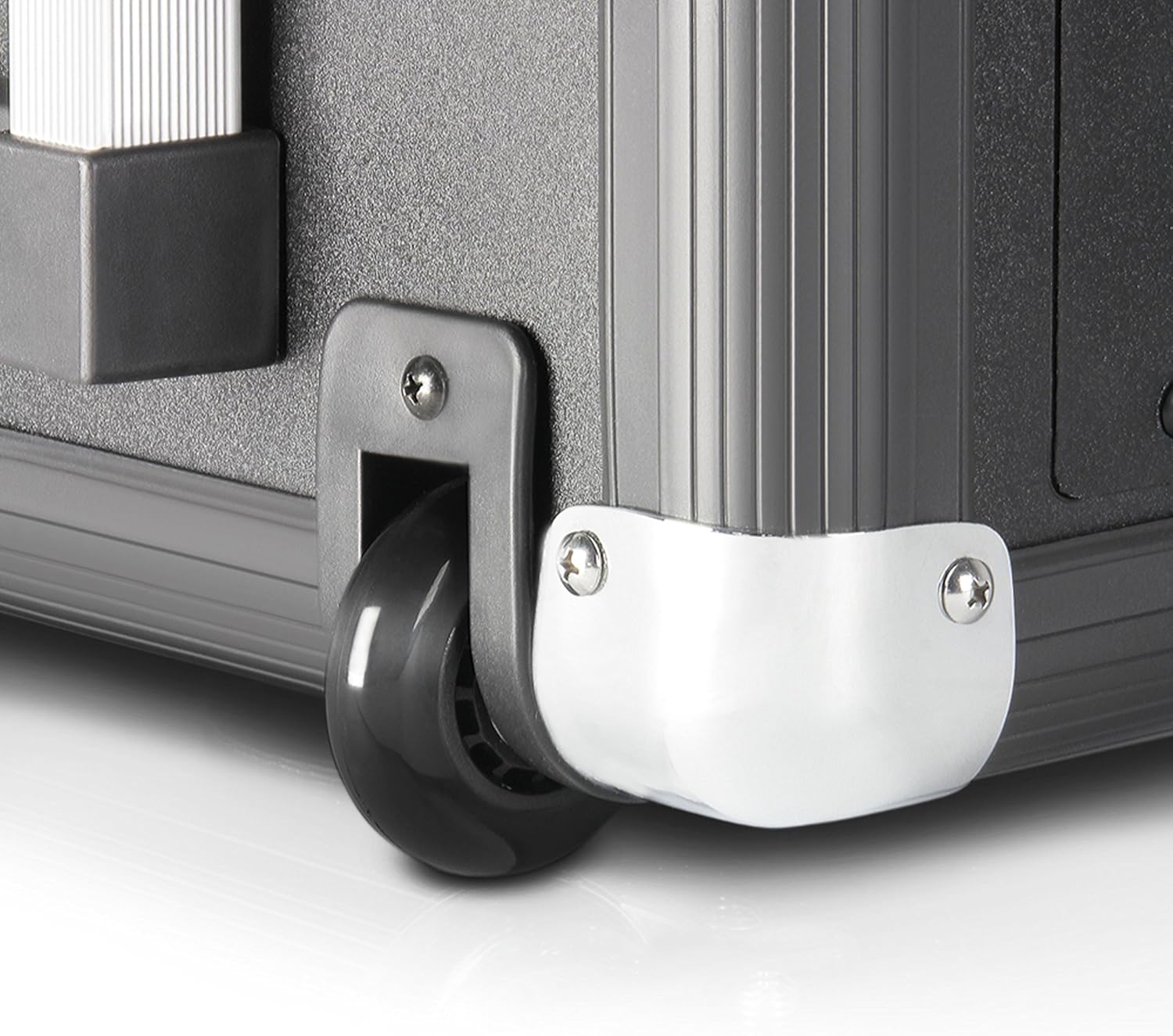
Figure 6: Close-up of one of the durable wheels and a metal corner protector, highlighting the robust construction designed for portability.
The LDRJ8 is designed for easy transport with integrated wheels and a retractable handle, similar to luggage. This allows for convenient movement of the system to various locations.
5. סעטאַפּ
5.1. Initial Power-Up and Charging
- Ensure the unit's power switch (OFF/ON) on the rear panel is in the OFF שטעלע.
- Verify the VOLTAGE selector on the rear panel matches your local power supply (115V or 230V).
- Connect the supplied power cable to the AC Input on the rear panel and then to a suitable power outlet.
- די אָפּצאָל indicator LED will illuminate, indicating the battery is charging. Allow sufficient time for a full charge before initial battery-powered use.
5.2. קאַנעקטינג אַודיאָ קוואלן
- מיקראָפאָנען/אינסטרומענטן: Connect microphones to CH 1 (XLR) and instruments to CH 2 (TRS/TS). Adjust the respective LEVEL knobs.
- External Audio Devices (e.g., CD Player, Mixer): Connect to CH 3 / AUX using RCA cables. Adjust the CH 3 / AUX LEVEL knob.
- USB/SD קאָרט: Insert a USB drive into the USB IN port or an SD card into the SD Card Slot for media playback.
- בלועטאָאָטה: Refer to the "Operating" section for Bluetooth pairing instructions.
6. Operating the PA System
6.1. יקערדיק אָפּעראַציע
- After connecting your audio sources, switch the unit's power to ON. The POWER LED will illuminate.
- Slowly increase the MASTER VOL to a desired listening level.
- Adjust individual channel LEVEL knobs for a balanced mix.
- Use the LOW and HIGH EQ knobs to adjust the bass and treble frequencies of the overall mix.
- Apply ECHO effect as desired using the ECHO knob.
6.2. MP3 Player / Bluetooth Operation
- דרוק די מאָדע button to cycle through available input modes: MP3 (USB/SD), AUX, Bluetooth.
- וסב / סד פּלייבאַק:
- אַרייַנלייגן אַ וסב פאָר אָדער סד קאָרט מיט mp3 files.
- Select MP3 mode. The display will show track information.
- Use the Play/Pause, Stop, Previous/Next Track buttons to control playback.
- Bluetooth Pairing:
- Select Bluetooth mode. The display will indicate "BT" or "Pairing".
- אויף דיין סמאַרטפאָנע אָדער טאַבלעט, געבן בלועטאָאָטה און זוכן פֿאַר בנימצא דעוויסעס.
- Select "LD Systems LDRJ8" (or similar) from the list to pair.
- Once paired, you can stream audio wirelessly to the PA system.
7. וישאַלט
- רייניקונג: Use a soft, dry cloth to clean the exterior of the unit. Do not use abrasive cleaners, solvents, or waxes.
- סטאָרידזש: ווען נישט אין באַנוץ פֿאַר לענגערע פּעריאָדן, זאָל מען דאָס אַפּאַראַט האַלטן אין אַ טרוקענעם, קילן אָרט, אַוועק פֿון דירעקטער זון און עקסטרעמע טעמפּעראַטורן.
- באַטערי זאָרגן: For optimal battery life, avoid fully discharging the battery frequently. Recharge the battery regularly, even if the unit is not in use, to maintain its capacity.
- Fuse Replacement: If the unit does not power on, check the fuse on the rear panel. Replace it only with a fuse of the identical type and rating (e.g., T 1 AL / 250V or T 500mA L / 250V).
8. טראָובלעשאָאָטינג
| פּראָבלעם | מעגלעך סיבה | לייזונג |
|---|---|---|
| קיין מאַכט |
|
|
| קיין געזונט רעזולטאַט |
|
|
| בלועטאָאָטה איז נישט פּערינג |
|
|
| פאַרקרימט געזונט |
|
|
9. ספּעסאַפאַקיישאַנז
| שטריך | דעטאַל |
|---|---|
| מאָדעל | LDRJ8 |
| סאָרט | לד סיסטעמס |
| מאַונטינג טיפּ | שטאָק שטייענדיק |
| מאַכט מקור | באַטאַרייע פּאַוערד |
| קאַנעקטער טייפּס | XLR, Speakon, Auxiliary, USB |
| מאַטעריאַל | שטאָל |
| פּונקט וואָג | 30 פונט (אומגעפער 13.6 ק"ג) |
| נומער פון טשאַנאַלז | 8 |
| אַודיאָ אַרייַנשרייַב | Various audio input devices |
| רעזולטאַט וואָסtage | 1400 וואטס (RMS) |
| וואָאָפער | 15-inch Faital Pro neodymium |
| קאַמפּרעשאַן דרייווער | 1.4-inch BMS |
| דיספּערסיאָן | 80 Degree x 50 Degree (rotatable asymmetrical horn flare) |
| דימענסיעס (L X W X H) | 11 x 15 x 17 אינטשעס (אומגעפער 27.9 x 38.1 x 43.2 ס״מ) |
| קאַנעקטיוויטי טעכנאָלאָגיע | Various (including Bluetooth) |
| קאַמפּאַטאַבאַל דעוויסעס | Smartphone, Tablet, Microphones, Instruments |
| ספּעציעלע פֿעיִקייטן | 1ms predictive peak limiter, State-of-the-art analog/digital converters |
10. וואָראַנטי אינפֿאָרמאַציע
Specific warranty details for the LD Systems Road LDRJ8 Portable PA System are typically provided at the point of purchase or within separate documentation included with the product. Please refer to your purchase receipt or the official LD Systems webזייטל פֿאַר די מערסט פּינקטלעכע און אַרויף-צו-דאַטע וואָראַנטי טערמינען און באדינגונגען.
Generally, warranties cover manufacturing defects under normal use. Damage resulting from misuse, accidents, unauthorized modifications, or improper maintenance is usually not covered. Keep your proof of purchase for any warranty claims.
11. שטיצן
For technical support, service, or further inquiries regarding your LD Systems Road LDRJ8 Portable PA System, please contact your authorized LD Systems dealer or visit the official LD Systems webפּלאַץ.
- אָנליין רעסורסן: www.ld-systems.com
- הענדלער קאָנטאַקט: Refer to your purchase documentation for local dealer contact information.