
הקדמה
This manual provides instructions for the setup, operation, and maintenance of your DIRECTV Universal Remote Control, model RC65. This remote is designed to operate your DIRECTV receiver and can be programmed to control other audio/video devices such as televisions and sound systems.
Please read this manual thoroughly before using your remote control to ensure proper functionality and to maximize your viewינג דערפאַרונג.
פּראָדוקט איבערview
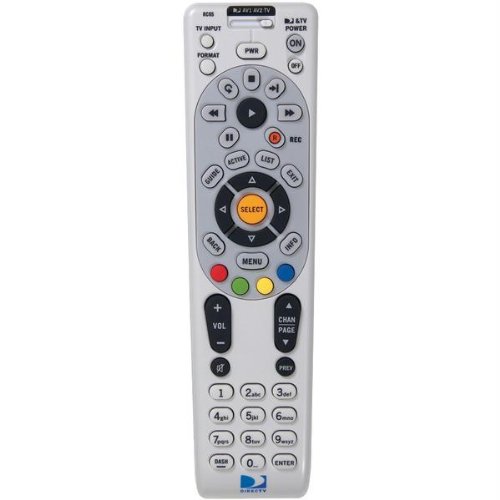
בילד: פראָנט view of the DIRECTV Universal Remote Control RC65. This image displays the remote's ergonomic design and the layout of its primary control buttons, including the directional pad, channel and volume controls, and various function keys. The remote is black with white button labels.
The DIRECTV RC65 remote control is a universal remote capable of controlling multiple devices. Its design focuses on ease of use and compatibility with a wide range of audio/video equipment.
סעטאַפּ
1. באַטאַרייע ייַנמאָנטירונג
- געפֿינען די באַטאַרייע אָפּטייל אויף די צוריק פון די ווייַט קאָנטראָל.
- Press down on the tab and slide the battery cover off.
- Insert two (2) AA batteries, ensuring the positive (+) and negative (-) terminals align with the markings inside the compartment.
- רוק די באַטאַרייע דעקן צוריק אין פּלאַץ ביז עס קליקס סיקיורלי.
באַמערקונג: באַטעריעס זענען נישט אַרייַנגערעכנט מיט די ווייַט קאָנטראָל.
2. Programming for DIRECTV Receiver
The remote is typically pre-programmed to operate your DIRECTV receiver. If it does not work, or if you are setting up a new remote, follow these steps:
- Point the remote at your DIRECTV receiver.
- דריקן און האַלטן די שטום און אויסקלייַבן buttons simultaneously until the green light at the top of the remote flashes twice.
- אַרייַן די קאָד 961. The green light will flash twice.
- דרוק די קאַנאַל אַרויף button. The green light will flash twice.
- דרוק די אויסקלייַבן button. The green light will flash twice.
- Test the remote by changing channels or adjusting volume.
3. Programming for Other Devices (TV, Audio)
To program the remote to control your television or other audio/video devices, you will need the device's brand code. Refer to the code list provided with your DIRECTV system or search online for "DIRECTV remote codes [your device brand]".
- צינדט אָן דעם דעווייס וואָס איר ווילט פּראָגראַמירן (למשל, אייער טעלעוויזיע).
- דריקן און האַלטן די שטום און אויסקלייַבן buttons simultaneously until the green light at the top of the remote flashes twice.
- Press the mode button for the device you are programming (e.g., TV for television, AV1 or AV2 for audio/video devices). The green light will flash once.
- Enter the 5-digit code for your device's brand. The green light will flash twice if the code is accepted.
- ריכט דעם ווײַט־קעסטל אויפן אַפּאַראַט און דריק אויף דעם קנעפּל מאַכט קנעפּל. אויב דער אַפּאַראַט שליסט זיך אויס, איז די פּראָגראַמירן געווען געראָטן.
- If the device does not turn off, repeat steps 1-5 with another code for your device's brand.
Tip: If you cannot find a code, try the "Code Search" method: After step 3, instead of entering a code, press קאַנאַל אַרויף repeatedly until the device turns off, then press אויסקלייַבן.
אַפּערייטינג ינסטראַקשאַנז
The DIRECTV RC65 remote control features a standard layout for easy navigation and control of your entertainment system.
- MODE Buttons (DIRECTV, TV, AV1, AV2): Select the device you want to control. Press the corresponding button before issuing commands for that device.
- מאַכט: טוט אן אדער אויסלעשן דעם אויסגעקליבענעם אפאראט.
- באַנד אַרויף / אַראָפּ: Adjusts the volume of the selected audio device (usually TV or AV receiver).
- CHANNEL UP/DOWN: Changes channels on the DIRECTV receiver.
- שטיל: מאָט אָדער אַנמיוט די אַודיאָ.
- גייד: Displays the DIRECTV program guide.
- מעניו: Accesses the DIRECTV system menu.
- SELECT/OK: באַשטעטיקט אויסוואַלן אָדער גייט אַרײַן אין מעניוס.
- ARROW Buttons (UP, DOWN, LEFT, RIGHT): נאַוויגירן דורך מעניוז און גיידס.
- רעקאָרד: Records the current program on your DIRECTV DVR.
- PLAY, PAUSE, STOP, REW, FF, SKIP: Control playback of recorded content or live TV (with DVR).
- אינפֿאָרמאַציע: דיספּלייז אינפֿאָרמאַציע וועגן דעם קראַנט פּראָגראַם.
- אַרויסגאַנג: Exits menus or guides.
Note: Specific button functions may vary slightly depending on your DIRECTV receiver model and programmed devices.
וישאַלט
רייניקונג פון די ווייַטקאָנטראָל
- ניצט אַ ווייכן, טרוקענעם שטאָף צו ווישן די ייבערפלאַך פון דער ווײַטקאָנטראָל.
- פֿאַר שווערן שמוץ, אַ ביסל דampווישט דעם שטאָף מיט וואַסער אָדער אַ מילדן, נישט-שרייַבנדיקן רייניגער. שפּריצט נישט רייניגער גלייך אויף דער ווײַטקאָנטראָל.
- Avoid using harsh chemicals, solvents, or abrasive cleaning pads, as these can damage the remote's finish or internal components.
באַטערי פאַרבייַט
Replace batteries when the remote's response becomes sluggish or if the green light at the top does not flash when a button is pressed. Refer to the "Battery Installation" section under Setup for detailed instructions.
- שטענדיק פאַרבייַטן ביידע באַטעריז אין דער זעלביקער צייט.
- Use new AA alkaline batteries for optimal performance.
- אַוועקוואַרפן אַלטע באַטעריעס לויט די לאָקאַלע רעגולאַציעס.
טראָובלעשאָאָטינג
ווייַט ניט ריספּאַנדינג
- טשעק באַטעריז: זיכער מאַכן אַז די באַטעריעס זענען ריכטיק אַרײַנגעלייגט און נישט אויסגעשעפּט. פֿאַרבײַטן אויב נייטיק.
- שורה פון דערזען: Make sure there are no obstructions between the remote and the device you are trying to control. The remote uses infrared (IR) signals, which require a clear line of sight.
- ריכטיק מאָדע: Verify that the correct mode button (DIRECTV, TV, AV1, AV2) is pressed for the device you intend to control.
- באַשטעטיק רימאָוט: Remove batteries, press all buttons a few times to discharge any residual power, then reinsert batteries.
Device Not Responding After Programming
- באַשטעטיקן קאָד: Double-check that you entered the correct 5-digit code for your device's brand. Try other codes listed for your brand.
- קאָד זוכן: Attempt the "Code Search" method described in the "Programming for Other Devices" section.
- דיווייס קאַמפּאַטאַבילאַטי: While the remote has an extensive code library, some older or very new devices may not be fully compatible.
Volume/Channel Control Issues
- Volume Lock: Ensure the volume is not locked to the DIRECTV receiver if you want to control the TV volume. To unlock, press and hold שטום און אויסקלייַבן until the green light flashes twice, then enter 993. דרוק אויסקלייַבן.
- קאַנאַל קאָנטראָל: Ensure the remote is in DIRECTV mode to change channels on the receiver.
ספּעסאַפאַקיישאַנז
| שטריך | דעטאַל |
|---|---|
| סאָרט | DIRECTV |
| מאָדעל נאָמען / נומער | RC65 |
| ספּעציעלע שטריך | וניווערסאַל |
| קאָליר | שוואַרץ |
| קאַמפּאַטאַבאַל דעוויסעס | Television, DIRECTV Receiver, Audio/Video Devices |
| קאַנעקטיוויטי טעכנאָלאָגיע | ינפרערעד (IR) |
| קאָנטראָללער טיפּ | קנעפּל קאָנטראָל |
| באַטערי טיפּ | 2 קס אַאַ באַטעריז (ניט אַרייַנגערעכנט) |
| פּונקט וואָג | אומגעפער 0.52 פונט |
וואָראַנטי אינפֿאָרמאַציע
This DIRECTV Universal Remote Control (Model RC65) comes with a limited warranty against defects in materials and workmanship under normal use. The warranty period typically covers 90 days from the date of purchase. Please retain your proof of purchase for warranty claims.
This warranty does not cover damage caused by misuse, accident, unauthorized modification, or use with non-DIRECTV approved accessories. For specific warranty terms and conditions, please refer to the documentation included with your DIRECTV system or visit the official DIRECTV support webפּלאַץ.
קונה שטיצן
If you require further assistance with your DIRECTV Universal Remote Control, please contact DIRECTV customer support:
- אָנליין שטיצן: באַזוכט די אָפֿיציעלע DIRECTV שטיצע website for FAQs, troubleshooting guides, and programming code lists.
- טעלעפאָן שטיצן: Refer to your DIRECTV service agreement or bill for the most current customer service phone number.
When contacting support, please have your DIRECTV account information and the remote control model number (RC65) ready.