
הקדמה
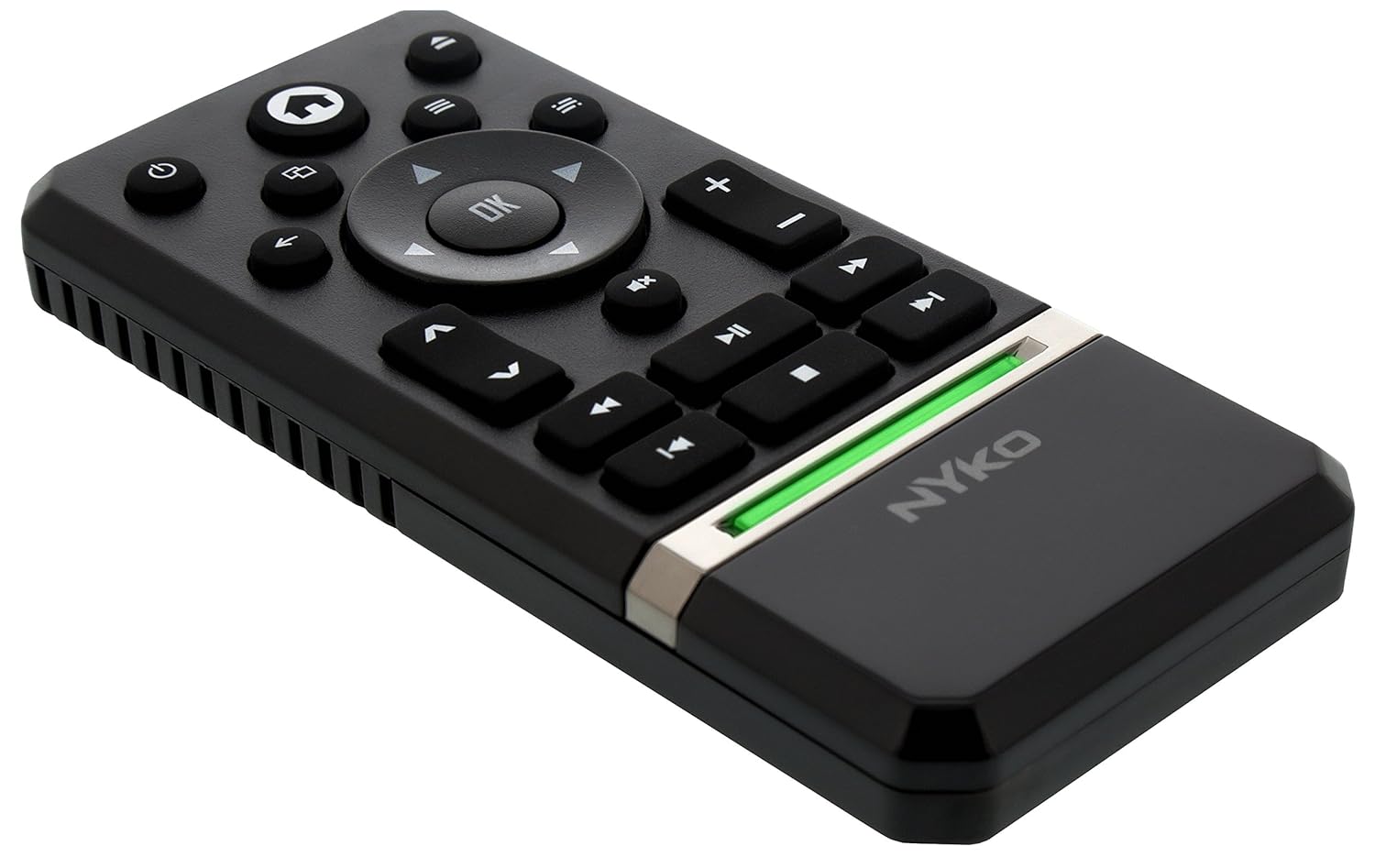
The Nyko Media Remote for Xbox One provides convenient control over your Xbox One console and various media applications. This remote simplifies navigation and playback of streaming content and physical media, offering dedicated buttons for common functions. It also features the ability to power your Xbox One on and off, and control basic functions of your television.

Image: Nyko Media Remote for Xbox One, front view.
פּעקל אינהאַלט
- Nyko Media Remote for Xbox One (Model: 86116)
- באַמערקונג: AAA באַטעריעס זענען נישט אַרייַנגערעכנט און מוזן זיין געקויפט באַזונדער.

Image: Nyko Media Remote for Xbox One in its retail packaging.
סעטאַפּ
1. באַטאַרייע ייַנמאָנטירונג
- געפינען די באַטאַרייע אָפּטייל אויף די צוריק פון די ווייַט.
- רוקט דעם באַטעריע דעקל אַראָפּ צו עפֿענען.
- אַרײַנשטעלן צוויי (2) AAA באַטעריעס, און זיכער מאַכן אַז די פּאָלאַריטעט (+/-) איז ריכטיק ווי אָנגעוויזן אין דעם אָפּטייל.
- Replace the battery cover by sliding it upwards until it clicks into place.
בילד: הינטערשטע view of the remote with the battery cover removed, illustrating the AAA battery placement.
2. ערשטע פֿאַרבינדונג
The Nyko Media Remote uses infrared (IR) technology. No manual pairing is required for the Xbox One. Simply ensure a clear line of sight between the remote's IR emitter and the Xbox One's IR receiver.
For TV control functions (volume, channels, power), your TV must be configured to respond to the Xbox One's IR signals, typically through the Xbox One's OneGuide settings. The remote sends commands to the Xbox One, which then relays them to your TV via its IR blaster (if configured) or Kinect sensor.
אַפּערייטינג ינסטראַקשאַנז
The Nyko Media Remote provides comprehensive control for your Xbox One and various media applications. Refer to the diagram below for button identification and their primary functions.

בילד: פראָנט view of the Nyko Media Remote, displaying all control buttons.
קנעפּל פאַנגקשאַנז:
| קנעפּל | פֿונקציע |
|---|---|
| מאַכט קנעפּל (⏻) | Powers the Xbox One console on or off. |
| היים קנעפּל (⌂) | Returns to the Xbox One Home screen. |
| View קנעפּל (🗀) | Accesses additional information or options within an app or game. |
| מעניו קנעפּל (☰) | Opens context-sensitive menus or options. |
| דירעקטיאָנאַל פּאַד (ד-פּאַד) | נאַוויגירט דורך מעניוז און אינהאַלט. |
| OK קנעפּל | Confirms selections. Can also function as Play/Pause in some apps. |
| צוריק קנעפּל (←) | גייט צוריק צום פריערדיקן עקראַן אָדער מעניו. |
| OneGuide Button (📱) | Launches the Xbox OneGuide for live TV and media. |
| באַנד אַרויף / אַראָפּ (⏸ / ⏷) | Adjusts the television volume (requires TV setup via Xbox One). |
| שטום קנעפּל (🔇) | Mutes or unmutes television audio. |
| קאַנאַל אַרויף / אַראָפּ (▲ / ▼) | Changes television channels (requires TV setup via Xbox One). |
| שנעל ריוויינד (⏪) | Rewinds media playback. |
| שפּיל / פּויזע (⏯) | שפּילט אָדער פּויזירט מעדיע ווידערשפּיל. |
| שנעל פֿאָרווערטס (⏩) | Fast forwards media playback. |
| פֿריִערדיקע שפּירט (⏮) | Skips to the beginning of the current track or the previous track. |
| האַלטן (⏹) | שטעלט אפ מעדיע ווידערשפּיל. |
| ווייַטער שפּור (⏭) | Skips to the next track or chapter. |
Media and App Control:
The remote is designed for seamless control of various Xbox One applications, including:
- OneGuide
- נעטפליקס
- הולו פּלוס
- אַמאַזאָן רעגע ווידעא
- Other streaming services and Blu-ray/DVD playback
Dedicated playback buttons (Play, Pause, Fast Forward, Rewind, Stop, Skip) provide intuitive control for movies, music, and other media.
וישאַלט
באַטערי פאַרבייַט:
When the remote's performance diminishes or it stops responding, it is likely time to replace the batteries. Follow the "Battery Installation" steps in the Setup section to replace the two AAA batteries.
רייניקונג:
To clean the remote, gently wipe it with a soft, dry cloth. Avoid using harsh chemicals, abrasive cleaners, or excessive moisture, as these can damage the remote's finish or internal components.
טראָובלעשאָאָטינג
- ווייַט ניט ריספּאַנדינג:
- זיכער מאַכן אַז פרישע AAA באַטעריעס זענען ריכטיק אינסטאַלירט.
- Verify there is a clear line of sight between the remote and the Xbox One console. Obstructions can block the infrared signal.
- Move closer to the Xbox One console. The remote has a maximum effective range of approximately 9 meters (25 feet).
- TV Control (Volume, Channel, Power) Not Working:
- Confirm that your Xbox One's OneGuide settings are properly configured for your television. The remote sends commands to the Xbox One, which then controls the TV.
- Ensure any necessary IR blasters or Kinect sensors are correctly set up and positioned.
- אומגעריכטע רעאַקציע:
- This can sometimes occur due to weak batteries or environmental interference. Replace batteries and ensure a clear line of sight.
ספּעסאַפאַקיישאַנז
| שטריך | דעטאַל |
|---|---|
| סאָרט | ניקאָ |
| מאָדעל נאָמען | מעדיע רימאָוט |
| מאָדעל נומער | 86116 |
| קאַנעקטיוויטי טעכנאָלאָגיע | ינפרערעד (IR) |
| קאַמפּאַטאַבאַל דעוויסעס | Xbox One, Television (via Xbox One IR blaster/Kinect) |
| באַטערי טיפּ | 2 X AAA באַטעריז (ניט אַרייַנגערעכנט) |
| מאַקסימום קייט | אַרויף צו 9 מעטער (25 פֿיס) |
| פּונקט וואָג | 0.1 פונט (בעערעך 45 גראַמז) |
| קאָליר | טונקל גרוי |
| נאָך פֿעיִקייטן | Ergonomic design, dedicated media playback controls. |
וואָראַנטי און שטיצן
Nyko products are designed for quality and reliability. For specific warranty details, please refer to the documentation included with your purchase or visit the official Nyko website. The product includes warranty information in multiple languages.
קונה שטיצן:
- בליצפּאָסט: customer.support@nyko.com
- טעלעפֿאָן: +1-888-400-6956
- אָנליין רעגיסטראַציע: www.nyko.com
- נאָך אינפֿאָרמאַציע: http://uqr.me/nykotechnologies/qr/83215

בילד: הינטערשטע view of the product packaging, detailing features and customer support contact information.