
1. הקדמה
This manual provides comprehensive instructions for the Adesso AKB-132UY Luminous Large Print Multimedia Desktop USB Keyboard. This keyboard is designed with large, high-contrast keys to enhance readability, particularly for users with visual impairments. It also integrates multimedia controls for convenience.

Figure 1: Adesso AKB-132UY Luminous Large Print Multimedia Desktop USB Keyboard. This image displays the full keyboard with its black frame and bright yellow keys, featuring large black characters.
2. פּעקל אינהאַלט
באַשטעטיקן אַז אַלע זאכן זענען פאַראַן אין פּעקל:
- Adesso EasyTouch 132 - Florescent Yellow Multimedia Desktop Keyboard
- שנעל אָנהייב גייד
3. סעטאַפּ אינסטרוקציעס
3.1 פֿאַרבינדן די קלאַוויאַטור
- געפֿינען אַן בנימצא וסב פּאָרט אויף דיין קאָמפּיוטער.
- Plug the USB connector of the Adesso AKB-132UY keyboard into the USB port.
- The operating system will automatically detect and install the necessary drivers. No additional software installation is typically required.
The keyboard is powered via the USB connection.
4. אפערירן די קלאַוויאַטור
4.1 שליסל פֿעיִקייטן
- Fluorescent 4X Large Print Keys: The keyboard features black characters printed in a large 4X size on bright fluorescent yellow keys. This design provides high contrast for improved visibility and readability, particularly beneficial for users with visual impairments.

פיגורע 2: נאָענט-אַרויף view of the keyboard's QWERTY section, highlighting the large black characters on fluorescent yellow keys.
- מולטימעדיאַ קאָנטראָלס: Dedicated hotkeys allow for one-touch control of media functions. These include:
- מעדיע פּלייַער
- באַנד אַראָפּ
- באַנד אַרויף
- שטום
- שפּיל / פּויזע
- פֿריִערדיקע שפּירט
- ווייַטער שפּור
- האַלטן

פיגורע 3: נאָענט-אַרויף view of the numeric keypad and dedicated multimedia control keys located on the upper right side of the keyboard.
- Windows One-Touch Controls: Access common Windows applications directly with dedicated hotkeys:
- מיין קאָמפּיוטער
- זוכן
- קאַלקולאַטאָר
- פּאָסט
- Home (Browser)
- Favorites (Browser)
- שטילע מעמבראַן שליסל סוויטשיז: The keyboard utilizes membrane key switches designed to provide a responsive and quiet typing experience. These switches are rated for a lifespan of up to five million keystrokes.
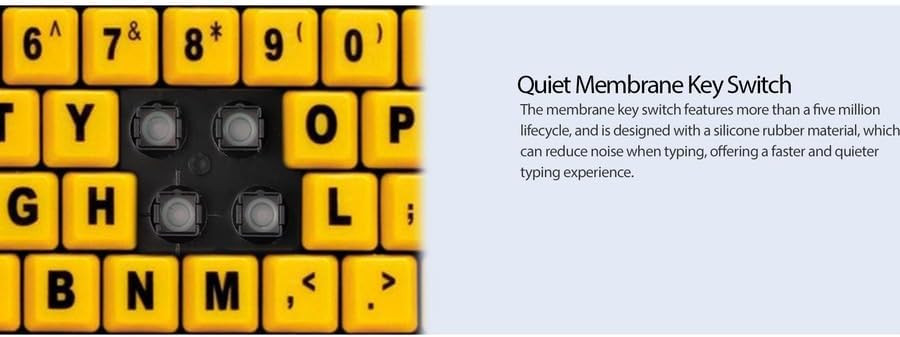
פיגורע 4: דעטאַילעד view showing the internal membrane key switch mechanism beneath a keycap.
- 104-Key US Layout: The keyboard features a standard 104-key US layout, providing a familiar typing experience.
5. וישאַלט
5.1 רייניקן די קלאַוויאַטור
כדי צו אויפהאלטן די קלאַוויאַטור'ס אויסזען און פונקציאָנאַליטעט:
- אָפּשטעקן די קלאַוויאַטור פֿון אייער קאָמפּיוטער איידער איר רייניקט.
- ניצן אַ ווייך, אַ ביסל דamp cloth to wipe the surface of the keys and the keyboard body.
- For stubborn dirt or debris between keys, use compressed air or a soft brush.
- Avoid using harsh chemicals, abrasive cleaners, or excessive moisture, as these can damage the keyboard's finish or internal components.
6. טראָובלעשאָאָטינג
If you encounter issues with your Adesso AKB-132UY keyboard, refer to the following troubleshooting steps:
6.1 קלאַוויאַטור רעאַגירט נישט
- קוק די USB קאַנעקשאַן: Ensure the keyboard's USB cable is securely plugged into a functioning USB port on your computer. Try unplugging and re-plugging the cable.
- פרובירט אן אנדערן USB פארט: Connect the keyboard to another USB port on your computer to rule out a faulty port.
- ריסטאַרט קאָמפּיוטער: מאנchmal קען א פשוטע סיסטעם ריסטארט פאררעכטן קאנעקטיוויטי פראבלעמען.
- פּרובירן אויף אן אנדער קאָמפּיוטער: If possible, test the keyboard on a different computer to determine if the issue is with the keyboard or your computer's setup.
6.2 שליסלען שטעקן זיך אדער נישט רעגיסטרירן
- Clean Under Keys: Dust, crumbs, or debris can get lodged under keys. Use compressed air to clear any obstructions.
- ויסמיידן ספּילז: Liquid spills can cause keys to stick or malfunction. If a spill occurs, disconnect the keyboard immediately and allow it to dry completely before reconnecting.
7. ספּעסאַפאַקיישאַנז
| שטריך | באַשרייַבונג |
|---|---|
| סאָרט | אַדעססאָ |
| מאָדעל נומער | AKB-132UY |
| מאָדעל נאָמען | EasyTouch 132 |
| קאַנעקטיוויטי טעכנאָלאָגיע | וסב |
| קלאַוויאַטור באַשרייַבונג | מעמבראַנע |
| ספּעציעלע שטריך | Large Print Keys |
| קאָליר | שוואַרץ געל |
| מאַטעריאַל | פּלאַסטיק |
| נומער פון קיז | 104 |
| קלאַוויאַטור אויסלייג | QWERTY (אמעריקאנער אויסלייג) |
| מאַכט מקור | וסב מאַכט |
| פּונקט וואָג | 1.5 פונט |
| קאַמפּאַטאַבאַל דעוויסעס | PC |
8. וואָראַנטי אינפֿאָרמאַציע
The Adesso AKB-132UY keyboard comes with a 1-יאָר לימיטעד וואָראַנטי from the date of purchase. This warranty covers defects in materials and workmanship under normal use. For specific terms and conditions, please refer to the warranty card included in your package or visit the official Adesso webפּלאַץ.
9. שטיצן
For technical support, product registration, or additional information, please visit the official Adesso webפּלאַץ בייַ www.adesso.com. You may also find FAQs and driver downloads on their support pages.