
1. הקדמה
This user manual provides essential information for the proper setup, operation, maintenance, and troubleshooting of your Ozone OES-BAS-22 Electronic Safe-Core. Please read this manual thoroughly before using the safe to ensure optimal performance and security. This electronic safe is designed to provide secure storage for your valuables.
2. פּראָדוקט איבערview
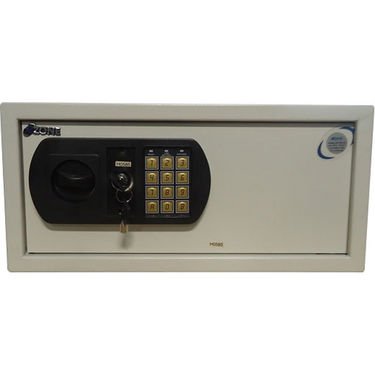
This image displays the front panel of the Ozone OES-BAS-22 Electronic Safe-Core, highlighting the electronic keypad, key override lock, and the overall compact design. The keypad allows for digital code entry, while the key provides an alternative access method.
3. סעטאַפּ
3.1. באַטאַרייע ייַנמאָנטירונג
- Locate the battery compartment, typically on the inside of the safe door.
- עפענען די באַטאַרייע דעקן.
- Insert the required number of batteries (usually AA or AAA, refer to the compartment label) ensuring correct polarity (+/-).
- פאַרמאַכן די באַטאַרייע דעקן סיקיורלי.
3.2. Initial Code Setting
- With the safe door open, locate the reset button (often a small red or green button) on the inside of the door or near the battery compartment.
- Press the reset button. You should hear a beep or see an indicator light.
- On the keypad, enter your desired new code (typically 3-8 digits).
- Confirm the code by pressing the 'E' or '#' button.
- Test the new code with the door open to ensure it works correctly before closing the safe.
4. אַפּערייטינג ינסטרוקטיאָנס
4.1. Opening the Safe with Electronic Code
- גיב אריין אייער פערזענלעכן קאד אויפן קלאַוויאַטור.
- Press the 'E' or '#' button.
- Within 5 seconds of a successful code entry, turn the handle clockwise (or counter-clockwise, depending on model) to open the door.
4.2. Opening the Safe with Override Key
- Locate the keyhole, usually hidden behind a small cover on the keypad panel.
- Insert the override key and turn it.
- While holding the key turned, rotate the handle to open the safe door.
4.3. פארמאכן און פארשליסן דעם זיכערן
- מאַכט פעסט צו די זיכערע טיר.
- Turn the handle counter-clockwise (or clockwise) until the bolts are fully extended and the door is securely locked.
4.4. Changing Your Personal Code
- מיט דער זיכערער טיר אפן, דריק דעם ריסעט קנעפל.
- Enter your new desired code (3-8 digits) on the keypad.
- Press the 'E' or '#' button to confirm.
- Verify the new code by entering it with the door open before closing.
5. וישאַלט
- באַטערי פאַרבייַט: Replace batteries annually or when the low battery indicator (if present) illuminates. Always use new, high-quality batteries of the specified type.
- רייניקונג: רייניקט די אויסערליכע זייט פון זיכער מיט א ווייכן, דamp cloth. Avoid abrasive cleaners or solvents that could damage the finish or keypad.
- שליסל סטאָרידזש: Store override keys in a secure location away from the safe itself. Do not store them inside the safe.
- מעכאניזם טשעק: Periodically check the locking bolts and door hinges for smooth operation. Do not lubricate the electronic lock mechanism.
6. טראָובלעשאָאָטינג
| פּראָבלעם | לייזונג |
|---|---|
| זיכער עפֿנט זיך נישט מיט קאָד. | Ensure batteries are fresh and correctly installed. Re-enter code carefully. Try the override key. |
| די קלאַוויאַטור רעאַגירט נישט. | Check battery power. Replace batteries if necessary. Ensure no foreign objects are obstructing buttons. |
| אַן אַלאַרם קלינגט אומגעריכט. | This safe features a visual alarm. Ensure the safe is not being tampered with. If persistent, contact customer support. |
| די טיר שליסט זיך נישט אדער פארשליסט זיך נישט ריכטיג. | Check for any obstructions inside the safe or around the door frame. Ensure the handle is fully turned to engage bolts. |
7. ספּעסאַפאַקיישאַנז
| שטריך | דעטאַל |
|---|---|
| סאָרט | אָזאָנע |
| מאָדעל | OES-BAS-22 |
| לאַק טיפּ | עלעקטראָניש |
| ספּעציעלע שטריך | פּאָרטאַטיוו |
| פּונקט וואָג | 12.2 ק״ג (26.9 פונט) |
| שרעק | וויסואַל |
| וואַסער קעגנשטעל מדרגה | ניט וואַסער קעגנשטעליק |
| UPC | 783942612165 |
| פּעקל דימענשאַנז | 42.9 X 38 X 20 סענטימעטער |


