
PROSCAN PKCR2713_AMZ
PROSCAN ELITE PKCR2713AMZ Under Counter CD Player with Clock Radio and Bluetooth
Model: PKCR2713_AMZ
הקדמה
The PROSCAN ELITE PKCR2713AMZ is a versatile under-counter audio system designed to provide entertainment and convenience in your kitchen or workspace. Featuring a CD player, FM radio, and Bluetooth connectivity, this unit allows you to enjoy your favorite music from various sources. Its space-saving design and intuitive controls make it a practical addition to any home.
וואָס איז אין די קעסטל
באַשטעטיקן אַז אַלע זאכן זענען פאַראַן איידער איר הייבט אָן די אינסטאַלאַציע:
- PROSCAN ELITE PKCR2713AMZ Under Counter CD Player
- Mounting Kit (includes template and hardware)
- גאַנץ פונקטיאָן רימאָוט קאָנטראָל
- אַק מאַכט אַדאַפּטער
סעטאַפּ און ינסטאַלירונג
Follow these steps to properly install your under-counter CD player:
- קלייַבן אַ אָרט: Select a flat, sturdy surface under a kitchen cabinet. Ensure there is adequate space for the unit and access to a power outlet.
- צוגרייטן זיך פֿאַר מאָנטירונג: Use the provided mounting template to mark the drilling locations under your cabinet. Note: Some users have reported the template may not be perfectly accurate; verify measurements before drilling.
- בויער פּילאָט האָלעס: פֿאָרזיכטיק באָרט פּילאָט לעכער אין די אָנגעצייכנטע לאָקאַציעס.
- צוטשעפּען מאַונטינג פּלאַטע: Secure the mounting plate to the underside of the cabinet using the provided screws.
- שטעלן די אַפּאַראַט: Slide the PROSCAN ELITE unit onto the mounting plate until it clicks securely into place.
- פאַרבינדן מאַכט: Plug the AC power adapter into the unit and then into a wall outlet.
- אינסטאַלירן באַקאַפּ באַטעריז: For clock and preset memory retention during power outages, install 2 x AA batteries (not included) into the battery compartment.
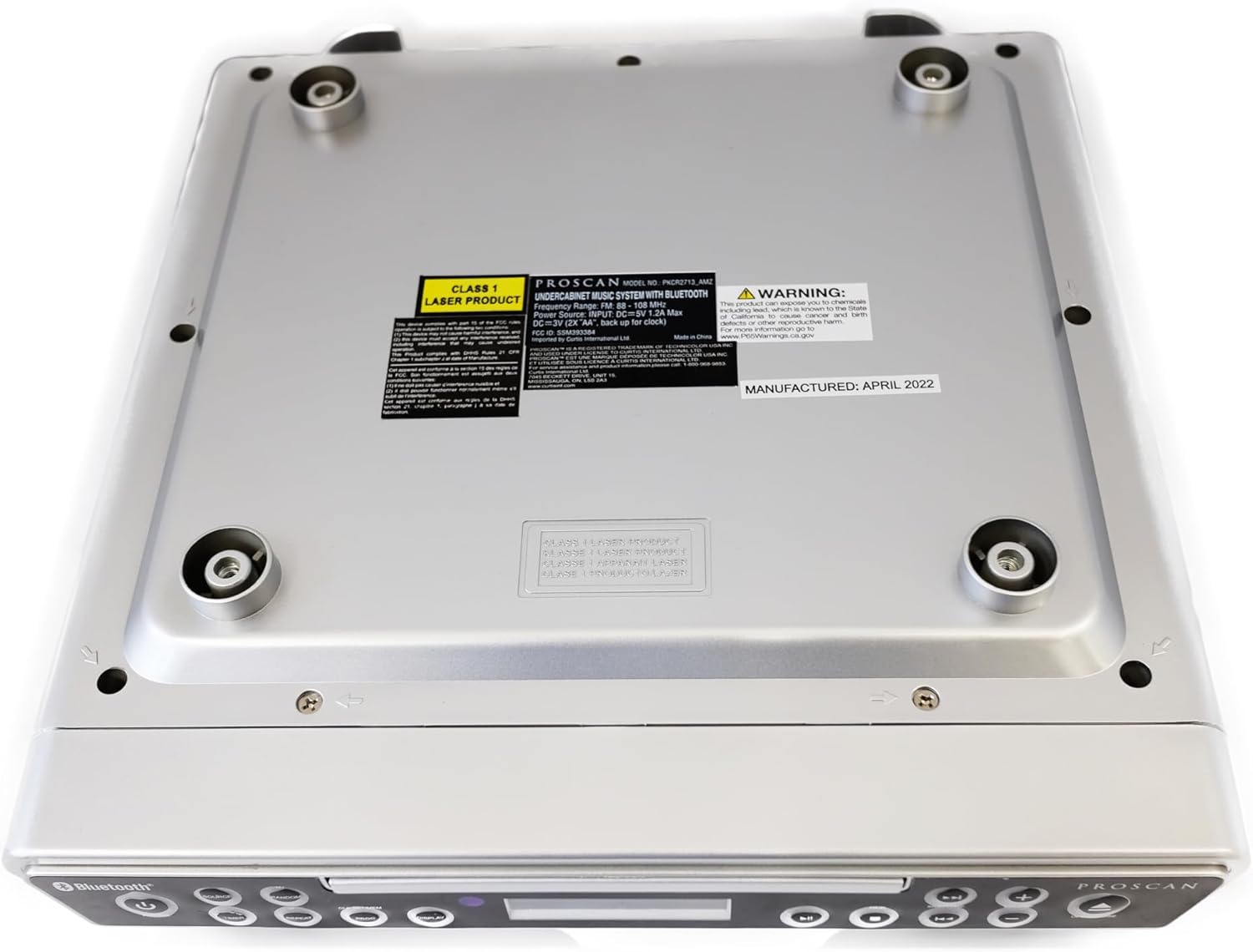
בילד: אונטן view of the unit, illustrating the mounting points and product information label.
אַפּערייטינג ינסטראַקשאַנז
פראָנט פּאַנעל קאָנטראָלס

Image: Front panel of the unit, showing the display, CD tray, and various control buttons.
- POWER קנעפּל: דרוק צו קער די אַפּאַראַט אויף אָדער אַוועק.
- SOURCE קנעפּל: Cycle through available modes: CD, FM Radio, Bluetooth.
- וואָלומע +/- קנעפּלעך: אַדזשאַסטירן דעם אַודיאָ אַרויסגאַנג לעוועל.
- עפֿענען/שליסן קנעפּל: Eject or retract the CD tray.
- SKIP/TUNE Buttons:
- In CD mode: Skip to the next/previous track.
- In FM mode: Tune to the next/previous radio station.
- שפּיל / פּויזע קנעפּל: Play or pause CD playback.
- PAIR קנעפּל: אָנהייבן בלוטוט פּערינג מאָדע.
- אַרויסווייַז קנעפּל: Adjust display brightness or cycle through display information.
- CLK SET/MEM Button: Set the clock or save/recall radio presets.
- TIMER קנעפּל: Set sleep timer or alarm functions.
- REPEAT קנעפּל: Repeat current track or entire CD.
- PROG קנעפּל: Program CD playback order.
- ראַנדאָם קנעפּל: Play CD tracks in random order.
קאָמפּאַקטדיסק שפּילער אָפּעראַציע
- דרוק די עפענען / נאָענט קנעפּל צו עפענען די CD טאַץ.
- Place a CD onto the tray with the label side facing up.
- דרוק די עפענען / נאָענט button again to close the tray. The unit will automatically begin playing the CD.
- ניצן די שפּיל / פּויזע, SKIP/TUNE, איבערחזרן, PROG, און ראַנדאָם קנעפּלעך צו קאָנטראָלירן פּלייבאַק.
עפעם ראַדיאָ אָפּעראַציע
- דרוק די מקור קנעפל ביז "FM" דערשיינט אויפן דיספלעי.
- ניצן די SKIP/TUNE buttons to manually tune to a desired frequency or press and hold to auto-scan for the next available station.
- צו ראַטעווען אַ פּרעסעט: שטעלט זיך צו צו דער געוואונטשענער סטאַנציע, און דאַן דריקט און האַלט די CLK SET/MEM קנעפּל ביז די פאָרגעשטעלטע נומער בלינקט. ניצט דעם SKIP/TUNE קנעפּלעך צו אויסקלייבן א פאָרגעשטעלטע נומער, און דאַן דריקן CLK SET/MEM ווידער צו באַשטעטיקן.
- צו צוריקרופן א פאָרגעשטעלטע פונקציע: דריקט קורץ די CLK SET/MEM קנעפּל און נוצן די SKIP/TUNE buttons to select the desired preset.
בלועטאָאָטה אָפּעראַציע
- דרוק די מקור button until "BT" or "Bluetooth" appears on the display. The unit will enter pairing mode, indicated by a flashing Bluetooth icon.
- אויף אייער בלוטוט-פארשטארקטע דעווייס (סמאַרטפאָן, טאַבלעט, אאז"וו), אַקטיווירט בלוטוט און זוכט פֿאַר פֿאַראַן דעווייסעס.
- Select "PROSCAN ELITE" or similar from the list of devices.
- Once paired, the Bluetooth icon on the unit's display will stop flashing, and you can stream audio from your device to the unit.
- To disconnect, either turn off Bluetooth on your device or press and hold the PAIR קנעפּל אויף די אַפּאַראַט.

בילד: זייט view of the unit, highlighting the 'LINE IN' auxiliary input port.
וישאַלט
- רייניקונג: ווישט אָפּ דעם אַפּאַראַט מיט אַ ווייכן, טרוקענעם שטאָף. ניצט נישט קיין שרײַבנדיקע רייניגער אָדער סאָלווענטן.
- CD באַהאַנדלונג: Handle CDs by the edges. Keep them clean and free of scratches to ensure optimal playback.
- באַטערי פאַרבייַט: Replace backup batteries (AA) annually or when the clock/presets are not retained during power outages.
טראָובלעשאָאָטינג
| פּראָבלעם | מעגלעך סיבה | לייזונג |
|---|---|---|
| דער אַפּאַראַט טוט נישט מאַכט אויף. | No power, AC adapter not connected. | זיכער מאַכן אַז דער AC אַדאַפּטער איז זיכער אַרייַנגעשטעקט אין דעם אַפּאַראַט און אין אַ אַרבעטנדיקן וואַנט ווענטיל. |
| קיין געזונט פון ספּיקערז. | Volume too low, incorrect source selected, muted. | Increase volume. Press SOURCE to select correct mode (CD, FM, BT). Check if unit is muted. |
| די סי-די שפרינגט איבער אדער שפילט נישט. | Dirty or scratched CD, CD inserted incorrectly. | Clean the CD with a soft cloth. Ensure CD is inserted label-side up. Try a different CD. |
| שלעכטע FM ראַדיאָ אָפּנאַם. | Weak signal, internal antenna position. | Reposition the unit for better reception. Note: This unit does not have an AM feature. |
| בלועטוט פּערינג פּראָבלעמען. | Device too far, Bluetooth not enabled on device, unit not in pairing mode. | Ensure device is within range. Enable Bluetooth on your device. Press PAIR button on unit. |
ספּעסאַפאַקיישאַנז
- פּראָדוקט דימענשאַנז: 14 X 4 X 12.5 אינטשעס (L X W X H)
- נומער וואָג: 0.035 אונסעס
- סאָרט: פּראָסקאַן
- מאָדעל נומער: PKCR2713_AMZ
- קאַנעקטיוויטי טעכנאָלאָגיע: בלועטאָאָטה
- קאָליר: זילבער
- רעדנער טיפּ: סטערעאָ
- מאַכט רעזולטאַט: 2 x 1.2 וו
- מאַכט מקור: AC Adapter with Battery Backup (2 x AA, not included)
- פֿעיִקייטן: Under-cabinet mounting, CD player, FM radio, Bluetooth 3.0, LED display, remote control.
וואָראַנטי און שטיצן
For warranty information and technical support, please refer to the documentation included with your purchase or visit the official PROSCAN webזייטל. האַלט דיין קויפן באַווייַז פֿאַר וואָראַנטי קליימז.
אָנליין רעסורסן:
- Official PROSCAN Store: PROSCAN ELITE Store
- באַניצער מאַנואַל (PDF): אָפּלאָדירן PDF מאַנואַל
Ask a question about this manual
Ask about setup, troubleshooting, compatibility, parts, safety, or missing instructions. Manuals+ will review the question and use this page’s manual context to help answer it.