
1. הקדמה
The Attop YD-719 Quad-Copter is an 8-inch remote-controlled aerial vehicle designed for recreational flight. It features a 4-channel remote control system, 3-axis flight control for stable operation, and a built-in camera capable of recording video and capturing still images. The quad-copter utilizes 2.4 GHz wireless technology for reliable communication and is powered by a rechargeable battery.
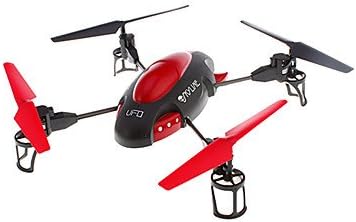
Image 1.1: The Attop YD-719 Quad-Copter, showcasing its red and black design with four propellers.
2. זיכערקייַט פּריקאָשאַנז
- Always operate the quad-copter in open areas, away from people, animals, buildings, and power lines.
- פליט נישט אין שטארקע ווינטן אדער שלעכטע וועטער באדינגונגען.
- ענשור אַז די באַטאַרייע איז גאָר טשאַרדזשד איידער יעדער פלי.
- האַלט פינגער און לויזע קליידער אַוועק פון ראָטירנדיקע פּראָפּעלערס.
- דערוואַקסענע השגחה איז רעקאָמענדירט פֿאַר ייִנגערע באַניצער.
- Do not attempt to modify the quad-copter or its components.
- Avoid flying near airports or restricted airspace.
3. פּעקל אינהאַלט
באַשטעטיקן אַז אַלע זאכן זענען פאַראַן אין פּעקל:
- Attop YD-719 Quad-Copter
- ווייַט קאָנטראָל
- Rechargeable Battery (for quad-copter)
- Four (4) Extra Rotor Blades
- צוויי (2) USB טשאַרדזשינג קייבאַלז
- באַניצער גייד (דעם דאָקומענט)
4. קאַמפּאָונאַנץ איבערview
4.1 Quad-Copter
The quad-copter features four rotors, a central body housing the electronics and camera, and landing gear. The built-in camera is located on the underside of the main body.

בילד 4.1: זייט view of the YD-719 Quad-Copter, showing the sleek body and propeller arms.
4.2 רימאָוט קאָנטראָל
The remote control is a 4-channel device operating on 2.4 GHz frequency, providing precise control over the quad-copter's movements. It typically includes two joysticks for flight control and various buttons for functions like trim adjustments, photo/video capture, and power.
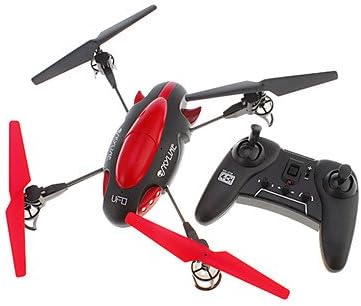
Image 4.2: The Attop YD-719 Quad-Copter alongside its remote control, illustrating their relative sizes.
5. סעטאַפּ
5.1 Quad-Copter Battery Charging
- Locate the rechargeable battery within the quad-copter's compartment.
- Connect one end of the provided USB charging cable to the battery and the other end to a USB power source (e.g., computer USB port, USB wall adapter).
- The charging indicator light will illuminate during charging and typically turn off or change color when fully charged. Refer to the specific indicator behavior in the product documentation if available.
- Charging time is approximately 60-90 minutes. Do not overcharge.

בילד 5.1: אונטערזייט view of the YD-719 Quad-Copter, showing the battery compartment and wiring.
5.2 אינסטאַלאַציע פון באַטעריע פֿאַר ווײַטקאָנטראָל
- עפענען די באַטאַרייע אָפּטייל אויף די צוריק פון די ווייַט קאָנטראָל.
- אַרײַנשטעלן דרײַ (3) AAA באַטעריעס, און זיכער מאַכן אַז די פּאָלאַריטעט (+/-) איז ריכטיק.
- פאַרמאַכן די באַטאַרייע אָפּטייל סיקיורלי.
5.3 פּראָפּעלער אינסטאַלאַציע/פאַרבייַט
The quad-copter comes with four extra rotor blades. If replacement is necessary:
- Carefully remove the damaged propeller by gently pulling it upwards from the motor shaft.
- Note the direction of rotation for each propeller. Propellers are typically marked (e.g., A or B) and must be installed on the correct motor.
- Press the new propeller firmly onto the motor shaft until it is seated securely.

Image 5.2: Close-up of a propeller and motor assembly on the YD-719 Quad-Copter.
6. אַפּערייטינג ינסטרוקטיאָנס
6.1 פּערינג די רימאָוט קאָנטראָל
- Place the quad-copter on a flat, level surface.
- Turn on the quad-copter's power switch. The LED lights will flash.
- קער אויף די ווייַט קאָנטראָל.
- Push the left joystick (throttle) all the way up, then all the way down. The quad-copter's LED lights will stop flashing and remain solid, indicating successful pairing.
6.2 אויפשטייג און לאַנדונג
- נעמען אַוועק: After pairing, slowly push the left joystick (throttle) upwards to increase motor speed and lift the quad-copter off the ground.
- לאַנדינג: Slowly pull the left joystick (throttle) downwards to decrease motor speed and gently land the quad-copter. Once landed, pull the throttle all the way down to stop the motors.
6.3 גרונטלעכע פלי קאָנטראָלן
- אַראָפּגיין / אַראָפּגיין: Left joystick (throttle) up/down.
- פאָרויס / צוריק: Right joystick up/down.
- דריי לינקס/רעכטס (יאָ): Left joystick left/right.
- Fly Left/Right (Roll): Right joystick left/right.
6.4 אויפנעמען ווידעא און נעמען בילדער
The YD-719 is equipped with a built-in camera. Refer to the remote control diagram (if provided in a physical manual) for specific buttons to activate video recording or still photo capture. Typically, a short press activates photo mode, and a long press activates video recording.
7. וישאַלט
7.1 רייניקונג
Use a soft, dry cloth to wipe down the quad-copter after use. Avoid using water or cleaning solvents, as they may damage electronic components.
7.2 פּראָפּעלער זאָרג
Regularly inspect propellers for damage (bends, cracks, chips). Replace any damaged propellers immediately to ensure stable flight and prevent further damage to the quad-copter.
7.3 באַטערי סטאָרידזש
When not in use for extended periods, store the quad-copter battery at approximately 50% charge in a cool, dry place. Remove batteries from the remote control if it will not be used for a long time.
8. טראָובלעשאָאָטינג
- Quad-Copter not responding: Ensure both quad-copter and remote control are powered on and successfully paired. Check remote control batteries.
- נישט-סטאַבילער פלי: Check for damaged propellers and replace if necessary. Ensure the quad-copter is placed on a level surface before pairing. Perform trim adjustments on the remote control if the quad-copter drifts.
- קורצע פלי צייט: Ensure the quad-copter battery is fully charged. Battery performance may degrade over time.
- קאַמעראַ רעקאָרדירט נישט: Ensure the quad-copter is powered on and the camera function is correctly activated via the remote control. Check if the memory card (if applicable) is inserted and has sufficient space.
9. ספּעסאַפאַקיישאַנז
| שטריך | באַשרייַבונג |
|---|---|
| מאָדעל נומער | YD-719 |
| פאַבריקאַנט | אַטטאָפּ |
| דימענסיעס (בעערעך) | 36.83 X 34.93 X 11.43 סענטימעטער (14.5 X 13.75 X 4.5 אינטשעס) |
| וואָג (בעערעך) | 680.39 ג (1.5 לבס) |
| קאָנטראָל טשאַנאַלז | 4-קאַנאַל |
| פלי קאָנטראָל | 3-אַקס |
| ווירעלעסס טעכנאָלאָגיע | 2.4 גהז |
| קוואַדקאָפּטער באַטערי | 600 mAh ריטשאַרדזשאַבאַל |
| רימאָוט קאָנטראָל באַטערי | 3 X AAA (ניט אַרייַנגערעכנט) |
| ספּעציעלע שטריך | Built-in Camera (Video/Photo) |
10. וואָראַנטי און שטיצן
For warranty information or technical support, please refer to the contact details provided with your purchase documentation or visit the manufacturer's official webזייטל. האַלט דיין קויפן באַווייַז פֿאַר וואָראַנטי קליימז.